
Local service guide
Network Setup and Support in Burlington, VT
For Network Setup in Burlington, start by separating internet activation from work inside your home: router configuration, room-by-room Wi-Fi testing, or Ethernet installation. Ask your internet provider what equipment and support your account includes before buying hardware or hiring independent help. Burlington Telecom advertises Smart WiFi with network support and remote assistance. For wiring or wall alterations, settle owner permission and ask the city about the proposed scope before scheduling. [1] [2] [3]
Choose the scope before choosing a technician
Describe the result you need: a working connection after a move, coverage in a home office, a connected printer, or wired outlets at chosen desks. Ask the technician to separate diagnosis from proposed upgrades. Include the rooms and devices you want tested in the written scope, so you can compare offers against the same task.
For a fault, record which devices lose connection, where you use them, and whether the problem also occurs through an Ethernet connection. Give the technician those observations and ask them to check the provider connection and home network before recommending replacement equipment. Avoid approving a package based on a speed test from one room.
Burlington Telecom describes Smart WiFi as including advanced network support and remote assistance. Ask which router, mesh equipment, and troubleshooting your account includes, then define any independent technician’s work around the remaining tasks. [1]
Keep internet charges separate from installation labor
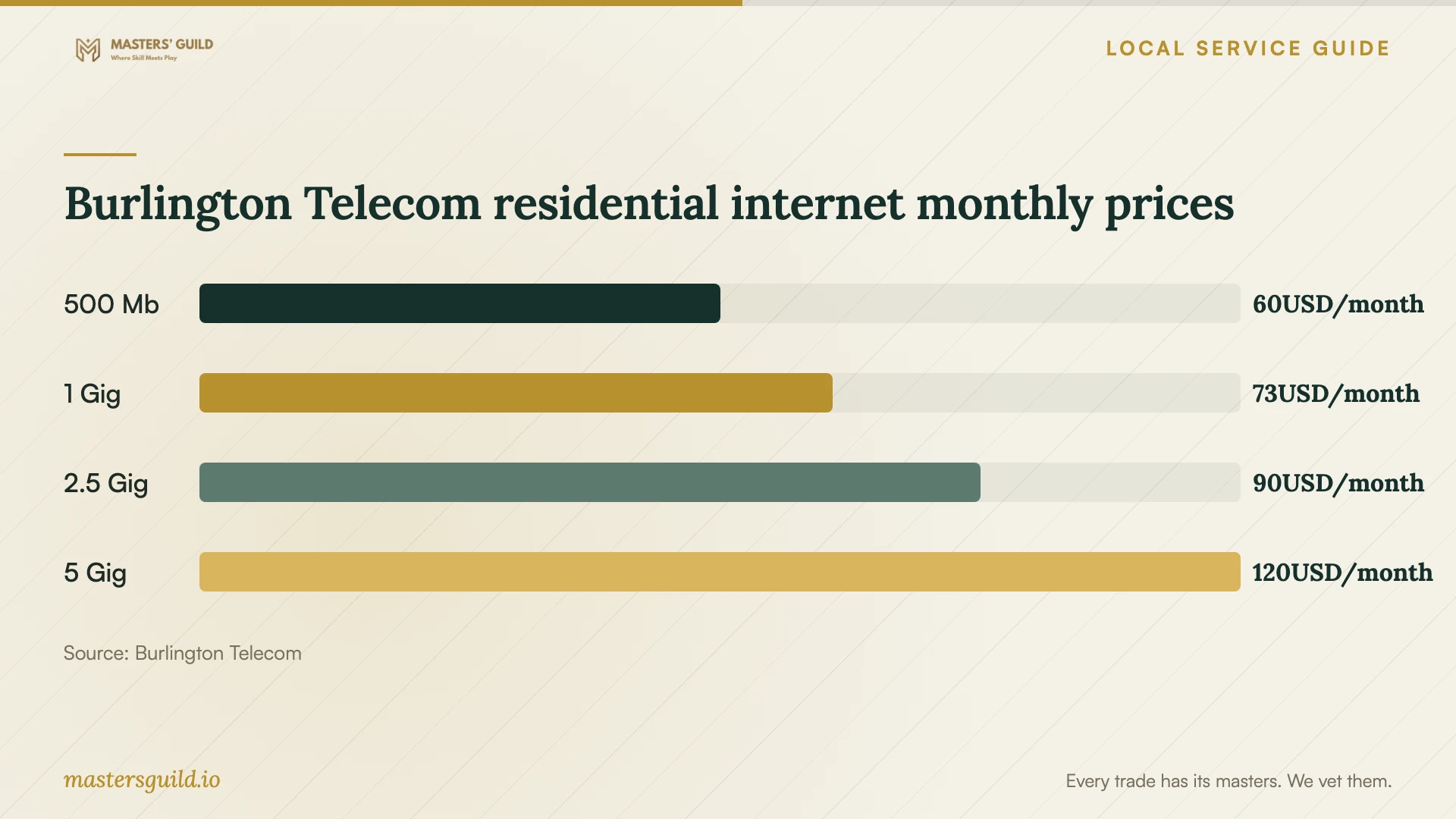
Burlington Telecom’s residential Broadband Facts labels list monthly prices of USD 60 for 500 Mb, USD 73 for 1 Gig, USD 90 for 2.5 Gig, and USD 120 for 5 Gig in the material retrieved October 12, 2026. These are internet subscription prices. Use a separate written quote for home-network diagnosis, configuration, cabling, and hardware. [1]
Those four labels list a USD 65 installation fee. The same page also lists a limited-time 1 Gig offer at USD 45 per month for 12 months, followed by USD 73, with a USD 0 installation fee. Confirm the offer and label that apply to your address and order before budgeting. [1]
For independent work, ask whether the quote covers a diagnostic visit or a completed installation. Request itemized equipment models, cable routes, outlet locations, testing, and any wall repair. Agree on how the technician will price additional work after opening a wall or finding an unusable cable route.
Settle access and permissions before wiring
Burlington Telecom places responsibility on the customer to obtain landlord permission for wiring and equipment installation. Its Landlord Letter of Permission lets an owner or authorized manager approve communication cable, equipment, and internal wiring, including permission for all units in a multi-dwelling property. Ask the owner to identify approved routes and any restrictions before the visit. [2]
Burlington publishes separate building and mechanical, electrical, or plumbing permit processes. The city requires building permits for non-MEP work except its listed exclusions, including in-kind repairs costing USD 1,000 or less. Send the city a description of any wall opening, new outlet, or related alteration and ask which permit process applies. Do not assume the repair exception covers a new installation. [3]
If the scope includes electrical work, ask who will perform it and request their credential details. Vermont’s Division of Fire Safety administers electrical trade licensing and provides a master list of license and certification holders. Use that resource to check the named professional; the licensing page does not establish a credential requirement for routine router configuration. [5]
Arrange a move without leaving setup to moving day
Burlington Telecom recommends notifying customer service 30 days before a move. For existing customers, its moving instructions call for verifying the new address, submitting landlord permission when renting, providing the move date, and scheduling installation. The provider says it does not charge for reinstallation unless the new address requires special work. [4]
Coordinate your home-network appointment with the internet activation appointment. Tell the technician whether you want to reuse your router, preserve the network name, reconnect printers, or install Ethernet outlets. Ask what access they need to closets, service-entry equipment, and proposed cable routes.
Agree on testing and handover
Ask the technician to test the rooms and devices named in your scope before you accept completion. Include a work call from the home office, a printer connection, and checks at each new Ethernet outlet as appropriate. Request labeled cables, a simple equipment map, and a record of the configuration changes.
Keep control of your administrator account and enter passwords yourself when practical. Agree on whether the technician will retain remote access and how you can revoke it. Ask for the follow-up support terms, including charges for another visit and responsibility for equipment warranty claims.
Burlington Telecom’s terms distinguish customer-owned inside wiring from equipment the provider supplies, which remains its property. Before an independent technician changes provider equipment, ask Burlington Telecom what changes it authorizes and who will support the resulting setup. [2]
Burlington Telecom residential internet monthly prices
Local details that affect your job
Rental permission has a specific local form
Burlington Telecom supplies a Landlord Letter of Permission for owners and authorized managers, including multi-unit properties. Its moving instructions tell renters to submit landlord permission before arranging installation. Complete that step with the property manager rather than arriving at the appointment with an unresolved wiring request. [2] [4]
Rental permit inspections need advance coordination
For permit inspections at rental properties, Burlington requires 48 hours of advance tenant notice. The inspector must meet the owner or local property manager, with the contractor also attending for MEP permits. If your network project includes permitted work, assign responsibility for notice and attendance before agreeing to an inspection date. [3]
Provider equipment may already cover the proposed purchase
Burlington Telecom advertises free Smart Wi-Fi and one mesh unit if needed for five years for new customers. Ask whether your order qualifies and what coverage support includes before approving a separate mesh purchase. Confirm service availability at the exact address as part of a move. [1] [4]
Match the next step to the job
| Your situation | First step | What to settle before booking |
|---|---|---|
| Moving an existing Burlington Telecom account | Verify the new address and arrange installation with the provider. | Give the move date and submit landlord permission if renting. |
| Considering new mesh equipment | Check the equipment and support included with your account. | Burlington Telecom advertises one free mesh unit if needed for new customers for five years; confirm eligibility. |
| Connection problems in selected rooms | Request diagnosis and testing in the affected rooms. | Agree on the evidence the technician will provide before recommending hardware. |
| Ethernet installation involving wall alterations | Prepare the route and alteration description for the city. | Ask which permits apply and who handles wall repair and inspection arrangements. |
| Network work that includes electrical work | Identify the professional performing the electrical portion. | Check their credential through the Vermont Division of Fire Safety’s licensing resources. |
Your hiring checklist
- Write down the affected rooms, devices, symptoms, and desired result.
- List your provider, plan, router model, and equipment you want to reuse.
- Ask the provider to explain the equipment and support included with your account.
- Mark proposed Ethernet outlet locations and ask for a cable-route plan.
- Resolve owner permission and permit questions before agreeing to invasive work.
- Request separate charges for labor, hardware, testing, and wall repair.
- Arrange access and a service-interruption window that fits your household.
- Agree on completion tests, administrator access, documentation, and follow-up charges.
Frequently Asked Questions
Should I buy a mesh system before hiring someone?
Check your provider equipment and support first. Burlington Telecom advertises free Smart Wi-Fi and one mesh unit if needed for five years for new customers. Ask the technician to assess your requested coverage before you approve additional hardware. [1]
Does each Ethernet drop need a Burlington permit?
The supplied city guidance does not answer that for every Ethernet drop. It describes building and MEP permit processes. Give the Building & Trades Division the cable route, wall alterations, and any electrical work, then ask which requirements apply to that scope. [3]
How far ahead should I arrange internet for a move?
Burlington Telecom recommends notifying customer service 30 days before moving. It asks existing customers to verify the new address, provide the move date, submit landlord permission if renting, and schedule installation. [4]
What should a network-support quote include?
Request the diagnostic scope, equipment models, outlet locations, proposed cable routes, completion tests, and documentation. Ask the bidder to separate labor and hardware and explain charges for wall repair, return visits, and changes you approve during the job.
Sources and scope
This guide combines the sources below with practical planning guidance. Figures apply to the stated geography and period; request a written quote for your property.