
Local service guide
Home Office Setup in Burlington, VT
For Home Office Setup in Burlington, hire an assembler for furniture, an IT technician for device and network configuration, and an electrician for new outlets or circuit work. Describe each task before requesting quotes. If your plan includes building alterations, check with the city’s Building & Trades Division before scheduling installation; Burlington lists narrow building-permit exceptions. [1]
Choose help for the work you need
Start with a task list: assemble the desk, position the chair, attach monitor arms, connect the dock, configure displays, and route cables. Ask each provider which tasks they accept and which require another contractor. For a heavy desk or wall-mounted display, ask how they will handle lifting and confirm the mounting hardware against the manufacturer’s instructions.
Give the provider furniture model numbers, monitor sizes and weights, photos of the room, and your preferred layout. Identify whether a monitor arm clamps to the desk or attaches to a wall. Ask the installer to inspect the attachment location before drilling and include any patching or finish repair in the quote.
For electrical work, ask for the electrician’s Vermont license details and verify them through the Division of Fire Safety’s master list of license and certification holders. The division identifies master, journeyman, and specialist electrical license categories. Ask who will handle the permit application and inspection coordination. [3]
Set the layout before buying more equipment
Measure the desk footprint, chair space, doorway, and delivery route. Sit in the proposed position and check screen reflections, reach to the keyboard, and access to outlets. Try the arrangement with your existing equipment before ordering another screen or a larger desk. Keep access to doors, windows, and heating equipment clear.
For a standing desk, ask the installer to run it through its full travel after attaching devices. Check that cables have enough slack and cannot catch on the frame. Decide where you want the dock, power strip, and chargers before the provider fastens cable trays or adhesive channels.
Resolve alterations and internet installation first
Burlington requires a building permit for non-mechanical, electrical, or plumbing work except the categories it lists, including painting, carpeting, and in-kind repairs costing $1,000 or less. The city provides a separate trades permit route for mechanical, electrical, or plumbing work. Describe proposed wall alterations, built-ins, and outlet changes to the division rather than assuming a furniture-setup quote covers approvals. [1]
For a project that needs zoning approval, Burlington says zoning approval comes first. The city allows related zoning, building, electrical, plumbing, and mechanical applications through its online permit system. Ask the city which approvals apply to your room conversion, then arrange the setup visit around the approved work. [2]
If you plan a Burlington Telecom installation, confirm the wiring route with the provider before placing furniture. Its terms require an adult age 18 or older at the premises and make customers responsible for landlord permission for applicable wiring and equipment. Its support page includes a landlord authorization form. [4]
Budget for setup and connectivity separately
Request a written setup quote that identifies labor, mounting hardware, cable supplies, travel charges, and packaging removal. Ask whether the provider charges a fixed amount or an hourly rate, whether they set a minimum visit charge, and how they approve extra work. Request separate prices for optional tasks so you can reduce the scope without losing essential work.
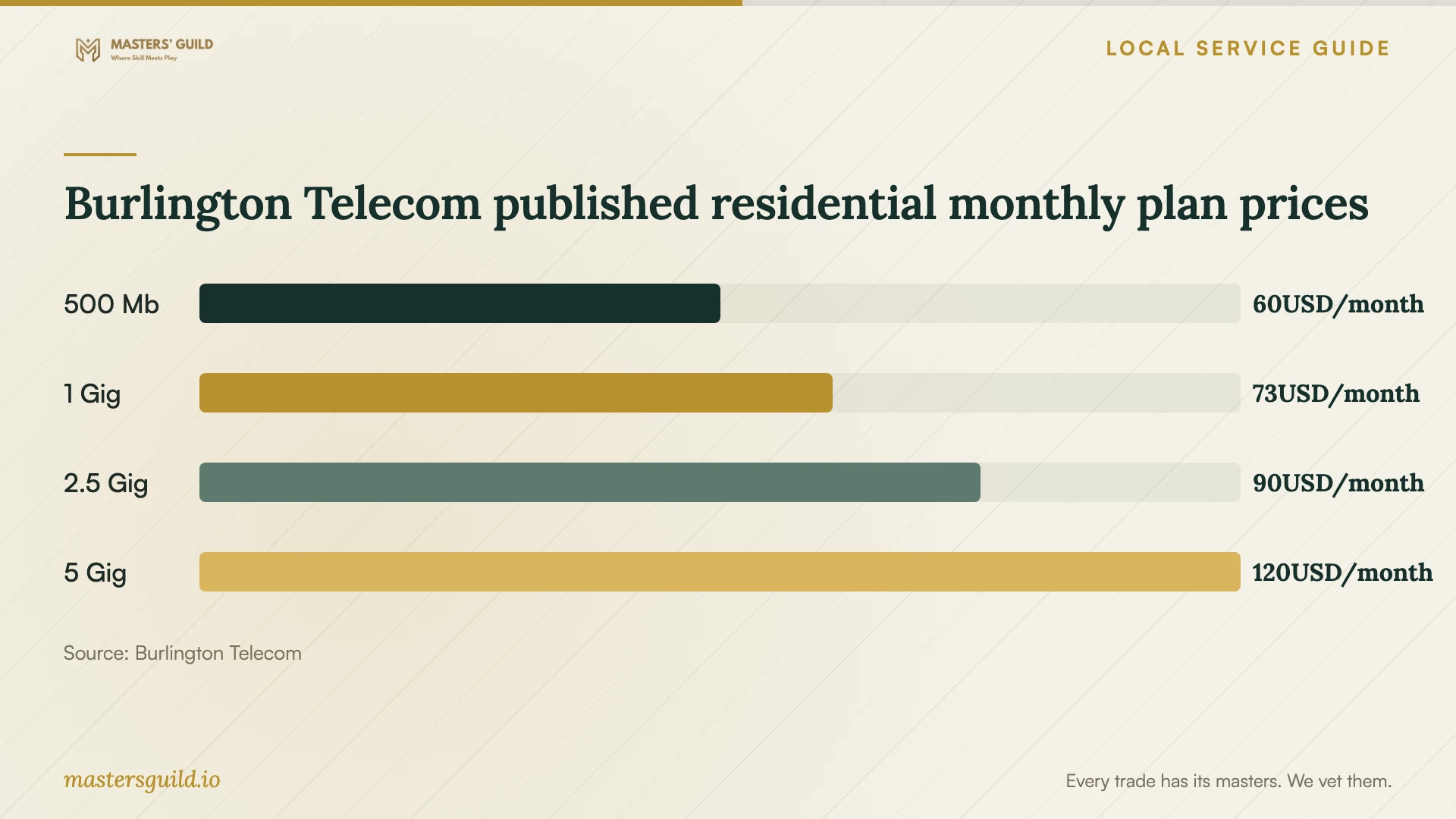
For internet budgeting, Burlington Telecom’s residential broadband labels list monthly prices of $60 for 500 Mb, $73 for 1 Gig, $90 for 2.5 Gig, and $120 for 5 Gig as retrieved on October 12, 2026. Each of those four labels lists a $65 installation fee and government taxes that vary by location. These are provider subscription prices, not home office assembly prices. [5]
Ask the provider to confirm address availability and the terms of the plan you choose. Compare typical upload and download speeds, then test your existing connection during a video call and file upload from the proposed desk. Ask the setup technician to compare Wi-Fi and a wired connection before recommending replacement network equipment. [5]
Agree on a working handover
Define completion before the visit: a stable desk, secure mounts, usable displays, working keyboard and mouse, connected network, and clear cable routes. Include a test call with your microphone and camera. If you use an employer-managed laptop, confirm with your IT team which changes the technician may make.
Enter account passwords yourself during setup. Before the provider leaves, test the equipment you use for work, operate the desk, and inspect the installation together. Ask for a list of installed parts, any unresolved tasks, and instructions for adjusting the mounts or disconnecting the equipment.
Burlington Telecom published residential monthly plan prices
Local details that affect your job
Check the city’s in-kind repair exception
Burlington limits its cost-based building-permit exception to in-kind repair work costing $1,000 or less. A low quote for a new alteration does not establish that exception. Send the Building & Trades Division a description of any proposed construction before approving the work. [1]
Coordinate rental access and permissions
For Burlington Telecom installation, customers must secure landlord permission for applicable wiring and equipment and have an adult present. Use the provider’s landlord authorization form when applicable. If permitted work also needs a city inspection at a rental property, Burlington requires 48 hours’ advance tenant notice and attendance by the owner or local property manager, plus the contractor for MEP permits. [1] [4]
Match the scope to the next step
| Your planned work | Who to ask | Before scheduling |
|---|---|---|
| Desk assembly and freestanding equipment | Furniture assembler | Send model numbers and agree on lifting, assembly, and cleanup. |
| Displays, dock, printer, and network configuration | IT setup technician | Specify devices, test requirements, and employer IT restrictions. |
| New outlets or circuit changes | Electrician | Verify Vermont credentials and ask the city about the trades permit process. |
| Built-ins or room alterations | Contractor and city Building & Trades Division | Confirm permit requirements; obtain zoning approval first if applicable. |
| Burlington Telecom rental installation | Internet provider and landlord | Arrange permission for wiring and equipment and an adult’s presence. |
Your hiring checklist
- List furniture models, device models, mounting choices, and the tasks you want priced.
- Measure the workspace and delivery route; send room and attachment-location photos.
- Identify proposed construction or electrical changes and resolve applicable city approvals.
- Confirm landlord permission and appointment access if internet installation needs them.
- Ask for an itemized quote, exclusions, and a method for approving extra work.
- Confirm employer IT restrictions before configuring a managed computer.
- Agree on a handover test covering desk movement, displays, network, camera, and microphone.
Frequently Asked Questions
Can one provider handle the entire setup?
Ask the provider to name the tasks they will perform and any subcontractors they will use. Put assembly, mounting, IT configuration, and electrical changes on separate lines. For electrical work, verify the proposed electrician’s credentials through Vermont’s Division of Fire Safety. [3]
Does a project under $1,000 avoid a building permit?
Burlington’s listed $1,000 exception covers in-kind repair work. Do not apply it to a new alteration based on price alone. Ask the Building & Trades Division to review the proposed work. [1]
Should I buy the fastest internet plan before setup?
Test your current connection at the desk first. Compare the provider’s typical upload and download speeds, equipment terms, and fees against your work needs. Burlington Telecom publishes those details in its residential broadband labels; ask it to confirm address availability and current terms. [5]
Sources and scope
This guide combines the sources below with practical planning guidance. Figures apply to the stated geography and period; request a written quote for your property.