
Local service guide
Computer Virus Removal in Burlington, VT
For Computer Virus Removal in Burlington, choose a technician who will agree in writing on diagnosis, file preservation, cleanup and any permission to reinstall the operating system. Describe whether you saw a warning, installed software or granted someone remote access. Ask for a diagnostic charge, a spending limit and an expected return date before handing over the computer.
Decide whether you need cleanup or scam recovery
Start by describing what happened rather than naming a virus. Tell the technician whether the warning appeared inside a browser, whether you downloaded anything, and whether another person controlled the computer. Ask for a diagnosis before approving a repair. Choose help through contact information you found independently of the alarming pop-up.
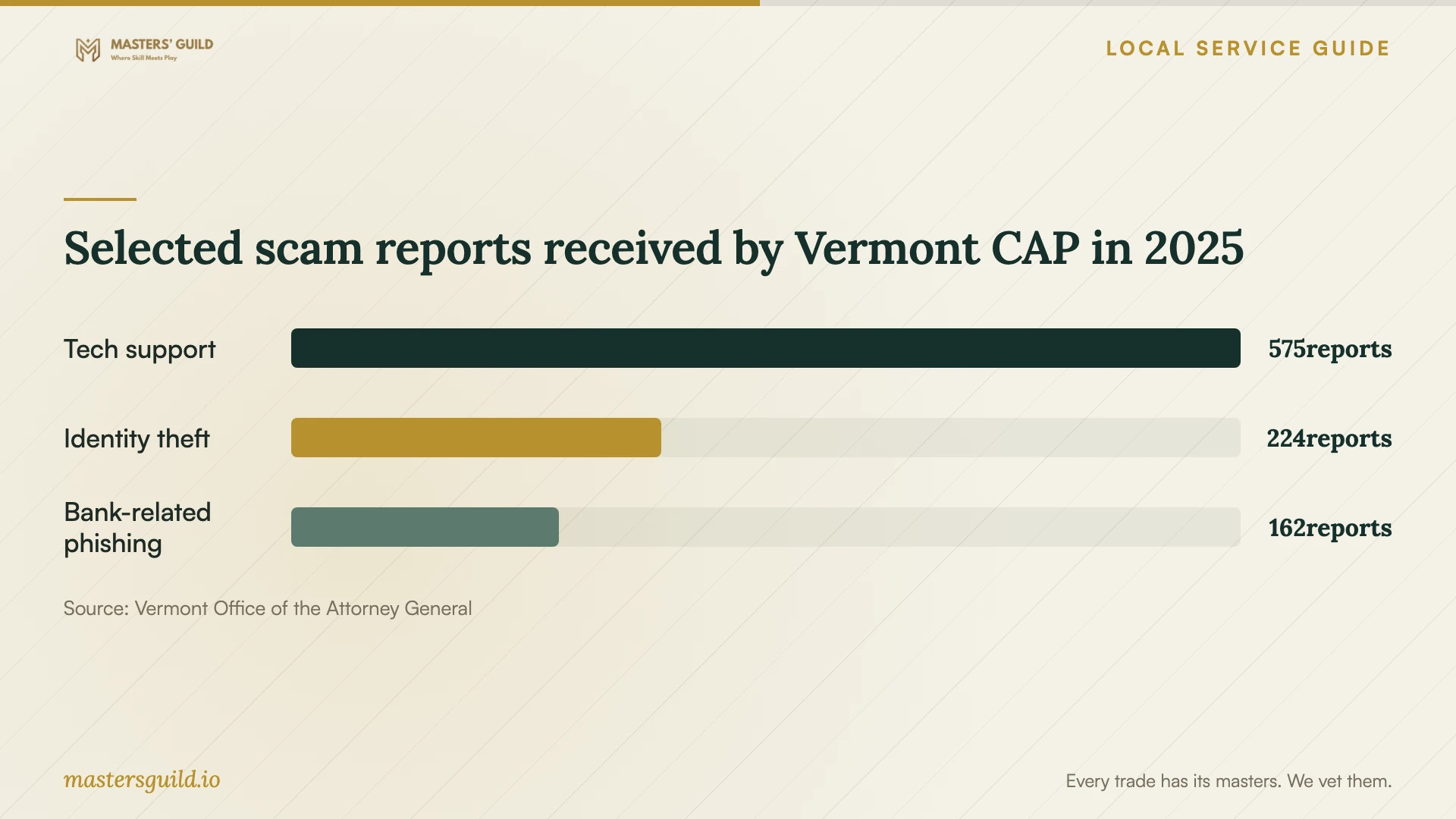
The Vermont Attorney General recorded 575 computer tech support scam reports in 2025. Its guidance describes sudden alerts about alleged malware infections or expiring antivirus software. Use that statewide evidence as a reason to question the warning before paying anyone. The report does not establish whether your device has an infection. [1]
If you transferred money, follow Vermont CAP's recovery guidance alongside the computer repair: contact the financial institution or transfer company, ask about a hold or freeze and a possible refund, and retain a copy of your fraud report. If you supplied bank or credit card information, contact the relevant institution. Tell the technician about remote access and any software the caller asked you to install. [2]
Agree on the repair scope and price
Ask for a written estimate that distinguishes diagnosis from the work you may approve afterward. Request prices for malware cleanup, browser cleanup, operating system repair, backup and reinstallation. Set a maximum charge and require a call before the technician exceeds it. For an hourly quote, ask what happens if the technician cannot complete the repair within your limit.
Discuss remote service, drop-off and a home visit with the technician. Ask which option they recommend for your symptoms and how they will handle access to your files. For drop-off, confirm the handover location, collection arrangements and whether they need your charger. For remote work, ask how you will end the session and whether they will remove remote access software afterward.
Ask for an expected completion date and an explanation of what could extend it. Agree on a fallback if cleanup fails: further diagnosis, an approved reinstall or return of the device without additional work. Request a completion note describing what the technician changed and what you should do next.
Protect files before authorizing a reset
List the files you want preserved, including photos, documents and files stored outside the usual folders. Tell the technician whether you have a backup and when you last checked it. Ask them to explain their preservation plan before deleting files, resetting the computer or reinstalling the operating system.
Agree on which folders the technician may access, where they may store a temporary backup and when they will delete their copy. Ask how they will handle account access without receiving your banking or email passwords. If they need an encryption recovery key, ask why and arrange a secure handover.
At collection, ask the technician to show that the computer starts, that your agreed files remain available and that they have addressed the original symptom. Review any remaining problems before approving extra work. Keep the invoice and repair notes with your backup information.
Compare repair with replacement
Request a diagnosis before deciding to replace the device. Compare the full repair quote, including file transfer and setup, with the replacement option you would choose. If you prefer replacement, ask the technician to quote file recovery and secure erasure as separate tasks. Give explicit instructions about returning or disposing of the old drive.
Vermont E-Cycles offers free recycling of covered computers and accessories for residents. The Department of Environmental Conservation warns that the program does not guarantee data security and instructs users to remove data before recycling. Arrange erasure before drop-off, or ask a data security service to handle a drive you cannot access. [4]
Selected scam reports received by Vermont CAP in 2025
Local details that affect your job
Vermont help after a tech support scam
Burlington residents can contact the Vermont Attorney General's Consumer Assistance Program at 800-649-2424 for scam reporting and support. If you paid a caller or disclosed financial information, contact the bank or payment company before waiting for a repair appointment. CAP's recovery guidance asks you to report jeopardized funds and personal information at once. [1] [2]
Choose an electronics acceptance location before traveling
CSWD's electronics instructions list acceptance at its Essex, Hinesburg, Milton, South Burlington and Williston drop-off centers. The electronics-specific list does not include the Burlington center. Choose one of the listed locations and confirm acceptance before traveling. For more than one cubic yard, CSWD asks you to arrange an appointment at 802-872-8100; staff at a center that has reached capacity may ask you to return or visit another location. [3]
Choose your next step
| Your situation | Next step | Question to ask |
|---|---|---|
| An unsolicited alert claims an infection | Pause before paying; Vermont identifies these alerts as a tech support scam tactic. | Can you diagnose the device without relying on the pop-up's claims? |
| You paid a suspected scammer | Contact the financial institution or payment company at once, alongside arranging repair. | Can you inspect the computer for changes made during remote access? |
| You need files preserved | Approve a preservation plan before cleanup or reinstallation. | Which files will you copy, and when will you delete your temporary copy? |
| You decide to retire the computer | Arrange data removal before using Vermont E-Cycles; the program does not guarantee data security. | Will you erase the drive and document what you did? |
Your hiring checklist
- Write down the warning, symptoms and actions you took, including downloads or remote access.
- Tell the technician whether you sent money or disclosed account information.
- List files to preserve and describe your existing backup.
- Get the diagnostic fee, approved scope and spending limit in writing.
- Require permission before a reset, reinstall or file deletion.
- Confirm handover, expected return date and temporary backup deletion.
- Review the repair notes and agreed files before accepting completion.
Frequently Asked Questions
How much should I budget for removal?
Ask for a device-specific written quote after describing the symptoms. Request separate charges for diagnosis, cleanup, backup and reinstallation, plus any travel or software charges. Set a spending limit and ask the technician to seek approval before adding work.
Does an infection warning mean I need a repair?
Ask for a diagnosis before approving work based on the warning. Vermont's Attorney General describes sudden malware and antivirus alerts as a tech support scam tactic. Explain to a technician you selected whether you downloaded software or granted remote access. [1]
Can I recycle my old laptop for free?
Vermont E-Cycles covers computers and laptops for residents, and CSWD lists them among its no-fee items. Use a location named in CSWD's electronics acceptance instructions and arrange data removal first. The state does not guarantee data security through recycling. [3] [4]
Sources and scope
This guide combines the sources below with practical planning guidance. Figures apply to the stated geography and period; request a written quote for your property.