
Local service guide
Cloud Service Setup in Burlington, VT
Arrange Cloud Service Setup in Burlington, VT by asking a technician to quote the devices, files, account security, and recovery tests you need. Keep the accounts and billing in your name, agree on how the technician will confirm completion, and measure your upload connection before accepting a migration deadline. Request separate charges for setup labor, subscriptions, and any internet changes.
Define the job before comparing offers
Tell each technician what you want to accomplish: share household documents, move a photo library, recover files after a computer failure, or configure several devices. List the computers and phones involved, their operating systems, the existing cloud accounts, and the folders you want included. Ask the technician to identify exclusions in the quote.
For a migration, request a plan that preserves the original files until you approve the result. Agree on how you will check folder contents, open sample documents, and account for files the technician could not transfer. For backup work, ask the technician to demonstrate recovery into a separate test folder. Do not accept account creation alone as the completion test for a backup job.
Check uploads before buying faster internet
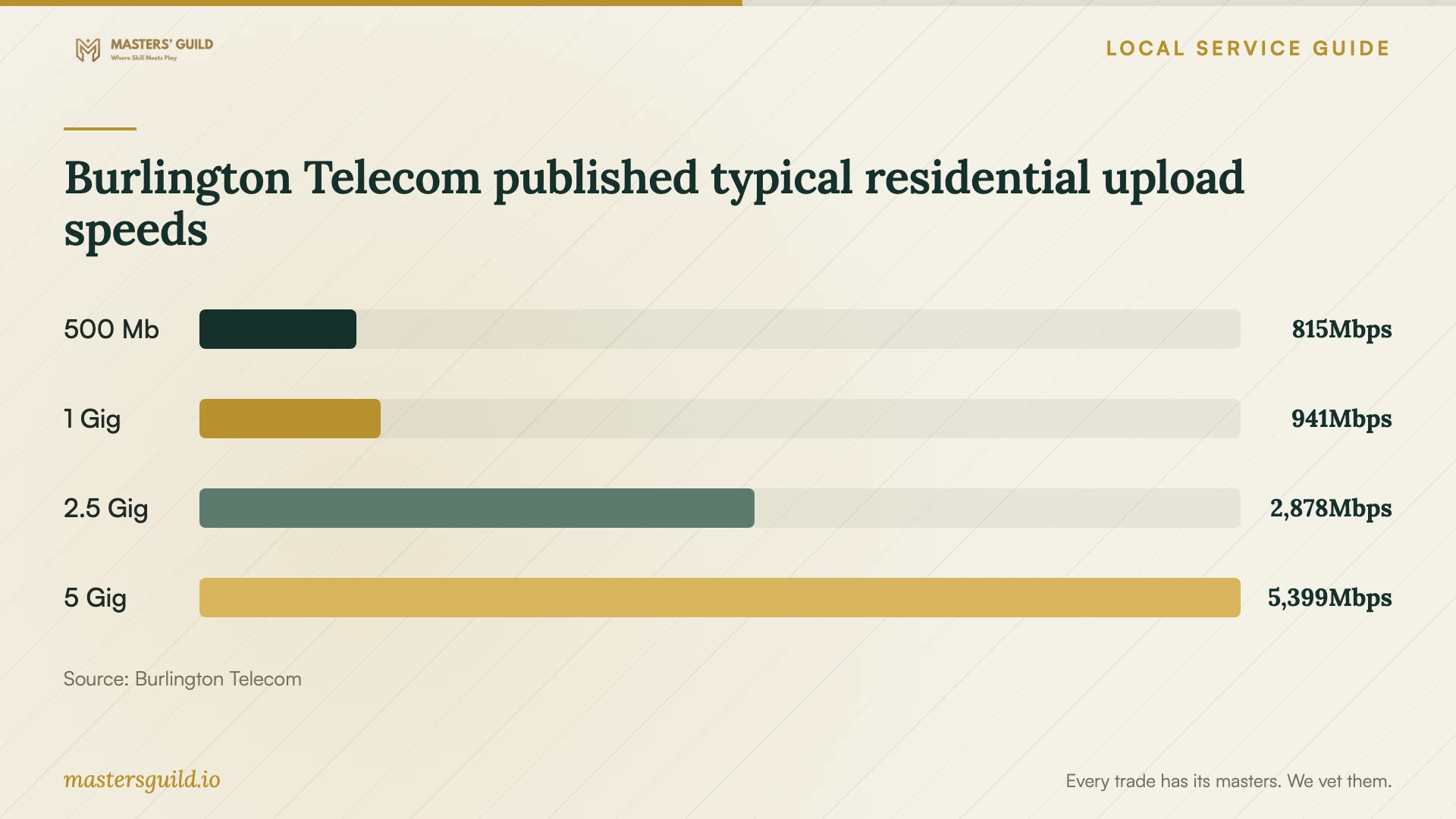
Burlington Telecom's residential labels report typical upload speeds of 815 Mbps for its 500 Mb plan and 941 Mbps for its standard 1 Gig plan. The labels also list higher-speed plans. These figures describe the provider's published connection performance; they do not establish how fast your chosen cloud service will accept files. [1]
Burlington Telecom identifies customer equipment, premises wiring, network congestion, and internet application performance as factors that can reduce actual speeds. Ask your technician to measure the connection and upload a representative folder before recommending a plan upgrade. Have them explain whether the constraint appears to involve your device, home network, internet service, or cloud destination. [2]
Separate the hands-on appointment from the remaining upload work. Ask who will monitor progress, whether the computer must stay awake, and how you will receive confirmation after the transfer finishes. Agree on any follow-up charge before the technician leaves.
Compare the full cost and invoice treatment
Request a written quote with setup labor, travel, storage subscriptions, equipment, and follow-up support on separate lines. Specify whether the technician charges a fixed fee or bills by time, and ask what requires your approval before they exceed the scope. The supplied evidence does not establish a Burlington technician price range, so obtain job-specific offers.
The Vermont Department of Taxes states that sales of prewritten computer software, including software accessed over the internet, became taxable on July 1, 2024. It lists development and technical support services as nontaxable. Burlington appears on the state's local-option sales-tax list, where taxable sales carry a combined 7% rate. Ask the seller to explain the classification and applicable tax for each subscription or service; do not assume that each cloud-related charge receives the same treatment. [3] [4]
Keep control of accounts and recovery
Create the account with your own email address and payment method. Enter passwords yourself, choose the recovery contacts, and ask the technician to explain the available additional sign-in protection. Agree on the access they need during setup and remove temporary access at handover. Ask them to document any continuing support access you choose to retain.
CISA advises backing up data to a secure external drive or a vetted cloud service and protecting devices and files with encryption. It also warns that losing encryption recovery keys or passwords can cause permanent data loss. Before changing encryption settings, ask the technician to verify your backup and help you store recovery information somewhere you control. [5]
If you include an external backup drive, CISA recommends disconnecting it when you are not backing up because ransomware could reach and damage a connected backup. Ask your technician to write down the backup routine, including when to connect the drive and how to check the last successful backup. [5]
Make the handover part of the appointment
Before paying for completion, sign in yourself, open files from each included device, and perform the agreed recovery test. Review sharing permissions with the technician and confirm that household members have only the access you intended. Ask for a short record of the folders covered, subscription renewal terms, unresolved transfer errors, and the support contact.
Keep the old device or original storage until you have reviewed the transfer and recovery results. Ask the technician to explain how to handle a missed backup, a full storage account, or a replacement phone. Choose someone who will teach you those steps and put the promised follow-up terms in writing.
Burlington Telecom published typical residential upload speeds
Local details that affect your job
Check the local internet offer before adding an upgrade
Burlington Telecom's standard 1 Gig residential label lists $73 per month and a $65 installation fee. Its separate 1 Gig LTO label lists $45 per month for 12 months, then $73, with a $0 installation fee. These are internet charges, separate from cloud setup labor. Confirm availability at your address and the exact offer before authorizing an internet change. [1]
Itemize taxable software at a Burlington address
Burlington has a 1% local-option sales tax in addition to Vermont's 6% sales tax. The state describes local-option tax as destination-based. Its software guidance taxes remotely accessed prewritten software and lists technical support services as nontaxable. Ask for separate subscription and support charges and confirm the seller's tax treatment rather than adding 7% to the entire setup quote. [3] [4]
Obtain permission if the job expands into internet installation
For Burlington Telecom installation, its subscriber agreement requires an adult to remain present and makes the customer responsible for securing required permissions for wiring and equipment. If you rent and the proposed cloud job includes a new internet installation, arrange access and obtain the necessary property permissions before booking that work. [2]
Choose the scope of help
| Your goal | Request this work | Completion check |
|---|---|---|
| Access documents across household devices | Account setup, selected folders, and a permissions review | Sign in yourself and open a sample file on each included device |
| Move an existing file library | Migration plan, preservation of originals, and an error report | Review folder contents and open representative files |
| Recover files after device loss | Backup configuration and a written recovery procedure | Restore a sample file into a separate test folder |
| Resolve a slow initial upload | Connection measurement and a representative cloud upload | Review the measured result before authorizing changes |
Your hiring checklist
- List the devices, operating systems, accounts, and folders included in the job.
- Choose the account owner, billing method, and recovery contacts before setup.
- Request separate labor, subscription, equipment, travel, and follow-up charges.
- Ask for a connection test and representative upload before approving an internet upgrade.
- Agree on how the technician will preserve originals and report transfer errors.
- Require a sample file recovery and review sharing permissions at handover.
- Store recovery information yourself and remove temporary technician access.
- Get written instructions for checking backups and requesting follow-up help.
Frequently Asked Questions
How much should I budget for technician setup?
Obtain a quote for your device count, file volume, migration work, and recovery tests. The available sources do not establish local technician fees. Keep internet charges and cloud subscriptions separate from labor, and agree on approval for additional work.
Do I need a faster internet plan for cloud backup?
Ask the technician to test your connection and a representative upload first. Burlington Telecom notes that equipment, wiring, congestion, and application performance can affect speed. Its published broadband figures do not guarantee your cloud transfer rate. [2]
Does Vermont tax cloud setup?
The state taxes remotely accessed prewritten software and lists technical support services as nontaxable. Burlington's combined sales-tax rate for taxable sales is 7%. Ask the seller to itemize charges and confirm how the rules apply to the specific products and services. [3] [4]
What should I ask about encryption?
Ask the technician to verify your backup before changing encryption settings and explain where you will store recovery keys. CISA warns that losing recovery keys or passwords can cause permanent data loss. Keep that information under your control. [5]
Sources and scope
This guide combines the sources below with practical planning guidance. Figures apply to the stated geography and period; request a written quote for your property.