
Local service guide
Data Recovery and Backup in Buffalo, NY
For Data Recovery and Backup in Buffalo, choose a provider by defining your priority files, checking available backups, and comparing written terms for diagnosis, recovery, and data handling. Set an approval limit before handing over equipment. For customer private information, include provider safeguards in the contract, as New York’s SHIELD Act guidance requires. [1]
Prepare the device and your recovery priorities
Give the specialist a short incident record: device model, symptoms, last successful use, and anything you tried after the problem appeared. Name the files or applications you need to resume business, such as accounting records or customer documents. Include their expected folder locations and identify the person who can inspect the result.
If you suspect storage failure, stop using the affected device while arranging an assessment. Avoid experiments on your only copy. Have the specialist explain how they will preserve the original media, whether they plan to work from a copy, and which proposed actions need your approval.
Inspect available backups from another device and record their dates. Include external storage, shared folders, and any copies held by your existing IT provider. Let the specialist assess whether those copies cover your priority files before you authorize recovery work. Choose a separate destination for returned data.
Compare quotes against the same outcome
Compare written quotes for the same device, priority files, and required outcome. Have each provider itemize assessment, recovery, return storage, shipping, and urgent-service charges. The agreement should state what you owe if you decline the quote or the specialist cannot recover the files you named, including conditions attached to any no-recovery, no-fee promise.
Define acceptance in that same agreement: which files or applications you need, how you will inspect them, and how the provider will handle partial recovery. For business software, include a check by someone who uses the application. Set a spending limit and require approval before additional work.
Confirm where the work will happen. If the receiving shop sends equipment elsewhere, get the facility’s name, transfer method, responsible contact, and expected assessment and return dates. Include a plan for reporting delays so you can decide whether to arrange temporary equipment or another way to continue work.
Set privacy and handover terms
The New York Attorney General’s SHIELD Act guidance says people or businesses maintaining private information must adopt administrative, technical, and physical safeguards. Its administrative examples include selecting suitable service providers and requiring safeguards by contract. Its physical examples address protection against unauthorized access during transportation and disposal. [1]
Your service agreement should identify who can access files, how the provider protects transfers, whether subcontractors receive copies, and when the provider will erase retained data. Obtain a handover receipt identifying the device and recipient. Use an agreed secure method to share necessary encryption credentials, and name the person authorized to approve access.
If you suspect unauthorized access, arrange incident advice alongside recovery. The Attorney General explains that the SHIELD Act’s breach definition includes access that compromises private data and that notification duties apply after a qualifying breach. Have the incident adviser assess that question even if the specialist recovers your files. [1]
Accept backup service after a restore demonstration
Tell the backup provider how much recent work you can afford to lose and how long you can operate without key systems. Have them propose a schedule and restore procedure against those needs. Name the devices, shared folders, and business applications you expect them to cover, along with any exclusions you need explained.
Before accepting the setup, have the provider restore representative files to a separate location and demonstrate access. Include an application-level check for business software. Record who receives failure alerts, who responds, and who can authorize a restore. Keep the restore instructions and necessary account access available to an authorized backup contact.
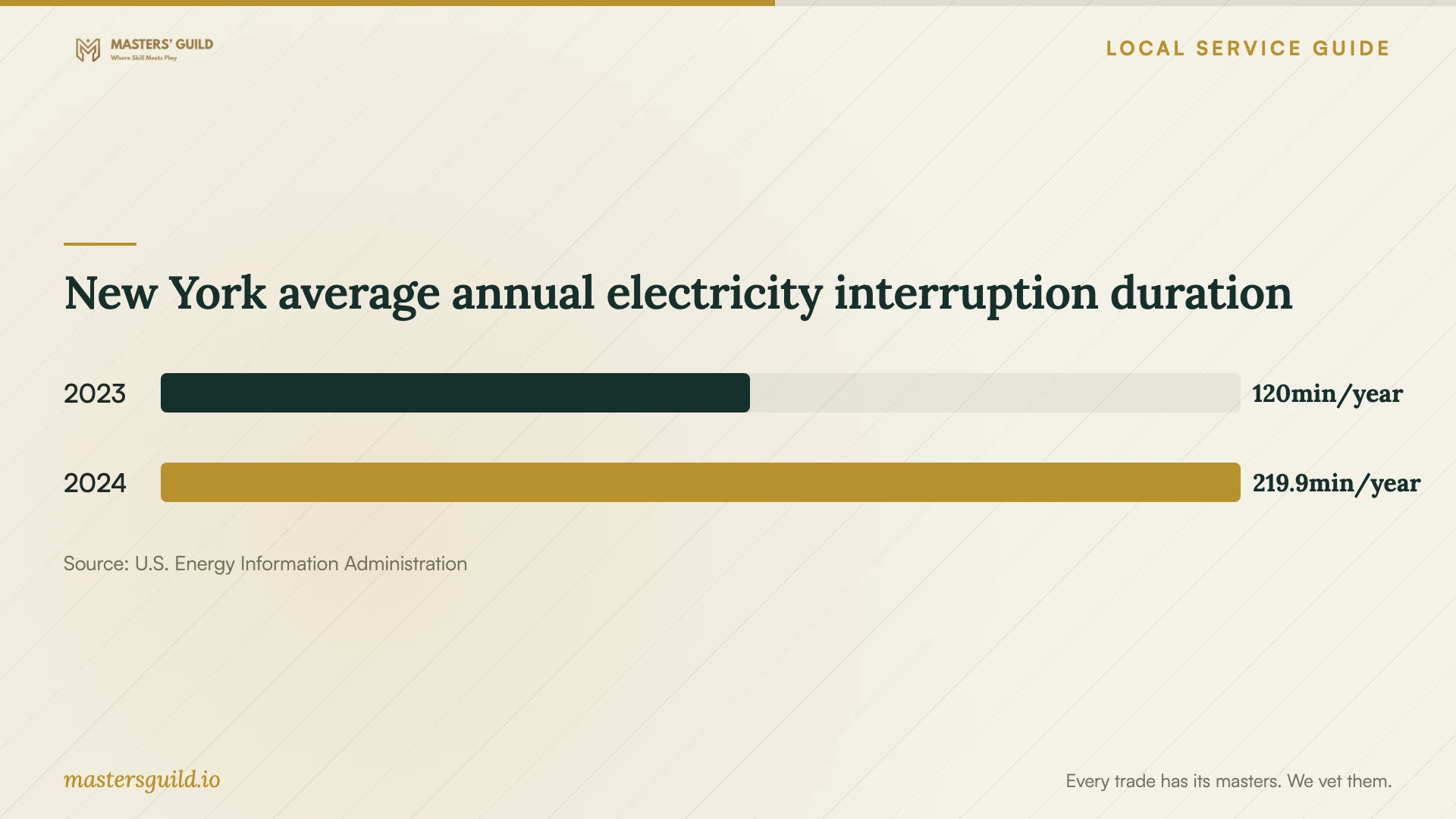
Include power interruptions in the plan. EIA reports New York statewide average non-momentary electricity interruption duration of 219.9 minutes in 2024 with major events, compared with 120 minutes in 2023. These historical state figures do not predict downtime at your premises. Discuss how the provider will resume interrupted backups and confirm completion. [4]
New York average annual electricity interruption duration
Local details that affect your job
Coordinate on-site work with your property’s power estimate
If National Grid supplies your premises, use its Upstate New York outage information when scheduling an on-site restore. National Grid updates its map every five minutes. County and town estimates describe when the last customer in the area should regain service; for your property’s estimate, log into your account. Share that estimate with the technician and confirm power availability before the visit. [3]
Confirm business-equipment disposal requirements in Tonawanda
Erie County lists Frey Electric at 100 Pearce Avenue in Tonawanda as accepting commercial and industrial electronic waste only. The listing specifies fees for all items, intact-device requirements, and no residential drop-offs. The county’s Goodwill entry assigns computer-data removal to donors and advises calling about location-specific e-waste restrictions. After verifying recovery and backup copies, coordinate sanitization or destruction with the intended destination before transporting equipment. [2]
Choose the next service to arrange
| Your situation | Next step | Question to settle |
|---|---|---|
| You have a backup you can inspect | Arrange a restore assessment | Does the copy contain your priority files and application data? |
| You lack a usable copy | Arrange a recovery assessment | What result will you accept, and what will an unsuccessful attempt cost? |
| The device holds customers’ private information | Include provider safeguards in the contract | Who accesses, transports, retains, and disposes of the data? |
| Your National Grid premises lack power | Check your account’s property estimate and coordinate the visit | Can you confirm power availability before the technician arrives? |
| You plan to retire business equipment | Verify copies, arrange data removal, and confirm destination requirements | Does the destination accept the equipment in its planned condition? |
Your hiring checklist
- Record the device model, symptoms, incident date, and recovery attempts.
- List priority files, applications, and available backup dates.
- Get an itemized quote, spending limit, acceptance test, and unsuccessful-recovery terms.
- Confirm the work location, transfer arrangements, and responsible contact.
- Document access controls, secure credential sharing, and deletion of retained copies.
- Complete a representative restore test and assign responsibility for backup alerts.
- Confirm power availability for an on-site appointment.
- Verify copies, arrange data removal, and confirm recycling acceptance before drop-off.
Frequently Asked Questions
How should I compare recovery quotes?
Use the same device, priority files, and required outcome for each quote. Include assessment charges, return storage, delivery, and any urgent-service fee. Settle partial-recovery and unsuccessful-recovery terms before authorizing work, then specify how you will inspect the returned files.
Does recovering files resolve a possible data breach?
Have an incident adviser assess unauthorized access and notification duties alongside recovery. The New York Attorney General explains that the SHIELD Act covers access that compromises private data and requires notification after a qualifying breach. Confirm the incident findings even if you regain access to your files. [1]
What should I see before accepting a backup setup?
Have the provider restore representative files to a separate location and let your staff open them. Include a check of any business application you expect to restore. Keep written instructions, access arrangements, and named responsibility for failure alerts and restore authorization.
Can I donate the old computer after recovery?
Verify the recovered files and backup, then arrange removal of data from the original device. Erie County’s Goodwill listing makes donors responsible for computer-data removal and advises calling about e-waste restrictions. Confirm acceptance with the intended location before delivery. [2]
Sources and scope
This guide combines the sources below with practical planning guidance. Figures apply to the stated geography and period; request a written quote for your property.