
Local service guide
Computer Virus Removal in Buffalo, NY
For Computer Virus Removal in Buffalo, NY, choose a technician who agrees in writing to diagnose the problem, protect the files you identify, and obtain your approval before reinstalling the operating system or adding paid software. Ask for separate cleanup, backup, and software charges. If a warning tells you to call a number or grant remote access, arrange help through a contact you choose: New York’s Attorney General warns that scammers use those requests to gain access to computers and bank accounts. [3]
Choose help through a contact you trust
Treat an unsolicited virus warning as a reason to pause before paying anyone. New York’s Attorney General describes a scam that starts with a call, text, email, or pop-up directing the recipient to supposed customer support. The caller then asks the recipient to install software that grants remote computer access. [3]
The Attorney General advises against calling the number in that message or granting an unknown person remote access. Choose your own repair contact and explain what happened, including any software you installed at the caller’s request. Ask the technician to include a review of that access in the repair scope. [3]
If someone also told you to move money for safekeeping, contact your financial institution using the number on your bank statement. The Attorney General identifies that demand as part of the scam. Keep the messages, payment records, and caller details for a complaint; computer repair should accompany your response to the financial exposure. [3]
Define the work before handing over the computer
Give the technician a short account of the symptoms: the exact warning, when it appeared, whether the computer starts, and what you downloaded or clicked beforehand. Ask for diagnosis before authorizing a wipe or reinstall. Request an explanation of the proposed work and what would trigger an additional charge.
Name the files you need to preserve, such as family photos, tax documents, or a personal project. State whether you have a backup and when you last checked it. Ask who will copy the files, where the technician will store them, and when they will delete any working copies. Set a written approval requirement for erasing storage.
Discuss access before sharing credentials. Ask which account the technician needs, whether you can enter its password yourself, and how they will end any remote session. Keep banking logins outside the repair handoff. For remote work, arrange a time when you can watch the session and ask questions.
Compare quotes by scope and invoice detail
Request a quote that separates diagnosis, malware cleanup, file backup or recovery, operating-system work, and software purchases. Ask whether the technician charges a fixed amount or an hourly rate, whether a diagnostic fee applies if you decline repair, and whether they require approval above a spending limit.
New York’s Department of Taxation and Finance lists troubleshooting, installing, repairing, maintaining, and servicing among exempt computer software services. When a seller provides these services with prewritten software, the exemption requires reasonable service charges stated separately on the invoice. Prewritten software itself is taxable. Ask the provider to explain the tax treatment of each quoted item, including any hardware work. [1]
Get a device-specific quote and confirm the expected return date. Ask each technician for the total authorized cost. Include the delivery method in that comparison: remote appointment, drop-off, or home visit, with any travel charge shown.
Agree on the handback and replacement plan
Before accepting the computer, ask the technician to explain what they found, what they removed or changed, and what remains unresolved. Have them demonstrate the functions you care about and confirm that your requested files are present. Ask about follow-up terms if the same symptom returns and whether any installed software has renewal charges.
If the technician recommends replacement, request the reason and compare the full alternatives, including file transfer and disposal. Erie County encourages repair and upgrades before replacement. Its electronics recycling page also warns that discarded computers can retain account numbers, passwords, and other personal information. [2]
For a computer you will recycle, include data erasure in the handoff plan and ask the technician to document the method. Erie County directs residents to collection events, possible permanent drop-off locations, and municipal collection information. The county asks residents to call locations before bringing electronics because acceptance rules can change. [2]
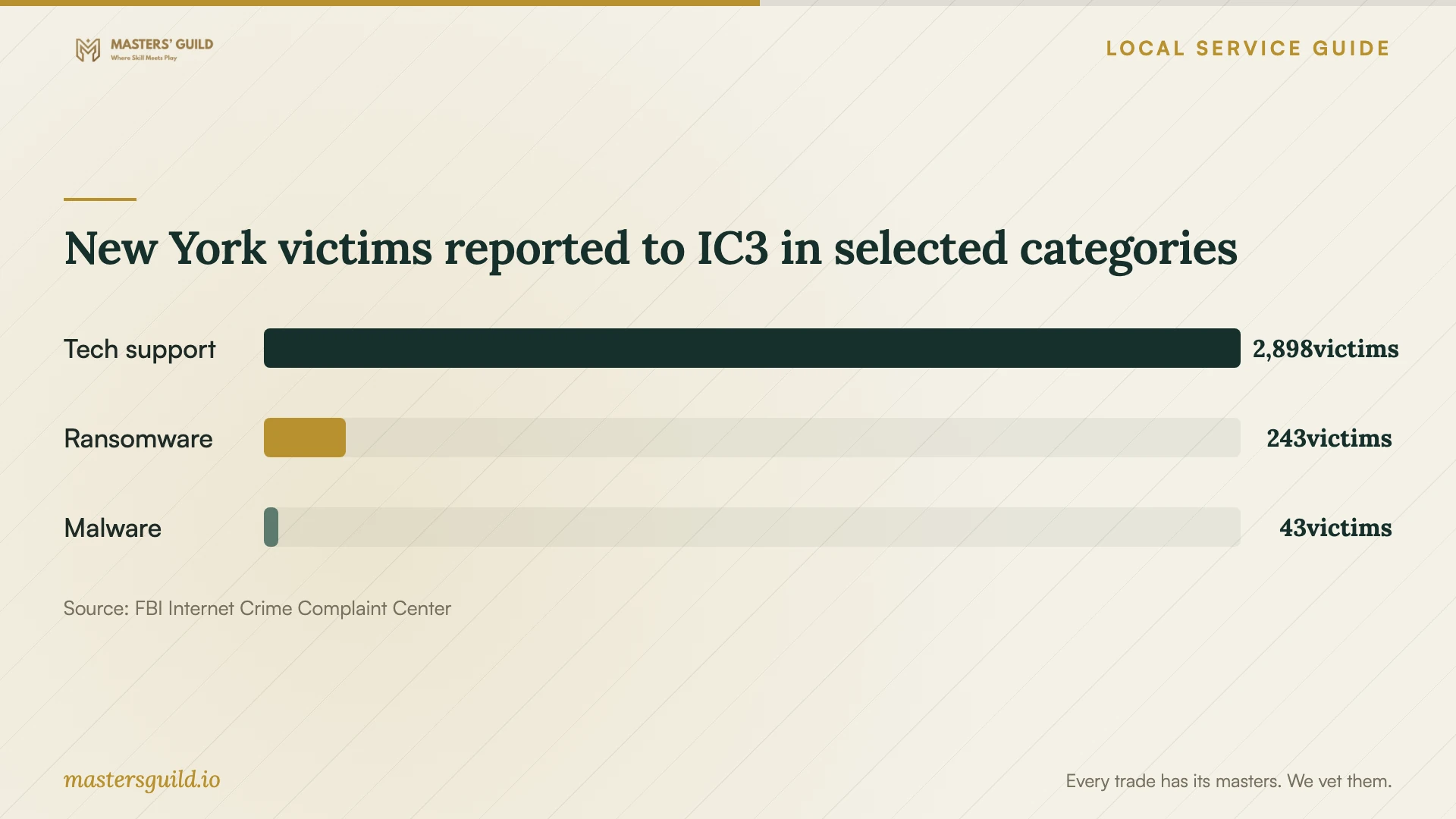
New York victims reported to IC3 in selected categories
Local details that affect your job
New York invoice rules affect quote comparisons
For a Buffalo repair, ask for software labor and any prewritten antivirus purchase on separate invoice lines. New York exempts reasonable, separately stated software maintenance, servicing, and repair charges, while it taxes prewritten software. A bundled price can obscure that distinction, so ask the provider to explain the invoice before you approve the work. [1]
Erie County disposal requires a separate plan
If you choose replacement, use Erie County’s electronics recycling page to check event, drop-off, or municipal collection options. Call the destination before taking the device there; the county warns that locations may change their rules. Arrange file preservation and data erasure before disposal rather than leaving the computer at the curb. [2]
New York provides a scam complaint route
If the repair request began with an unknown caller or pop-up and led to remote access or demands to move money, include scam reporting in your next steps. New York’s Attorney General accepts online complaints and calls at 1-800-771-7755. Contact your bank through the number on your statement if someone claims your account is at risk. [3]
Match the next step to your situation
| Situation | Next step | Question to settle |
|---|---|---|
| An unsolicited warning gives a support number | Choose your own repair contact; do not call the supplied number | Did you install software or grant the caller access? |
| The computer starts and your files matter | Request diagnosis with a file-preservation plan | Will the technician seek approval before erasing storage? |
| Cleanup includes an antivirus purchase | Request separate service and software invoice lines | How does the provider apply New York tax rules? |
| Someone asks you to transfer money for safety | Contact your bank through the number on your statement | Have you saved the messages and payment details? |
| You decide to replace the computer | Arrange file transfer and erasure, then confirm recycling acceptance | Will the Erie County collection destination accept this device? |
Your hiring checklist
- Write down the symptoms and keep a copy of the warning or message.
- List the files to preserve and identify your existing backup.
- Choose the technician through a contact you select.
- Get an itemized quote and a limit requiring further approval.
- Approve any wipe, reinstall, or paid software purchase as a separate decision.
- Agree on account access, file-copy storage, and deletion of working copies.
- Confirm the return date and follow-up terms.
- Ask for a written repair summary and check your files at handback.
Frequently Asked Questions
How much should I budget for removal?
Get a device-specific quote before setting the budget. Ask for diagnosis, cleanup, file preservation, reinstall work, and software as separate items. Set a spending limit and require approval for additions.
Should I allow remote repair?
Consider it only after choosing and verifying your own repair contact. Ask what access the technician needs and how they will end it. New York’s Attorney General advises against granting remote access to someone you do not know in response to unsolicited support messages. [3]
Does New York charge tax on virus removal?
The state lists software troubleshooting and repair among exempt services. If the provider combines those services with prewritten software, reasonable service charges must appear separately on the invoice to qualify for exemption. Ask the provider to explain your specific charges. [1]
Can I recycle the computer instead?
Arrange preservation of needed files and documented data erasure first. Erie County lists electronics collection resources and asks residents to call receiving locations before bringing devices because their rules may change. [2]
Sources and scope
This guide combines the sources below with practical planning guidance. Figures apply to the stated geography and period; request a written quote for your property.