
Local service guide
Arrange software installation in Bridgeport, CT
Arrange software installation in Bridgeport by giving the technician your computer model, operating system, program names, and intended tasks before requesting an itemized quote. Agree on activation, testing, and follow-up support. For help learning a program, consider Bridgeport Public Library’s one-on-one Digital Navigator service. Confirm the location, appointment availability, and whether staff can help with your goal. [1]
Define the work before comparing quotes
List the programs you want, the computers involved, and what you need to do with each program. Include your operating system version and any error message. Tell the technician whether you own a license or need help choosing one. Ask them to confirm compatibility and license requirements before you buy.
Treat application installation, operating system replacement, file transfer, and account recovery as separate requested tasks. Ask the technician to identify which tasks the quote includes and which require inspection before pricing. For an operating system change, agree on preserving files and reinstalling existing applications before work begins.
Choose how the technician will help
For remote work, ask whether the technician can complete your requested tasks with your current connection and whether you need to remain at the computer. Agree on the access method, when access ends, and whether they will remove remote access software afterward. Enter passwords yourself where possible.
For a home visit, include testing with your printer or other equipment if those connections matter. For drop-off service, ask what accessories to bring, how the provider will protect the device, and how you will approve additional work. Request an appointment estimate and an estimate of how long you will be without the computer.
Compare labor, licenses, and tax
Request a fixed price for the agreed work or an hourly rate with an approval limit. Ask the provider to identify software purchases, recurring subscriptions, travel, diagnostic charges, and follow-up support. Compare written quotes for the same tasks, including the same file protection and testing requirements.
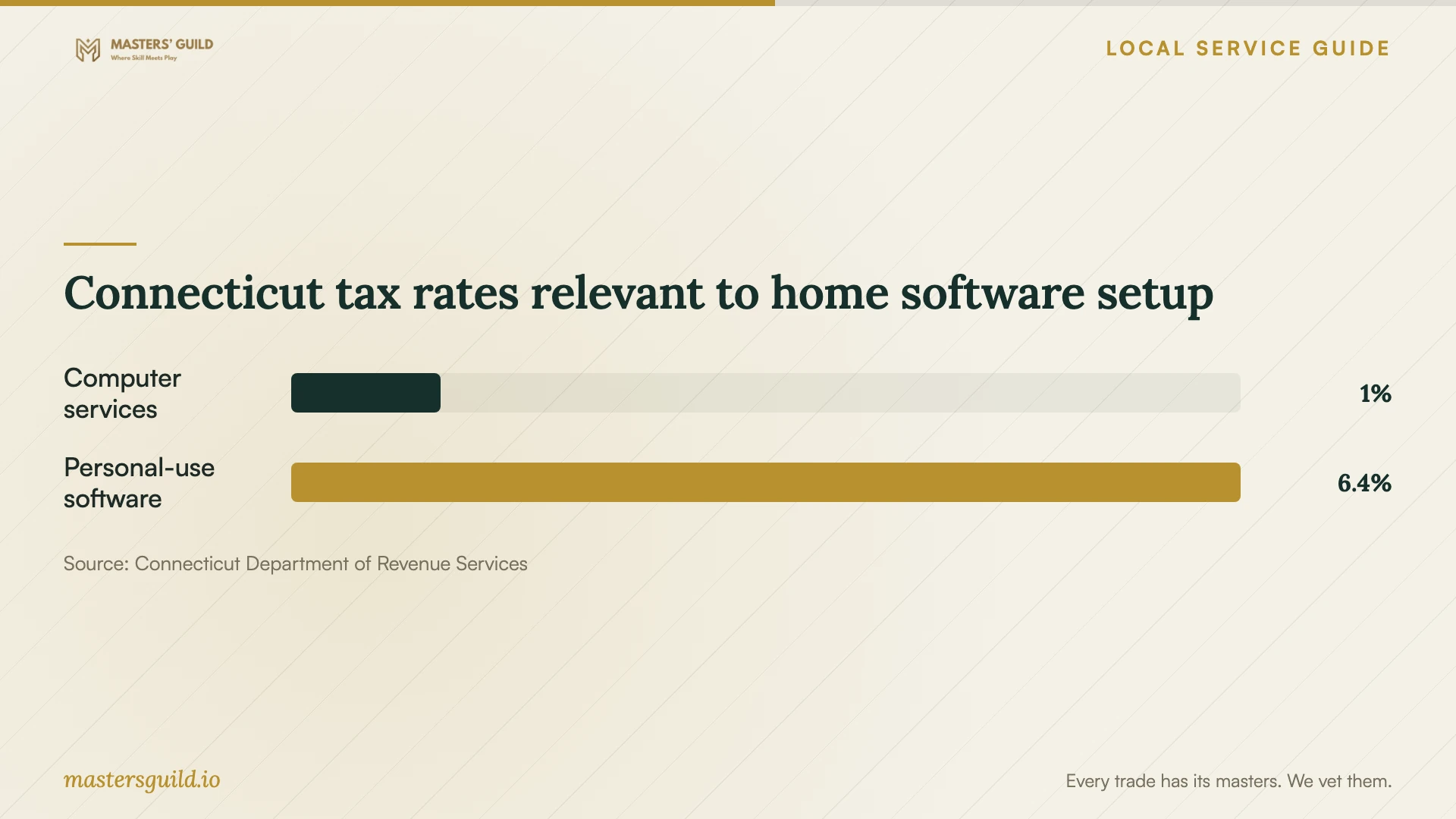
Connecticut DRS lists computer and data processing services at 1% and canned software electronically accessed or transferred for personal use at 6.35%. Connecticut imposes no additional local sales taxes. Ask the provider to explain the tax beside each relevant charge rather than assuming one rate applies to the whole job. [3]
DRS’s older software-specific policy classifies installation as a computer and data processing service, but the page warns that it has not incorporated recent legislative changes. Treat that classification as historical guidance and ask the provider to confirm the current treatment of your installation. Request separate invoice lines as a practical way to understand software, services, and tax. [2]
Protect your files and agree on completion
Back up the files you want to preserve and check that you can open a sample from the backup. Have your purchase receipt, license details, and account recovery method available. Keep passwords out of the job description. Ask the technician to use the publisher’s download source and explain any request to disable security controls.
Before accepting completion, open the program under your own account, confirm activation, and test a representative file. Ask the technician to demonstrate the tasks you named in the scope. Include printing, email, or syncing where you requested those functions. Keep a record of installed programs, renewal terms, unresolved issues, and the agreement for correcting installation problems.
Connecticut tax rates relevant to home software setup
Local details that affect your job
Check library learning support and branch availability
Bridgeport Public Library’s Digital Navigator program offers one-on-one technology learning, including help with internet use, online connections, resumes, and spreadsheets. Complete its intake form or call 203-576-7400 ext. 440 to discuss your goal. Confirm the appointment location and availability: the same library page lists East Side Branch as temporarily closed for renovations. Ask about your particular program before assuming staff provide installation or repair. [1]
Use Connecticut tax categories when reviewing the quote
For a household purchase in Bridgeport, distinguish the software charge from the service charge. Current statewide DRS guidance lists computer and data processing services at 1% and electronically accessed or transferred canned software for personal use at 6.35%, with no additional municipal sales tax. Request separate amounts and ask the provider to confirm how each part of your job qualifies. These are statewide distinctions, not Bridgeport labor prices. [3]
Choose the next step for your software task
| Your situation | Suggested next step | Confirm before proceeding |
|---|---|---|
| You want to learn spreadsheets or online tools | Ask the library’s Digital Navigator program about one-on-one help | Your learning goal, appointment availability, and an available location |
| You want a named application installed | Request an installation and activation quote | Compatibility, license ownership, and completion tests |
| You want an operating system replaced | Request a written backup and reinstallation plan | Which files and applications the technician will preserve |
| Your quote combines software and labor | Request separate charges and an explanation of tax | How the provider classifies each purchase and service |
Your hiring checklist
- Record the computer model, operating system version, program names, and error messages.
- Describe the tasks you expect to complete after installation.
- Confirm compatibility and who will supply each license.
- Request itemized charges and an approval limit for extra work.
- Back up important files and check your account recovery access.
- Agree on remote access, device custody, and password handling.
- Test activation and agreed functions before accepting completion.
Frequently Asked Questions
Can the library install software for me?
The library describes technology help and one-on-one learning; it does not promise software installation or repair on this page. Describe your device and goal through its intake process or call 203-576-7400 ext. 440. Confirm the appointment location and availability, since the page lists East Side Branch as temporarily closed for renovations. [1]
Should installation and the software license have the same tax rate?
Ask the provider to explain each charge. Current DRS guidance lists computer and data processing services at 1% and electronically delivered canned software for personal use at 6.35%. Its older software policy classifies installation as a computer service, but warns that it has not incorporated recent legislative changes. Confirm the current classification for your job. [2] [3]
What should I ask about follow-up support?
Ask whether the price includes correcting activation or configuration problems, how long that support lasts, and how to report an issue. Have the provider distinguish correction of the agreed installation from help with a new problem. Keep those terms with the written scope.
Sources and scope
This guide combines the sources below with practical planning guidance. Figures apply to the stated geography and period; request a written quote for your property.