
Local service guide
Office Relocation and Setup in Bridgeport, CT
For Office Relocation and Setup in Bridgeport, hire a mover against a written inventory, access plan and setup scope, and assign an IT contact to test the destination before staff return. Before committing to move day, check any alterations or occupancy changes with the Building Department and any proposed public street or sidewalk staging with Licensing & Permits. The city requires building permits for alterations and occupancy changes and provides permits for occupying the public right of way. [1] [2]
Define what the mover must deliver
Give bidders an inventory that names desks, chairs, cabinets, meeting tables, printers and equipment needing special handling. Include dimensions for bulky pieces and photographs of the pickup and delivery routes. Ask for a site visit or a review of those photographs before accepting a quote. Identify anything you plan to leave behind so the crew does not load it by mistake.
Request separate line items for packing, transport, dismantling, reassembly, placement, storage and disposal. Ask bidders to explain their charges for waiting, extra truck trips, stairs and changes to the agreed scope. Have them describe their insurance and damage-claim process in writing, including how they handle customer-packed equipment. Compare the finished scope and exclusions alongside the total.
Define setup as an acceptance task: furniture in its assigned room, desks assembled, labeled boxes delivered to the right workstation and packaging removed if included. Assign IT reconnection to a named person or firm. Ask the mover to identify subcontractors and explain which party you contact if something arrives damaged or a setup task remains unfinished.
Confirm the destination before scheduling
Bridgeport requires a building permit for alterations, repairs and changes in occupancy of an existing building or structure. Ask the landlord and Building Department how your proposed office use and fit-out fit those requirements. Describe the work precisely; moving desks and constructing partitions are different scopes. Do not interpret the city's reference to moving a building as a blanket permit requirement for transporting office furniture. [1]
For a building permit, the city directs applicants to create a Park City Portal account, apply for a Zoning Plan and submit documents in PDF format. Its document list includes a detailed scope, construction drawings or sketches and a floor plan showing the work. Ask your landlord or fit-out contractor who will prepare and submit the applicable documents, then track that responsibility separately from the mover's booking. [1]
The city makes the property owner responsible for ensuring contractors have permits before work begins. It also states that the Building Department cannot issue permits when property taxes or WPCA sewer user fees are delinquent. If your move depends on construction, ask the owner to resolve permit readiness before you commit to a firm handover date. [1]
Plan loading access at both addresses
Ask both building managers to confirm loading locations, freight-elevator reservations, permitted working hours, keys and any insurance documents they want from the mover. Walk the route from the truck to the suite. Record door widths, turns, stairs and the location where the crew may stage furniture. Give the same access information to each bidder.
Bridgeport's Licensing & Permits office issues occupancy permits for the public right of way and provides a form for the right to occupy a city street. If your plan includes staging equipment, placing a dumpster or occupying street or sidewalk space, describe the arrangement to that office before the move. Ask whether it needs an occupancy permit and how to arrange it; the department page does not establish a rule for every ordinary truck parking situation. [2]
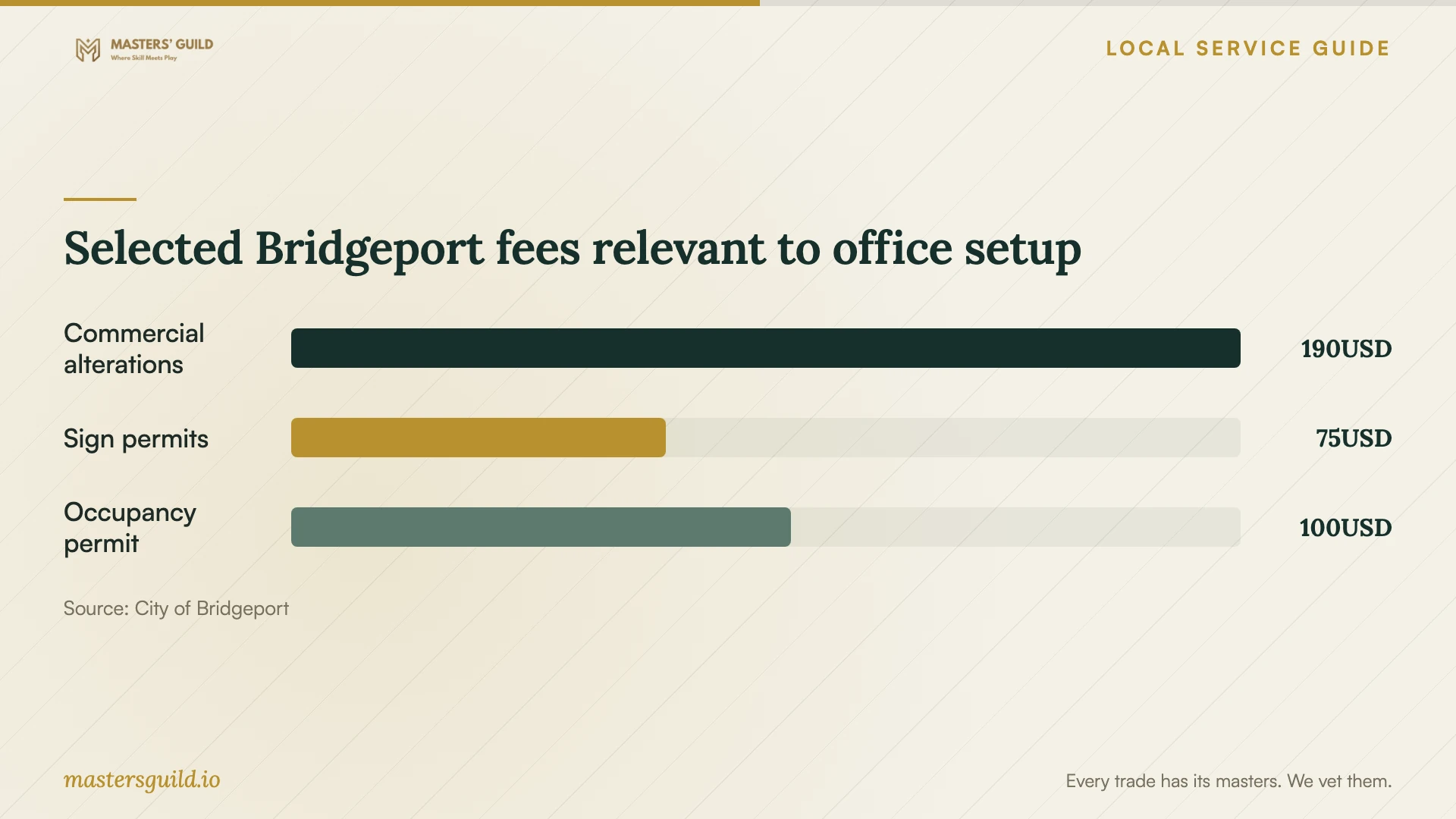
The city lists an Occupancy & Dumpster Permit at $100 per location. Confirm applicability and the current charge with the office before budgeting it. Keep the permit charge separate from the mover's access or waiting charges, and name who will obtain the permit if the city requires one. [4] [2]
Arrange a workable first day
Create a destination floor plan with a room or workstation code for each desk, device and box. Pack an opening-day kit with the items your team needs to start work, and keep keys and essential records under a named employee's control. Agree on who disconnects equipment, who transports it and who reconnects it.
Have your IT contact plan backups and test the internet connection, phones, printers and access to business systems. Set an order for restarting the functions your business depends on. Agree on a fallback if the destination is not ready, such as remote work or keeping selected equipment at the old address with the landlord's agreement.
Before accepting completion, walk the suite with the crew lead. Check furniture placement and assembly against the agreed plan, record visible damage and list unfinished tasks. Have staff report equipment issues to your IT contact so you can distinguish a transport problem from a reconnection task. Keep photographs, the inventory and the signed handover record together.
Selected Bridgeport fees relevant to office setup
Local details that affect your job
Building approval includes a zoning application
For work requiring a building permit, Bridgeport also requires a Zoning Plan application through Park City Portal and PDF documents. Ask the fit-out contractor and property owner to identify the applicant and prepare the scope and drawings before you tie the move to construction completion. [1]
Public-space staging has its own contact
Contact Licensing & Permits at 203-576-7123 to check a proposed public-right-of-way loading or staging arrangement. The office lists hours of Monday through Friday, 7:30 am to 3:00 pm, at 45 Lyon Terrace. Give the office the address and proposed use of the street or sidewalk rather than assuming your loading reservation covers public space. [2]
Check property-account blockers with the owner
Bridgeport states that delinquent property taxes or WPCA sewer user fees prevent the Building Department from issuing permits. If alterations determine your move date, ask the property owner to check these accounts before you book the crew. [1]
Choose the next step for your move
| Your situation | Next step | Put in writing |
|---|---|---|
| Furniture transport and placement | Ask a mover to review inventory and both access routes. | Packing, assembly, placement, exclusions and completion checks. |
| Alterations or a change in occupancy | Check building requirements; Bridgeport requires permits for these scopes. | Who handles the building permit and accompanying Zoning Plan application. |
| Proposed public street or sidewalk staging | Check the arrangement with Licensing & Permits, which issues public-right-of-way occupancy permits. | Who obtains any required permission and pays the applicable charge. |
| Computers, printers and business systems | Assign an IT contact and agree on restart testing. | Disconnection, equipment handling, reconnection and acceptance responsibilities. |
Your hiring checklist
- Send bidders one inventory, photographs and matching pickup and delivery scopes.
- Confirm loading access, elevator reservations, working hours and building-manager requirements.
- Assign the owner or fit-out contractor to check destination approvals with the city.
- Ask Licensing & Permits about any proposed occupation of public street or sidewalk space.
- Label furniture, equipment and boxes to match the destination floor plan.
- Name the person responsible for backups, disconnection, reconnection and testing.
- Record damage and unfinished setup tasks during the final walk-through.
Frequently Asked Questions
Does moving office furniture require a building permit?
The supplied city guidance identifies building alterations, repairs and occupancy changes as permit triggers; it does not establish a blanket requirement for furniture transport. Describe your destination use and any fit-out work to the Building Department so you can confirm the applicable requirements. [1]
Can the mover reconnect our computers and network?
Ask the bidder to define its setup scope. Assign responsibility for device handling, reconnection and testing before hiring. If you use a separate IT firm, give it the move sequence and require a named contact for opening-day issues.
What city fees should we consider?
The published schedules list $190 for commercial alteration zoning compliance, $75 for a zoning sign permit and $100 per location for an Occupancy & Dumpster Permit. Check which applications apply to your project. These are selected city fees, not a complete permit budget or an office moving quote. [3] [4]
Sources and scope
This guide combines the sources below with practical planning guidance. Figures apply to the stated geography and period; request a written quote for your property.