
Local service guide
Network Setup and Support in Bridgeport, CT
For Network Setup and Support in Bridgeport, hire around the work you need: equipment troubleshooting, configuration, or installed network wiring. Separate those tasks in the quote and agree on connection tests before buying equipment. For new low-voltage wiring, confirm the permit plan with the Building Department; the city includes low-voltage systems in its electrical permit requirements. Have the responsible contractor explain how their Connecticut license covers the installation. [1] [2]
Define the problem and the work you want
Prepare a short description of what fails and where. Name the room, device and activity: a video call drops in the upstairs office, a printer loses its connection, or a television cannot connect. Tell the technician whether you notice the problem on one device or several. Request a diagnosis before approving replacement hardware.
Separate configuration from physical installation in the quote. For configuration, specify router setup, device connections and the rooms you want tested. For installation, identify cable endpoints, equipment locations and proposed wall openings. Assign responsibility for patching, cleanup and labeling. Compare quotes that cover the same work.
Check who takes responsibility for wiring
For hired electrical installation work, get the responsible person's name and Connecticut contractor license category. DCP licenses individuals rather than electrical companies. Its professional-licensing guidance reserves permit applications and consumer contracts to contractors; journeypersons and apprentices need a licensed contractor of record under the stated employment arrangements. Bridgeport separately allows an owner who permanently resides at a single-family property to apply for an electrical permit. That homeowner route does not establish a hired technician's contractor credentials. [1] [3]
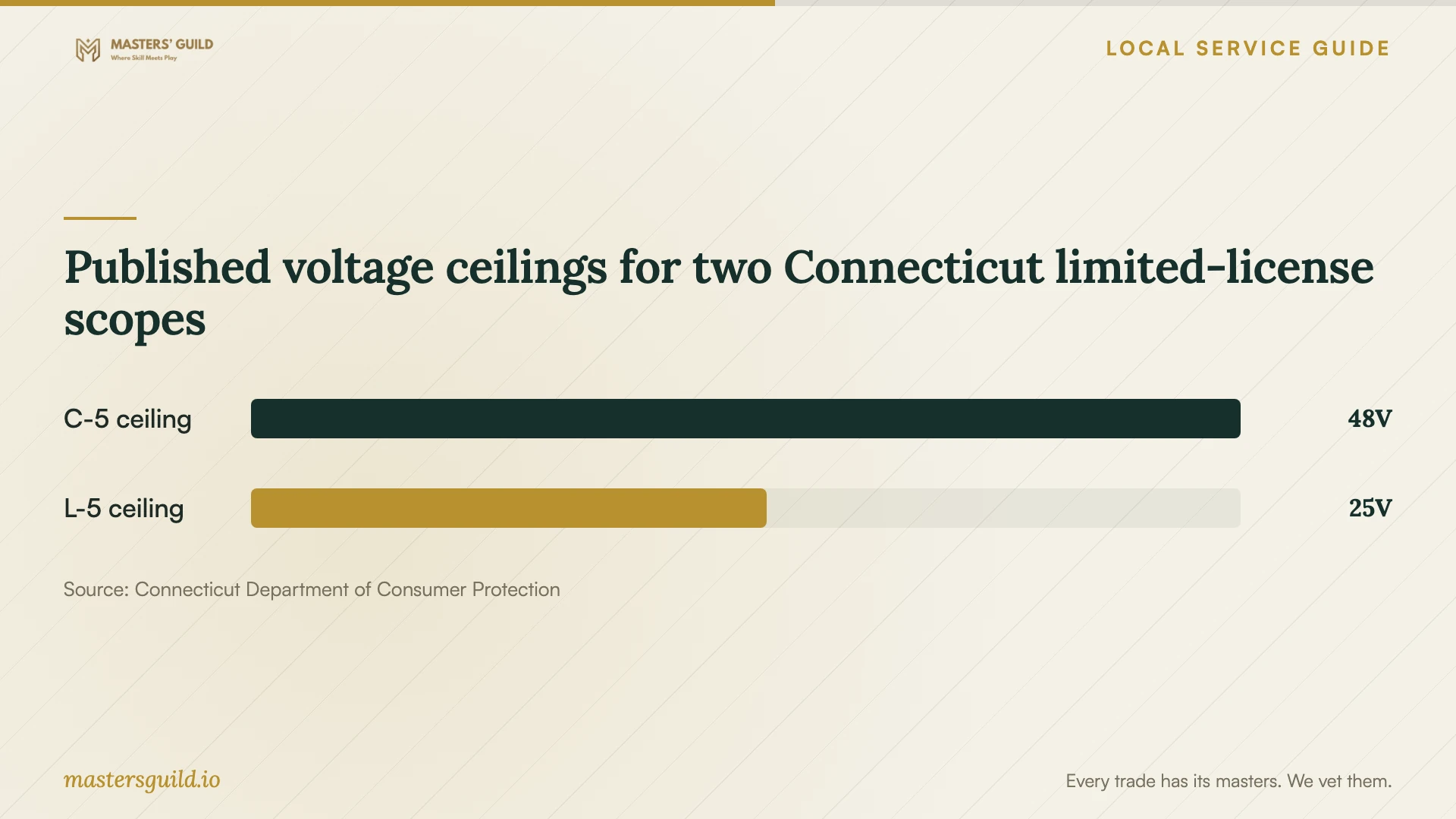
Have the contractor match their license scope to your proposed installation. DCP permits C-5 holders to perform specified low-voltage and telephone-interconnect work within stated limits. It excludes telecommunications installation or repair from L-5 work except for alarm interface wiring to an existing telephone connection for monitoring. E-1 holders have an unlimited electrical scope. Confirm suitability for the actual work rather than choosing from a category name. [2]
If different providers configure equipment and install cable, put their responsibilities in writing. Decide who returns if you cannot connect through a new outlet after setup. Include testing and handover requirements in both scopes so you have a clear contact for unresolved problems.
Resolve the permit application before scheduling
Bridgeport lists low-voltage systems among work requiring an electrical permit. The city directs applicants to create an account in the Park City Portal and submit documents in PDF format. Give the Building Department your proposed cable routes and equipment details, then confirm the documents and credentials it requires for that scope. [1]
The city's application checklist names a current E-1 license card, a detailed written scope, wiring diagrams, construction drawings and specifications, and equipment or material data sheets. DCP also defines limited-license work categories. If a provider proposes a limited license, have the city confirm how that provider can apply for your installation before you agree to a start date. [1] [2]
Agree on charges, access and completion
Request an itemized quote for diagnosis, equipment, cable installation, permit handling, testing and wall repairs. Establish whether the provider charges a fixed amount or by time, what triggers an extra charge, and how you approve changes. Include the equipment models and ownership terms if the provider supplies hardware.
Before the appointment, photograph your existing equipment and list the devices you want connected. Arrange access to proposed cable routes and clear the work area. Keep account access available for setup. Agree on how you will enter passwords without leaving them in project notes.
At completion, have the technician demonstrate your agreed activities in the agreed rooms. Request labels for new outlets, equipment settings and a record of cable endpoints. Confirm that you control the administrator account. Put follow-up support charges and return-visit terms in writing before accepting the completed work.
Published voltage ceilings for two Connecticut limited-license scopes
Local details that affect your job
Check property charges before fixing a start date
Bridgeport states that its Building Department cannot issue permits when property taxes or WPCA sewer user fees are delinquent. For a project requiring a permit, check those accounts before committing to installation or ordering equipment. [1]
Confirm the resident-homeowner application route
Bridgeport allows a property owner who permanently resides in a single-family residence to apply for an electrical permit. If you intend to apply yourself, confirm your eligibility and submission requirements with the department. For a rental or another building type, confirm who should apply rather than assuming this route applies. [1]
Prepare authorization for a contractor's agent
Bridgeport requires an agent to provide a signed letter on company letterhead identifying the agent, permit type and work address, plus photo identification and license documentation. If an office employee handles the application, have the contractor prepare the authorization before submission. [1]
Match your proposed work to the next step
| Proposed work | Request in the quote | Before agreeing |
|---|---|---|
| Troubleshooting existing equipment | Diagnosis and checks in the affected rooms | Describe the failures and approve purchases separately. |
| Router or mesh configuration | Setup, device connections and handover | Agree on the rooms and activities to test. |
| New installed network wiring | Cable routes, endpoints and contractor credentials | Confirm Bridgeport's low-voltage permit requirements for the scope. |
| Installation under a limited license | Exact license category and scope explanation | Check DCP's restrictions and confirm the city's application requirements. |
| Homeowner-managed permit application | Clear division of application and installation responsibilities | Confirm Bridgeport's permanently resident single-family owner eligibility. |
Your hiring checklist
- List the rooms, devices and activities you want the technician to test.
- Photograph the modem, router and existing cable endpoints.
- Separate configuration tasks from proposed wiring in the quote.
- Confirm the permit applicant and required documents with the Building Department.
- Identify who purchases equipment and handles wall repairs and cleanup.
- Agree on connection tests, account control and handover documentation.
- Get written terms for extra work, follow-up support and return visits.
Frequently Asked Questions
Does Bridgeport require a permit for network cabling?
The city includes low-voltage systems in its electrical permit requirements. Give the Building Department your proposed installation scope and confirm the requirements before work starts. This guidance addresses installed systems; it does not establish a permit requirement for router settings or Wi-Fi troubleshooting alone. [1]
Can I apply for the permit instead of the contractor?
Bridgeport allows an owner who permanently resides in a single-family residence to apply for an electrical permit. Confirm your eligibility and required documents with the department. When you hire electrical professionals, DCP's contractor rules govern their professional permit and contracting responsibilities. [1] [3]
Does any low-voltage license cover network installation?
Check the exact category and proposed work. DCP gives C-5 and L-5 holders different scopes and excludes telecommunications installation or repair from L-5 work except for a specified alarm interface. Have the contractor and permitting department confirm suitability for your installation. [1] [2]
What should I receive when the job ends?
Request the agreed connection tests, labels for new cable endpoints, equipment and settings documentation, and control of administrator accounts. Include these deliverables in the quote alongside support charges and return-visit terms.
Sources and scope
This guide combines the sources below with practical planning guidance. Figures apply to the stated geography and period; request a written quote for your property.