
Local service guide
Data Recovery and Backup in Bridgeport, CT
For Data Recovery and Backup in Bridgeport, CT, choose a provider who scopes the problem before starting work, names the files or systems you need restored, and puts handling terms and charges in writing. For suspected ransomware, hire incident-response help that can isolate affected systems and preserve evidence. For ongoing backup service, require encrypted offline copies and a demonstrated restore test, consistent with CISA guidance. [1]
Choose the right scope before handing over a device
Tell the provider what happened, which devices you used, and what you have tried since discovering the loss. Separate missing files, an unreadable device, a failed backup restore and a suspected security incident in your description. Ask the provider to explain its proposed first step before authorizing repairs or changes to the original media.
For a recovery job, give the provider a short priority list: accounting records, current customer work, email archives or another named set of files. Ask whether it performs the work itself or sends the device to another facility. Agree who may access the contents, how the provider records transfers, and when it will return the original device.
For suspected ransomware, follow your incident-response plan and contact your IT or security provider. CISA recommends isolating affected systems from the network. It advises powering them down only when network disconnection is not possible, because shutdown loses potential evidence in memory. Ask the responder to preserve evidence and assess the compromise before restoring operations. [1]
Compare written recovery quotes
Request an itemized quote for your device and failure, with separate charges for assessment, recovery work, shipping, replacement storage and returning the original media. Ask what you owe if you decline the proposed work or the provider cannot recover your priority files. Have the provider define any success-based payment terms in writing, including how it treats partial recovery.
Ask for an assessment date and a proposed delivery date, with the assumptions behind each. If you need files for payroll or a customer deadline, identify that deadline before the provider starts. Require approval before extra work or subcontracting, and compare proposals that cover the same recovery priorities and delivery requirements.
Agree on an acceptance check. Open a selection of recovered files and confirm that the application you use can read them. Ask the provider to document missing or unreadable items. Keep the original media until you accept the result and arrange its return, retention or destruction in writing.
Specify a backup service you can restore from
CISA recommends offline, encrypted backups of critical data and regular testing of their availability and integrity. It explains that ransomware can delete or encrypt accessible backups. Ask the installer to show which copy remains protected if someone compromises your everyday account or business network. [1]
List the devices, shared folders, cloud accounts and applications you want covered. Set an acceptable amount of lost work and a target time to resume each essential activity. Ask the provider to explain backup frequency, retention, failed-job alerts and who responds to those alerts. Put those responsibilities in the service agreement.
Require a restore demonstration before accepting installation. Choose a representative file and an essential application or system, then record the steps and access credentials you would need during an outage. Ask who controls encryption keys and how you regain access if the provider becomes unavailable. CISA recommends retaining offline recovery documentation and formalizing provider security requirements in contracts. [1]
Plan for flooding and power interruptions
Bridgeport’s natural-hazard page describes a regional assessment that identifies parcels vulnerable to coastal flooding, inland flooding and storm surge. Use that planning context to ask about your premises: where should you place backup hardware, and where could you restore operations if you cannot enter the building? Treat this as a reason to review your address, rather than a finding that your property will flood. [2]
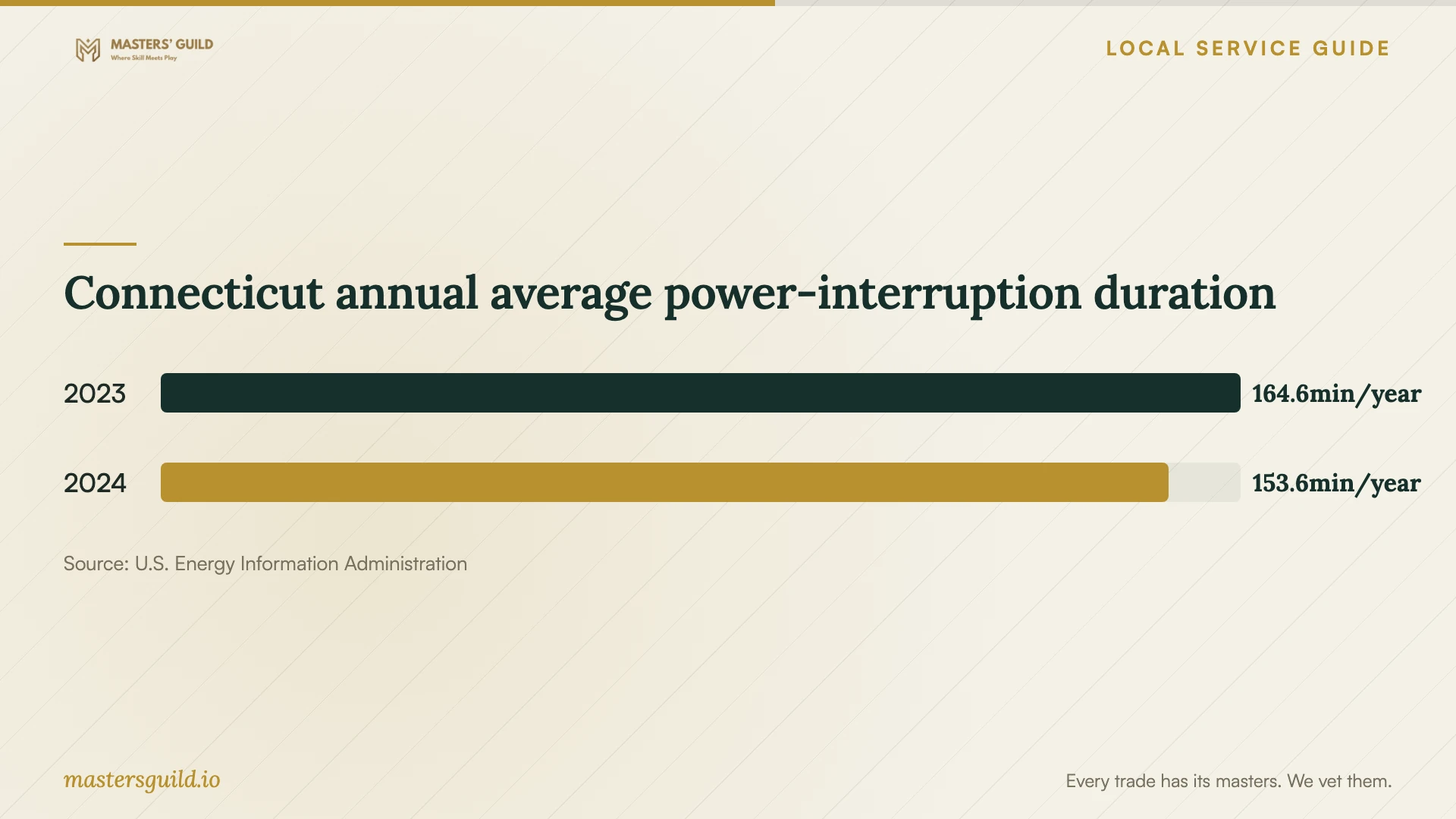
EIA reports Connecticut average annual non-momentary interruption durations of 153.6 minutes in 2024 and 164.6 minutes in 2023, including major events. Ask the installer whether your proposed storage equipment needs battery backup and a configured shutdown process. Have it size any battery to the equipment and shutdown task; statewide annual totals do not establish battery runtime for your premises. [6]
Resolve privacy and disposal before closing the job
If you suspect unauthorized access to personal information, involve your incident-response contact and legal adviser alongside the recovery provider. Connecticut’s Attorney General says covered breach notices to residents must occur without unreasonable delay and within 60 days of discovery, with notice to the Attorney General no later than resident notification. Ask the responder to preserve the records needed to assess exposure. [1] [3]
After accepting the recovery and checking a separate backup, decide what happens to the old media. Connecticut DEEP distinguishes household electronics collection from non-residential waste, which follows separate hazardous-waste and solid-waste rules. For business equipment, ask a commercial recycler about eligibility, data-security procedures and written confirmation of the agreed sanitization or destruction. [4]
Connecticut annual average power-interruption duration
Local details that affect your job
Address-specific flood planning
The City’s regional mitigation planning includes parcel vulnerability to coastal and inland flooding and storm surge. Ask your installer to review hardware placement at your premises and propose a backup copy at a separate location. Include a plan to retrieve that copy and resume essential work if you cannot enter the building. [2]
Connecticut breach-response deadlines
For breaches covered by Connecticut’s reporting requirements, resident notice must occur without unreasonable delay and no later than 60 days after discovery. The Attorney General must receive notice no later than residents. If a Connecticut resident’s Social Security number or Taxpayer Identification Number is believed compromised, the state requires an offer of 24 months of credit monitoring. Choose response help that can support this assessment alongside restoration. [3]
Residential collection is a different disposal route
DEEP lists the Bridgeport Transfer Station at 475 Asylum Street for residential electronics, with listed hours of 7:00 a.m. to 3:00 p.m., Monday through Saturday. Confirm current hours and acceptance with the local recycling coordinator before visiting. Do not assume this household collection route accepts business equipment; DEEP treats non-residential electronics separately. [4] [5]
Match the job to the provider’s proposed work
| Your situation | Work to request | Before approving |
|---|---|---|
| Missing files or unreadable media | A scoped recovery assessment | Name priority files and authorize proposed changes in writing. |
| A backup exists | A supervised restore check | Confirm the provider can restore usable files and applications. |
| Suspected ransomware | Incident response and evidence preservation | Isolate affected systems and coordinate restoration on a clean network. |
| New backup installation | Encrypted offline backups and restore testing | Agree coverage, retention, alert ownership and protected access. |
| Business equipment disposal | A commercial recycling assessment | Confirm acceptance and documented data-security procedures. |
Your hiring checklist
- Write down the incident timeline, device details and recovery attempts.
- Name the files and applications you need first.
- Ask who will handle the device and whether another facility will receive it.
- Get assessment, recovery, shipping and return-media charges in writing.
- Define partial recovery, acceptance checks and payment terms.
- Specify backup coverage, retention, alert handling and account ownership.
- Require a restore demonstration and usable recovery instructions.
- Agree on original-media return and eventual sanitization or destruction.
Frequently Asked Questions
How much should I budget for recovery?
Obtain an itemized quote for your device and failure, starting with the assessment charge. Ask what you owe for unsuccessful or partial recovery, whether shipping and return storage cost extra, and which additional charges require your approval.
Can the provider restore a backup after ransomware?
Ask the responder to assess the compromise before restoration. CISA recommends restoring critical services from offline encrypted backups and taking care to avoid reinfecting clean systems. Require a plan for evidence preservation, cleanup and restoration priorities. [1]
Does recovering files settle a possible data breach?
Arrange a separate assessment of possible exposure. CISA describes ransomware incidents that also involve stolen data, and Connecticut imposes notification requirements for covered breaches. Ask your responder and legal adviser to assess those obligations while recovery proceeds. [1] [3]
Can I recycle the original device once files come back?
First accept the recovered files and verify a separate backup. Ask the recycler whether it will destroy or reuse the equipment and document the agreed procedure. In Connecticut’s household program, DEEP requires approved recyclers to secure hard drives until physical destruction, or erase them to the prescribed standard before reuse or resale. Business electronics follow a separate disposal framework; confirm the commercial recycler’s handling terms. [4]
Sources and scope
This guide combines the sources below with practical planning guidance. Figures apply to the stated geography and period; request a written quote for your property.