
Local service guide
Computer Virus Removal in Bridgeport, CT
Arrange Computer Virus Removal in Bridgeport, CT with a written diagnosis, a plan for preserving your files, and an itemized quote. Set a spending limit and require permission before drive erasure or an operating system reinstall. Discuss remote help, drop-off service, or a home visit based on whether the computer starts, what access you can provide, and which files you need.
Describe the problem and protect your files
Give the technician a short account of the problem: the message you saw, any recent download, whether you allowed remote access, and what changed afterward. Photograph the message without interacting with it if you can. Request a diagnosis before committing to a cleanup package.
List the photos, documents, and other files you want to preserve, including anything outside your usual folders. Describe your backup and when you last checked its contents. Require permission before the technician copies files, erases a drive, or reinstalls the operating system. Agree on what happens if recovery fails before approving that work.
Choose an appointment and agree on access
Discuss remote diagnosis if the computer starts and you can join the session. Use contact details you chose yourself, and agree on how the technician will identify themselves and end remote access. Avoid arranging service through a warning displayed on the affected computer.
For drop-off service, confirm what to bring, whether the technician needs the charger, and when you should expect the diagnosis. For a home visit, name any connected equipment you want included and get the travel charge in writing. Ask for the provider's completion estimate after diagnosis rather than assuming a turnaround.
Discuss password access before handing over the device. Consider entering passwords yourself or asking whether the technician can work through a temporary account. Document permission to copy personal files, where service backups will stay, and when the technician will delete those copies.
Compare scope, charges, and Connecticut tax
Compare quotes for the same tasks. Separate diagnosis, cleanup, backup, software purchases, hardware repairs, travel, and follow-up support. Specify which work the technician may perform within your spending limit and which additions require a call. Include any charge due if you decline the repair after diagnosis.
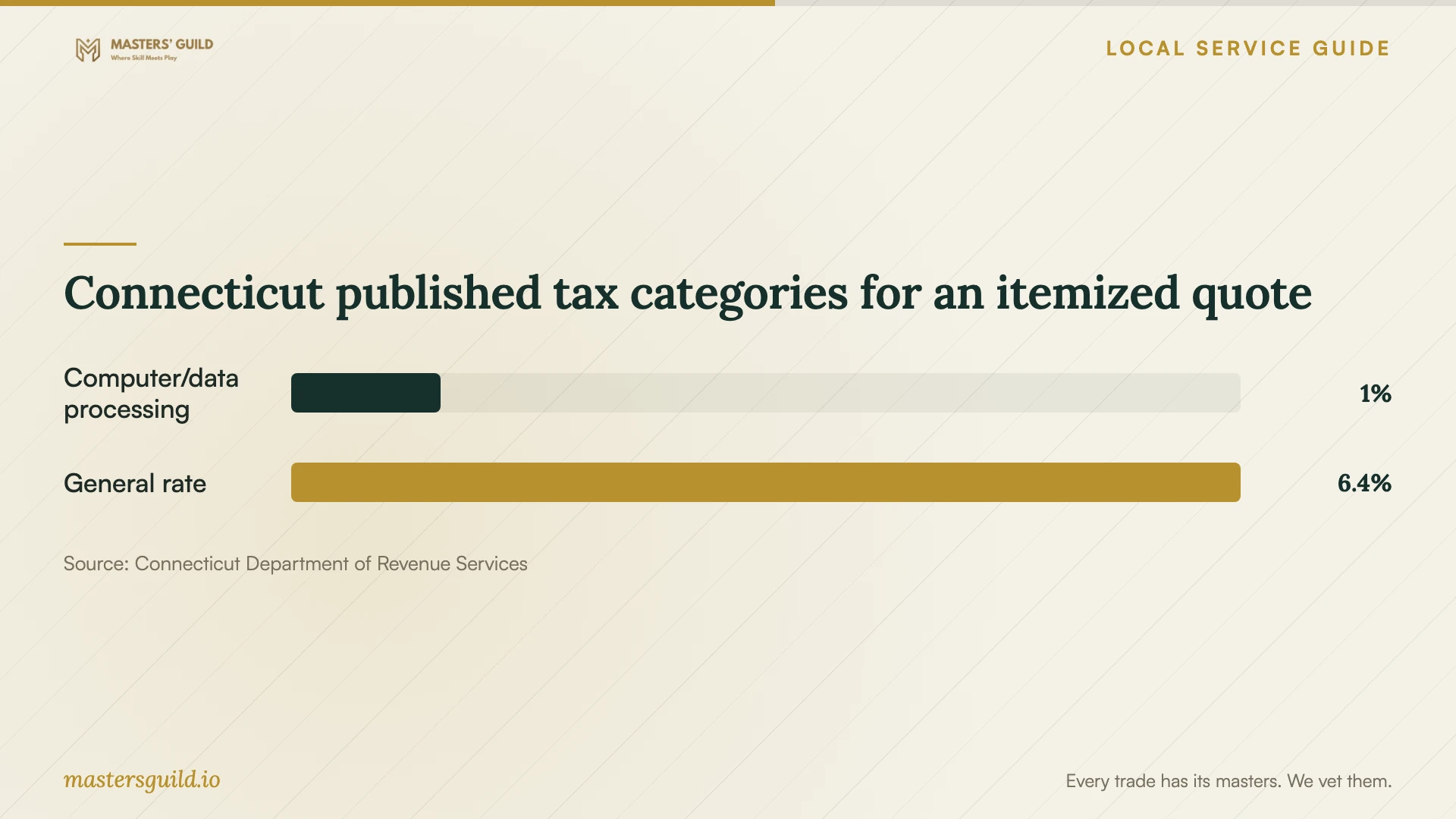
Connecticut DRS lists a 1% rate for computer and data processing services and a 6.35% general rate for most goods and taxable services. Local jurisdictions impose no additional sales taxes. Have the provider identify the tax classification of each part of the quote rather than assuming one rate covers the entire job. [1]
In its older PS 2006(8) guidance, DRS distinguishes software maintenance and support from hardware repair and directs retailers to state component charges separately. That publication warns that it has not incorporated recent legislative changes. Treat its separate-charge discussion as older guidance, consult the current DRS rate page for published rates, and refer uncertain classifications to the provider or DRS. [1] [2]
Check the repair before accepting the computer
Agree on completion checks before authorizing work. Request a written account of what the technician found, what they changed, which files they restored, and any unresolved concerns. At handover, open the files and programs you identified as essential. Confirm what follow-up the price includes if the original symptoms return.
If you choose replacement, obtain a separate quote for recovering needed files and erasing the drive before disposal. DEEP includes household computers in Connecticut's covered electronics program and says covered devices must be recycled. Discuss whether the recycler will reuse the drive or destroy it, and who will handle data erasure. [3]
Connecticut published tax categories for an itemized quote
Local details that affect your job
Use the residential electronics collection destination
DEEP lists Bridgeport Transfer Station at 475 Asylum Street as a residential electronics collection location. The city confirms the address and lists year-round hours of Monday through Saturday, 7:00 am to 3:00 pm. Confirm current electronics acceptance and hours before the trip, after completing your file recovery and erasure arrangements. [4] [5]
Prepare for the city's access and load rules
Bridgeport requires people who live outside the city but own property there to bring proof of ownership and limits those visitors to one trip per day. The city also requires covered and secured loads. If you fall within that ownership category, prepare the document and consolidate the trip before traveling. [5]
Check household eligibility before arranging disposal
Connecticut's program provides free municipal collection opportunities for household covered electronics, with drop-offs of seven or fewer covered devices at one time. DEEP allows facility access fees where an approved free alternative exists and treats business electronics under separate waste rules. For an employer-owned computer used at home, have the employer arrange disposal rather than assuming residential collection applies. [3]
Choose what to discuss before booking
| Your situation | Option to discuss | Agreement to request |
|---|---|---|
| The computer starts and you can join a session | Remote diagnosis | Technician identification, access permissions, and ending remote access |
| You want an assessment with the device present | Drop-off diagnosis | What to bring, diagnosis charges, and permission for further work |
| You want connected equipment checked at home | A home visit | Equipment included, travel charge, and appointment arrangements |
| You want files preserved while considering replacement | Separate recovery and erasure quotes | Files to recover, approval limits, and who handles the drive afterward |
Your hiring checklist
- Record the symptoms, recent downloads, and any remote access you allowed.
- List essential files and describe your existing backup.
- Get the diagnosis fee, itemized scope, and spending limit in writing.
- Agree on account access, file copying, and deletion of service backups.
- Require permission before drive erasure, a reinstall, or parts purchases.
- Have the provider explain tax classifications and follow-up coverage.
- Open essential files and programs at handover.
- Complete data handling and confirm collection access before recycling.
Frequently Asked Questions
How much should I budget for virus removal?
Request a written quote based on the symptoms and your file preservation needs. Compare diagnosis, cleanup, backup, software repair, and follow-up as separate items. Set a maximum spend and establish whether you owe a diagnosis charge if you decline further work.
Should I authorize a drive wipe?
Approve erasure only after discussing the files you need, the proposed backup and restore process, and what happens if recovery fails. Have the technician explain the proposed work and obtain your permission before proceeding.
Does Bridgeport add a local sales tax?
No. Connecticut DRS says local jurisdictions impose no additional sales taxes. DRS lists a 1% computer and data processing services rate and a 6.35% general rate for most goods and taxable services. Have the provider explain the classification of each invoice charge. [1]
Can I recycle the computer after deleting my files?
Arrange data sanitization first. DEEP warns that someone can recover deleted files and advises residents to erase data or ask the recycler about its procedures. DEEP lists Bridgeport Transfer Station at 475 Asylum Street for residential electronics collection; confirm acceptance before traveling. [3] [4]
Sources and scope
This guide combines the sources below with practical planning guidance. Figures apply to the stated geography and period; request a written quote for your property.