
Local service guide
Cloud Service Setup in Bridgeport, CT
For Cloud Service Setup in Bridgeport, hire a technician for a defined task: moving selected files, connecting household devices, or configuring and testing backup recovery. Compare itemized quotes using the same devices, file volume, and acceptance tests. For introductory technology learning, consider Bridgeport Public Library’s participant-led, one-on-one Digital Navigator program before booking paid assistance. [1]
Define the work before comparing quotes
Write a short description of what you want the technician to complete. For file access, identify the folders and devices you want connected. For a migration, name the source account, destination account, and files you intend to keep. For backup work, include a demonstration of recovering a selected file.
Have the provider explain the proposed recovery arrangement. Discuss accidental deletion, a lost device, and loss of account access. Request the relevant retention settings and recovery limits before accepting a subscription, and decide who in the household should view, edit, or manage shared folders.
Compare providers against this same description. Include your approximate storage use and any devices you cannot access. Ask the provider to identify exclusions, such as damaged files or account recovery, before agreeing to a price.
Agree on transfer completion and follow-up
Connecticut’s Get Connected page provides resources for checking upload and download speeds. Measure the connection at the home where you plan to have the work done, then share the results with the provider for scheduling. [3]
Agree on who will monitor any transfer that continues after the appointment, report errors, and confirm completion. Include the cost of remote follow-up in the quote. If you need files available by a particular date, have the provider explain how they will assess that deadline before you commit.
Decide whether you want remote assistance or an in-home visit. For remote work, request an explanation of the connection method and how you can end access. For a visit, have the named devices charged and available, along with any external drives included in the job.
Review the full price and tax classification
Request separate amounts for setup, migration, subscriptions, and follow-up. Confirm whether the technician charges for monitoring uploads and whether the subscription renews monthly or annually. Set an approval limit for extra work and identify who will pay the software provider.
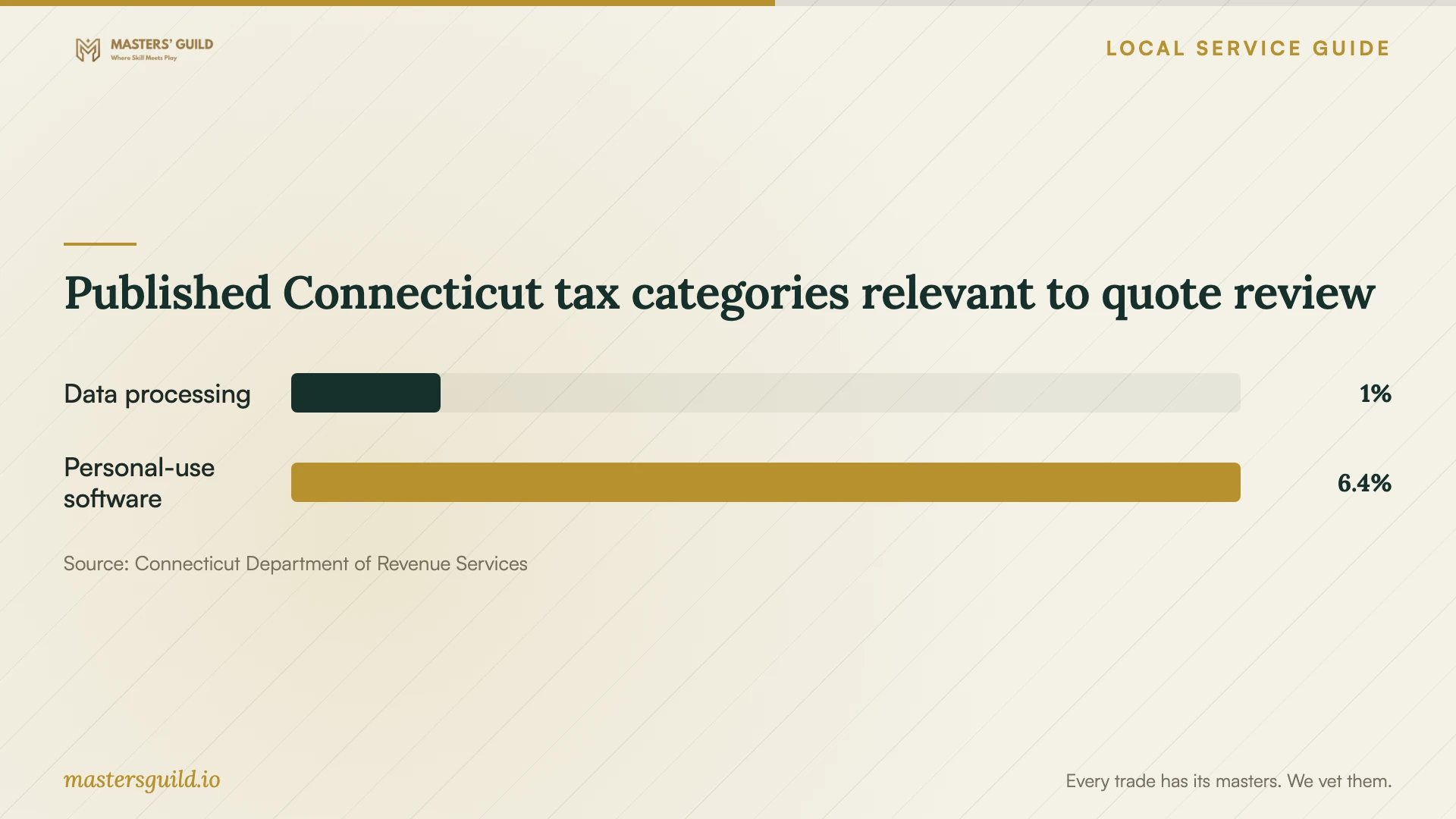
Connecticut’s Department of Revenue Services lists a 1% rate for computer and data processing services. It lists a 6.35% rate for canned software electronically accessed or transferred for personal use. DRS states that Connecticut local jurisdictions impose no additional sales taxes. Have the provider identify the classification of each charge rather than applying either category to the entire package. [2]
Use the tax chart as a prompt for invoice questions. Request an explanation if the quote combines labor and software under one tax rate. Compare the initial payment and the recurring commitment together before choosing an offer.
Prepare for a useful handover
Check that you can sign in and receive recovery messages before the appointment. Enter your own passwords and verification codes during setup. Keep account recovery and billing under your control, and agree on removal of temporary technician access.
At handover, open representative files from the destination and the devices included in the job. Choose an older document, a recent photo, and an item from a shared folder. For backup work, have the technician restore a sample file into a separate folder and explain how you can repeat the process.
Keep a short record of the selected folders, sharing permissions, unresolved errors, and follow-up arrangements. Retain the source files until you have completed the agreed checks. Before closing the job, practice the everyday task you wanted help with, such as saving a new document or finding a photo on another device.
Published Connecticut tax categories relevant to quote review
Local details that affect your job
Discuss a learning goal with the library first
Bridgeport Public Library’s Digital Navigators offer one-on-one technology learning with participant-selected goals, including internet-use help and assistance finding or signing up for affordable internet access. Use the program’s intake form or call 203-576-7400 ext. 440. Describe the cloud task you want to learn and confirm whether the program can help before choosing paid setup assistance. [1]
Use Connecticut connection resources before scheduling
The statewide Get Connected page offers upload and download speed-check resources and a route to report an inability to get high-speed internet where you live. For a Bridgeport home with connection concerns, use those resources before committing to a transfer deadline. Discuss the results with your technician and identify any internet access work you need to arrange separately. [3]
Question a separate Bridgeport sales-tax surcharge
Connecticut DRS states that local jurisdictions impose no additional sales taxes. If a quote includes a separate Bridgeport sales-tax surcharge, request an explanation and a corrected breakdown where appropriate. Ask the provider to address that question separately from the state tax classification of setup services and software. [2]
Choose the next step for your household
| Your need | Next step | Question to resolve |
|---|---|---|
| Learn technology basics | Discuss your goal with Bridgeport Public Library’s Digital Navigator program. | Does my cloud-account learning request fit your assistance? |
| Move selected files | Request a migration quote with named source and destination accounts. | Who will handle errors or unfinished transfers? |
| Set up backup recovery | Include a sample restore demonstration in the agreed work. | Can I repeat the recovery process after the technician leaves? |
| Investigate connection concerns | Use Connecticut’s Get Connected speed and connectivity resources. | Should I address internet access before scheduling the transfer? |
Your hiring checklist
- Prepare one device and folder list for all providers quoting the job.
- Check sign-in access and recovery contact details.
- Have chargers and any source drives available.
- Choose household sharing permissions before the session.
- Agree on an approval limit for extra work.
- Select sample files for the handover and recovery checks.
Frequently Asked Questions
Can the library help me choose where to start?
Bridgeport Public Library describes participant-led, one-on-one technology learning and help with internet access. Explain what you want to learn through its Digital Navigator intake process. Confirm suitability for your cloud task before relying on the program for the work. [1]
How should I handle an unfinished upload?
Agree on a follow-up arrangement before work starts. Name the person who will check progress, the way they will report errors, and any extra charge. Keep the source files while you confirm the destination contents.
Does the same Connecticut tax rate cover labor and software?
DRS lists computer and data processing services at 1% and canned software electronically accessed or transferred for personal use at 6.35%. Have the provider explain each invoice classification. Do not assume either category covers every cloud subscription or bundled package. [2]
Sources and scope
This guide combines the sources below with practical planning guidance. Figures apply to the stated geography and period; request a written quote for your property.