
Local service guide
Website design in Brandon: scope, quotes and handover
Arrange Website design in Brandon by giving each bidder the same written brief: customer tasks, page content, booking or sales functions, accessibility testing, account ownership and maintenance responsibilities. Ask for an itemized proposal and acceptance criteria before agreeing to a launch date. Include Manitoba’s information and communication requirements in the scope if your business has employees, and ask the designer to identify applicable exceptions. [1] [2]
Write a brief around customer tasks
Start with what a customer should accomplish: understand your services, request a quote, book an appointment or complete a purchase. List the information you want to provide before that action, such as service boundaries, hours, product details or cancellation terms. Ask bidders to explain how their proposed pages support those tasks.
Give the designer a content inventory. Identify text and photographs you will supply, material you want rewritten and existing pages you want retained. For a redesign, list important page addresses and ask for a plan to preserve them or redirect visitors to the appropriate replacement. Name one person who can approve content and design.
Describe booking and checkout requirements through examples. Ask the bidder to demonstrate your intended appointment types, payment steps, confirmation messages and cancellation process. Include staff administration in the demonstration so you can assess how you will manage the site after handover.
Compare deliverables and ongoing charges
Request separate prices for design and build work, content preparation, migration, integrations, accessibility assessment and training. Ask the bidder to identify recurring charges for hosting, software subscriptions and support, with the billing currency and applicable taxes stated. Compare the same scope before choosing a proposal.
Ask each bidder to state the number of revision rounds, approval stages and exclusions. Define how you will approve extra work and its cost. Tie payment milestones to reviewable deliverables, such as an approved page design, a working test site and completion of agreed launch checks.
Request examples relevant to your project and ask what the bidder personally delivered. During a walkthrough, try the contact form, booking journey or purchase process yourself. Ask who will perform the work, who will answer questions and how you will receive progress updates.
Include Manitoba accessibility work in the scope
The Manitoba Accessibility Office identifies WCAG 2.1 Level AA as the minimum for newly published web content, content required to access goods and services, and new or significantly updated web applications. Its guidance notes that exceptions may apply. Consult the regulation when determining applicability to your business and proposed work. [2]
Ask the designer to identify which pages, forms, documents and third-party functions they will assess. Request automated checks and manual testing, including keyboard navigation, form labels and error messages. Agree who will correct findings and how you will review unresolved issues before approving launch.
Assign an internal contact for accessible-format requests and feedback. Manitoba’s guidance includes notifying people that they can request accessible information, consulting with the requester, providing it in a timely manner at no extra cost, and establishing a feedback process. Ask the designer to include an appropriate notice and contact route in the website scope. [2]
Agree ownership, launch checks and maintenance
Put account control in writing. Specify who will register the domain, hold hosting and software accounts, and receive renewal notices. Request business-controlled administrator access and clarify rights to the finished design, text, images and source files. Ask what you can transfer if you change providers and what requires a separate licence.
Before launch, review the site on a phone and computer. Submit forms and confirm delivery to the intended inbox. Test booking confirmations or purchase receipts where relevant. For a redesign, review the agreed redirects. Ask for a backup and recovery plan, a named launch contact and a written process for reporting defects.
Separate defect correction from ongoing maintenance in the agreement. State the correction period, support hours and response expectations. Assign responsibility for software updates, backups, content changes and accessibility checks after edits. Request a handover session in which you make a routine change yourself, with written instructions to keep.
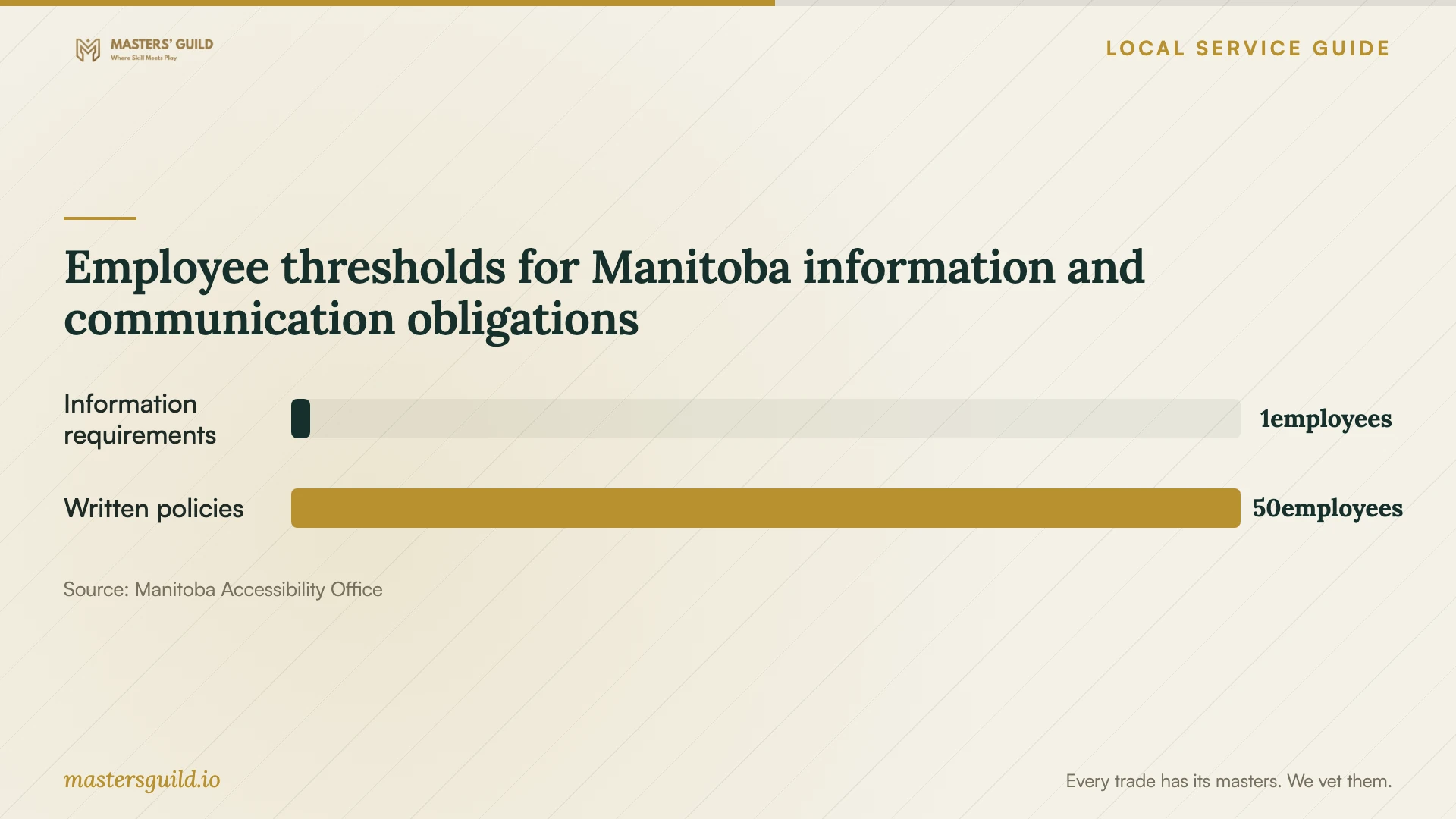
Employee thresholds for Manitoba information and communication obligations
Local details that affect your job
One employee brings accessibility requirements into the brief
Since May 1, 2025, Manitoba requires businesses and non-profits with at least one employee to provide accessible information and communication. For a Brandon business within that scope, discuss applicability and exceptions before approving the website specification. Include responsibility for accessible-format requests, feedback and staff training alongside the technical work. [1] [2]
At 50 employees, assign a policy documentation owner
Manitoba’s information and communication guidance requires businesses and non-profits with 50 or more employees to keep written accessibility and training policies, including a summary of training materials and when training opportunities occur. They must tell the public that those policies are available on request. Assign an internal owner and agree what notice the designer will add. The province distinguishes these requirements from an accessibility plan, which it describes as optional best practice for businesses and non-profits. [1]
Match the project scope to your situation
| Your situation | What to include | What to ask before approval |
|---|---|---|
| Customers need information and a contact route | An agreed page list, content and working enquiry form | Can I review the complete enquiry journey on the test site? |
| Customers need bookings or online purchases | Customer and staff workflows, confirmations and administration | Can you demonstrate my appointment or order process? |
| Your business has at least one employee | Applicable Manitoba information and communication requirements | Which requirements and exceptions apply to this project? |
| Your business has 50 or more employees | Written accessibility and training policies, plus a public availability notice | Who owns the documentation and who adds the website notice? |
| You are replacing an existing site | Content inventory, address mapping, migration and handover | How will we review retained content and redirects before launch? |
Your hiring checklist
- List the customer tasks, pages and functions you want the designer to deliver.
- Identify who supplies copy, photographs, product information and approvals.
- Request itemized build costs, recurring charges, exclusions and revision terms.
- Define accessibility testing, correction responsibilities and acceptance evidence.
- Confirm business control of accounts and rights to website assets.
- Test forms, bookings, checkout and agreed redirects before launch.
- Record maintenance duties, support terms and handover instructions.
Frequently Asked Questions
What should a website design quote include?
Ask for the page list, functions, content responsibilities, revision rounds, accessibility testing, launch checks and handover deliverables. Request separate recurring charges and a written process for approving extra work. Use the same brief for each bidder.
Does a small Brandon business need to consider accessibility?
Manitoba’s information and communication requirements apply to businesses and non-profits with at least one employee. The provincial guidance specifies WCAG 2.1 Level AA for covered web content and applications, while noting exceptions. Consult the regulation to determine applicability and ask the designer to document the agreed scope. [1] [2]
Do I need an accessibility plan before commissioning a site?
The province says businesses and non-profits do not have to create an accessibility plan, though it recommends one as best practice. That differs from the written accessibility and training policy requirements for organizations with 50 or more employees. Assign responsibility for the requirements that apply to your organization. [1]
What should I receive at handover?
Request administrator access, an account and renewal list, agreed website assets, backup and recovery instructions, training notes and outstanding defect details. Confirm who handles updates and support, and practise a routine content change before signing off.
Sources and scope
This guide combines the sources below with practical planning guidance. Figures apply to the stated geography and period; request a written quote for your property.