
Local service guide
Network Setup and Support in Brandon, MB
Arrange Network Setup and Support in Brandon by describing the rooms and devices you need connected, then requesting a written quote for diagnosis, installation and testing. Choose help that covers your proposed router configuration or cable installation. Westman customers should identify their equipment before selecting a setup guide. Coordinate any new power outlet or circuit with Manitoba Hydro’s electrical permit process. [2] [4]
Define the problem before choosing equipment
Write down the result you want: a usable connection at the basement desk, streaming in the living room, or coverage at your patio table. Name the affected devices and note when the problem occurs. Include whether other devices lose their connection at the same time. Give the technician this description before requesting a hardware recommendation.
Westman distinguishes internet service from Wi-Fi, the wireless network that connects your devices to that service. Request a diagnosis that identifies which part needs attention. Have the technician explain which checks they will perform and which problems they would refer to your internet provider. [1]
For configuration help, request a scope covering router settings and the devices you want connected. For Ethernet outlets, request proposed cable routes, outlet locations, terminations and testing. Have the candidate explain their experience with the work you propose and provide proof of liability insurance before agreeing to drilling or installation.
Review Westman options against your needs
Westman instructs customers to identify their equipment so they can use the correct setup guide. Its Connect Wi-Fi app supports password changes, guest networks, connected-device viewing and speed tests. Decide whether you need help with those controls, additional coverage, or cable installation before choosing the scope of a visit. [2]
Westman lists a Wi-Fi 7 compatible modem with its Connect 1 GIG and Connect 2.5 GIG internet plans. It also offers Connect Outdoor Wi-Fi. If those options fit your household, confirm the equipment, support and charges attached to your account before comparing a separate system. [1]
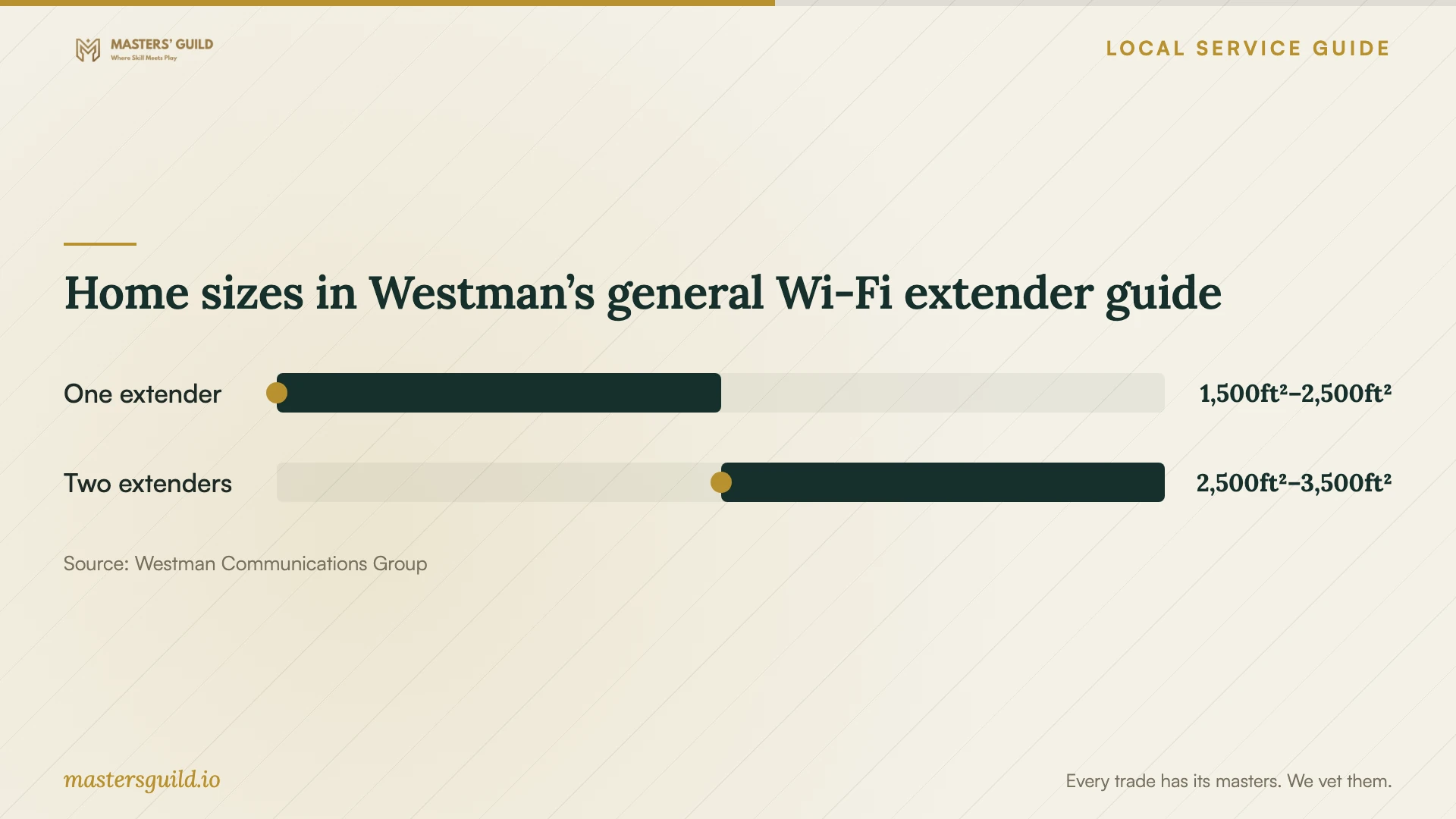
Use Westman’s floor-area extender guide to frame a discussion about coverage. The provider cautions that building materials, including tile and brick, can affect coverage, and that households needing more than one extender may face an additional charge per extender. Request checks in your target rooms before approving an extender count. [1]
Get quotes for the actual installation
Give each candidate the same room list and proposed work. Request separate amounts for diagnosis, labour, hardware, cable installation, wall repair and follow-up support. Have them identify taxes and any continuing subscription charges. Agree on how they will obtain your approval for extra work.
For cabling, have the installer describe how they will reach each outlet and identify any openings they propose in finished walls. Specify who repairs and paints those areas. Include cable labels and connection testing in the quote, along with any equipment you must supply.
Request an expected visit length and a planned interruption window. Tell the technician about video calls or other activities you need to protect during the work. Compare the complete job price and included tasks rather than choosing from an hourly rate alone.
Set completion checks and support terms
Agree on completion checks before work starts. Use the device, location and activity that prompted the job, such as a video call from your desk. Have the technician record where they tested, what they tested and any unresolved problem. For new Ethernet outlets, include a labelled list of the connections and their test results.
Keep the network administrator account under your control. Request equipment names, a simple connection diagram and instructions for changing credentials. Discuss whether the technician will retain remote access and how you can remove it. Record the follow-up period, what it covers and any charge for another visit.
Home sizes in Westman’s general Wi-Fi extender guide
Local details that affect your job
Permission before moving Westman equipment
Westman retains ownership of equipment it supplies unless you have fully paid for it. Its terms prohibit relocation of that equipment without its knowledge and permission. If a technician proposes moving your modem or other provider equipment, confirm the proposed location with Westman before including the move in the job. [3]
Manitoba Hydro handles new electrical work
In Brandon, Manitoba Hydro provides electrical wiring permits and inspections under its outside-Winnipeg jurisdiction. Hydro requires a permit before electrical work starts and accepts applications through ePermits, which requires an account. Contractors need a valid Manitoba journeyperson’s electrician licence to register. For a new power outlet or circuit, have the electrician include the permit and inspection schedule; Hydro requires wiring to remain visible for inspection. [4]
Westman installations in rental premises
Westman’s terms require customers who do not own their premises to obtain the owner’s consent for its installation and maintenance. Before arranging that work, document agreement on equipment locations, drilling, cable routes and future maintenance access with the owner. [3]
Match the proposed visit to your goal
| Your goal | Scope to request | Question for the quote |
|---|---|---|
| Connect devices to existing equipment | Router configuration and device connection | Which devices will you connect and test? |
| Improve coverage in specific rooms | Coverage assessment and an equipment proposal | How will you check the rooms I identified? |
| Use Wi-Fi on the patio | Compare Westman’s outdoor Wi-Fi option with a separate installation | What equipment and charges would each approach include? |
| Add Ethernet outlets | Cable routes, terminations, labels and testing | Who repairs any openings in finished surfaces? |
Your hiring checklist
- Prepare a room-by-room list of connection problems and affected devices.
- Record your provider, plan and modem or router model.
- Photograph proposed cable outlets and accessible routes for the quote.
- Choose who will purchase the hardware and hold its warranty details.
- Compare itemized quotes with wall repair and follow-up terms included.
- Reserve an interruption window that fits your household’s schedule.
Frequently Asked Questions
Should I buy mesh equipment before booking help?
Request a diagnosis before choosing hardware. Westman offers Connect Wi-Fi and gives a general extender guide, with a warning that building materials can affect coverage. Have the technician tie the proposal to your target rooms and confirm compatibility with the equipment you plan to keep. [1]
Does Ethernet cabling require an electrical permit?
Confirm the permit requirements for your proposed Ethernet-only scope with Manitoba Hydro before installation. For a project that includes a new power outlet, circuit or other electrical work, Hydro requires an electrical permit before that work starts and handles permits outside Winnipeg. [4]
What can I check in the Westman app before a visit?
Westman’s setup guidance lists speed tests, connected-device viewing, network settings, guest networks and password changes. If you can access the app, note the connected devices and record a speed test to share with the technician. Keep your account credentials private when requesting quotes. [2]
Sources and scope
This guide combines the sources below with practical planning guidance. Figures apply to the stated geography and period; request a written quote for your property.