
Local service guide
Home Office Setup in Brandon, MB
For Home Office Setup in Brandon, arrange furniture assembly and computer configuration around your equipment list, and hire a licensed electrician if you need new outlets or wiring changes. Measure the room before buying furniture and separate these tasks in your quote. Manitoba Hydro handles electrical permits and inspections outside Winnipeg and requires a permit before electrical work starts. [1]
Choose help by the work you need
Describe the finished workspace in your request. List desk and chair models, monitors, mounting hardware, computer, dock and peripherals. Request separate scope descriptions for assembly and equipment configuration, including any tasks the provider expects another contractor to complete.
For a wall-mounted monitor, send the mount instructions, monitor model and photographs of the intended wall. Have the installer explain how they will check wall support and mounting compatibility. For a clamp-mounted arm, provide the desktop thickness and show any frame or drawer beneath the mounting edge.
Treat new outlets and wiring alterations as a separate electrical scope. Manitoba Hydro recommends licensed electricians and requires electrical contractors to hold a valid Manitoba journeyperson electrician’s licence to register for ePermits. Have the electrician identify permit and inspection responsibilities in the quote. [1]
Check room fit before ordering furniture
Measure the room, doorway, proposed desk footprint and storage position. Mark the furniture outline on the floor and move a chair through your expected working area. Open nearby doors and drawers. Leave access for reaching connections and removing equipment for maintenance.
CCOHS advises considering movement, storage, visitors, sound privacy and visual privacy when planning an office. Choose the room around your tasks: confidential calls, document handling and multiple screens deserve attention alongside furniture dimensions. [5]
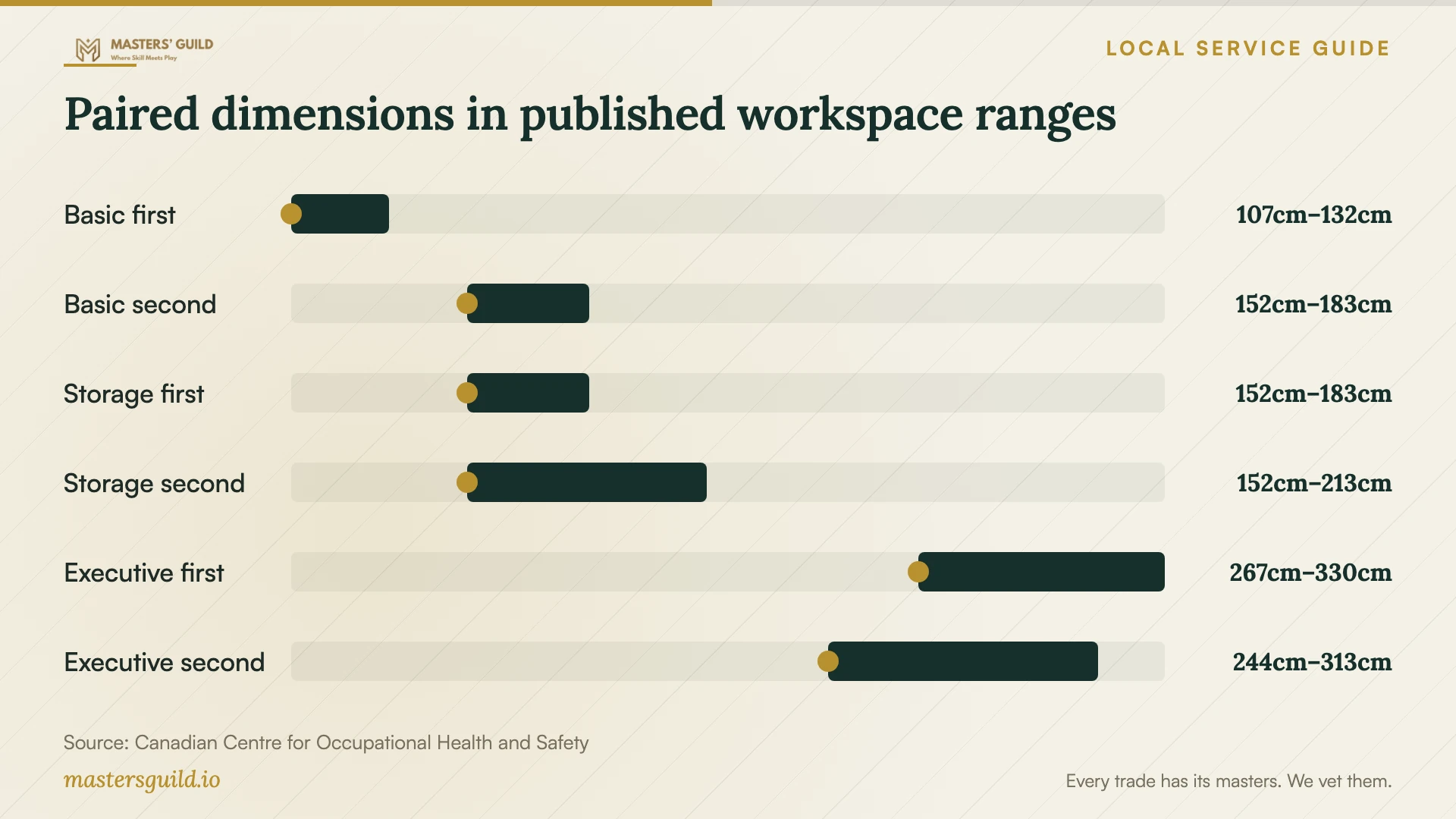
Read the chart rows in pairs. CCOHS publishes 107–132 cm × 152–183 cm for a basic workstation, 152–183 cm × 152–213 cm for a desk with a secondary surface, and 267–330 cm × 244–313 cm for an executive office accommodating meetings of three or four people. The source does not label the dimensions as width or depth. [5]
CCOHS reproduces these examples from Panero and Zelnik’s 1979 design reference. Treat them as background for comparing uses, rather than contemporary measurements of homes in Brandon. CCOHS explains that individual space needs depend on the person and the work. Check both dimensions against a room mock-up and your chosen furniture. [5]
Include adjustment in the installation
Have the installer adjust the workstation with you present. CCOHS recommends relaxed shoulders, straight wrists and elbows close to the body at about 90 degrees. For a standing desk, it places the work platform around standing elbow height. Check keyboard, mouse and monitor positions while sitting and standing. [4]
Test the desk through its movement before fastening cable bundles. CCOHS advises keeping cables, electrical access, storage and the layout from interfering with desk adjustment. Include a demonstration of desk movement and access to connections in the handover. [4]
Plan to change position and take breaks away from the computer. CCOHS presents varied sitting and standing schedules and advises alternating as needed while allowing time to adjust. Consult your health professional if you need a personal routine. [4]
Resolve approvals before a room conversion
Describe proposed construction to City Development Services before booking a renovation. The City’s renovation-permit page lists an application, building plans and property-owner authorization when the applicant does not own the property. It does not identify which home-office projects trigger a permit, so request a determination for your scope. [3]
For a business operated from your residence, Brandon uses a home-based business application to establish a business or change its parameters, including its address or the number of clients visiting the property. Confirm how your intended use fits the requirements before planning visits. The cited page does not establish that every remote employee needs these approvals. [2]
Compare quotes and agree on completion
Send each provider the same equipment list and room photographs. Request separate amounts for labour, supplied hardware, travel, packaging removal and follow-up visits. Confirm whether the provider quotes a fixed amount or charges by time, and agree on how you will approve extra work.
Define completion before the visit. Include furniture stability, desk movement, screen adjustment, cable access and tests of your computer, dock, camera and audio. Handle your own account sign-ins. Record any unfinished task and agree on who will complete it.
Paired dimensions in published workspace ranges
Local details that affect your job
Use Manitoba Hydro for electrical permitting
For wiring work in Brandon, follow Manitoba Hydro’s process for properties outside Winnipeg. Hydro accepts permit applications through ePermits and requires a permit before work starts. It requires wiring to remain visible for inspection. Have your electrician coordinate the inspection before anyone conceals wiring behind finished walls. [1]
Confirm both home-business approvals
Brandon’s home-based business application covers a development permit from Planning and Buildings and a business licence from the Licensing Section. Applicants who do not own the residence must include an authorization letter. Submit the completed application at Door D, 638 Princess Avenue. Call 204-729-2110 about the application or 204-729-2230 about licensing before arranging client visits. [2]
Prepare renovation documents before booking
The City lists an application, building plans and owner authorization where applicable for a renovation-permit submission. Contact Development Services at 204-729-2214 with your proposed office conversion. Confirm the approvals and plans you need before committing to construction dates. [3]
Match your project to the next step
| Your project | Help to arrange | Before booking |
|---|---|---|
| Furniture and existing plug-in equipment | Assembler and computer technician as needed | List models, connections and completion tests. |
| Sit/stand desk | Installer who will adjust it with you | Include sitting and standing adjustments and cable clearance. |
| New outlets or wiring changes | Licensed electrician | Agree on Manitoba Hydro permit and inspection responsibilities. |
| Room renovation | Renovation contractor and City scope review | Confirm permit requirements and prepare plans and owner authorization where applicable. |
| Establishing a home business or changing client visits | City Planning and Buildings and Licensing Section | Clarify the development permit and business licence application. |
Your hiring checklist
- Measure the room, access doorway, furniture footprint and chair movement.
- Send furniture, monitor, dock and mount model numbers with photographs.
- Separate assembly, mounting, computer configuration and electrical work.
- Confirm project approval requirements before scheduling alterations.
- Request an itemized quote and a process for approving extra work.
- Agree on packaging removal, equipment tests and follow-up work.
- Attend the workstation adjustment and final handover.
Frequently Asked Questions
How much should I budget for installation?
Request a quote for your equipment and room. Have providers separate assembly, mounting, computer configuration and electrical work, and specify hardware and follow-up visits. Agree on a spending limit and approval process for additions before the visit.
Can I add an outlet myself?
Manitoba Hydro allows eligible homeowners to perform self-wiring under conditions, including owning and occupying the single dwelling, personally doing the work and having service no greater than 200 amperes. Permit and inspection requirements still apply. Hydro recommends licensed electricians; confirm eligibility and the proposed work with Hydro before starting. [1]
Does a home office need a business licence?
Confirm your intended use with the City. Brandon’s home-based business process covers establishing or changing a business in a residence and includes development-permit and business-licence approvals. The cited page does not establish that every employee working remotely needs these approvals. [2]
Should I stand for the whole workday?
CCOHS advises alternating positions as needed and taking breaks away from the computer. It notes that standing too long can lead to foot, knee, hip and back issues. Adjust the workstation for both positions and seek personal guidance from your health professional when needed. [4]
Sources and scope
This guide combines the sources below with practical planning guidance. Figures apply to the stated geography and period; request a written quote for your property.