
Local service guide
Data Recovery and Backup in Brandon, MB
For Data Recovery and Backup in Brandon, choose a provider who separates recovering missing files from setting up ongoing protection. Ask for a written assessment, an approval limit, data-handling terms and a demonstration that you can restore essential files. For business backups, the Canadian Centre for Cyber Security recommends encrypted off-site storage, restricted access and regular restoration checks. Build those requirements into the job before agreeing to a recurring service. [4]
Define the recovery job before handing over a device
Give the technician a short incident history: what stopped working, when you last accessed the files, and what you tried afterward. Name the device and storage type if you know them. List priority folders, accounting records or customer documents, along with the date of your last usable backup. Avoid sending sensitive file contents with an initial inquiry.
For a device that clicks, disconnects or has suffered water damage, pause further attempts and ask a recovery specialist how to handle it. Ask whether the proposed work involves restoring an existing backup, recovering deleted files or investigating damaged storage. Have the provider explain the next step before authorizing repair, formatting or replacement.
Confirm who will do the work and where. A local intake appointment does not tell you whether the provider will send the device elsewhere. Ask about subcontractors, shipping, custody records and returning the original device. Record the device serial number and agree on a secure way to supply any required encryption key or credential.
Compare quotes by deliverables and approval limits
Request separate amounts for assessment, recovery work, return storage, shipping and any urgent service. Ask what you owe if the technician cannot recover your priority files, or recovers only part of them. Define success through named files you can open and use, rather than accepting an unexplained promise of successful recovery.
Set a spending limit that requires your approval before additional work. Ask for an assessment date, an estimated completion date and an update process if the technician changes the plan. Explain your operational deadline, but distinguish receiving files from restoring the applications and access your staff need.
For ongoing backup service, separate setup charges from storage subscriptions, monitoring, support and restore assistance. Ask who owns the account, how you retrieve your data when changing providers, and what happens to retained copies when you cancel. Obtain the provider’s retention and deletion terms in writing.
Make restoration part of backup installation
The Canadian Centre for Cyber Security recommends backing up essential business information to an external secure location, encrypting backups and limiting access to people responsible for testing and restoration. It also recommends clear restore procedures and regular checks that those procedures work. Use this guidance to compare proposals for your office or shop. [4]
Tell the installer how much recent work you can afford to lose and how long you can operate without your files. Ask them to propose a backup schedule, retention period and restoration process around those limits. Include the systems you depend on, and ask them to identify anything outside the proposed scope.
Before accepting the installation, have the technician restore representative files to a separate location. Open those files with the applications you use. Record who receives failure alerts, who responds and who can authorize a restore. Keep account recovery instructions and encryption-key arrangements accessible to an authorized person if your usual administrator is unavailable.
Check data access before approving the work
Ask who can view your files, where the provider will store working copies and how long they will retain them. Agree on secure delivery and a deletion process after you verify the result. For staff or customer records, give the technician access only to the material needed for the agreed job.
Manitoba Health says PHIA trustees may disclose personal health information to an information manager only after entering a written agreement that ensures adequate protection. Its definition includes providers of information management or information technology services to a trustee. The trustee remains responsible for the information manager’s use of that information. A covered clinic should resolve these terms before handing over storage or granting access. [3]
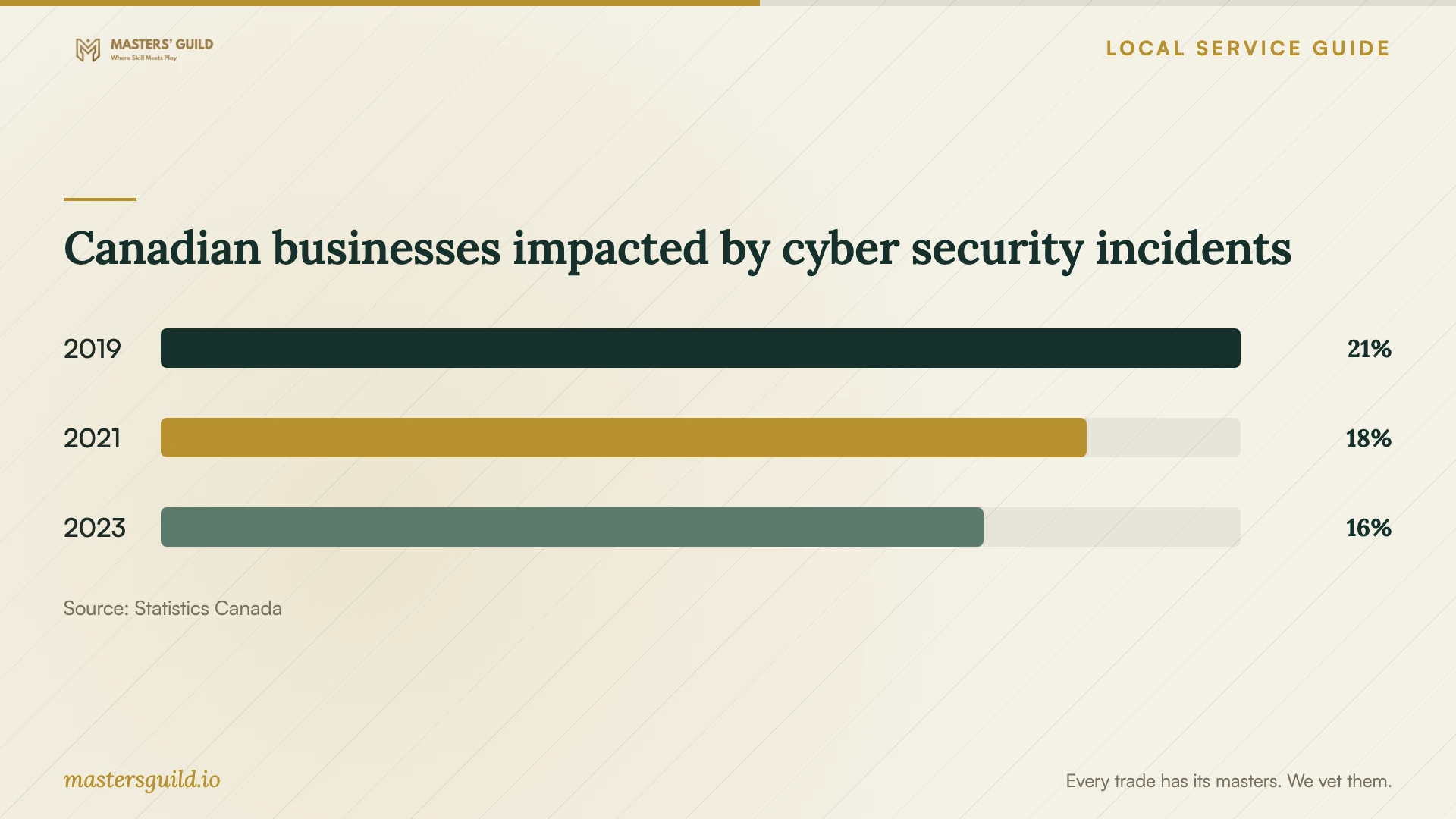
Canadian businesses impacted by cyber security incidents
Local details that affect your job
Brandon flood exposure changes equipment placement
The City identifies spring runoff toward the Assiniboine River, river overflow and ice jams as flood concerns. It also warns that heavy rainfall can cause flooding when ground is frozen or saturated, and advises moving electrical appliances and belongings above flood level. If you keep business storage in a basement, ask the installer to assess a higher location. Pair that placement with an encrypted off-site backup, as the Cyber Centre recommends, rather than keeping all copies on the premises. [1] [4]
Manitoba Hydro notices affect scheduling
Manitoba Hydro aims to give at least two days of notice before planned outages, but says emergency planned work may involve shorter notice. Through an online account, customers can choose text, email or automatic phone notifications and receive a reminder on the outage day. Check notices for your premises before scheduling a lengthy migration or initial backup. Ask the technician how they will pause, resume and verify the job if power stops. [2]
Choose the scope that matches your situation
| Situation | Scope to request | Acceptance question |
|---|---|---|
| Missing files with an existing backup | Check the backup and restore selected files | Can I open the priority files without overwriting other needed data? |
| Missing files without a checked backup | Recovery assessment with a spending limit | Which files define success, and what do I owe if they cannot be recovered? |
| Business files need ongoing protection | Encrypted off-site backups with restore procedures and regular tests | Who will run the tests and respond to backup failures? |
| A PHIA trustee needs outside IT access to health records | Written information-manager agreement before disclosure | Have we agreed on protection, access and handling responsibilities? |
Your hiring checklist
- Write down the incident history, device details and priority files.
- Identify the latest backup you have already checked.
- Confirm the work location, subcontractors and device custody process.
- Get assessment fees, unsuccessful-recovery terms and an approval limit in writing.
- Agree on secure credential sharing, file delivery and retained-copy deletion.
- Choose a backup schedule and retention period around your business needs.
- Check equipment placement and outage notices before installation.
- Witness a restore test and keep written recovery instructions.
Frequently Asked Questions
How much should I budget for recovery?
Ask for an assessment-based quote rather than approving an open-ended job. Request separate charges for assessment, recovery, delivery media and shipping, plus the amount payable if your priority files cannot be recovered. These sources do not establish a Brandon recovery price range.
How do I know the backup setup is complete?
Require a demonstrated restore of representative files, written instructions and a named person responsible for checks. The Cyber Centre recommends regular verification that restoration mechanisms work. Agree on the next test date before signing off. [4]
Can a clinic use an outside recovery technician?
Manitoba Health permits PHIA trustees to disclose personal health information to an information manager after entering a written agreement that ensures adequate protection. The trustee retains responsibility for the manager’s use of the information. Have the person responsible for privacy review the arrangement before granting access. [3]
Sources and scope
This guide combines the sources below with practical planning guidance. Figures apply to the stated geography and period; request a written quote for your property.