
Local service guide
Computer Virus Removal in Brandon, MB
Arrange Computer Virus Removal in Brandon, MB by asking a technician for a written scope covering diagnosis, file preservation, operating-system recovery and account security. Agree on the price and approval process before they erase files or reinstall software. Disconnect a suspected infected computer from networks and avoid signing into email or banking on it while you arrange help, following Canadian Centre for Cyber Security guidance. [1]
Contain the problem before arranging service
Disconnect Wi-Fi and Ethernet when you suspect malware. The Canadian Centre for Cyber Security advises powering off a device if malware appears active or spreading, and avoiding sensitive account sign-ins on the affected device. Use another trusted device to contact a technician and discuss account recovery. This federal guidance addresses organizations; its containment steps also provide a practical starting point for your home computer. [1]
Tell the technician what happened before the symptoms appeared: a download, email attachment, new browser extension or remote-support session. The Cyber Centre identifies these among possible infection routes. Describe what you see without deciding the diagnosis yourself. Its warning-sign list includes browser redirects, slow performance, crashes and unknown programs. [1]
Write down the warning message, affected filenames and the approximate time you noticed the problem. Tell the technician whether you have family photos, tax records or other files you cannot replace. Ask how they will preserve those files before you approve erasure or reinstallation.
Choose support without following a fake warning
Find support through company contact details you have checked. The Canadian Anti-Fraud Centre describes scammers who claim a computer has a virus, request remote access, alter settings and demand payment. Some ask victims to sign into banking during the session. An alarming pop-up demanding an urgent call appears among the Centre's examples of tech-support fraud. [2]
Before allowing remote access, ask who will perform the work, what they will access and how you will end the session. Discuss whether you should stay present. Keep account recovery under your control and ask for a process that lets you enter new passwords on a trusted device.
If you gave an unknown caller access, tell the repair technician before they begin. Ask them to review remote-access software and changed settings. Include any payment or identity concerns in your reporting plan alongside computer repair. The Anti-Fraud Centre advises fraud victims to contact local police and report the incident through the national reporting service. [2] [5]
Compare quotes by the work they include
Request an itemized quote for diagnosis, malware work, backup handling, operating-system reinstallation and file restoration. Ask whether you owe a diagnostic fee if you decline the repair, and whether taxes, travel or follow-up support fall outside the quoted total. Set a spending limit that requires your approval before additional work.
Ask the technician to explain their recovery plan. The Cyber Centre recommends offline antivirus scans when possible, restoration from known clean backups created before infection, and scanning backup files before restoration. Its organizational guidance calls for operating-system reinstallation and clean malware scans before reconnecting the device. Ask how the proposed work addresses those steps. [1]
Choose remote, drop-off or home service after discussing containment and access. Ask how the technician will work while the computer remains disconnected, what equipment you should bring and when you can expect an assessment. Request a completion estimate for your case. If you need the computer for a deadline, explain that before agreeing to the booking.
Include account recovery and a clear handover
Plan account recovery even if the computer starts working again. The Cyber Centre explains that information-stealing malware can collect credentials, browser session information and saved payment details. It recommends resetting associated passwords, revoking active sign-in sessions and access tokens, and re-enrolling multi-factor authentication. [1]
Ask for a written handover stating what the technician found, what they changed, which files they restored and which checks they completed. Have them explain any remaining concern and the limits of the work. Confirm who will handle updates and future backups, and whether the agreed price includes follow-up if the original symptoms return.
After recovery, watch for new alerts or unusual behaviour and perform regular antivirus scans, as the Cyber Centre recommends. Ask the technician which changes you should report and how to contact them about a recurrence. [1]
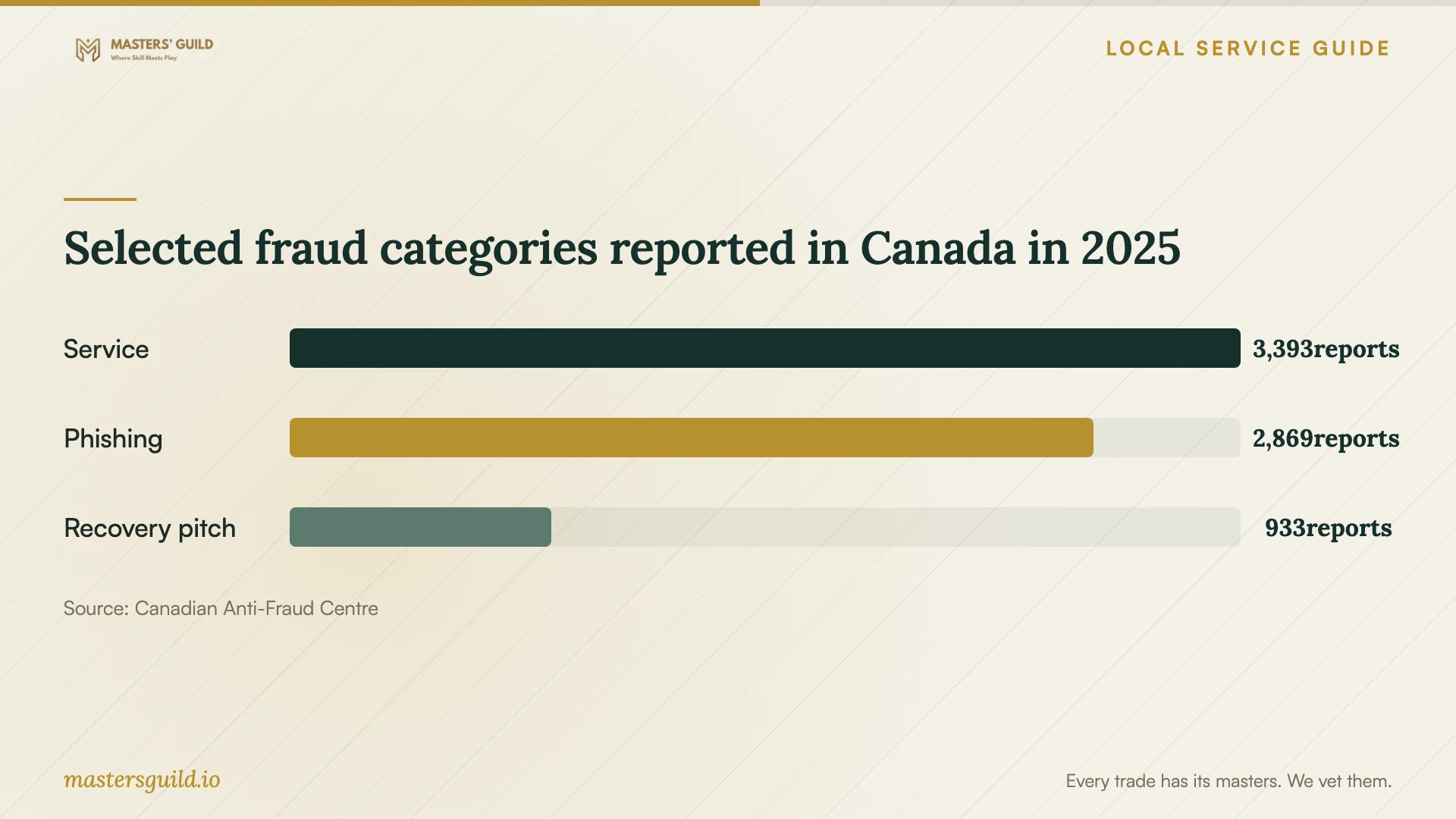
Selected fraud categories reported in Canada in 2025
Local details that affect your job
Use Brandon's non-emergency contact for suspected fraud
Brandon Police Service lists 204-729-2345 for non-emergencies and its address as 1020 Victoria Avenue. The Canadian Anti-Fraud Centre advises fraud victims to contact local police and report through the national reporting service. If your repair follows fraudulent remote access or payment, keep caller details, messages and transaction records and ask police how to provide them. Use the non-emergency contact for a non-emergency inquiry. [3] [5]
Arrange data handling before an Eastview recycling trip
The City lists Eastview Landfill at 765 33rd Street East and accepts desktop computers, laptops, notebooks, tablets and netbooks through its e-waste program. Before taking a replacement-bound computer there, ask the technician to quote file recovery and storage-drive sanitization. Confirm who will remove your personal data before drop-off. For a computer belonging to a commercial company, the City directs companies to call 204-729-2281 before bringing e-waste. [4]
Match the service scope to your situation
| Your situation | Next step | Ask the technician |
|---|---|---|
| Browser redirects, pop-ups or unknown programs | Describe the symptoms and arrange diagnosis. | Will you check browser settings, extensions and installed programs? |
| Files renamed, encrypted or accompanied by a ransom demand | Disconnect the device and contact an IT provider. | How will you assess recovery and preserve files before changes? |
| An unsolicited caller had remote access | Include account recovery and suspected-fraud reporting in the plan. | Will you review remote-access tools and changed settings? |
| You choose to replace the computer | Arrange data handling before using Eastview's e-waste program. | What will file recovery and storage-drive sanitization cost? |
Your hiring checklist
- Describe the symptoms and any recent downloads or remote-support access.
- List the files you need preserved and describe your existing backups.
- Check the technician's contact details before granting access.
- Get an itemized quote, a spending limit and an approval step for erasure or reinstallation.
- Agree on who will handle password changes and existing sign-in sessions.
- Request a written record of the work, restoration checks and follow-up terms.
- If replacing the computer, arrange personal-data removal before e-waste drop-off.
Frequently Asked Questions
How much should I budget for removal?
Request a written quote for your device and symptoms. Ask the technician to separate diagnosis, recovery, backup handling and restoration, then identify taxes and any fee payable if you decline further work. Compare quotes for the same scope and set an approval limit before work starts.
Can I restore my existing backup?
Ask the technician to assess it first. The Cyber Centre recommends restoring only known clean backups created before infection and scanning backup files before restoration. Tell the technician when you made the backup and which files matter most. [1]
Should I call the number in a virus warning?
Choose support through contact details you have checked. The Canadian Anti-Fraud Centre describes alarming website pop-ups that demand an urgent call as a tech-support fraud tactic. Tell your chosen technician if you called that number or granted access. [2]
Where can I take a computer I decide to replace?
Eastview Landfill's e-waste program accepts desktop and portable computers at 765 33rd Street East. Arrange personal-data removal first. The City asks commercial companies to call 204-729-2281 before bringing e-waste. [4]
Sources and scope
This guide combines the sources below with practical planning guidance. Figures apply to the stated geography and period; request a written quote for your property.