
Local service guide
Data Recovery and Backup in Boston, MA
Arrange Data Recovery and Backup in Boston with separate scopes for recovering missing files and maintaining future backups. Give the provider your device details, priority files, operational deadline, and spending limit. Agree on how you will check recovered results. For backup setup, specify acceptable data loss, restoration priorities, access responsibilities, and a demonstrated restore before accepting the work.
Prepare the recovery handoff
Write down what happened, when you last accessed the missing files, any error messages, and what you tried afterward. Identify the device and name the folders or applications you need first. Request handling instructions before attempting further recovery work, especially if you suspect physical damage.
Confirm who will perform the assessment and where the provider will send your equipment. Record the serial number, accessories, recipient, and handoff date. Include an approval step before the provider expands the work or transfers the device to another facility.
Define acceptance around files you can use. Request an inventory, then open representative documents and business records. For an application restore, include launching the application and checking its records. Specify whether you want file delivery, replacement-device setup, or help resuming operations.
Compare the full quote and delivery terms
Request separate charges for assessment, recovery, transport, return storage, and urgent service. Establish what you owe if you decline the proposed work or receive only part of your priority data. Give the provider a written spending limit and require approval for additional charges.
Separate the assessment deadline from the recovery delivery estimate. Explain which business activity you need to resume and agree on progress updates. For ongoing backup support, include setup, recurring charges, restore assistance, retention, and the terms for retrieving your data when you end the service.
Specify backups around restoring operations
Boston's Emergency Management office provides essential-business-function and continuity-and-restoration worksheets, plus exercises for testing a plan. Use these resources to identify the work you need to resume and assign responsibility for each system. [1]
For each function, list the files, applications, accounts, and recovery keys you need. Tell the installer how much recent work you could afford to lose and how long you could operate without that function. Document the backup schedule, retention, alert recipient, and person responsible for checking failures.
Include a restore demonstration to a separate destination. Check the restored files and required applications, record the result, and agree on future test responsibilities. Plan how you would obtain your backup and credentials if you could not enter your premises.
Boston's Coastal Resilience Planning page identifies neighborhood plans and the Massachusetts Coast Flood Risk Model for flood extents and depths. The city designed its coastal-plan strategies around a 1% annual-chance storm with sea-level-rise projections for 2070. These citywide planning resources do not establish your building's flood exposure. Use them to begin a discussion about equipment placement and a backup location outside your premises, then request an address-specific assessment if you need a property-risk finding. [4]
Set access and incident-notification responsibilities
Name the people and subcontractors who may handle your files. Agree on where the provider keeps working copies, how you will supply credentials, and when it will remove temporary copies after acceptance. Keep a named security contact in the service agreement.
Massachusetts Chapter 93H, Section 3(a) covers a person or agency that maintains or stores, but does not own or license, data containing personal information about a Massachusetts resident. That custodian must notify the owner or licensor as soon as practicable and without unreasonable delay when it knows or has reason to know of a security breach, unauthorized acquisition, or unauthorized use. The custodian must also cooperate with the owner or licensor. [5]
Section 3(b) places separate duties on owners or licensors of covered Massachusetts-resident data. Under the same knowledge trigger and timing standard, they must notify the attorney general, the director of consumer affairs and business regulation, and the affected resident in accordance with the chapter. Document which role your business and vendor hold, and review your own notification obligations if an incident occurs. [5]
Authorize disposal after checking the results
Retain the original device until you have checked the recovered results and accepted delivery. Then decide whether to keep it, request its return, or authorize disposal. Request a record identifying the device, disposal method, and completion date.
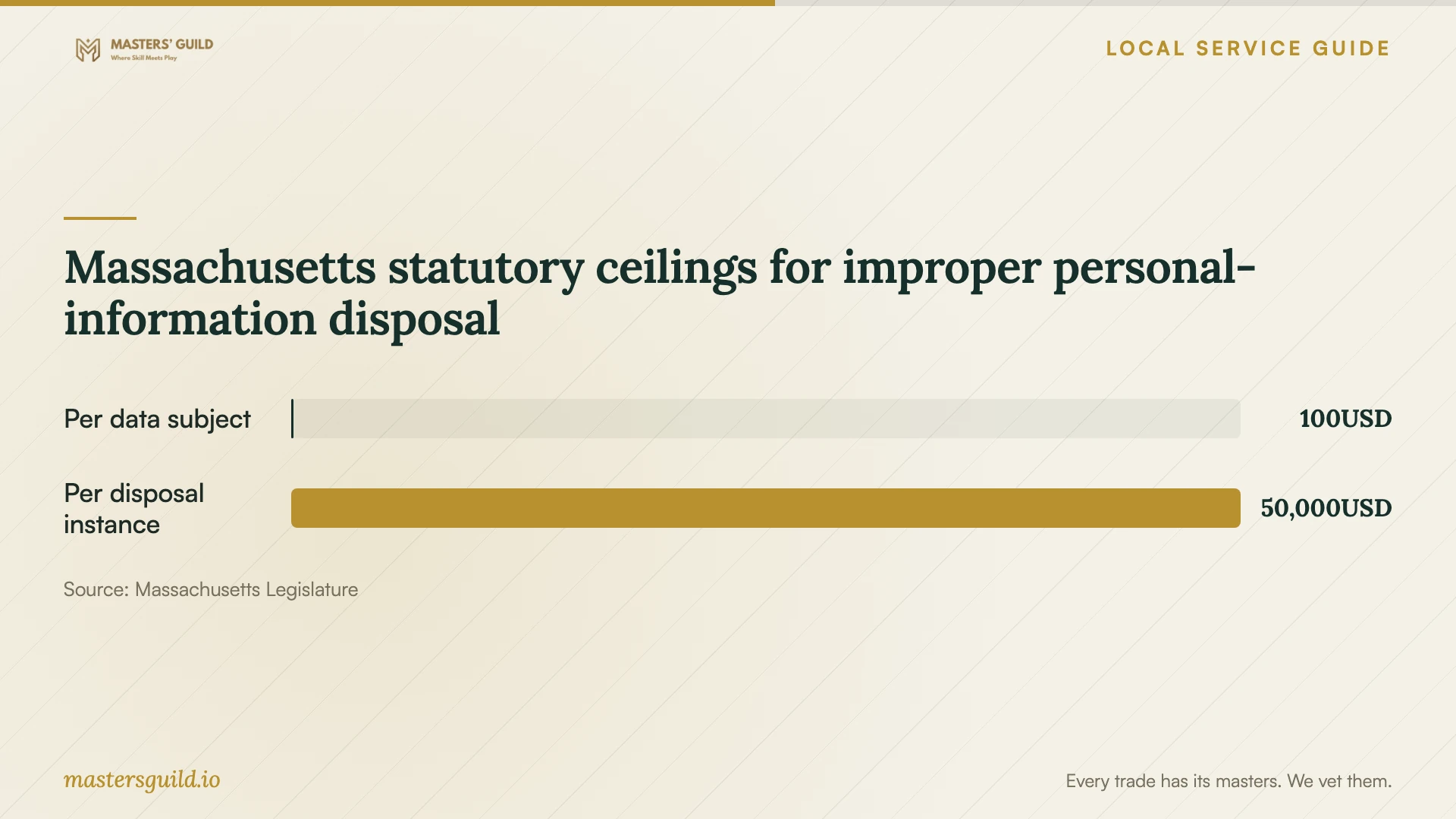
Massachusetts Chapter 93I, Section 2 requires destruction or erasure of electronic media containing covered personal information so that someone cannot practicably read or reconstruct it. Third-party disposal contractors must implement and monitor policies against unauthorized access, acquisition, or use during collection, transportation, and disposal. Include those handling stages in your agreement. [2]
Boston excludes business waste from its Zero Waste Days household collection program. Arrange commercial disposal as part of the recovery or equipment-replacement scope, and confirm who authorizes erasure or destruction after you accept the recovered data. [3]
Massachusetts statutory ceilings for improper personal-information disposal
Local details that affect your job
Prepare your scope with Boston's continuity toolkit
The city's Business Continuity page provides guidance, plan templates, essential-function and restoration-strategy worksheets, and disruption exercises in multiple languages. Start with the worksheets to rank your operational priorities, then use an exercise to discuss who retrieves backups and authorizes restoration if your usual contact is unavailable. [1]
Arrange commercial disposal for office equipment
Boston Zero Waste Days list computers among accepted household electronics, require proof of Boston residency, and reject business waste. A residency document does not make office equipment eligible. Arrange a commercial route and agree on data erasure or destruction before surrendering storage media. Ask the contractor to document its data-handling procedure as well as its recycling destination. [3] [2]
Use coastal plans to frame a site-specific discussion
Boston's Coastal Resilience Planning page lists plans for East Boston and Charlestown, Downtown and North End, South Boston, and Dorchester. The city describes pathways that can carry coastal flooding inland and identifies the Massachusetts Coast Flood Risk Model for planning data. These citywide planning resources do not establish your building's flood exposure. Review the relevant plan before discussing storage placement and a backup location outside your premises with the installer. [4]
Match the service scope to your next step
| Your situation | Scope to request | Acceptance check |
|---|---|---|
| You have a backup to restore | Restore assistance to a separate destination | Open priority files and check required applications |
| You cannot access important files | Device assessment, recovery proposal, and spending limit | Compare usable returned files with your priority list |
| You are arranging ongoing backups | Schedule, retention, alerts, access responsibilities, and restore support | Complete and document a restore demonstration |
| You are retiring office equipment | Commercial disposal; Boston Zero Waste Days exclude business waste | Match device identifiers to the disposal record |
Your hiring checklist
- List priority files, applications, and the business activities you need to resume.
- Record device identifiers, incident history, and handoff instructions.
- Confirm the assessment location, subcontractors, and transport arrangements.
- Set a spending limit and clarify unsuccessful or partial-recovery charges.
- Document backup schedules, retention, alert ownership, and restoration priorities.
- Complete a restore demonstration and check representative files and applications.
- Agree on incident contacts, temporary-copy removal, device return, and disposal records.
Frequently Asked Questions
Can I request recovery and backup setup together?
Request separate scopes, prices, and acceptance checks for the two tasks. Define the files you need back first, then agree on future backup schedules, retention, alert responsibilities, and restore tests. Ask the provider to identify any work it will subcontract.
How should I evaluate partial recovery?
Name priority files at intake and agree on charges for partial results. Request an inventory and check usable files before accepting delivery. For business applications, include a check that you can open the application and access the required records.
Can I take old office computers to a Boston Zero Waste Day?
Boston excludes business waste from these events. Its household program accepts computers and requires residency documentation. Arrange commercial disposal for office equipment and document how the contractor will handle storage media containing personal information. [3] [2]
Sources and scope
This guide combines the sources below with practical planning guidance. Figures apply to the stated geography and period; request a written quote for your property.