
Local service guide
Boise software installation: Hiring guide
Arrange software installation in Boise, ID by naming your device, operating system, application and the task you want to complete. Ask a technician to quote installation, activation, configuration and a working demonstration. Before booking, agree on backup responsibility, account access, software charges and the cost of troubleshooting if the installation fails.
Describe the result you need
Give the technician the application name and version, your computer model, operating system version and any error message. Describe the result in everyday terms: open and edit a document, send mail from an existing account, print from the application or import a photo collection. Ask whether the quote includes that test.
For a new computer, list the programs you want and identify which files you want to move from the old device. For an operating system change, request a compatibility check and a recovery plan before authorizing work. Keep data migration and account recovery as separate items so you can approve their scope and cost.
Choose remote help, a visit or drop-off
Ask about remote help if your computer starts, you can connect to the internet and you are comfortable supervising a screen-sharing session. Have the technician explain the access tool, how you approve access and how you end it. Agree on whether they will remove the tool or disable continued access at the end.
Request a home visit if you want the technician to test the application with your printer or other equipment in place. For drop-off service, ask what accessories to bring, how the shop will protect your files and who will call before extra work. Include your service address when requesting a visit and ask for any travel charge in writing.
Compare itemized quotes and tax treatment
Ask for a written total or an hourly rate with a spending limit. Have the technician identify diagnostic charges, installation labor, software license costs, file transfer, travel and follow-up support. Ask what you owe if they diagnose an incompatible device but cannot install the program.
The Idaho State Tax Commission lists custom computer software, electronically delivered software and software loaded by a seller without leaving discs or drives among nontaxable sales. Its guidance also lists tangible personal property as taxable. Ask the seller to identify software delivery, hardware and service charges on separate invoice lines and explain the treatment of your purchase. [1]
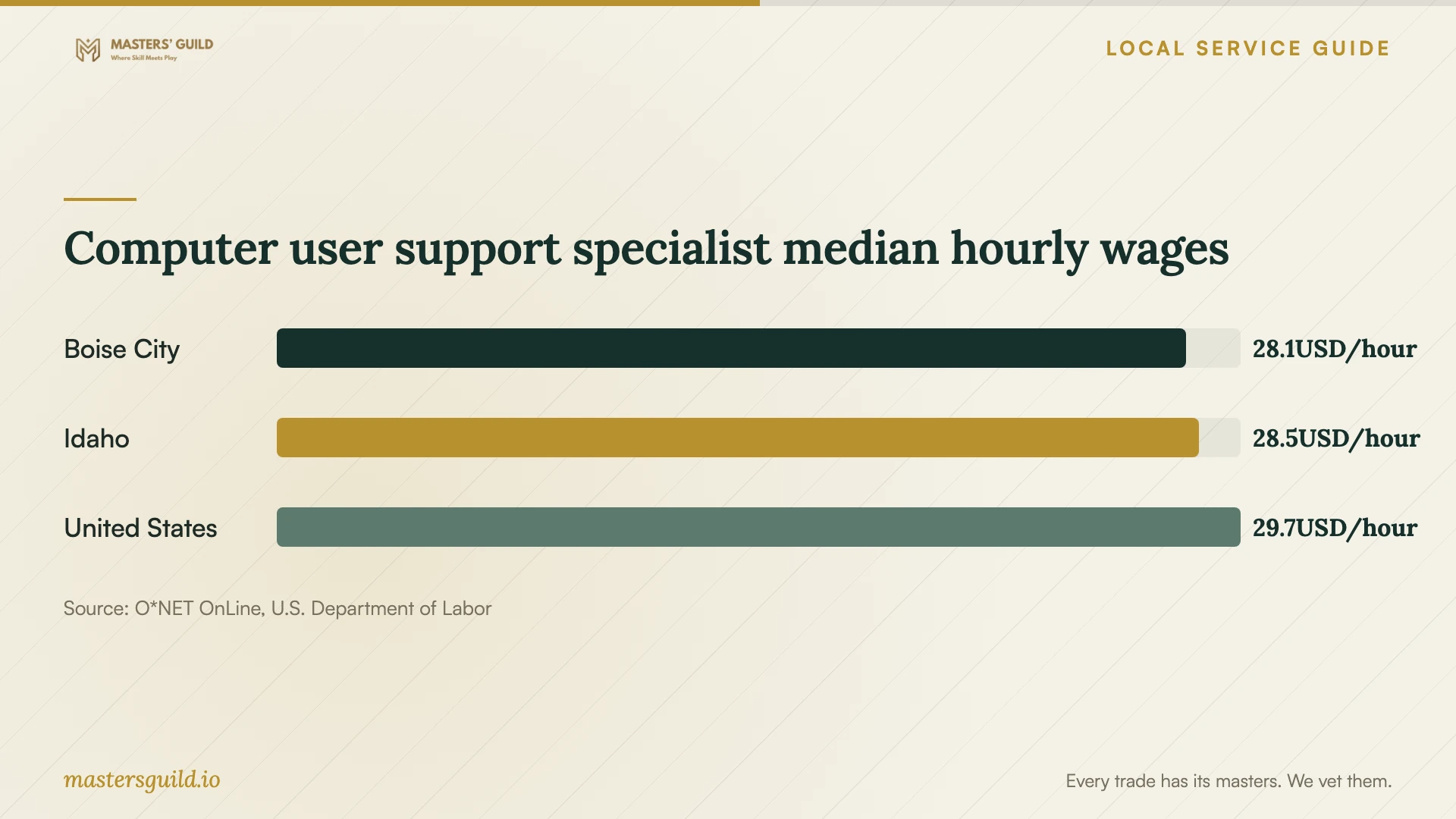
O*NET reports a Boise City median hourly wage of $28.05 for computer user support specialists using 2025 Bureau of Labor Statistics data. The chart compares employee wages across the published geographic areas. Use written offers for your installation scope when setting a budget; an employee wage does not establish a technician's customer billing rate. [4]
Check the local library option before buying help
Boise Public Library lists Tech Coach Appointments and Adobe Creative Cloud Access among its amenities. If you need instruction or occasional access to a program, contact a branch and ask which location offers the relevant service, what equipment you can use and whether you need an appointment. Ask whether help with installation on your laptop falls within the appointment scope. [2]
The library prohibits users from installing software on its equipment or storing data on its computer hard drives. Its personal-device Wi-Fi policy assigns equipment configuration to users and says the library does not provide technical support for connections or equipment configurations. Confirm any Tech Coach assistance before bringing a device for setup. [3]
Protect your files and check the handover
Back up the files you want to keep and check that you can open a copy before the appointment. Tell the technician which folders they may access. Keep passwords out of the job description; arrange to enter credentials and approve account prompts yourself. Ask them to explain any administrator access they need.
Before accepting the work, restart the computer and open the application from your usual account. Complete the task you named in the quote. Check activation, file access and any agreed printer or email connection. Ask for the installed version, purchase receipt, renewal terms and a written explanation of follow-up support. Confirm that you control the account used to purchase or activate the software.
Computer user support specialist median hourly wages
Local details that affect your job
Call a Boise branch about instruction
The Downtown Library at 715 S. Capitol Blvd. lists its contact number as (208) 972-8200. The library's locations page includes Tech Coach Appointments and Adobe Creative Cloud Access in its amenities. Call to confirm the offering and location before buying a subscription or booking paid help for an instructional task. [2]
Bring your own installation plan
Boise Public Library prohibits software installation on library equipment and data storage on its computer hard drives. Use library access to investigate available resources, then arrange installation on your own computer. Confirm appointment scope because the library's personal-device Wi-Fi policy excludes connection and equipment-configuration support. [3]
Ask for Idaho-specific invoice explanations
Idaho's tax guidance distinguishes nontaxable electronically delivered software and seller-loaded software without retained physical media from taxable tangible personal property. For a purchase combining software and equipment, request an itemized invoice and an explanation of the tax charged. Do not assume one treatment covers the whole package. [1]
Choose the help that matches your task
| Your situation | Next step | Confirm before booking |
|---|---|---|
| You want help learning a program | Ask Boise Public Library about Tech Coach Appointments. | Confirm location, appointment scope and eligibility. |
| You want to install a program on a library computer | Arrange installation on your own device instead. | Library policy prohibits user software installation on its equipment. |
| Your computer starts and you want supervised setup | Ask a technician to assess remote service. | Access permissions, removal of continued access and a working demonstration. |
| You need testing with equipment at home | Request a visit covering the full setup. | Travel charges, included equipment and the final test. |
| You need an operating system change or file transfer | Request a written backup and recovery plan. | Compatibility, files to retain and approval for additional work. |
Your hiring checklist
- Record the device model, operating system version, application name and error message.
- Define the task the technician must demonstrate before handover.
- Check a backup of the files you want to retain.
- Locate purchase records and arrange to enter account credentials yourself.
- Choose remote service, a home visit or drop-off and confirm access arrangements.
- Request itemized charges, a spending limit and approval before extra work.
- Test the application after a restart and confirm account ownership and follow-up support.
Frequently Asked Questions
How much should I budget for installation?
Request quotes for your device and application rather than budgeting from an employee wage or an unrelated repair price. Ask for installation, software purchases, migration and troubleshooting as separate items. Set a spending limit and require approval before the technician adds work.
Can Boise Public Library install software for me?
The library lists Tech Coach Appointments; contact a branch to ask whether your installation task falls within their scope. Users cannot install software on library equipment, and the personal-device Wi-Fi policy excludes connection and equipment-configuration support. [2] [3]
Does Idaho tax downloaded software?
The Idaho State Tax Commission lists electronically delivered software among nontaxable sales. It also lists seller-loaded software when the seller leaves no discs or drives with the buyer. Ask the seller to explain any tax on bundled equipment or other invoice items. [1]
Should I give the technician my password?
Arrange to enter your password and approve account prompts yourself. Ask what access the technician needs and why. For remote work, agree on how you will supervise the session and confirm that continued access ends when the work finishes.
Sources and scope
This guide combines the sources below with practical planning guidance. Figures apply to the stated geography and period; request a written quote for your property.