
Local service guide
Computer Virus Removal in Boise: Plan the Repair
For Computer Virus Removal in Boise, choose a technician who provides a written diagnosis and repair scope before making changes. Request a device-specific quote; prices and completion dates depend on the agreed scope. Explain whether you need computer cleanup, help preserving files, or assistance after sharing account information with a suspected scammer.
Describe the problem before booking
Give the technician a short account of the incident. Include the warning text, recent downloads, any remote session you allowed, and what you noticed afterward. Say whether the device starts and identify its operating system if you know it. Ask for an assessment before accepting a proposed cleanup or hardware replacement.
Tell the technician whether you entered account credentials, shared identity information, or sent money. Keep passwords out of the booking message. Ask whether the proposed work covers the computer alone or includes guidance on reviewing affected accounts. Handle banking questions with your bank through contact details you already trust.
Choose how the technician will access the device
For remote help, contact a provider you selected and ask what access the technician requires. Confirm the person's identity, the session charge, and how you can end the connection. Ask them to explain any remote-access program they propose installing and agree on whether they will remove it at handover.
For drop-off work, confirm what to bring, such as the charger or recovery information. Request an intake receipt naming the device and accessories. For a home visit, ask about travel charges, the appointment window, and whether the visit includes assessment of connected equipment. Choose an arrangement you can manage without handing over unrelated devices or account access.
The FBI advises contacting the claimed company for verification when an unsolicited caller requests personal information or demands cryptocurrency. Use an independent contact method before accepting that caller's offer of repair. [3]
Prepare and authorize the work in order
1. Record the symptoms and your priorities. Name the folders you need, describe existing backups, and tell the technician about messages or payment records connected to the incident. Ask them to explain how they propose assessing and handling those files.
2. Agree on access and storage. Discuss a temporary device login or another suitable access arrangement. Ask who can view repair copies, where the technician will store them, and when they will delete them. Keep your main email credentials under your control.
3. Approve a defined scope. Set a spending limit and a contact method for changes. Require another approval before drive erasure, operating-system reinstallation, or hardware disposal. Have the technician explain what you would need to restore afterward, including applications and settings.
4. Review the handover. Request a record of work performed and programs added or removed. Check access to your agreed files with the technician, discuss unresolved symptoms, and ask how to handle a recurrence. Confirm who will complete any remaining updates or account tasks.
Compare the scope and total charge
Request a device-specific quote; prices and completion dates depend on the agreed scope. Have each provider quote the same tasks so you can compare the total. Clarify whether backup, file recovery, reinstallation, travel, or additional appointments cost extra.
Ask what you owe for diagnosis if you decline further work and whether the provider credits that fee toward an approved repair. Discuss the update schedule if the technician needs more time. For a software purchase or service bundle, ask the provider to explain the charge and its tax treatment.
Address suspected fraud alongside device repair
If someone obtained identity information, consider Idaho's advice for cybercrime victims: place a credit freeze by contacting each of the three major credit bureaus. The state explains that placing and lifting a freeze is free. A freeze restricts access to your credit file and can help prevent fraudulent credit applications. [2]
For a scam involving a cryptocurrency kiosk, the FBI advises retaining receipts and transaction documentation, filing a local police report, and submitting an IC3 complaint. Include the transaction ID, destination wallet, kiosk location, and caller identifiers if you have them. Tell the technician about evidence you want retained before authorizing changes. [3]
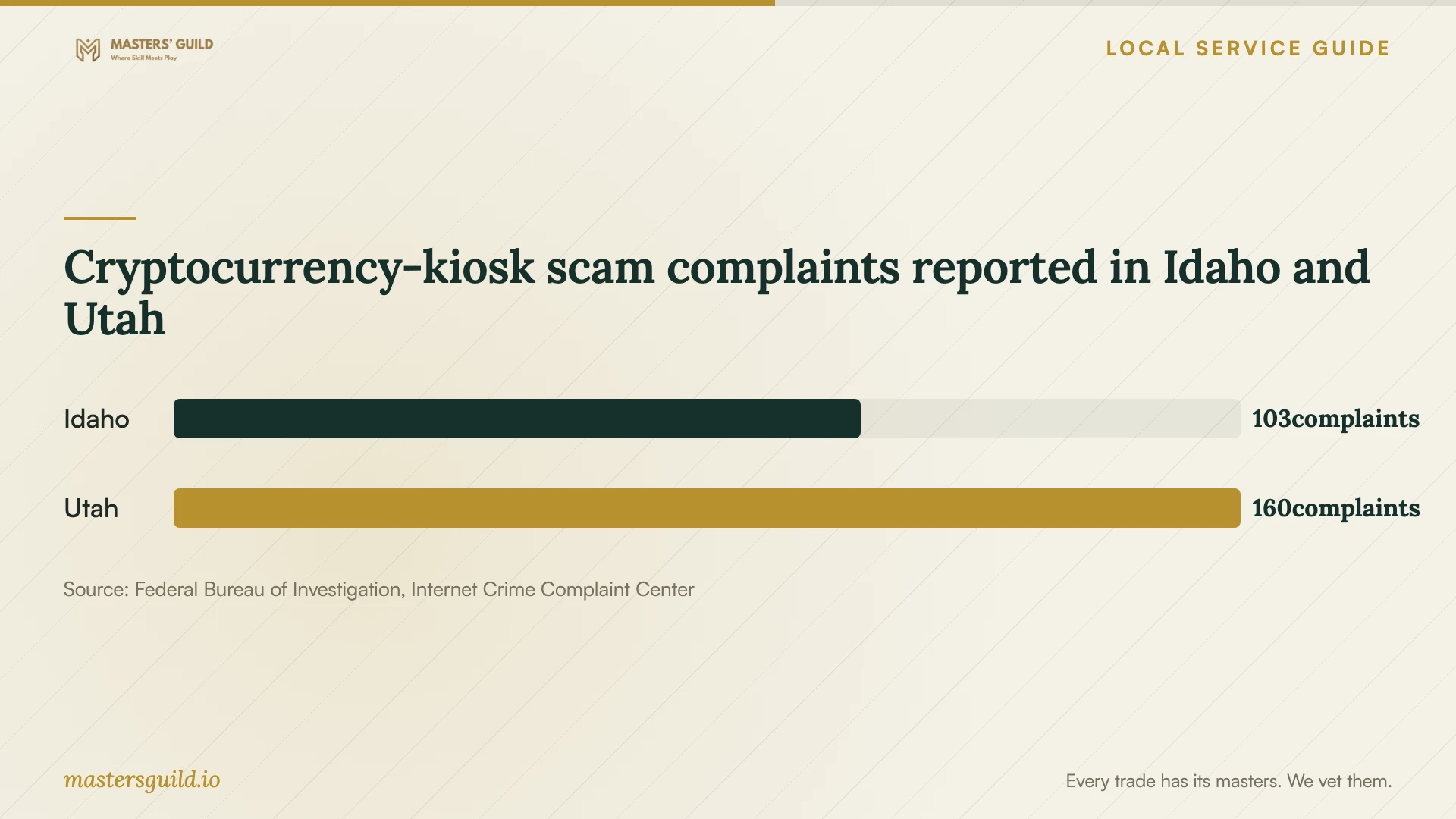
The state-level complaint chart provides context for this payment demand. Use it to recognize why a supposed support provider's kiosk instructions deserve scrutiny. Do not use the counts to estimate your computer's infection status or a repair budget. [3]
Cryptocurrency-kiosk scam complaints reported in Idaho and Utah
Local details that affect your job
Idaho hardware-repair invoices
When a repair includes replacement hardware, ask the shop to separate parts from repair labor on the invoice. The Idaho State Tax Commission includes computers in its repair-shop guidance: separately listed repair labor is not taxable, while parts are taxable. If the shop combines parts and labor, it must calculate sales tax on the entire charge. Confirm the invoice format before agreeing to a hardware repair. [1]
Idaho's homeowner reporting route
Use the citizen reporting route on Idaho's cybercrime page for suspected fraud connected to your home computer. The state directs citizens and businesses to the FBI Internet Crime Complaint Center and provides a separate route for state agencies. It asks you to report even if you are unsure your complaint qualifies as a crime; you do not need the repair technician to make that determination first. [2]
Match the repair request to your situation
| Situation | Request | Next step |
|---|---|---|
| Warnings or unexplained behavior | Diagnosis before approving changes | Give the technician the warning text and incident timeline. |
| Computer will not start | Assessment and a proposed file-handling plan | Discuss transport and recovery information before the appointment. |
| Replacement hardware proposed | Separate parts and repair-labor charges | Apply Idaho's invoice distinction: combining those charges makes the full amount taxable. |
| Identity information exposed | Device assessment plus a clear boundary for account assistance | Consider Idaho's credit-freeze guidance and citizen IC3 reporting route. |
| Unsolicited caller demands cryptocurrency | Independent verification of the claimed company | If you paid through a kiosk, retain documentation and report to local police and IC3. |
Your hiring checklist
- 1. Write a short incident timeline and record the warning text.
- 2. Confirm the appointment format, accessories needed, and access method.
- 3. Identify important folders, existing backups, and incident records.
- 4. Review the written scope, total charge, and conditions for extra approval.
- 5. Agree on temporary-copy storage and deletion.
- 6. At handover, check your files and review the work record.
Frequently Asked Questions
How much should I budget?
Request a device-specific quote; prices and completion dates depend on the agreed scope. Ask for the total for your chosen service arrangement and confirm what you owe if you decline the repair after diagnosis.
Should I bring an external backup drive?
Ask the technician before the appointment. Describe what the drive contains and whether you connected it during the incident. Agree on which devices the technician will assess and record any accessories you leave with the computer.
What should I ask about follow-up support?
Ask how to contact the technician if the same symptoms return, whether another assessment carries a charge, and what any written service guarantee covers. Request specific terms for your repair rather than assuming follow-up work is included.
Sources and scope
This guide combines the sources below with practical planning guidance. Figures apply to the stated geography and period; request a written quote for your property.