
Local service guide
Cloud Service Setup in Boise, ID
For Cloud Service Setup in Boise, hire help when you want a technician to organize a migration, configure household devices, or demonstrate file recovery. Before booking, agree on the accounts, folders, devices, subscription charges and completion tests. Ask who will check the initial upload, and keep account ownership and recovery access under your control.
Define the job before requesting a quote
Write down what you want to retrieve and from which devices. Your request might cover family photos on a phone, household documents on a laptop and access for another family member. Name the folders you want included and identify anything you want kept outside the cloud. Ask the technician to describe the proposed setup in terms you can check.
For a migration, identify the source account, destination account and files you intend to move. Ask who will inspect the transferred files, how the technician will handle duplicates and when you can retire the old account. Keep original copies until you review the result. For backup work, include a demonstration of restoring a sample file.
Check connectivity before scheduling the transfer
Use the FCC National Broadband Map to investigate service at your home address. The FCC describes its fixed broadband map as showing provider-reported service types and maximum advertised upload and download speeds at individual locations. You can change the data date and filter by technology or speed. Treat these listings as advertised options rather than measurements of your home connection. [3]
Share a recent home upload test with the technician and ask them to plan around your connection. Decide whether they will configure the service during the appointment and check the upload afterward, or remain responsible through completion. Ask what you should do if the computer sleeps, the connection drops or the transfer reports an error. Include follow-up responsibilities in the quote.
Compare quotes and recurring charges
Ask each technician to quote the same device list, folders and completion tests. Request an explanation of hourly or fixed charges, remote sessions versus home visits, follow-up work and any subscription you must buy. Specify who will pay the subscription and manage renewal. Use written quotes for your scope; this guide does not provide a verified local setup price range.
Ask the seller to explain tax on each invoice item. The Idaho State Tax Commission lists tangible personal property among taxable sales. It lists electronically delivered software, software loaded without leaving storage media and some remotely accessed software among nontaxable sales. Avoid assuming that this guidance settles the treatment of your entire package. Request an explanation for hardware, software and service charges before agreeing. [2]
Keep account control and verify the handover
Use an account you control and enter your own password during the appointment. Ask the technician to help you review recovery contact details and available sign-in protections. Agree on any temporary access they need and remove it at handover. Keep recovery information somewhere you can reach without relying on the device receiving the setup.
Before accepting the work, open representative files on the intended devices and review who can access shared folders. For backup work, ask the technician to restore a sample into a separate location so you can inspect it without overwriting the original. Request a handover note covering included folders, exclusions, subscription ownership and the next step for any unfinished upload.
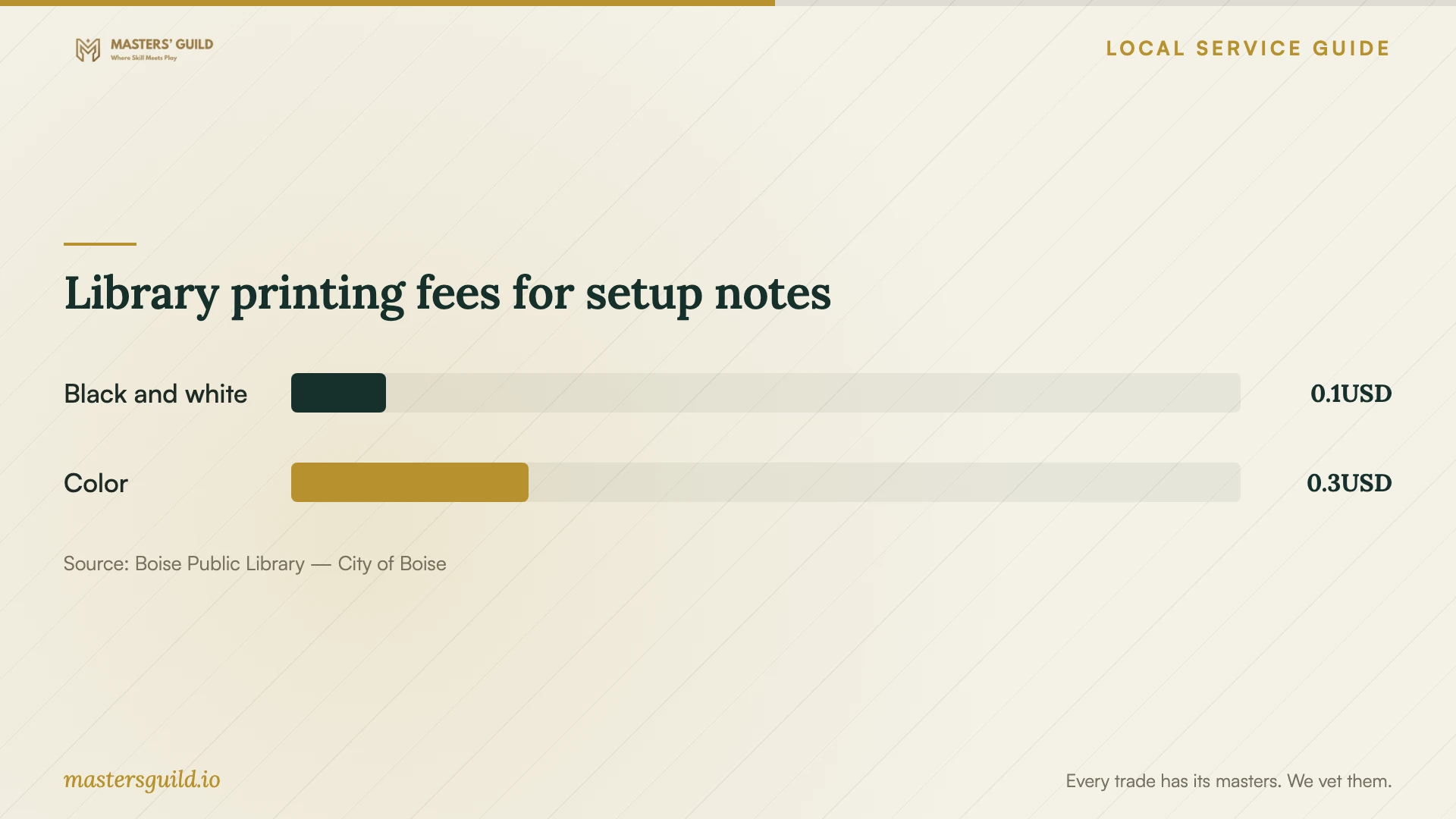
Library printing fees for setup notes
Local details that affect your job
Investigate basic help at a nearby library
Boise Public Library includes Tech Coach Appointments in its location amenity filters. Contact a branch to confirm the appointment process and whether staff can address your account or device question before paying for broader work. The directory lists Collister at 4724 W. State St. and Hillcrest at 5246 W. Overland Rd. Confirm cloud migration or backup setup coverage rather than assuming a coach offers those services. [4]
Plan an access fallback within library limits
Boise Public Library provides free Wi-Fi inside all five locations during open hours and in library parking lots from 7 a.m. to 9 p.m. The library names the network City of Boise Free and discloses filtering. Consider this access for reviewing account settings on your own device if home internet is unavailable. Check branch hours before traveling and ask about connection suitability before planning a large transfer. [1]
Prepare paper records before the appointment
Boise Public Library lists scanning at no charge. If your project includes paper household records, ask staff about the scanning process and handling your files before bringing sensitive documents. Agree with your technician whether scanning, naming and organizing those records belong in the setup quote or in your preparation work. [1]
Choose the next step for your household
| Your situation | Suggested next step | Confirm before proceeding |
|---|---|---|
| You need help understanding an account or device | Investigate the library's Tech Coach Appointments listing | Appointment availability and whether staff cover your question |
| You want selected folders accessible on several devices | Request a setup quote with a device and folder list | Access tests, sharing permissions and subscription ownership |
| You want a recoverable copy of household files | Include a sample restore in the backup scope | Included folders, recovery procedure and handover notes |
| You intend to move a large file collection | Review address-level internet options and test your home upload | Who checks transfer completion and handles interruptions |
| Your quote includes equipment and software | Ask for separate charges and tax explanations | Which invoice items the seller treats as taxable |
Your hiring checklist
- List the devices, accounts and folders you want included.
- Identify files that should stay outside the cloud.
- Check home upload performance and agree on unfinished-transfer follow-up.
- Confirm account ownership, recovery access and subscription billing.
- Request an itemized quote with tax explanations and completion tests.
- Keep original files until you inspect the migrated copies.
- Test file access, sharing permissions and a sample restore before handover.
Frequently Asked Questions
Should I arrange remote help or a home visit?
Choose after describing the devices and preparation work. Ask the technician whether they can complete your scope through a remote session or need physical access. For either option, agree on how you will enter credentials, review the result and end their access.
Does the appointment end when the upload starts?
Set that boundary in the quote. Ask whether the technician will check completion afterward, how you should report errors and whether follow-up costs extra. Include file inspection and a sample restore when you request migration or backup verification.
Can the library replace a paid setup appointment?
Investigate it for a basic question first. The library directory lists a Tech Coach Appointments amenity filter. Ask the branch whether staff can help with your specific task, and confirm migration or backup setup coverage before relying on that assistance. [4]
Will Idaho sales tax apply to my cloud subscription?
Ask the seller about the specific product. Idaho guidance lists some remotely accessed software as nontaxable, along with other software categories. Avoid treating that category as a blanket exemption for cloud subscriptions or bundled setup invoices. [2]
Sources and scope
This guide combines the sources below with practical planning guidance. Figures apply to the stated geography and period; request a written quote for your property.