
Local service guide
Software Installation in Birmingham, AL
Arrange Software Installation in Birmingham, AL by asking a technician to quote the named applications, device setup, activation, and a working test. Before buying Microsoft 365, check whether you qualify for UAB access: UAB offers it to students, faculty, and staff, with downloads on up to five personal devices. Define backup and data-transfer work before accepting an offer. [1]
Describe the result you want before requesting quotes
Give the technician your computer model, operating system version, application names, and any error messages. Explain the task you want to complete after installation, such as opening a spreadsheet, sending email, or printing a document. Ask the technician to confirm compatibility before you purchase software.
Separate the work into installation, account sign-in, configuration, file transfer, and instruction. Request an explicit answer about which tasks the quote includes. For an operating system change, ask the technician to document what they intend to keep, erase, or reinstall, and agree on a backup plan before work begins.
Check software access before paying for a license
UAB students, faculty, and staff can access Microsoft 365 through their UAB credentials. UAB describes online applications and downloads on up to five personal devices. If you qualify, check your account access before asking a technician to buy a separate subscription. [1]
UAB tells faculty and staff to consult their department or school IT support before installing products on a UAB system. For a university computer, make that consultation your first step. For your personal computer, ask the installer to identify the account that will own or activate each application, and enter your credentials yourself. [1]
Compare the full charge and choose the appointment format
Ask each technician to separate labor, software purchases, subscriptions, travel, backup, and file transfer in the estimate. Request a fixed scope or a spending limit for troubleshooting. Agree on when the technician must stop and seek your approval for extra work.
Alabama Department of Revenue's June 2019 guidance states that software transactions are taxable, while separately stated or invoiced services accompanying software conveyance are not subject to state sales or use tax. Ask the seller to explain the tax treatment on your itemized quote rather than applying a blanket tax assumption to the total. [3]
For remote work, ask how you will approve access and end the session. For an in-home appointment, describe any printer or other device you want included in testing. For a drop-off, obtain a receipt listing the computer and accessories, and agree on how the technician will contact you about additional charges.
Protect your files and agree on a handover test
Back up the files you want to preserve and check that you can open a sample from the backup. Keep recovery information available without sending passwords in the job description. Ask the technician to explain any proposed deletion or reset before authorizing it.
At handover, open the application under your own account and complete the task you named in the scope. Check activation, open a sample file, and test printing or email if you included those tasks. Request a record of installed applications, renewal obligations, unresolved errors, and the process for reporting an installation problem.
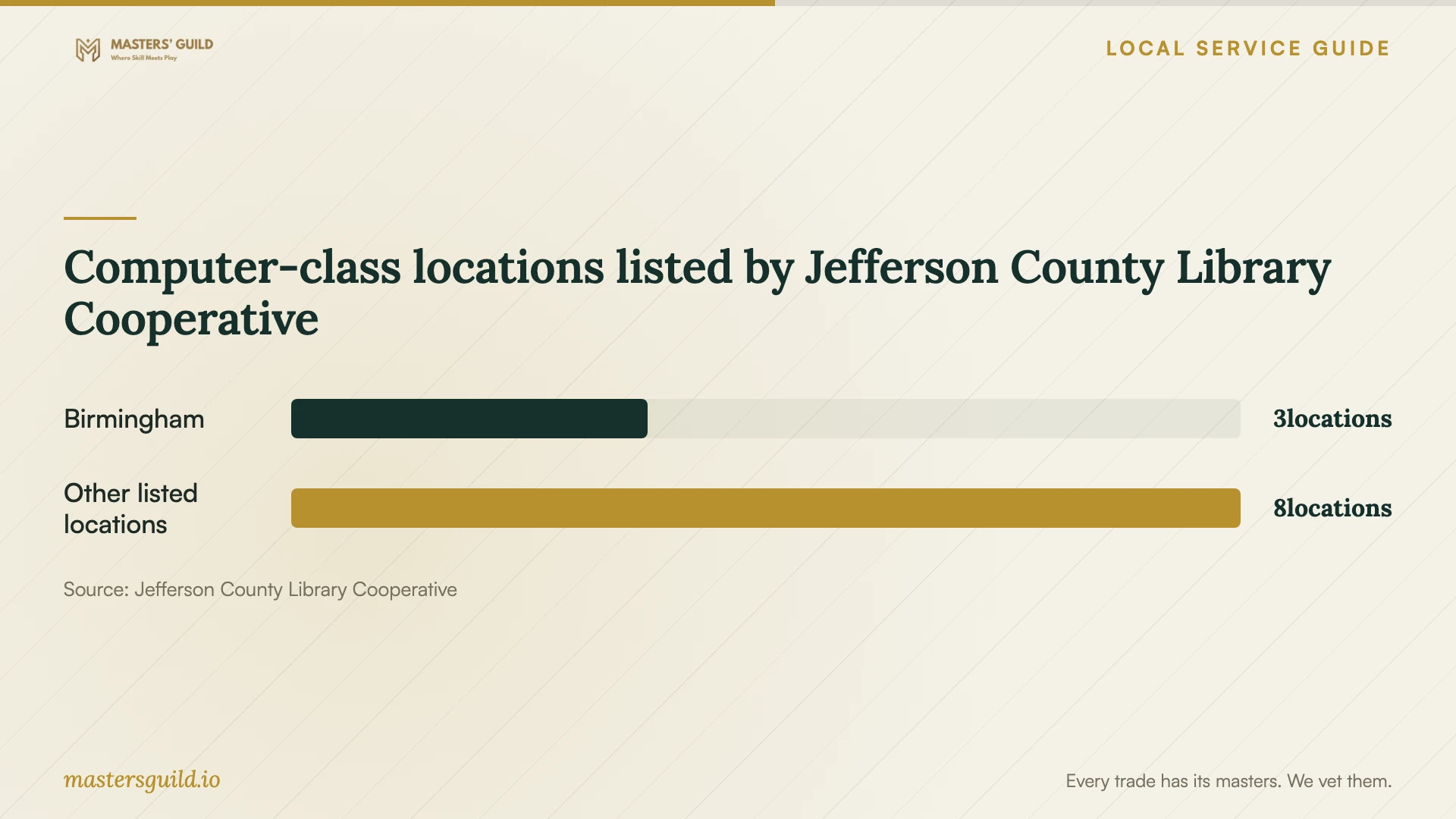
Computer-class locations listed by Jefferson County Library Cooperative
Local details that affect your job
Use Birmingham library classes for learning needs
Jefferson County Library Cooperative lists computer classes at Birmingham Public Library Central, Five Points West, and Springville Road. Contact Central at 205-226-3680, Five Points West at 205-226-4013, or Springville Road at 205-226-4081 for schedules and subjects. If your application works but you need instruction, ask about a suitable class before paying for an installation appointment. The directory does not promise individual installation help. [2]
Plan installation on a computer you control
JCLC's Internet Safety Policy prohibits using your own software programs on member-library computers and altering their settings. Do not plan to install your purchased application on a public library computer. Arrange the work on your own device, and ask the branch about its rules before bringing a personal device for any assistance. [4]
Separate personal and university device support
UAB's Microsoft guidance gives eligible users a personal-device download option while directing faculty and staff to departmental or school IT before installing on UAB systems. Identify who owns the computer before arranging outside help. University affiliation alone should not lead you to authorize changes to a university device. [1]
Choose the next step for your situation
| Your situation | Next step | Confirm before proceeding |
|---|---|---|
| You qualify for UAB Microsoft 365 | Check UAB account access before purchasing | Personal-device downloads cover up to five devices |
| You use a UAB-owned system | Faculty and staff should consult departmental or school IT | Obtain guidance before arranging outside installation |
| Your application works but you need instruction | Ask a listed library about computer classes | Confirm the subject and schedule with that location |
| You need installation on your own computer | Request a written installation and testing scope | Agree on account ownership, backup, and extra charges |
| You planned to use a library computer | Arrange installation on your own device | JCLC prohibits personal programs and settings changes on member-library computers |
Your hiring checklist
- List the applications, computer model, operating system version, and error messages.
- Check existing subscriptions and any eligible university access before buying software.
- Ask the technician to confirm compatibility and identify who will own each license.
- Agree on backup, file transfer, and any proposed deletion before work starts.
- Request itemized charges and a limit for additional troubleshooting.
- Keep control of account sign-ins and approve remote access yourself.
- Complete an agreed application test and obtain a written handover record.
Frequently Asked Questions
What should a software installation quote include?
Request the application names, device count, activation work, configuration, and a completion test. Ask for separate prices for software, labor, backup, and file transfer. Specify whether you want instruction and how the technician should handle work beyond the agreed scope.
Can I use UAB Microsoft 365 on my home computer?
UAB describes Microsoft 365 access for students, faculty, and staff, including downloads on up to five personal devices. Check your eligibility and sign-in access before purchasing a separate license or arranging setup. [1]
Can a Birmingham library help me learn an application?
JCLC lists computer classes at Central, Five Points West, and Springville Road. Contact the location to ask whether its classes cover your application and skill level. Do not assume the class includes installation on your personal computer. [2]
Should software and installation have separate invoice lines?
Request separate lines and ask the seller to explain the tax. Alabama Revenue's published guidance distinguishes taxable software transactions from separately stated or invoiced accompanying services that are outside state sales or use tax levies. [3]
Sources and scope
This guide combines the sources below with practical planning guidance. Figures apply to the stated geography and period; request a written quote for your property.