
Local service guide
Computer Virus Removal in Birmingham, AL
For Computer Virus Removal in Birmingham, choose a technician you contact through a trusted channel, agree on file preservation before work starts, and request a written quote covering diagnosis, cleanup and any proposed reinstall. Tell the technician whether you shared passwords or allowed remote access, and require your approval before they erase files or add charges.
Choose help without following a fake warning
Contact a repairer through contact information you found and checked yourself. In its June 2017 consumer guidance, Alabama’s Attorney General warns that criminals can disguise caller ID as a legitimate company or local number. The office also advises ignoring pop-ups that tell you to call tech support. [3]
Describe the warning before agreeing to a repair. Note what appeared on screen, whether you clicked anything, and whether someone asked for payment or computer access. Ask the technician to diagnose the issue before you authorize a cleanup package.
If you shared a password, include account protection in your plan. The Attorney General advises changing shared passwords and changing passwords on other accounts that use them. Tell the technician which accounts need attention without sending those passwords in a job description. [3]
Define the work before handing over your computer
Give the technician a short symptom history: when the problem began, what you installed or opened beforehand, and whether the computer still starts. Identify the documents, photos and other files you want preserved. Ask them to explain their backup plan before they change the operating system.
Request a written scope that separates diagnosis, malware removal, operating-system repair, backup and restoration. Set a spending limit and require approval for a reinstall, replacement hardware or additional recovery work. Ask what you owe if you decline the repair after diagnosis.
Agree on access and privacy. Ask who will handle the device, whether they will copy files to another drive or service, and when they will delete any repair copies. Discuss a temporary access account where practical, and keep account passwords out of messages and intake forms.
Choose remote, drop-off or home service around your circumstances. For remote work, agree on the session time and how access ends. For drop-off, confirm intake and collection hours and get a receipt identifying the computer and accessories. For a home visit, ask whether the quote includes travel.
Compare quotes by scope and total
Ask each technician to quote the same tasks. A useful estimate identifies the diagnosis charge, cleanup labor, backup work, any software purchase and the total you must approve. Request separate turnaround estimates for diagnosis and completion rather than assuming the appointment date means you will get the computer back that day.
Alabama’s Department of Revenue says repair or installation labor qualifies for a sales-tax exemption when the seller lists it as a separate invoice item. It also says local sales-tax rates vary. Ask the repairer to distinguish labor from hardware and explain tax on any purchases included in the quote. [1]
Before accepting an ongoing security subscription, ask for its price, renewal terms and cancellation process. Require the technician to identify which purchases you authorized. Agree on any follow-up charge if the original symptom returns, and request a written description of the completed work.
Check the repair before collection
Ask the technician to demonstrate startup, open the files you identified as essential, and check the problem that prompted the visit. Request a summary of what they removed or changed, which scans they ran, and any remaining concern that needs another decision.
Ask them to identify any remote-access software used during the job and show you how they ended access. Confirm that you control any new account or subscription. Keep the invoice and repair summary with your device records.
If you choose replacement, put file transfer and drive sanitization in the scope before disposal. Ask how the technician will handle a drive they cannot read or erase, and who will keep it. Confirm your important files on the replacement device before authorizing disposal of the original.
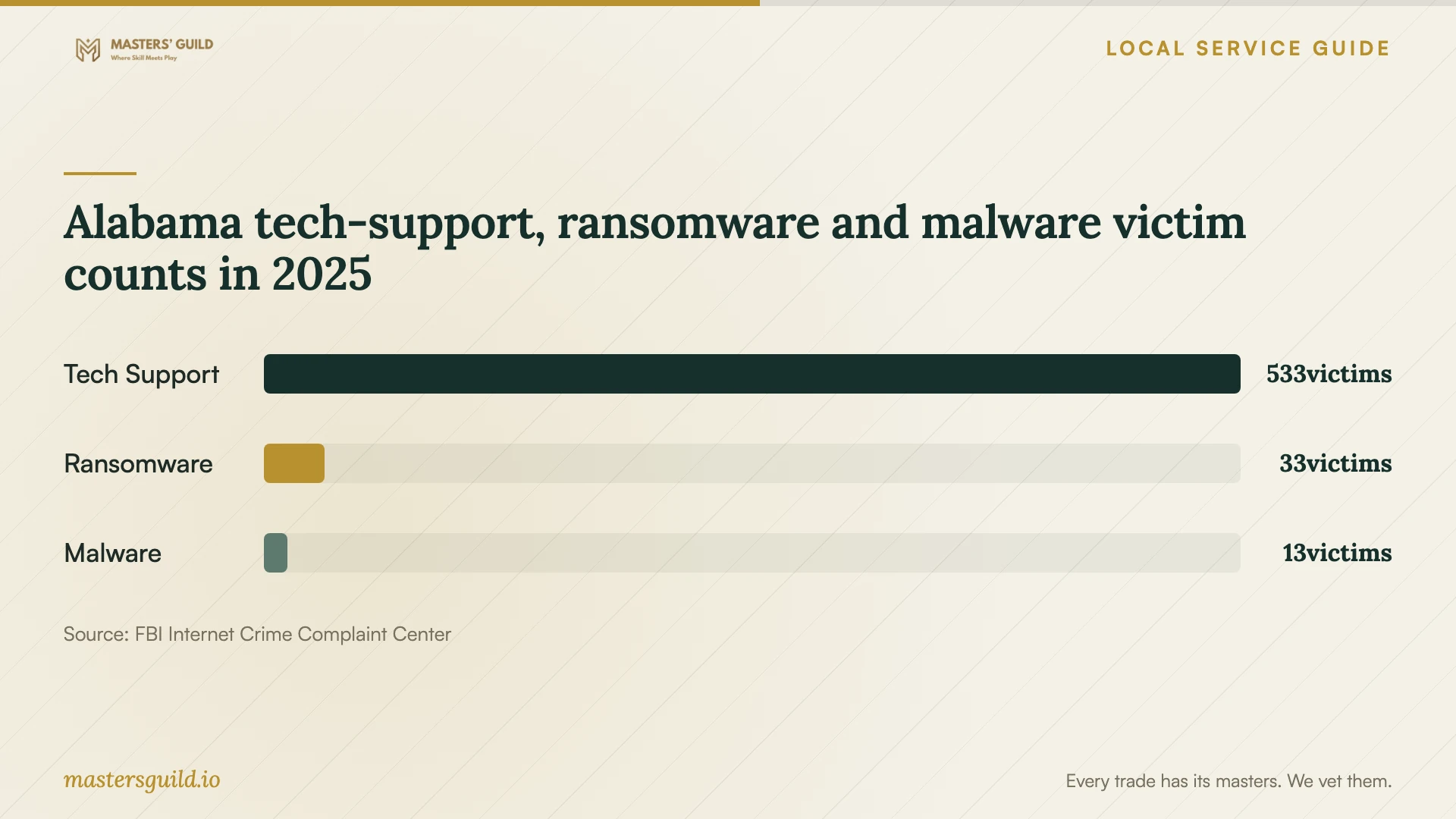
Alabama tech-support, ransomware and malware victim counts in 2025
Local details that affect your job
Alabama invoice treatment affects quote comparisons
For a repair arranged here, ask the seller to list repair labor as a separate invoice item. Alabama’s Department of Revenue exempts that labor when itemized. Compare the final payable totals and ask the seller to explain any hardware or other purchase charges; the department notes that local sales taxes vary. [1]
Plan a separate recycling trip if you replace the device
Birmingham’s Public Works page lists Gone For Good at 101 Oslo Circle, Birmingham, with phone number 205-943-5252, and Secure Shredding and Recycling at 135 Distribution Drive, Homewood, with phone number 205-549-2120. The city advises calling about hours and fees and notes exceptions to free electronics drop-off, including CRT monitors and certain printers. Confirm acceptance of your exact equipment before travelling, and arrange file preservation and drive sanitization with your technician before handing it over. [2]
Choose the next step for your situation
| Situation | Next step | Question for the technician |
|---|---|---|
| A pop-up tells you to call support | Ignore the displayed number and choose help through a contact you checked. | Can you diagnose the warning before I authorize cleanup? |
| You gave someone access or a password | Disclose the access and plan password changes for affected accounts. | Will you review remote access and help me identify account-recovery tasks? |
| You need files preserved | Require a preservation plan before approving changes. | Which files will you copy, where will you keep them, and when will you delete repair copies? |
| The technician proposes a reinstall | Approve the scope and file plan before work starts. | What will you restore, and which applications must I reinstall? |
| You decide to replace the computer | Arrange data handling, then confirm recycling acceptance and fees. | How will you sanitize or retain the old drive before disposal? |
Your hiring checklist
- Record symptoms, warning text and any access or payment you gave someone.
- List the files you need preserved and tell the technician about existing backups.
- Agree on diagnosis charges, a spending limit and approval for extra work.
- Require permission before a reinstall, file deletion or hardware replacement.
- Confirm appointment, collection and estimated completion times.
- Ask for itemized labor, purchases, taxes and subscription terms.
- Review the repair summary and confirm essential files before collection.
- If replacing the device, confirm data removal and recycling acceptance.
Frequently Asked Questions
Can I try a scan before paying for help?
Alabama’s Attorney General advises using legitimate security software to scan for malware and deleting items it identifies as problems. If you want help choosing the next step, describe your symptoms and file-preservation needs to a technician before authorizing changes. [3]
What should a virus-removal quote include?
Ask for diagnosis and cleanup charges, the backup or reinstall scope, any purchases, and the total requiring your approval. Set a limit for extra work and ask what happens if you decline the repair after diagnosis.
Does Alabama tax the repair labor?
The Department of Revenue says labor to repair or install property is exempt when the seller bills it as a separate invoice item. Ask the seller to distinguish labor from purchases and explain the tax treatment of the complete quote. [1]
Where can I take a computer I decide to replace?
Birmingham’s Public Works department lists local electronics-recycling destinations, including Gone For Good in Birmingham and Secure Shredding and Recycling in Homewood. Call ahead about equipment acceptance, hours and fees. Ask your technician to address files and drive sanitization before disposal. [2]
Sources and scope
This guide combines the sources below with practical planning guidance. Figures apply to the stated geography and period; request a written quote for your property.