
Local service guide
Cloud Service Setup in Birmingham, AL
For Cloud Service Setup in Birmingham, AL, hire a technician against a written scope that names the accounts, data, staff access, and finished result you need. Request separate charges for labor and subscriptions, an upload assessment before scheduling the move, and a demonstration of the completed setup. Keep ownership of the accounts and recovery credentials with your business.
Choose the work you want completed
Describe the problem in everyday terms before choosing a platform. You might need staff to share project folders, replace an existing storage account, or recover business records after a device failure. Ask the technician to explain how the proposed arrangement meets that task and which decisions you must make before work starts.
Give candidates a compact inventory of devices, accounts, users, and selected folders. Flag records that require restricted access. For a move between services, identify who can authorize access to the old account and who will approve closure after the transfer. Keep account passwords out of the inventory.
Compare quotes by responsibility and completion
Request separate amounts for setup labor, subscriptions, equipment, and later support. Ask whether the technician charges for attended work, elapsed transfer time, or a completed result. Set an approval limit for additional work and name the person who can authorize it.
Ask candidates about work with your chosen platform and how they would handle your access requirements. Have them explain who performs the job, whether they need remote access, and how they will remove temporary access afterward. Request a written allowance for unfinished uploads so you know who monitors them after the appointment.
Check upload capacity before choosing a migration date
The FCC’s National Broadband Map lets you search an address and review provider-reported technologies and maximum advertised download and upload speeds. You can filter for business locations. Use that information to investigate connection options, then confirm the service with the provider before arranging a change. [1]
Ask the technician to measure upload performance at the office and estimate the transfer schedule using the selected data volume. Reserve a work window that suits your operations, and request separate estimates for the technician’s appointment and the end of uploading. Ask how staff should handle edits to files during the move.
If you cannot order a service shown for your address, the FCC provides an availability-challenge process. Resolve the discrepancy before commissioning a migration that depends on that service. [1]
Plan for a power interruption
Ask the technician how they will resume an interrupted transfer and identify anything left unfinished. Discuss whether to assess backup power for the computer and network equipment. For essential documents, specify which copies you want accessible without an internet connection and who may use them.
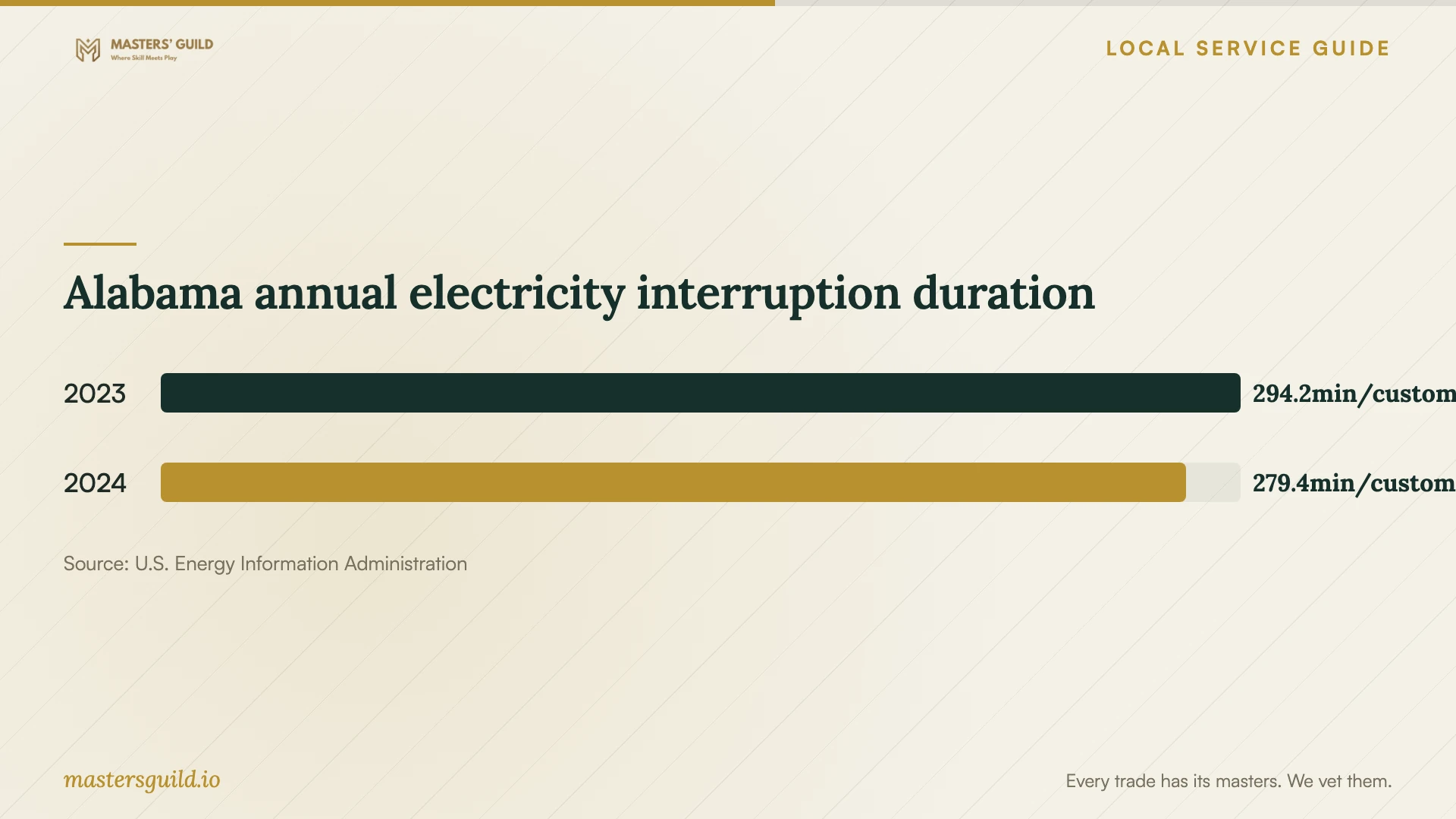
EIA reports statewide electricity interruption figures for Alabama. Use the chart as context for discussing continuity with the technician. Avoid treating the statewide average as a prediction for your office or a specification for backup-power runtime. [3]
Agree on a handover you can verify
Before work begins, choose representative files and staff roles for the handover demonstration. Have the technician show that you can open the files and that the agreed permissions work. For backup work, include a restoration of a disposable test file to a location you approve.
Keep the originals until you approve the results. Collect concise notes covering account ownership, renewal responsibility, unresolved errors, and the support arrangement. Enter passwords yourself where possible, and store recovery information somewhere your business controls.
Alabama annual electricity interruption duration
Local details that affect your job
Assign an Alabama Power outage contact
If Alabama Power supplies your premises, review the contact preferences on your utility account before the appointment. The utility says it enrolls customers in outage alerts and offers text, phone, or email updates. It targets alerts for approximately 10 minutes after a confirmed outage. Assign someone at the premises to notify the technician when power fails instead of waiting for the alert. [2]
Plan around the utility’s restoration sequence
Alabama Power describes restoring main distribution lines and prioritizing vital services such as hospitals, emergency services, and water facilities. Crews also focus on repairs that restore the greatest number of customers before progressing to smaller neighborhood and individual lines. For an office it serves, agree on a usable stopping point before moving essential records: retain an accessible working copy and decide which tasks staff can continue away from the premises. Schedule the restart after someone confirms power and connectivity at the office. [2]
Match the requested scope to your business task
| Your task | Scope to request | Decision before work |
|---|---|---|
| Share working documents | Folder organization and staff permissions | Who may view, edit, and manage access? |
| Move to another service | Data transfer and handling of files edited during the move | When should staff stop editing the originals? |
| Arrange backup | Selected data, backup schedule, and recovery demonstration | Which records must you be able to recover? |
| Prepare for interrupted office access | Offline working copies and a documented restart procedure | Which tasks must staff continue away from the premises? |
Your hiring checklist
- Name the business outcome and the person authorized to approve completion.
- Prepare the device, account, user, and folder inventory without passwords.
- Identify restricted records and obtain any required internal approvals.
- Confirm an upload assessment and a suitable work window.
- Separate one-time charges from recurring subscriptions.
- Agree on interruption handling and the final demonstration.
Frequently Asked Questions
Should I book remote or on-site setup?
Choose remote work if you can connect the equipment, sign in, and supervise access. Request an on-site scope if you need help identifying devices or checking physical network connections. Have the technician explain what you must do during either appointment.
Can I get a firm price before the technician visits?
Request a written quote with stated assumptions about data volume, device access, and account readiness. Ask what would trigger a revised price. Have the provider clarify subscription charges and responsibility for unfinished transfers before you accept.
Does the broadband map show my actual upload performance?
The FCC map lists maximum advertised speeds reported by providers at a location. Ask for a measured test at your premises before accepting the transfer schedule. [1]
What should I ask about accidental deletion?
Ask the technician to explain what happens after someone deletes a file, which recovery options the proposed plan includes, and any retention limits. Have them identify the applicable plan terms before you approve the subscription.
Sources and scope
This guide combines the sources below with practical planning guidance. Figures apply to the stated geography and period; request a written quote for your property.