
Local service guide
Technical Skills Training in Billings, MT
Arrange Technical Skills Training around a task your staff must complete, such as building a spreadsheet or using business software. Ask for a written scope, a practice exercise, and a total quote. In Billings, compare private instruction with City College’s customized workplace training, the library’s free online courses, and CO+LAB equipment instruction before committing staff time. [1] [2] [3]
Define the task before choosing an instructor
Write a brief with your software name and version, the staff attending, their starting skills, and the result you want. Replace a broad request for computer training with a concrete exercise: create an inventory sheet, export a report, or update a page in your website’s test environment.
Ask the instructor to describe how they would teach that task and check progress. Request a sample exercise that resembles your work. Explain who needs help with basic navigation and who wants advanced instruction. Ask how the provider would adapt the lesson for those differences.
Agree on what learners should complete without prompts after instruction. Include practice files and a reference guide in the scope. If you also want device repairs or software configuration, request separate deliverables and prices so you can assess each part of the proposal.
Compare workplace training with independent study
City College at MSU Billings offers short-term non-credit courses and customized training for industry partners. Its workforce staff describe a consultative process that may include technical skills training. Past customized courses have covered software, safety, and skills, with delivery on campus and at employer worksites. [2]
For a workplace proposal, describe your software, group size, preferred location, and deadline. Ask whether the program can cover the specific task before setting aside staff time. The catalog lists 406-247-3055 for Workforce and Resource Development inquiries. [2]
Billings Public Library provides patrons with free Universal Class continuing education courses, including technology subjects. Learners register with a library card number and pursue online independent study. Before assigning a course to staff, review its syllabus and choose a business exercise that lets them practice the relevant steps. [1]
Arrange equipment access before a hands-on lesson
CO+LAB, the library’s all-ages makerspace, offers equipment reservations and hands-on programs. The library lists 3D printers, laser engravers, and a CNC mill among its equipment. Most equipment requires certification before use; arrange the account, certification, and reservation steps before planning an equipment-based lesson. [3]
The library also offers CO+LAB2GO take-home kits without a certification requirement. Check a kit’s contents before designing an exercise. For a business prototype, ask library staff about materials, permitted uses, and equipment access before promising a finished item. [3]
Ask what equipment certification covers and whether you need separate instruction in design software or file preparation. Confirm permission before bringing an outside instructor or arranging a staff group session. Keep the equipment access requirements separate from the skill you want employees to learn.
Get a complete quote and prepare practice files
Request a written total that identifies teaching time, preparation, travel, software subscriptions, materials, and follow-up help. Ask about cancellation terms and approval for additional work. Use the same brief for each provider so you can compare the proposed instruction and deliverables.
Agree on devices, internet access, accounts, and who will handle installation. For remote instruction, test screen sharing and audio before the lesson. Ask the trainer to use your software version and identify the permissions learners need.
Remove customer, employee, and payment information from practice files. Create practice accounts with access limited to the exercise. Agree on recording permission and who may retain files. After instruction, ask staff to repeat the task without prompts and identify the steps that need another explanation.
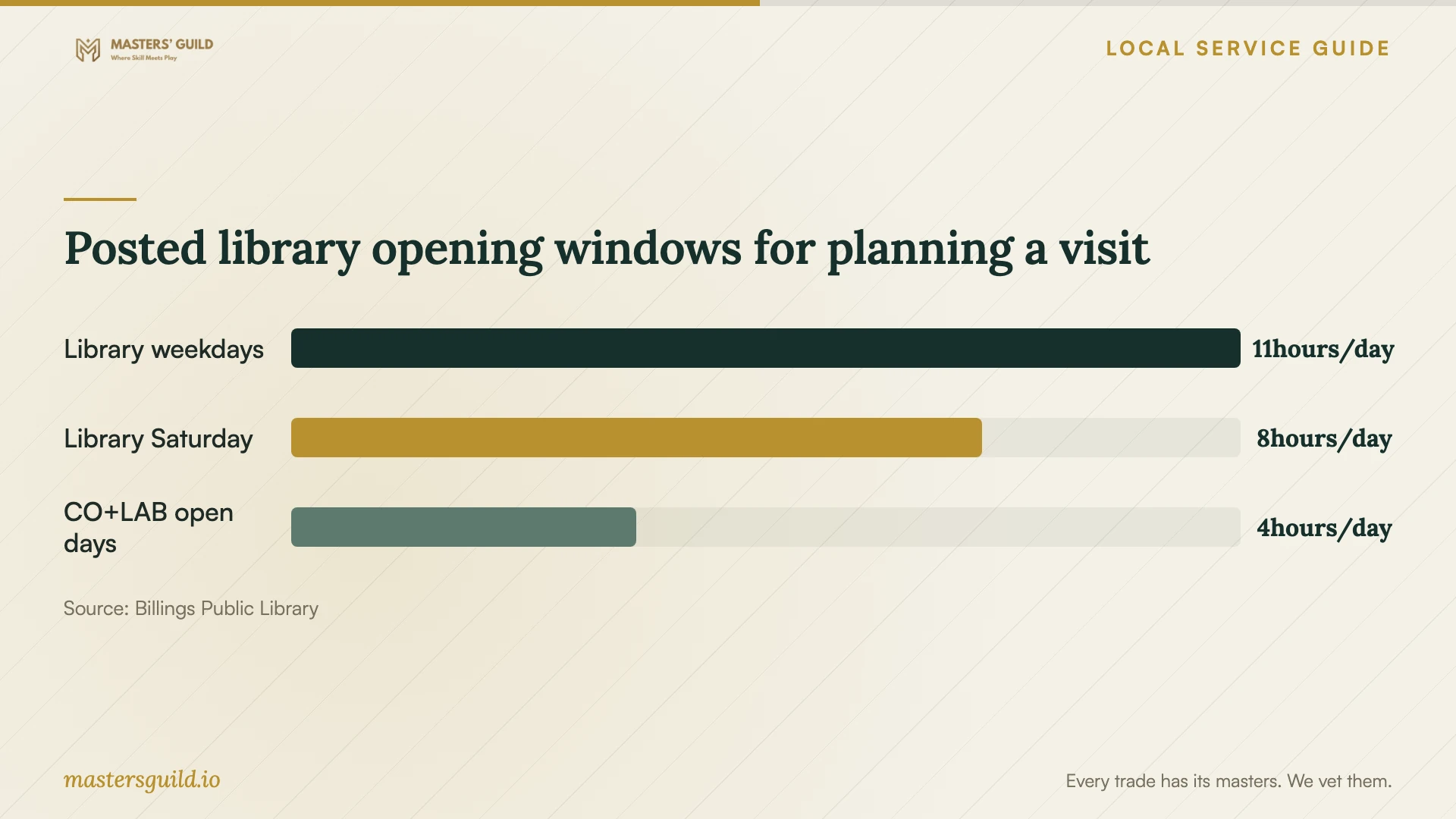
Posted library opening windows for planning a visit
Local details that affect your job
A local worksite training route
City College develops customized training contracts for local businesses and describes delivery at employer worksites as well as on campus. If you want staff to practice together at your premises, ask its workforce team for a worksite proposal. Confirm subject coverage, scheduling, and price before committing. [2]
Separate library access requirements
Universal Class registration requires a library card number. For CO+LAB equipment, the library directs users to create a CO+LAB account and get certified; most equipment requires certification. CO+LAB2GO kits do not. Choose the learning format before arranging access or hiring an instructor to accompany your staff. [1] [3]
Statewide career-training eligibility
Montana’s Department of Labor & Industry provides a WIOA Eligible Training Provider List with searches by school and program. For an employee considering career training, use this statewide resource to investigate programs and ask Job Service about individual eligibility and assistance before including funding in the budget. [4]
Choose a training route
| Your goal | Route to consider | Confirm before committing |
|---|---|---|
| Independent technology study | Library Universal Class courses, free to patrons | Library card registration and a syllabus that fits the task |
| A shared workplace software task | City College customized business training | Subject coverage, worksite arrangements, schedule, and contract price |
| Hands-on fabrication equipment learning | CO+LAB programs and equipment certification | Certification, reservations, materials, and permitted use |
| Career training connected to WIOA | Montana’s Eligible Training Provider List | Program suitability and individual assistance eligibility |
Your hiring checklist
- Name the software, version, and task each learner should complete.
- Describe starting skills and ask how the instructor will handle differences.
- Request a sample exercise that resembles your business work.
- Get a total quote with preparation, travel, materials, and follow-up identified.
- Confirm devices, accounts, permissions, and any equipment certification.
- Prepare practice files with sensitive information removed.
- Agree on cancellation, recording, and additional-work terms.
- Set a practice task to check progress after instruction.
Frequently Asked Questions
Can staff start with free technology courses?
Billings Public Library offers patrons free Universal Class courses, including technology subjects. Registration requires a library card number. Review the syllabus against your software and intended task before assigning a course to staff. [1]
Can a local program train staff at our workplace?
City College describes customized training contracts with courses delivered at employer worksites and on campus. Past courses include software and skills training. Ask workforce staff whether they can cover your task and provide a current proposal. [2]
Can staff use CO+LAB equipment without certification?
Most CO+LAB equipment requires certification before use. The library directs users to create a CO+LAB account and get certified. Its take-home CO+LAB2GO kits do not require certification. Confirm the requirements for your intended equipment. [3]
How should I compare instructor quotes?
Give each instructor the same task, learner description, and expected outcome. Compare the complete fee, practice materials, preparation, and follow-up. Ask how learners will demonstrate the skill without help before agreeing to a package.
Sources and scope
This guide combines the sources below with practical planning guidance. Figures apply to the stated geography and period; request a written quote for your property.