
Local service guide
Computer Virus Removal in Billings, MT
For Computer Virus Removal in Billings, choose a technician you have researched and agree on diagnosis, file preservation, price, and return timing before authorizing repairs. Tell the technician if a suspicious caller accessed the device. Montana’s Department of Justice warns that unknown remote operators can install malicious software and steal personal information. Include a review of that access in your repair request. [1]
Describe symptoms and request a diagnosis
Montana’s internet-security guidance identifies repeated pop-up ads, unwanted browser redirects, unexpected toolbars, random error messages, and sluggish performance as possible spyware clues. Use those observations to describe your problem. Ask the technician to explain the findings before you authorize cleanup or a reinstall. [3]
Prepare a short intake note with your computer model, operating system, recent downloads, and security programs you have used. Explain whether the computer starts and which household tasks you cannot complete. Include any support call, remote session, or software installation that preceded the problem.
Agree on the repair and protect your files
Request a written scope with separate charges for diagnosis, malware removal, operating-system repair, backup, and reinstall work. Clarify what you owe if you decline the repair and whether the provider credits the diagnostic fee toward approved work. Compare the same tasks across quotes.
Before booking, follow this sequence: identify the files you need to preserve, describe your existing backups, agree on an approval limit for additional work, and confirm the target return date. Ask the technician to contact you before erasing a drive or changing the agreed scope.
For a proposed reinstall, specify which documents and applications you want restored. Agree on who will check that the files open, how the technician will handle temporary copies, and which account or application details you must supply. For drop-off service, request a receipt identifying the device and accessories.
Montana’s guidance recommends operating-system and browser updates, security software, and firewall protection to reduce spyware and adware risk. Include a review of those settings in your requested handover, and ask the technician to explain which updates you will manage afterward. [3]
Verify remote support and payment instructions
Research the person or company before granting access. In its September 30, 2022 enforcement notice, Montana’s Department of Justice described cold callers who offered virus removal while installing malicious software on victims’ computers. The agency urged consumers to investigate alleged support providers before engaging them. [1]
For remote service, agree on the access software, session time, and procedure for ending access. If a stranger already connected, request a review of installed remote-access tools and explain what the caller asked you to do. Montana officials warn that unknown operators can install keystroke-recording software, steal login credentials, or hijack a computer. [1]
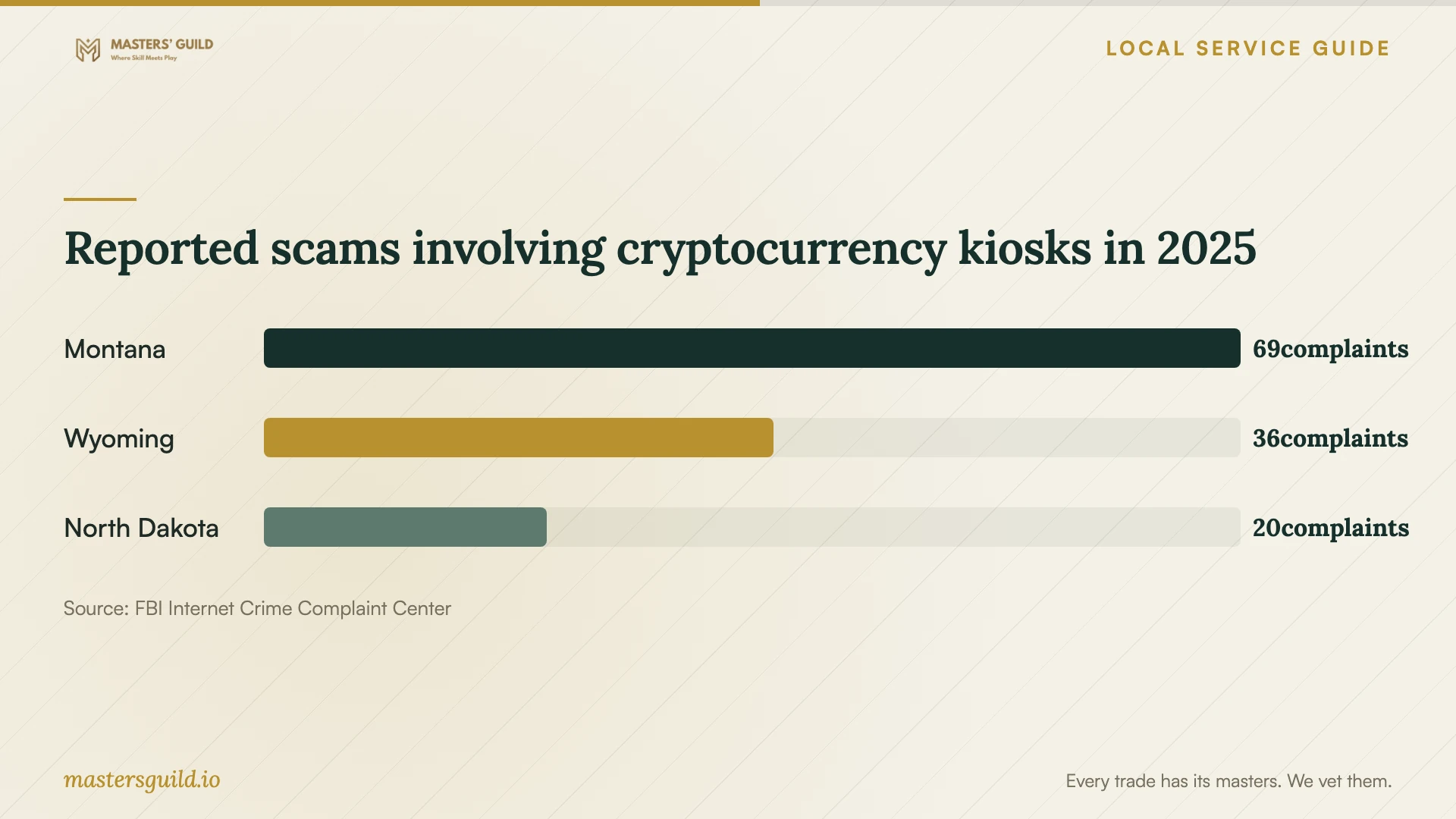
Stop before following an unfamiliar caller’s instructions to scan a QR code and pay through a cryptocurrency kiosk. The FBI advises against those instructions and recommends contacting the claimed company for verification. Keep receipts and transaction documentation if you already sent money. [4]
Check the result and handle account exposure
Montana’s phishing guidance advises consumers to contact a company through a known, legitimate number or website rather than a suspicious message. If you disclosed financial information, contact the affected institution alongside arranging the repair. The guidance also recommends contacting the credit-card company and placing fraud alerts with credit bureaus after phishing disclosures. [3]
At handover, request a written account of what the technician found, changed, and left unresolved. Try the activities that first showed the problem and check your essential files. Clarify the follow-up terms, any further charges, and whom to contact if the symptoms return.
If you choose replacement, plan file transfer and drive erasure before recycling. Billings Public Works limits its free e-waste program to residential waste and directs business-generated electronics to a paid option through Yellowstone E-Waste Solutions. Confirm which category applies before arranging disposal. [2]
Reported scams involving cryptocurrency kiosks in 2025
Local details that affect your job
Montana help for questionable support offers
The Montana Department of Justice’s September 30, 2022 tech-support enforcement notice listed 800-481-6896 for speaking with an Office of Consumer Protection specialist. Confirm the office’s current contact information before relying on that historical listing. Prepare the caller’s name, payment requests, receipts, and a timeline of remote access if you seek help evaluating an offer or reporting what happened. [1]
Residential computer recycling in Billings
Billings Public Works lists free residential electronic-waste recycling through its partnership with Yellowstone E-Waste Solutions. Yellowstone County residents qualify, and accepted items include computers and accessories. The page lists Billings Regional Landfill at 5240 Jellison Road and the Environmental Compliance Coordinator at 247-8633. Confirm the drop-off location, intake arrangements, and accepted accessories before traveling. Ask your technician to finish file transfer and drive erasure first. [2]
Choose the next step for your situation
| Situation | Next step | Question for the technician |
|---|---|---|
| Pop-up ads, redirects, or unfamiliar toolbars | Request diagnosis of possible spyware symptoms. | What did you find, and which repair do you recommend? |
| A suspicious caller accessed the computer | Include a review of remote-access tools. | Which tools or settings did the caller change? |
| Essential files without a checked backup | Agree on file preservation before authorizing changes. | How will you check that my needed files remain usable? |
| You are considering replacement | Compare repair, transfer, and replacement expenses. | What would file transfer and drive erasure cost? |
| You plan to recycle a business computer | Arrange the paid business option rather than residential intake. | Who will confirm acceptance and disposal charges? |
Your hiring checklist
- Record the symptoms, recent downloads, and any suspicious support calls.
- List your device model, operating system, and security software.
- Identify essential files and describe your existing backups.
- Compare itemized scopes and clarify diagnostic charges.
- Set an approval limit and require consent before drive erasure.
- Agree on intake, return timing, and progress updates.
- Request a completion note, check your files, and clarify follow-up terms.
Frequently Asked Questions
Do pop-ups prove that my computer has a virus?
Montana lists a barrage of pop-up ads among possible spyware clues. Request diagnosis rather than selecting a repair from that symptom alone. The state also advises against clicking links inside pop-up windows. [3]
What should I agree on before booking?
Agree on the proposed tasks, diagnostic charge, file-preservation plan, approval limit, and target return date. Clarify backup, reinstall, and follow-up charges. Explain any household deadline and ask when the technician will update you if the schedule changes.
Can the free recycling program take a business computer?
Billings Public Works limits the free program to residential e-waste. It identifies Yellowstone E-Waste Solutions as a paid recycling option for business-generated waste. Confirm acceptance and charges before arranging disposal. [2]
What should I do after a cryptocurrency kiosk payment?
Keep receipts and transaction documentation. The FBI advises reporting suspected kiosk fraud to local police and IC3, including available transaction IDs, wallet addresses, kiosk location, and information about the person who requested payment. [4]
Sources and scope
This guide combines the sources below with practical planning guidance. Figures apply to the stated geography and period; request a written quote for your property.