
Local service guide
Cloud Service Setup in Billings, MT
Arrange Cloud Service Setup in Billings by asking a technician to quote the devices, files, account permissions, and recovery tests you need. Choose remote help if you can connect and operate the devices yourself; request an in-home visit for hands-on assistance. Keep account ownership and recovery access under your control, and agree on how you will check the completed work before booking.
Define the work before comparing quotes
Write down the outcome you want: family photos accessible on your devices, household documents organized in your account, or a recoverable copy of important files. Ask the technician to identify the folders they will include, who will have access, and the recovery method they will demonstrate. Include those tasks in the quote.
For a migration, name the source drive or account and the destination account. Agree on how the technician will handle duplicates, folder names, and files they cannot transfer. Keep the original copies until you have reviewed the destination and completed the agreed recovery test. Assign responsibility for checking uploads that continue after the appointment.
Check internet access before scheduling uploads
Search your street address on the FCC's National Broadband Map before planning around a new internet connection. You can view the technologies and maximum advertised download and upload speeds that providers report offering at that location. The FCC describes mobile coverage as outdoor or in-vehicle coverage, so do not use that map as confirmation of reception inside your home. [3]
Ask the internet provider to confirm service availability, upload speed, and any usage limits for your intended plan. Give the technician your file volume and request an upload test on the connection you will use. Ask them to separate attended setup work from later upload monitoring when proposing a schedule.
For temporary access, Billings Public Library offers filtered mobile hotspots. Patrons can place holds and collect them at the first-floor help desk or library express lockers. The library limits borrowing to one hotspot per card and suspends service after the 14-day checkout period. Confirm availability and test the intended service before scheduling work around a loan. [1]
Prepare files and keep control of the account
List your devices and existing accounts before the appointment. Mark the folders you want included and separate files you do not want the technician to open. Decide which household members need access to shared folders. Review permission settings with the technician and approve the access you want.
Create or approve the main account yourself. Enter your passwords, check recovery contact details, and ask for help configuring additional sign-in protection. Agree on the technician's access during the job and remove it at handoff. Request written instructions for adding a device, recovering a file, and changing sharing permissions.
For paper records, Billings Public Library offers free scanning to a USB drive or email. Computer users need a valid library card or guest pass. The library allows a total of four hours of internet-terminal use each day on a first-come basis. Plan a preparation visit around those access rules and check your saved scans before leaving. [2]
Agree on charges and completion checks
Ask each technician to price the same device list and tasks. Request separate charges for setup labor, subscriptions, extra storage, and follow-up help. Ask whether the quoted work includes file cleanup, migration errors, and checking unfinished uploads. Use written offers to set your budget; the evidence for this page does not establish local technician prices.
Ask the technician to explain how they will handle private files and demonstrate the tasks you want on your devices. Before accepting the handoff, open selected files on the intended devices, review sharing permissions, and perform the agreed recovery test. Check that you control recovery access and know whom to contact about unfinished work.
Review the cloud provider's privacy notice and process for requesting your data. Montana's Department of Justice explains that the Consumer Data Privacy Act gives covered consumers rights to know, correct, delete, and obtain a copy of personal data. The agency also describes applicability thresholds and exemptions. Check whether the law applies to a provider before relying on those rights. [4]
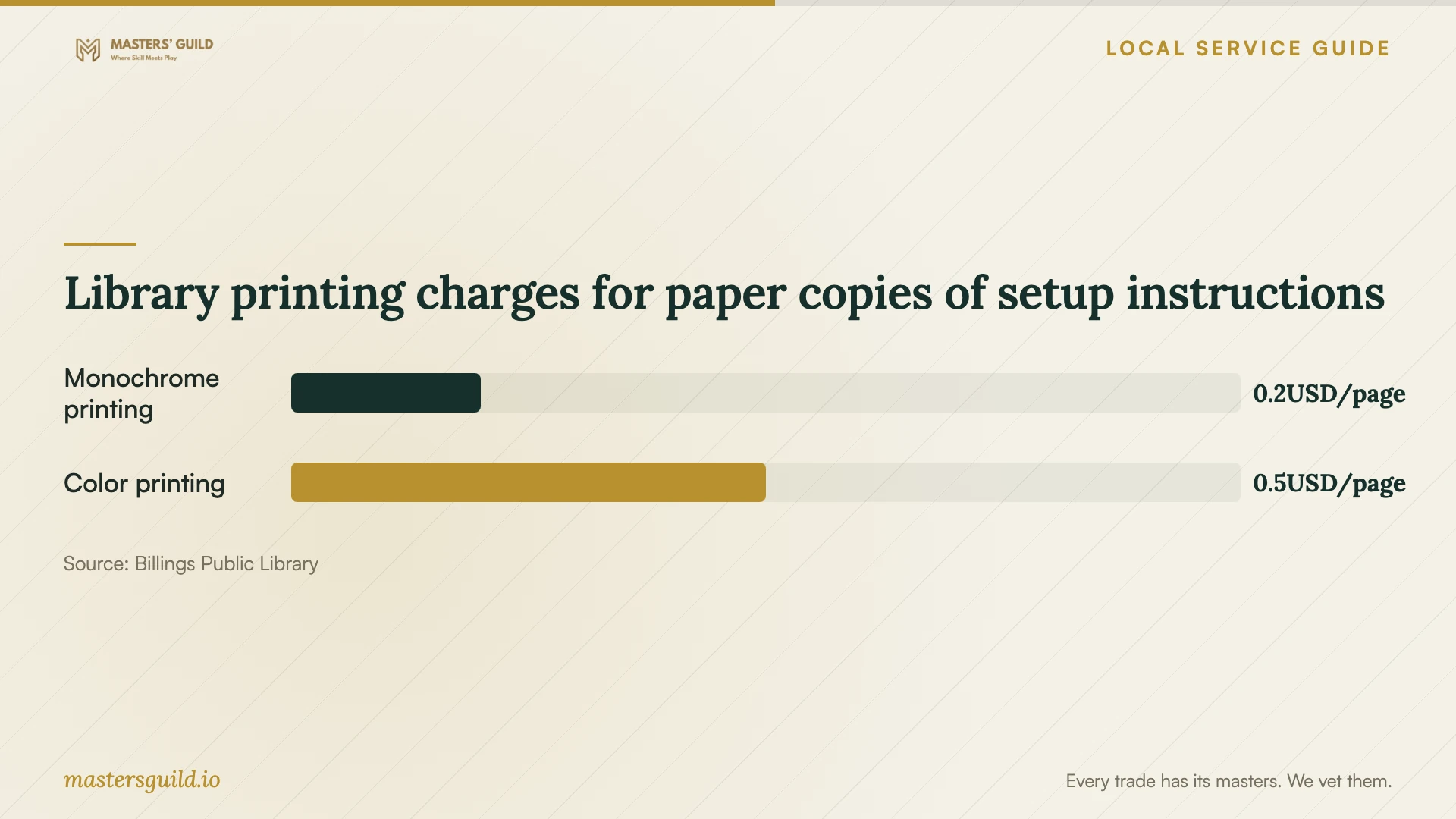
Library printing charges for paper copies of setup instructions
Local details that affect your job
Plan borrowed internet around the return deadline
Billings Public Library lends hotspots for 14 days, then suspends service and charges $1 per day. The hotspots provide filtered access, and patrons can borrow one per card. Confirm availability, test your intended cloud service, and leave time for completion checks before returning the kit. Do not assume a loan will support your entire upload schedule. [1]
Prepare household records at the library
You can use the scanner at the library's second-floor release station to save documents to USB or email without a scanning charge. Consider preparing selected household records there before the paid setup appointment. Bring a USB drive if you choose that method, check the scans, and name the files before handing them to a technician. [2]
Choose a setup arrangement
| Your situation | Suggested arrangement | Confirm before booking |
|---|---|---|
| You can connect and operate your devices | Request remote setup help | Device list, access method, and completion checks |
| You need hands-on help with devices | Request an in-home appointment | Tasks included and any visit charge |
| You are waiting for home internet | Consider the library's filtered, 14-day hotspot loan | Availability and whether your intended cloud service works |
| You have paper household records | Consider the library's free scanning to USB or email | Documents to scan and where you will save the files |
Your hiring checklist
- List the devices, source accounts, and folders included in the job.
- Choose the account owner and decide who needs shared-folder access.
- Ask the technician to test an upload on your intended connection.
- Prepare selected scans and retain originals until you approve the migration.
- Request separate charges for labor, subscriptions, storage, and follow-up.
- Agree on a recovery demonstration and responsibility for unfinished uploads.
- Check recovery details and remove temporary technician access at handoff.
Frequently Asked Questions
How much should I budget for setup?
Request a written quote for your device list, migration, permissions, and recovery test. Ask the technician to separate setup labor from recurring subscriptions and storage charges. The evidence for this page does not establish a local price range, so compare offers against the same scope.
Can I use a library hotspot for the appointment?
The library lends hotspots with filtered internet for 14 days. Confirm availability and test your intended cloud service before making a loan part of your appointment plan. The library's guidance does not establish upload performance or suitability for a large initial backup. [1]
How can I check internet options at my home?
Search your address on the FCC's National Broadband Map to see provider-reported technologies and maximum advertised upload and download speeds. Confirm the offering with the provider, then ask the technician to test the connection you will use before agreeing on an upload schedule. [3]
What should the technician demonstrate before finishing?
Ask them to open selected files on your intended devices, perform the agreed recovery test, and review sharing permissions with you. Check your recovery contact details and remove temporary access. Request instructions you can follow after the appointment.
Sources and scope
This guide combines the sources below with practical planning guidance. Figures apply to the stated geography and period; request a written quote for your property.