
Local service guide
Software Installation in Baton Rouge, LA
Arrange Software Installation in Baton Rouge by requesting a written quote for your devices, named programs, activation, and a test of the tasks you need. Confirm that you, the intended license holder, can use each package on the intended device. If you plan to use LSU's TigerWare, check its eligibility rules and package terms before authorizing a purchase. LSU warns that its overview may contain dated material. Compare written quotes for the same defined job. [1]
Describe the result you want
Give the technician your computer model, operating-system version, software names, and device count. Say whether you own the licenses or want help purchasing them. Include the exact error message from an unsuccessful installation, with personal information removed.
Specify what you want to do after setup. For a document application, request activation under your account and a demonstration of opening, editing, and saving a sample file. For email, identify the account and any messages or contacts you want transferred. List printer setup, file migration, and instruction as separate requests.
Ask the technician to propose remote work, a home visit, or a drop-off appointment based on your situation. Explain whether the device starts and whether you can connect to the internet. For drop-off work, request a device receipt and agree on how the technician will obtain approval for added work.
Confirm the individual software entitlement
LSU's TigerWare overview describes free and discounted software for current students and active faculty and staff at the LSU Baton Rouge Campus, LSU Law Center, and LSU Ag Center. It requires a valid myLSU ID and password. The overview says incoming students receive access on the first day of their first semester and excludes alumni and retired employees. [1]
The overview excludes LSU Lab School students and faculty, while allowing faculty and staff who hold a dual appointment with the LSU campus and Lab School. LSU last updated the article on September 25, 2024, and warns that it may contain dated material. Confirm your present eligibility and the selected package's terms, including permission to install it on the intended device. Another household member's affiliation does not establish your entitlement. [1]
For any purchase, ask whose account will own the license, whether the subscription renews, and who will keep the receipt. Enter your own account credentials during the appointment. Require your approval before the technician substitutes a program or buys a subscription.
Compare itemized quotes and question tax
Compare written quotes for the same defined job. Request separate amounts for installation labor, software purchases, subscriptions, file transfer, travel or collection, and tax. Ask whether the technician charges a fixed fee or bills for time. Agree on the charge for an unsuccessful activation and the terms for follow-up help.
The Louisiana Department of Revenue states that, effective January 1, 2025, state and local sales and use tax applies to digital products, prewritten computer access services, and information services. Some covered items may have been taxable before that date. Ask the seller which charges they consider taxable and why; this guidance does not settle the treatment of every installation labor charge. [3]
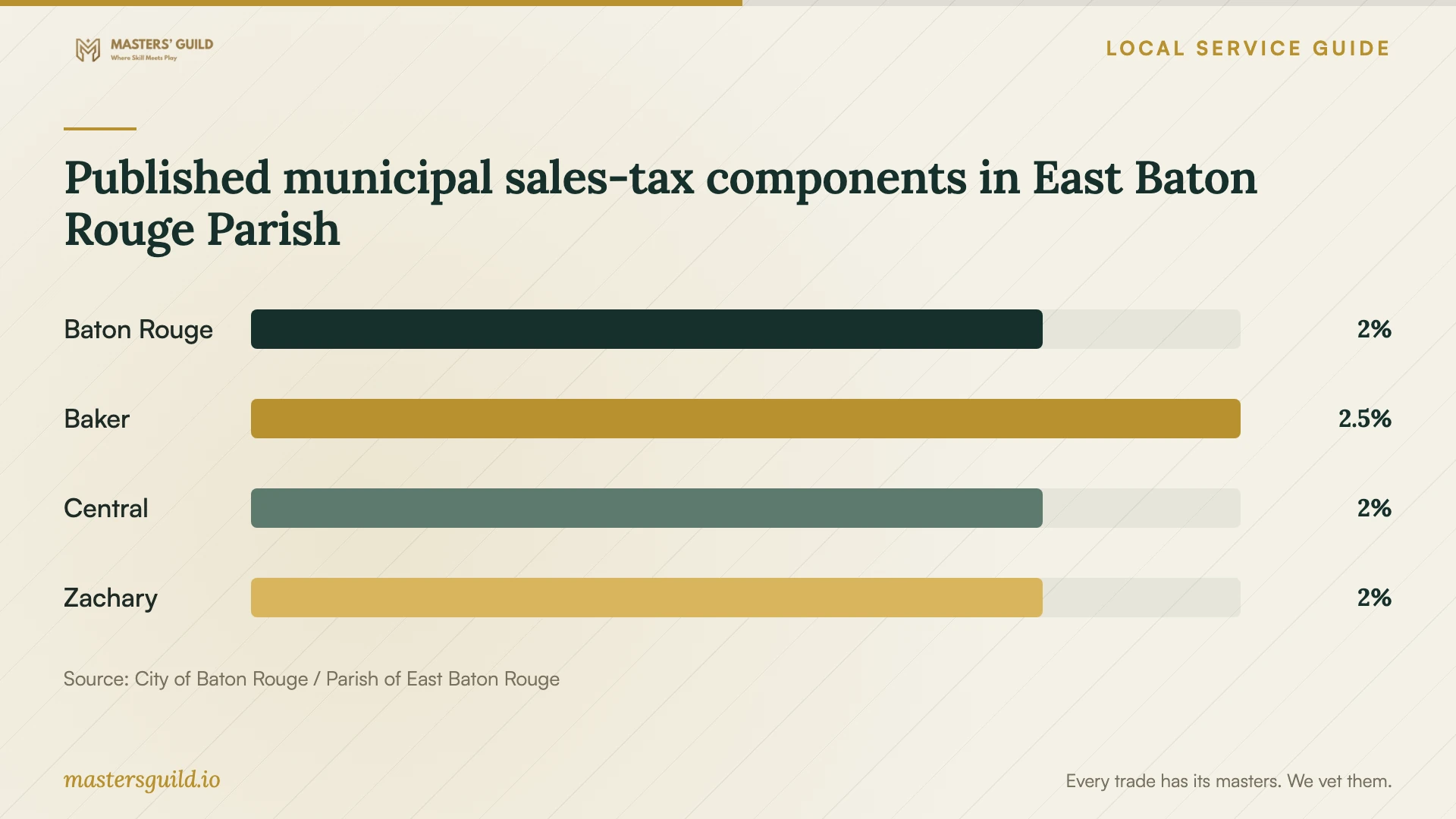
The City-Parish provides an address lookup for identifying a sales-tax domicile and applicable tax column. Ask the seller which address controls the transaction under the applicable sourcing rules, then use the lookup to review that address. The chart shows municipal components from the published table, whose effective dates the page does not state. Confirm applicable charges and rates before calculating tax. [4] [5]
Prepare the device and test the handover
Back up the files you want to keep and open a sample from the backup. Gather purchase receipts and prepare access to account recovery methods. Tell the technician before work begins if you cannot sign in or want an operating-system reinstall. Request an explanation and an approval step for any proposed erasure.
Agree on how you will enter passwords and approve sign-ins. For remote work, ask the technician to explain the access tool and how to end the session. At handover, test the agreed tasks yourself. Request a record of installed programs, versions, license ownership, unresolved problems, and the follow-up arrangement.
Choose instruction when setup already works
East Baton Rouge Parish Library lists Gale Courses covering Microsoft, Adobe, and QuickBooks applications, LinkedIn Learning software and technology tutorials, and Learning Express operating-system and computer-basics resources. The library says patrons can access online databases for free; some require registration or a library-card number. [2]
If your application opens and your main difficulty is using it, review those course topics before booking more installation work. For personal instruction, name the task you want to practice and request a separate training quote. Ask the technician to leave written steps you can follow after the appointment. [2]
Published municipal sales-tax components in East Baton Rouge Parish
Local details that affect your job
LSU access belongs to the eligible individual
Before purchasing software, check whether you qualify under TigerWare's specified campus and individual eligibility rules. The overview includes Lab School restrictions and flags dated material. Confirm the selected package's current terms and intended-device permission. Do not assume that another household member's LSU affiliation authorizes your installation. [1]
Parish-library learning can change your booking
East Baton Rouge Parish Library lists application courses, software tutorials, and computer-basics resources. Check course topics and account or card requirements before paying for instruction. The cited page describes learning resources and does not promise home installation or device repair. [2]
Check the tax domicile for the relevant address
The City-Parish Sales Tax Domicile Lookup accepts an address number and street name to identify an applicable tax column. For an unresolved address or further tax questions, the page gives taxpayer assistance at 225-389-3084. Ask the seller to confirm which transaction address applies before using the lookup. [5]
Match the appointment to your problem
| Your situation | Next step | Define completion |
|---|---|---|
| You own a license and want setup | Confirm device permission and quote installation plus activation | Open, edit, and save a sample file |
| You want to use TigerWare | Confirm your individual eligibility under LSU's specified rules and the package's intended-device terms | Install only after confirming authorization |
| The application works but you need instruction | Review parish-library learning resources or request personal training | Practice the task you wanted to learn |
| You want an operating-system reinstall | Agree on backup, file retention, and erasure before work | Check retained files and agreed applications |
| The quote includes unexplained tax | Ask for taxable charges, sourcing rules, and confirmed rates | Receive an itemized explanation |
Your hiring checklist
- List devices, operating-system versions, applications, and tasks to test.
- Confirm your license ownership and permission for each intended device.
- Check individual eligibility and package terms before using institutional software.
- Back up important files and open a sample from the backup.
- Prepare receipts, account recovery access, and your own sign-in approvals.
- Request an itemized quote and an approval process for added work or erasure.
- Test the agreed tasks and retain the installation and follow-up record.
Frequently Asked Questions
Can I use TigerWare through someone else in my household?
Do not treat their affiliation as your entitlement. LSU's overview specifies eligible individual users and campuses, includes Lab School restrictions, and warns of dated material. Confirm your own eligibility and whether the particular package permits installation on your intended device. [1]
Can LSU alumni download TigerWare software?
The cited overview excludes alumni and retired employees under its license agreements. Because LSU flags the article as potentially dated, confirm any separate entitlement you may hold before arranging an installation. [1]
Does the library offer installation at home?
The cited library page describes courses, tutorials, and learning databases. It does not offer a home installation service. Use its resources to plan instruction or decide whether learning the application addresses your problem. [2]
How should I compare installation prices?
Give each technician the same devices, programs, and completion tasks. Request separate labor, purchases, subscriptions, extras, and tax amounts. Ask about failed activation, approval for added work, and follow-up charges. Confirm which quoted charges the seller considers taxable under Louisiana's guidance. [3]
Sources and scope
This guide combines the sources below with practical planning guidance. Figures apply to the stated geography and period; request a written quote for your property.