
Local service guide
Network Setup and Support in Baton Rouge
For Network Setup and Support in Baton Rouge, hire someone who will diagnose the connection, define the rooms and devices to serve, and quote configuration and cabling separately. Before approving equipment purchases, agree on completion tests and account handover. If the installation includes a new or extended electrical circuit, check the City-Parish permit requirements before work starts. [1]
Choose a diagnostic visit or a defined installation
Start with the problem you want the technician to solve: dropped calls at a desk, a bedroom without usable Wi-Fi, or a move that requires reconnecting equipment. List the affected devices and note whether the problem occurs throughout the home or in particular rooms. Ask for a diagnostic visit if you cannot yet describe the installation you need.
For a planned installation, name the rooms that need coverage and the locations where you want wired connections. Ask the technician to explain the proposed router location, access points, and cable routes. Request a reason for each equipment purchase and agree on whether you or the technician will supply it.
Check internet options at your address
The FCC lets you search an address and compare providers that report service there, their connection technologies, and maximum advertised download and upload speeds. Use those details when discussing your current plan with a technician. Treat them as reported availability and advertised speeds, then ask the provider to confirm service and installation terms. [4]
ConnectLA also provides a Louisiana location-level broadband map through GUMBO 2.0. The state describes an expansion effort intended to close coverage gaps by 2028, or sooner. For a home here, distinguish a confirmed installation offer from a future expansion plan before committing to equipment for a proposed connection. [3]
Ask the technician to compare your connection near the router with the connection in the rooms where you have trouble. Request a written explanation of the findings and the next step: provider troubleshooting, configuration changes, equipment placement, or a proposed cable installation. Avoid approving a hardware list without a diagnosis.
Make cabling and electrical work separate decisions
Before approving in-wall cables, ask for the route, outlet locations, termination work, testing, and wall repair responsibilities in writing. Discuss visible cable runs if you want to avoid opening walls. If you rent, obtain the owner's approval for drilling and permanent alterations before scheduling that work.
The City-Parish residential guidance lists new electrical circuits, replacements and extensions of existing circuits, and structural wall modifications as permit triggers. It does not settle whether your particular Ethernet installation needs a permit. Describe the proposed work to Permits & Inspections and ask the installer to identify who will handle any required application and inspection. [1]
Compare quotes without inventing a local price
Request separate amounts for diagnosis, configuration, equipment, cable installation, wall repairs, and follow-up support. Ask whether the quote includes a return visit if an agreed completion test fails. For hourly work, agree on an initial spending limit and require approval before the technician exceeds it.
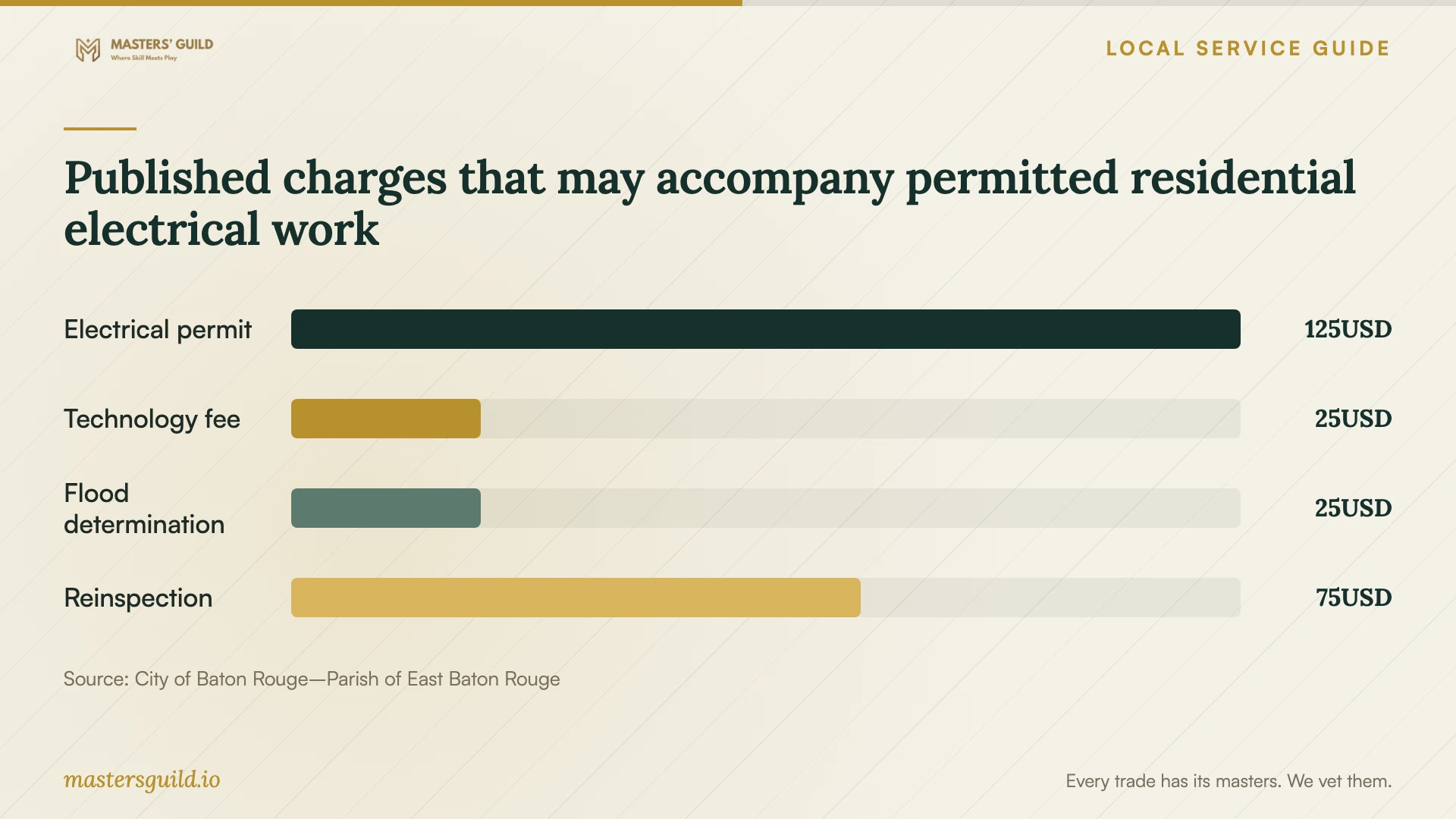
The City-Parish publishes a $125 residential electrical trade permit fee, plus listed charges such as a $25 technology fee and $25 flood zone determination fee. Use the chart to discuss applicable charges if the network project includes permitted work. Confirm which charges apply to your application; these figures do not establish a total project price or a fee for routine router setup. [2]
Agree on testing and handover before the visit
Choose the tasks you will use to accept the work, such as making a video call from your desk, connecting a printer, and using the network in an agreed room. Ask the technician to record test locations and results. For new cable connections, request labels and the agreed cable test results.
Keep control of the network's administrator account. Arrange access to provider equipment and account details without sending passwords in the job description. At handover, request an equipment list, a simple connection diagram, and instructions for obtaining support. Agree on any remote access and how you will remove it when support ends.
Published charges that may accompany permitted residential electrical work
Local details that affect your job
Use the City-Parish application route for accompanying building work
The City-Parish directs residential permit applicants to MGO Connect and its application instructions. If your proposed network equipment needs a new electrical circuit, or the cable route involves structural wall modifications, resolve the permit scope before scheduling installation. Ask who will submit the application and arrange required inspections. [1]
Check Louisiana expansion plans before choosing equipment
ConnectLA's GUMBO 2.0 map lets you inspect broadband need by location across Louisiana. Its stated expansion goal extends to 2028, or sooner, so do not assume planned service is available at your home today. Confirm an installation offer with the provider before choosing equipment around that future connection. [3]
Match the job scope to your next step
| Your situation | Next step | What to request |
|---|---|---|
| You cannot identify the cause of dropouts | Arrange diagnosis before equipment purchases | Recorded findings and a proposed remedy |
| You want coverage in specified rooms | Request a placement and configuration proposal | Equipment list and room-level acceptance tests |
| You need wired connections | Review routes before approving installation | Locations, labels, testing, and repair responsibilities |
| The project includes a new electrical circuit | Resolve the City-Parish permit scope | Application responsibility and applicable fees |
| You are considering a different internet provider | Check address-level reported options | Provider confirmation of availability and installation terms |
Your hiring checklist
- List affected rooms, devices, symptoms, and times when the problem occurs.
- Record your internet plan and existing modem, router, and access point models.
- Confirm reported address-level service options with the provider.
- Mark proposed wired connection locations and discuss cable routes.
- Request separate quote lines for equipment, labor, repairs, and applicable permits.
- Agree on completion tests, spending limits, and approval for extra work.
- Request administrator access, equipment records, and follow-up support terms.
Frequently Asked Questions
Do I need a permit for router setup or Ethernet cabling?
The supplied City-Parish guidance does not establish a permit requirement for ordinary router configuration or settle the requirements for a particular Ethernet cable route. It lists new, replaced, or extended electrical circuits and structural wall modifications as permit triggers. Ask Permits & Inspections about your exact scope. [1]
Does the broadband map guarantee the speed I will receive?
The FCC describes provider-reported availability and maximum advertised speeds. Use the map to investigate options, then confirm service with the provider. If the reported availability at your address is incorrect, the FCC offers an Availability Challenge process. [4]
Should I buy a mesh system before hiring someone?
Ask for a diagnosis and placement proposal first. Have the technician explain the equipment choice, connection between devices, and tests you will use to accept the installation. Agree on who supplies the hardware and who handles returns.
What should I receive when the technician finishes?
Request administrator access, an equipment list, connection labels, agreed test results, and support instructions. Confirm which accounts you control and whether the technician retains remote access. Put follow-up support terms in writing before approving the job.
Sources and scope
This guide combines the sources below with practical planning guidance. Figures apply to the stated geography and period; request a written quote for your property.