
Local service guide
Cloud Service Setup in Baton Rouge, LA
For Cloud Service Setup in Baton Rouge, hire a technician for a defined result: connect your chosen devices, transfer agreed folders, configure household access and demonstrate file recovery. Request a written scope with separate setup and subscription charges, plus responsibility for unfinished uploads. Keep account ownership, billing and recovery access in your name.
Define the work and compare complete quotes
Start with the result you want: photos accessible from selected devices, a shared family folder or recoverable copies of household documents. List the computers, phones and tablets involved, the folders to include and anything the technician must leave untouched. Identify who needs access to each shared folder.
Request separate charges for setup, migration, device configuration and follow-up. Before approving a subscription, review the proposed storage allowance, renewal terms and billing owner. Have each bidder explain how they would handle duplicate files, inaccessible accounts, storage shortages and work outside the agreed scope.
Choose remote help if you can connect the equipment and follow instructions yourself. Request an in-home appointment if you want someone to work through the devices beside you. Agree on whether the price includes a completion review after the initial appointment and how the technician will charge for additional work.
Check your address before scheduling the transfer
The FCC’s broadband map lets you search your street address and inspect provider-reported availability, connection technologies and maximum advertised download and upload speeds. Use it to identify possible service options, then confirm availability with the provider. Measure your current upload performance when planning the cloud transfer. [3]
Have the technician record the selected data volume and measured connection performance before proposing a transfer schedule. Agree on which equipment should remain running, how to recognize an interruption and who will review errors or incomplete folders. Keep the original files until you approve the results.
If you plan to change internet service, separate account preparation from the main upload until you have a confirmed activation date. You can use the planning appointment to inventory files, settle household permissions and review subscription choices.
Keep account control and define recovery
Create the account with an email address and recovery method you control. Enter passwords and verification codes yourself. Agree on any temporary technician access and remove it at handover. Store account and recovery instructions somewhere you can reach without signing into the cloud account.
Decide whether your priority is shared access, file recovery or both. Require the technician to explain how the proposed service handles edits and deletions, including any recovery restrictions. Use a disposable sample file for the demonstration so you can see the steps without risking an important document.
Accept the work through demonstrations
At handover, open agreed files from the selected devices, test each household member’s permissions and recover the sample file. Review a written list of completed folders, outstanding uploads and errors. Record who will confirm completion and when you should expect that review.
Choose essential documents to keep offline and test them with the internet disconnected. Have the technician demonstrate how to check transfer status and resume work after an interruption. Keep those instructions with your household emergency information.
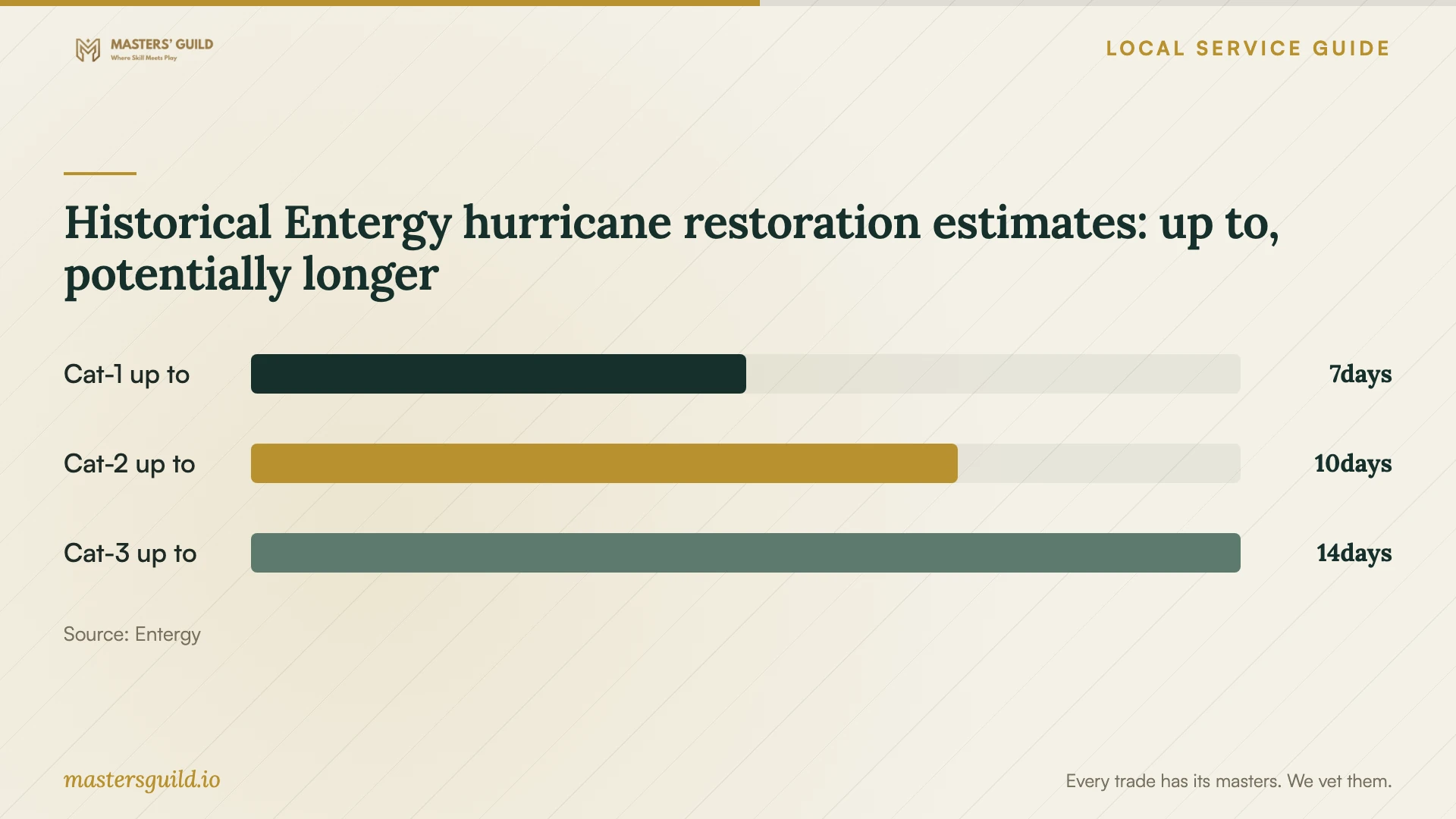
Entergy’s September 2024 Francine preparation guidance described conditional hurricane restoration estimates across affected parts of its service area and warned that storm complexities could extend them. Use that regional history to discuss offline access and recovery preparation. It does not predict power or internet downtime at your home. [4]
Historical Entergy hurricane restoration estimates: up to, potentially longer
Local details that affect your job
Check library hotspot stock before booking
East Baton Rouge Parish Library offers hotspot borrowing and usage without charge, limits checkout to one per household and does not accept reservations. It lists checkout branches including Main Library at Goodwood, Bluebonnet and Jones Creek. Its eligibility wording names in-parish adults and preferred patrons aged 55+ with accounts in good standing; confirm your eligibility with the branch. Loans start at three weeks. Confirm stock before arranging an appointment, then test reception at home because the hotspots depend on a T-Mobile cellular connection. Require an upload test before planning a large migration around the borrowed connection. [1]
Verify activation separately from Louisiana expansion plans
ConnectLA’s GUMBO 2.0 page provides a map of Louisiana broadband serviceable locations and describes expansion intended to help close coverage gaps by 2028, if not sooner. For a home awaiting improved service, investigate the location on that map and confirm installation and activation with the provider before scheduling the main transfer. Treat the statewide expansion goal as planning context rather than confirmation that a connection is ready at your address. [2]
Match the appointment to your goal
| Your situation | Scope to request | Completion check |
|---|---|---|
| You want selected files on household devices | Account configuration, folder selection and device setup | Open agreed files on each selected device |
| You are moving an existing collection | Inventory, migration and exception review | Review missing files, duplicates and unfinished uploads |
| You want recoverable documents | Recovery configuration, offline selection and instructions | Recover a sample file and open an offline document |
| You need temporary internet | Connection testing before the main transfer | Confirm library eligibility and stock; hotspots are not reservable |
Your hiring checklist
- List devices, folders and household access needs.
- Confirm that you can sign in and use your recovery methods.
- Separate setup, subscription and follow-up charges in the quote.
- Agree on connection testing and responsibility for unfinished transfers.
- Select essential documents for offline access.
- Complete access, permissions and sample recovery demonstrations.
- Retain original files until you approve the transfer.
Frequently Asked Questions
How much should I budget?
Request a quote for your device list, selected files and completion tests. Require separate subscription charges and clarify whether the price includes a later completion review. Agree on the charge for additional work before the appointment.
Can I use a library hotspot?
Consider one after confirming eligibility, stock and reception at home. East Baton Rouge Parish Library specifies T-Mobile coverage dependence and three-week initial loans. Test upload performance before committing to a large transfer. [1]
Does the FCC map show my measured upload speed?
The FCC displays provider-reported availability and maximum advertised speeds. Measure your home connection for appointment planning. If a provider’s availability listing appears inaccurate, the FCC explains how to submit an availability challenge. [3]
Should I delete the original files after setup?
Keep them until you have reviewed the transferred folders, opened sample files and completed a recovery demonstration. Agree on a separate cleanup step so nobody deletes the originals while you are still checking the work.
Sources and scope
This guide combines the sources below with practical planning guidance. Figures apply to the stated geography and period; request a written quote for your property.