
Local service guide
Baltimore computer virus removal: Hiring guide
For computer virus removal in Baltimore, choose a technician you contact through a verified business channel and agree on diagnosis, file preservation, repair authorization, and the total charge before handing over your computer. Ask for separate prices for cleanup, reinstalling software, and recovering files. If a security pop-up tells you to call for help, verify the contact elsewhere: the FTC describes scams that start with fake Microsoft or Apple alerts and a phone number. [4]
Verify the help before granting access
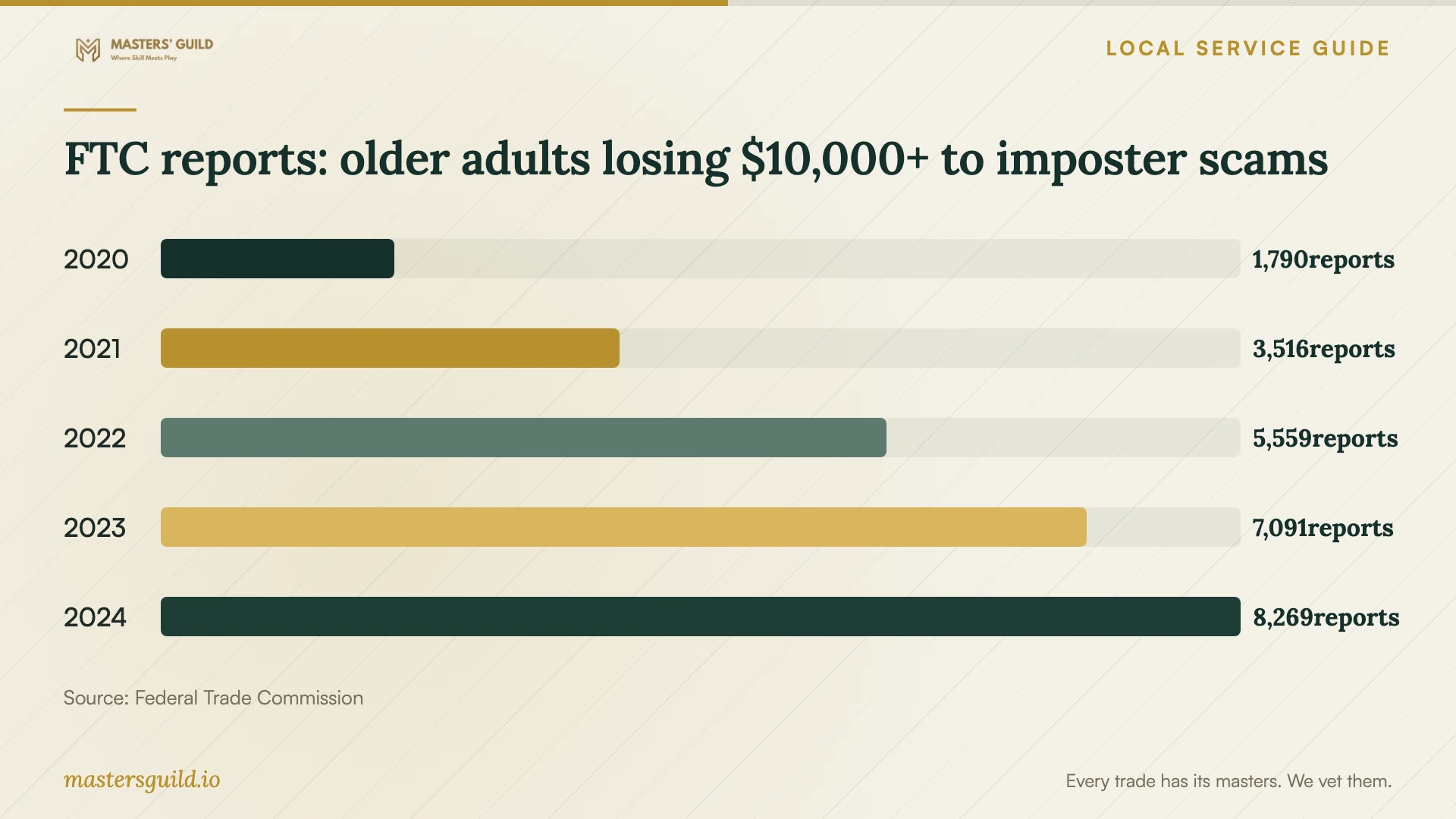
The FTC describes scammers who impersonate Microsoft or Apple through fake security alerts, persuade callers that their accounts face a crisis, and demand money. Follow the agency’s advice: end the call and contact the business or agency through a number or website you know is real. Do not transfer money in response to an unexpected warning to protect an account. [4]
Tell your chosen technician what happened before requesting cleanup. Include whether you called the displayed number, installed a program at the caller’s request, granted access, or sent money. Ask the technician to address any access software you installed as part of the repair scope. Keep account and payment questions separate from the computer repair, and verify any purported bank contact through your own trusted channel. [4]
Choose a repair scope that protects your files
Describe the symptoms without deciding the diagnosis in advance. Write down the warning text, when it appeared, whether the computer starts, and which files you need to keep. Ask the technician to explain the proposed work after diagnosis. Agree on a spending limit and require a call before the technician expands the job.
Separate cleanup from file recovery and reinstalling the operating system. Ask which personal folders the technician will preserve, where they will store any copied files, and when they will delete their copies. If you lack a usable backup, make that clear before authorizing work. Request written approval steps for any action that could erase your files.
For remote help, ask how you will identify the technician and end the session. For drop-off work, request a receipt naming the device and accessories. For a home visit, confirm the appointment window, travel charge, and how the technician will quote work they cannot complete during the visit. Choose the arrangement after discussing your symptoms and file needs.
Compare complete quotes and Maryland tax treatment
Compare written totals for the same proposed work. Ask each provider to identify diagnostic charges, cleanup, file copying, software purchases, travel, and follow-up support. Confirm whether you owe a diagnostic fee if you decline the repair. Request separate approval for subscriptions and ask who will manage cancellation and renewal.
Maryland’s repair regulation excludes labor that restores existing property or a digital product to its original condition or usefulness from tax, unless that labor constitutes a taxable service. The Comptroller’s bulletin applies a 3% rate to specified data, IT, and software publishing services from July 1, 2025. It lists computer disaster recovery and computer software installation among the covered activities. Ask the seller to explain how it classifies each part of your job. [1] [2]
Ask about tax on any added software subscription. The bulletin distinguishes individual-use software as a service, which it taxes at 6%, from qualifying enterprise use at 3%. Request line items and the seller’s explanation of the tax on a combined repair and subscription package. [1]
Agree on handover checks and a replacement plan
Before paying for completed work, ask the technician to demonstrate the agreed checks with you present. Review whether the computer starts, whether you can open the files you asked them to preserve, and whether the original symptom recurs during the demonstration. Request a record of work performed, software added or removed, and any unresolved issue. Ask what follow-up the quoted price includes.
If you prefer replacement, compare the repair total with the cost of a replacement device and help transferring your files. Ask the technician to explain the plan for the old drive before you surrender it. Baltimore City’s Public Works department offers eCycling for old computers and TVs. Confirm current drop-off hours, eligibility, accepted equipment, and data-erasure options with Baltimore City before visiting. [3]
FTC reports: older adults losing $10,000+ to imposter scams
Local details that affect your job
Maryland quotes need a service-by-service tax explanation
For a Baltimore repair, ask the provider to separate restoration labor from software installation, disaster recovery, and new subscriptions. Maryland exempts qualifying restoration labor unless it constitutes a taxable service, while its IT bulletin assigns 3% tax to specified services. Use this distinction when comparing a basic cleanup quote with a package that includes installation or recovery. Ask for the classification and tax amount before approving the package. [1] [2]
Baltimore City offers an electronics disposal option
Baltimore City Public Works identifies computers and TVs as electronics covered by its eCycling offering. If you decide to replace the computer, confirm the current accepting location, hours, and eligibility before transporting it. Arrange file transfer and drive handling with your technician first. Ask the city about data-erasure options before handing over a device that contains personal files. [3]
Choose your next step from what happened
| Situation | Next step | Question before approval |
|---|---|---|
| A pop-up gives a support number | Use a contact channel you verify, following FTC guidance. | Have I contacted this provider through a trusted number? |
| You granted a caller computer access | Tell your chosen technician what you installed and authorized. | Will the scope address the access software I installed? |
| You need files and lack a usable backup | Require a file-preservation plan before destructive work. | Which actions need my permission before they erase data? |
| The quote combines cleanup and software | Request line items and a Maryland tax explanation. | How did you classify repair labor, installation, and subscriptions? |
| You choose replacement | Arrange file transfer and confirm Baltimore City eCycling arrangements. | Who will handle the old drive and my personal data? |
Your hiring checklist
- Record the symptoms and any contact with a caller claiming to provide technical support.
- Verify the provider’s contact details before granting access or handing over the device.
- Identify the files you need and explain whether you have a usable backup.
- Set a diagnostic fee, spending limit, and approval requirement for extra work.
- Require permission before drive erasure, operating-system reinstallation, or paid software purchases.
- Ask for itemized charges and the seller’s explanation of Maryland tax treatment.
- Agree on completion checks, copied-file deletion, and follow-up terms.
Frequently Asked Questions
How much should I budget for the repair?
Request current itemized quotes after describing the symptoms and your file needs. Compare diagnosis, cleanup, recovery, software, travel, and tax as separate items. Set a spending limit and require your approval before the technician adds work or purchases.
Should I call the number in a virus warning?
The FTC advises against using a number in a computer security pop-up. Contact the company through a number or website you know is real. The agency describes fake alerts that impersonate Microsoft or Apple and lead callers into scams. [4]
Does Maryland charge 3% tax on all virus removal?
Ask the provider to explain the tax for your specific job. Maryland distinguishes qualifying repair labor from taxable services, and the Comptroller requires vendors to evaluate each service. Request the provider’s treatment of cleanup, installation, recovery, and any software subscription. [1] [2]
Can I recycle the computer if I replace it?
Baltimore City offers eCycling for computers and TVs. Confirm the current accepting location, hours, eligibility, and data-erasure options before visiting. Arrange file transfer and personal-data handling with your technician before surrendering the device. [3]
Sources and scope
This guide combines the sources below with practical planning guidance. Figures apply to the stated geography and period; request a written quote for your property.
- Technical Bulletin No. 56: Sales and Use Tax on Data or Information Technology Services and Software Publishing Services
- COMAR 03.06.01.03: Repairs of Tangible Personal Property, Digital Codes, Digital Products, and Taxable Services
- Hard-to-Recycle Items
- False alarm, real scam: how scammers are stealing older adults’ life savings