
Local service guide
Cloud Service Setup in Baltimore, MD
For Cloud Service Setup in Baltimore, hire a technician against a written scope covering the files you will move, staff access, account ownership, backup recovery, and handover. Request separate setup and subscription charges with Maryland tax treatment explained. Before accepting the work, have the technician demonstrate a file restore and confirm that you control the administrator account. CISA recommends backup testing and limiting third-party access to assigned responsibilities. [1] [3]
Specify the work before requesting offers
Write down what you want staff to do after the appointment: open shared documents, upload photographs from a phone, recover an invoice, or work from another device. List the devices, existing accounts, folders, and people involved. Give each technician the same scope so you can compare proposed work and exclusions.
For a migration, identify what the technician will transfer and what they will leave behind. Include folder organization, sharing permissions, and applications that need separate attention. Agree on a sample of files you will open at the destination before authorizing removal of original copies. Choose examples from the records you need for daily work.
Specify whether you want file sharing, backup configuration, or both. Have the technician explain how you would recover a deleted file and recover business records after losing access to the main account. CISA recommends frequent backups, offline or cloud-to-cloud backup arrangements, and storage deletion protection. It also recommends considering version control. [3]
Compare setup charges and ongoing costs
Compare written quotes for the same migration, access, and recovery scope. Request separate charges for assessment, device configuration, staff instruction, recovery testing, and follow-up support. Separate the technician’s labor from subscriptions and optional support agreements. Record who will pay renewals and who can approve an increase in spending.
Maryland’s Comptroller states that specified data, IT, and software publishing services became subject to a 3% sales and use tax effective July 1, 2025. Its service list includes cloud storage, cloud computing, computer software installation, and computer disaster recovery. Vendors must evaluate each service’s taxability rather than rely on their primary business classification. [1]
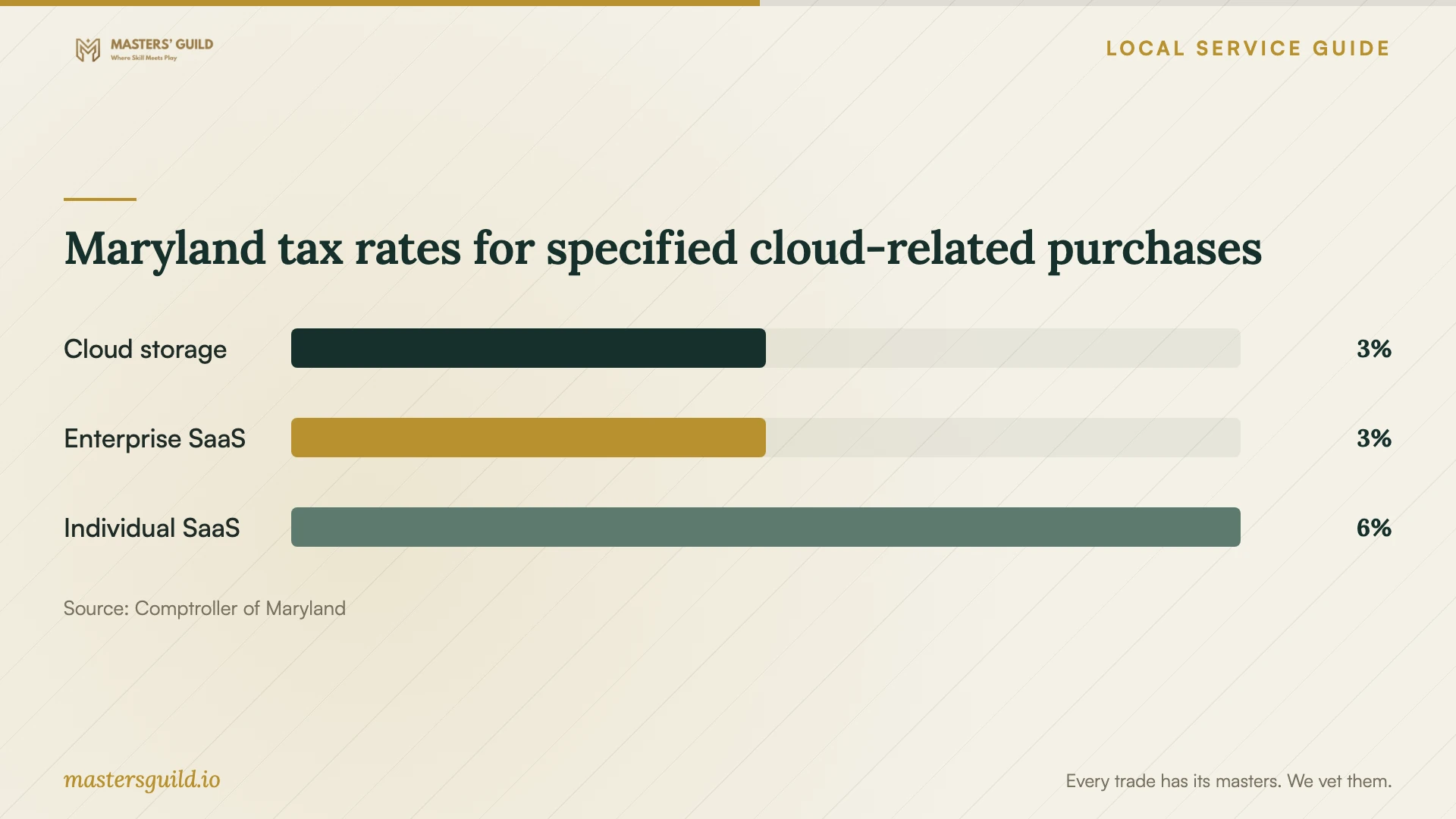
For SaaS, the bulletin distinguishes purchases or licenses solely for use in an enterprise computer system from purchases that do not meet that qualification. Qualifying commercial enterprise-system SaaS attracts 3% tax. Individual-use SaaS attracts 6%. A business buyer’s nonqualifying SaaS purchase can also attract 6%, because Maryland requires the higher applicable rate when a purchase meets both digital-product and taxable-service definitions. Have the seller explain each classification, including any mixed-use purchase. [1]
Keep control of accounts and technician access
Designate an owner or employee to control billing, recovery information, and administrator access. Record who can add users, change permissions, and cancel subscriptions. Include a procedure for removing an employee’s access while retaining the business files they managed. Keep the account and renewal records somewhere the designated owner can find them.
CISA recommends phishing-resistant multifactor authentication, separate administrator and everyday user accounts, and access limited to what each person needs. It also recommends restricting third-party access to devices and servers within their responsibilities. Have the technician explain how they will apply those controls to the services you choose. [3]
Agree on technician access before the session. Request the name of any remote-support software they intend to install and an explanation of access they want to retain afterward. At handover, review their permissions and remove access you have not agreed to keep. Put any continuing support arrangement in writing, including how you can end it.
Accept the setup through a working demonstration
Have a staff member sign in, open a migrated file, edit a shared document, and confirm that another intended user can access it. Test a restricted folder with an account that should lack access. Record the results and any unfinished transfers before accepting the work. Agree on who will finish outstanding tasks and how you will check them.
Request a restore into a separate test location, then open the recovered file. CISA recommends testing backup procedures and checking backup availability and integrity in a disaster recovery scenario. For critical records, discuss its recommendation for offline, encrypted backups as part of your recovery plan. [3]
Keep a short handover document covering account ownership, backup responsibilities, the restore procedure, renewal terms, and support arrangements. Name the person who will check backup results and arrange future recovery tests. Have that person follow the instructions during handover so you can resolve unclear steps before the technician leaves.
Maryland tax rates for specified cloud-related purchases
Local details that affect your job
Maryland tax changes the quote comparison
For your Baltimore purchase, request separate Maryland tax classifications for setup services and subscriptions. The Comptroller lists cloud storage among services subject to 3% tax. Its 3% commercial enterprise SaaS treatment requires purchase or licensing solely for use in an enterprise computer system; nonqualifying SaaS can attract 6% even when the buyer operates a business. The bulletin also treats each subscription payment as a separate sale. Compare recurring totals alongside the appointment charge. [1]
Use Baltimore’s free training for basic skills
Enoch Pratt Free Library offers free computer classes covering Microsoft Office and Google applications, plus access to Digital Learn tutorials on cloud storage. Its computer-training page lists branch and virtual options. Contact the training team at 443-984-4944, Monday through Friday from 10 am to 2 pm, to confirm whether a class fits your needs. Use that answer to decide how much basic instruction to include in your paid job; specify migration and permission testing separately. [2]
Choose the scope that fits your task
| Your task | Suggested next step | Acceptance check |
|---|---|---|
| Learn basic cloud-storage skills | Check Pratt Library’s free classes and cloud-storage tutorials | Confirm the course covers the task you want to learn |
| Move existing business files | Request a migration scope with exclusions and an original-copy retention plan | Open selected files at the destination and check folder organization |
| Give staff shared access | Request role-based permissions and separate administrator access | Test an authorized user and a user who should lack access |
| Protect critical records | Include backup configuration and recovery testing in the scope | Restore a sample file and review the offline-backup plan |
Your hiring checklist
- List devices, users, existing accounts, and the folders you want moved.
- Choose an owner for billing, recovery details, and administrator access.
- Request separate prices for setup, subscriptions, and continuing support.
- Have the vendor explain Maryland tax treatment, including the solely-for-enterprise-system-use qualification for SaaS.
- Agree on temporary technician access and any retained support access.
- Test migrated files and staff sharing permissions before removing originals.
- Watch a file restore and keep instructions that your designated employee can follow.
Frequently Asked Questions
Can I use free local training before hiring someone?
Pratt Library offers free computer classes and links to cloud-storage tutorials. Consider those options for basic tasks, then decide whether to hire a technician for migration, account permissions, or recovery testing. Confirm the class topic and availability with the library before scheduling. [2]
Does Maryland charge 3% tax on every business cloud subscription?
No. The Comptroller lists cloud storage among services subject to 3%, but SaaS has separate classification rules. Qualifying commercial SaaS must be purchased or licensed solely for use in an enterprise computer system to receive the 3% treatment. Nonqualifying SaaS can attract 6% even for a business buyer; the higher applicable rate applies. Request a line-by-line explanation. [1]
Should the technician keep administrator access?
Keep administrator ownership within your business and agree on continuing technician access in writing. CISA recommends limiting third-party access to assigned responsibilities and separating administrator accounts from everyday user accounts. Review retained permissions at handover and specify how you can revoke them. [3]
What should I request before signing off?
Request demonstrations of file access, intended sharing permissions, and recovery of a sample file. Keep a list of unfinished work and written restore instructions. CISA recommends testing backup availability and integrity; include that test in the agreed scope and have your designated employee participate. [3]
Sources and scope
This guide combines the sources below with practical planning guidance. Figures apply to the stated geography and period; request a written quote for your property.