
Local service guide
Software Installation in Bakersfield, CA
For Software Installation in Bakersfield, hire a technician after you agree on the programs, devices, activation steps, and completion tests. Ask for separate charges for installation, software purchases, travel, and any repair work. Before buying Office for a household student, check Bakersfield College or CSUB account benefits and desktop eligibility. [1] [2]
Define the installation before comparing quotes
Give each technician the same scope: device model, operating-system version, program name, number of devices, and the task you want to complete. Explain whether you already own the software and whether you need files or settings from another computer. For an error, copy the message and describe the step that triggered it.
Ask the technician to distinguish installation from configuration. Your requested work might include signing in, activating a license, choosing a file location, connecting an email account, or testing a printer from the application. Put those tasks in writing so you can compare offers for the same result.
Request a quote that separates labor, software or subscriptions, travel, backup, and troubleshooting. Ask whether the provider charges a fixed amount or bills for time, what happens if activation fails, and whether you must approve extra work. Avoid approving an open-ended repair while arranging a straightforward installation.
Check household access before buying software
Bakersfield College tells students to sign in through Office using their BC email and password to download Office 365, including Word, Excel, and PowerPoint, at no charge. If someone in your household qualifies, check that access before adding a retail license to the installation budget. [1]
CSUB distinguishes Office for the web from desktop Office. Its web offering requires an active CSUB account, a supported updated browser, and internet access, with no installation required. Desktop access requires an appropriate Office 365 EDU license and available device seats. Ask the account holder to check their license before the technician arrives. [2]
For course-specific software, confirm the exact application with the instructor. CSUB requires instructor-provided or campus-provisioned ArcGIS credentials for student ArcGIS Pro access. The university also explains that ArcGIS Pro has no native macOS application; Mac users need a Windows environment or should discuss campus lab resources with their instructor. Describe that requirement when requesting help. [2]
Choose the service format and protect your files
Ask about remote help if your computer starts, you can access the internet, and you can stay present during the session. Describe any sign-in, connection, or startup problem before accepting that format. For an in-home visit or drop-off, confirm who will handle the device and how you will approve changes.
Back up the files you want to keep before authorizing removal, replacement, or an operating-system reinstall. Ask the technician to explain what they intend to preserve and what they intend to erase. Keep your recovery information available, enter passwords yourself where possible, and avoid putting passwords in the job description.
Agree on how the technician will end a remote session and remove any access you do not want to retain. For a shared household computer, specify which person’s account should own the subscription and where each person should save files. Ask for a short handover explaining the installed applications, account ownership, and any unfinished tasks.
Handle repair charges and taxable purchases
California’s Bureau of Household Goods and Services lists personal computers among the electronic equipment covered by its repair guidance. For repair work, it says service dealers must provide a written estimate including the total price before repairs, quote any trip charge before the service call, and obtain approval for additional repair charges. Use that guidance if your installation job develops into computer repair; it does not establish a registration requirement for every software-only installer. [6]
CDTFA says software and mobile applications delivered over the internet are generally not taxable. If the seller also supplies a backup copy on physical media, such as a flash drive, the entire software sale is usually taxable. Ask the provider to explain the tax treatment of each purchase rather than applying a city tax rate to the whole installation quote. [4]
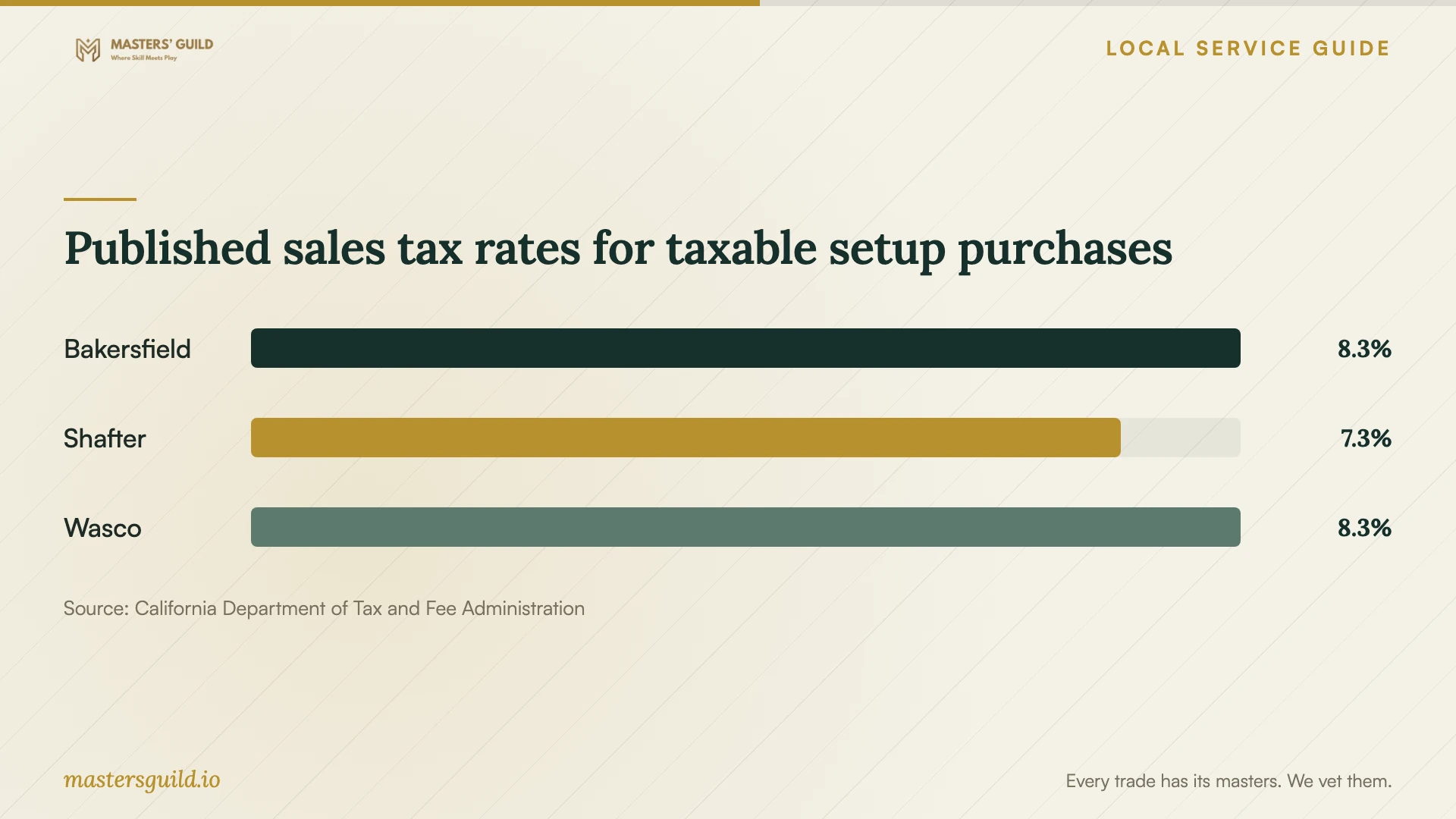
CDTFA’s table effective October 1, 2026 lists Bakersfield’s sales and use tax rate as 8.250 percent. For a taxable purchase associated with setup, verify the applicable address and ask the seller which items attract tax. The chart compares published jurisdiction rates, not technician prices or the taxability of installation labor. [5]
Published sales tax rates for taxable setup purchases
Local details that affect your job
Bakersfield College households: check Office access first
BC students can download Office 365 at no charge using their college account, according to the college’s FAQ. Have the student confirm access before you authorize a software purchase, then specify whether the technician should install Word, Excel, and PowerPoint and test the student’s sign-in. [1]
CSUB households: confirm desktop eligibility
CSUB identifies Microsoft 365 A3 For Faculty and Microsoft 365 A3 For Student Use Benefit as licenses that provide desktop Office access. The university asks users to check their license and available seats before installation. If you need only its web applications, arrange browser access and account setup instead of paying for a desktop installation you do not need. [2]
Kern County Library users: update the app request
Kern County Library ended Hoopla service effective January 1, 2026 and identifies Libby, cloudLibrary, the Palace Project, and Kanopy as continuing options. It restricts Libby and Kanopy access to Kern County residents and offers staff help. Before hiring someone to configure library access, ask library staff which service fits your card and device. [3]
Choose the scope that matches your situation
| Your situation | Arrange | Confirm before work |
|---|---|---|
| You own an application and want it working | Installation, activation, and a sample-task test | Exact version, device compatibility, and included configuration |
| A BC student needs Office | Check college access, then request the needed desktop apps | Student sign-in works before buying a separate license |
| A CSUB account holder needs Office | Choose web access or eligible desktop installation | License type and available desktop seats |
| You want library reading or streaming access | Choose a continuing Kern County Library service | Card eligibility and device fit; Hoopla service has ended |
| The computer needs repair before installation | Request a repair estimate before expanding the scope | Total price, trip charge, diagnostic fee, and approval of extra work |
Your hiring checklist
- List the device model, operating-system version, applications, and desired results.
- Confirm license ownership and any school-account eligibility before purchasing software.
- Copy error messages and tell the technician about startup or internet problems.
- Back up files and agree on any removal or erase steps before work begins.
- Request separate labor, software, travel, and troubleshooting charges.
- Keep the account holder available to enter passwords and approve sign-ins.
- Test activation, a sample file, and any requested email or printer connection.
- Get a handover with unfinished tasks, subscription ownership, and follow-up terms.
Frequently Asked Questions
How much should I budget for installation?
Get an itemized quote for your exact devices and applications. Ask the provider to separate labor from licenses, subscriptions, travel, backup, and troubleshooting. Confirm what the quoted price includes and the amount you must approve before extra work begins.
Should I buy Office before booking help?
Check existing access first. Bakersfield College says students can download Office at no charge through their BC account. CSUB desktop access requires an eligible EDU license and available seats. Ask the account holder to confirm access before authorizing a purchase. [1] [2]
Can someone restore my Kern County Library Hoopla access?
The library ended its Hoopla contract effective January 1, 2026. Ask library staff about continuing services such as Libby, cloudLibrary, the Palace Project, or Kanopy before paying a technician to troubleshoot the discontinued service. [3]
How should I check the work before accepting completion?
Open each requested application under your account, confirm activation, and complete a sample task. Check that you can find and save a file. Test any email, printing, or library access included in the agreement, then ask the technician to document anything still unresolved.
Sources and scope
This guide combines the sources below with practical planning guidance. Figures apply to the stated geography and period; request a written quote for your property.