
Local service guide
Smart Appliance Setup in Bakersfield, CA
For Smart Appliance Setup in Bakersfield, choose a provider who will confirm your exact models, quote the tasks you need, and demonstrate the agreed features on your phone. Separate physical installation from app and network work. If you use PG&E, check your account's rate plan before requesting appliance schedules: its residential plans have different peak windows. [1]
Define a setup appointment you can compare
Send the appliance brand and model number, describe its installation status, and name the task you want completed. Include the phone you intend to use, any existing household hub, and the step where setup stopped. A photo of the model label and the exact error message can help you explain the job without guessing at the cause.
Request separate quote entries for app pairing, network troubleshooting, household access, schedules, and instruction. Agree on a fixed price or hourly arrangement, a limit for troubleshooting, and the approval needed before extra work. Include equipment and return visits in that discussion so you can compare the same scope across offers.
Choose an observable completion test. You might want to open the appliance in your account, receive a supported status notification, and change a schedule yourself. For a connection problem, describe the failure and agree on how the provider will test it. Include what you will pay if the provider cannot complete the agreed task.
Confirm features before paying for integration
EPA discusses remote monitoring, household integration, and grid services as opportunities for connected appliances. It also says connected criteria are optional for products where connectivity is not the primary driver of energy performance. Use those categories to describe your goals, then have the provider check the manufacturer's instructions for your model. [2]
Specify the features you want to use. For example, request a cycle-finished alert or a delayed dishwasher start, subject to model support. Have the provider identify any account, hub, subscription, or other purchase needed to achieve that result before you approve it. Avoid paying for an integration based on a brand name alone.
EPA treats remote management and demand response as separate capabilities in its connected-product guidance. Keep any proposed utility enrollment as a separate decision. Before agreeing, request an explanation of the proposed controls and how you would change or leave the arrangement. [2]
Choose schedules from your actual PG&E plan
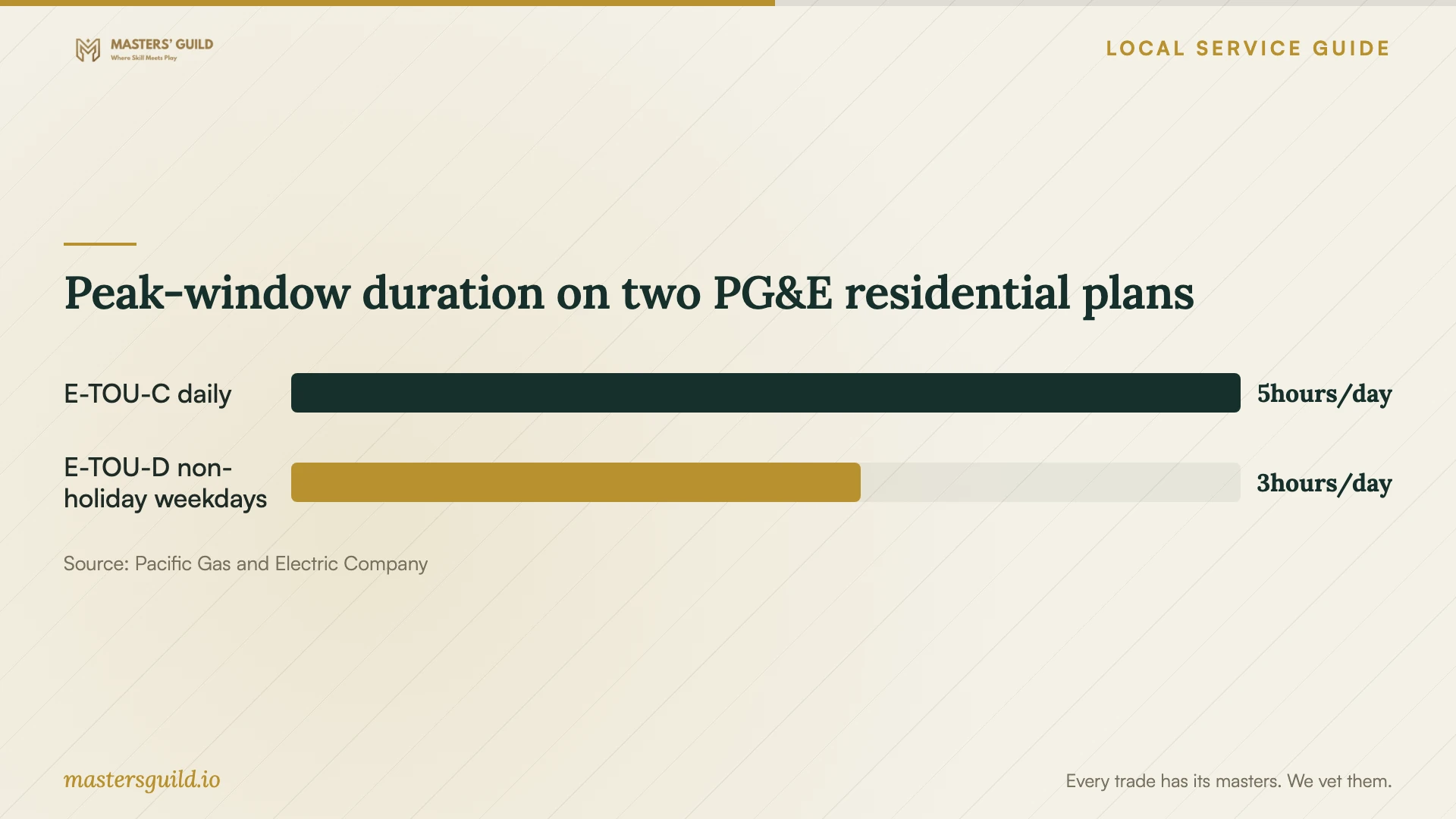
PG&E's E-TOU-C plan has higher-priced hours from 4 to 9 p.m. every day. E-TOU-D has higher-priced hours from 5 to 8 p.m. on applicable weekdays; PG&E identifies weekends and most holidays as off-peak. Confirm your account's plan and applicable holiday treatment before requesting a repeating schedule. [1]
PG&E recommends moving laundry and dishwasher operation to lower-priced off-peak hours. For a compatible appliance, agree on a schedule that follows the manufacturer's operating instructions and suits your household. During handover, practice changing the start time and cancelling the delay rather than relying on a setting you have not used. [1]
For E-TOU-C, PG&E also bases pricing on baseline allowance and whether usage exceeds it. PG&E says that allowance depends on where you live, your heating source, and the season. Treat appliance energy information as one input when reviewing usage; compare it with your account's billing information before drawing conclusions about your total bill. [1]
Arrange physical work as a separate scope
Tell the provider whether the appliance already has its physical installation complete. List any proposed changes to outlets, fixed wiring, water connections, or other building components. Before approving those changes, confirm the applicable contractor licensing and permit requirements with the responsible authorities and record who will handle them.
For an address within Bakersfield city jurisdiction, start with the city's Building Division. The official Building Information Guides page includes an Online Permit Application and Status entry. Describe the proposed physical work to the division and request direction on the applicable permit process before scheduling that part of the job. [3]
Include the jobsite's permitting authority, any required application responsibility, and contractor credential checks in the installation scope. If you rent, obtain the owner's approval for physical changes. Keep the app appointment focused on the tasks you and the provider have agreed to complete.
Prepare accounts and inspect the handover
Charge your phone and have account recovery access available. Sign in yourself when credentials are needed, and keep the appliance under your household account. Discuss any temporary access before granting it. Agree in advance on whether the provider may change router settings and request a record of approved changes.
Operate the agreed features yourself before the appointment ends. Review household permissions, notifications, and schedules. Record the configured models and the steps you would use to reconnect them. Confirm the contact and terms for follow-up if the same setup problem returns, including whether the original price covers another visit.
Peak-window duration on two PG&E residential plans
Local details that affect your job
Your PG&E plan changes the requested start time
For a Bakersfield household using PG&E, check the account before requesting an evening appliance delay. E-TOU-C peak pricing ends at 9 p.m. daily. E-TOU-D peak pricing ends at 8 p.m. on applicable weekdays, while weekends and most holidays are off-peak. Have the provider demonstrate a supported schedule using your plan and household routine. [1]
Use the city permit route for proposed alterations
For work within Bakersfield city jurisdiction, the city's Building Information Guides page provides Building Division navigation and an Online Permit Application and Status entry. Before booking physical alterations alongside setup, describe those changes to the division, confirm the applicable process, and agree with the installer on who will handle any required application. [3]
Match the appointment to your goal
| Your situation | Scope to request | Check before agreeing |
|---|---|---|
| Installed appliance needs pairing | App setup and a demonstration | Exact model support and ownership of the account |
| Connection keeps failing | Troubleshooting with an agreed limit | Charges if the provider cannot resolve the problem |
| You want off-peak operation | A supported schedule using your PG&E plan | E-TOU-C: 4 to 9 p.m. daily peak; E-TOU-D: 5 to 8 p.m. applicable weekdays, excluding most holidays |
| You want alerts or integration | Model-specific feature confirmation | EPA makes connected criteria optional where connectivity is not the primary energy-performance driver |
| You propose physical alterations | Separate installation scope and authority checks | For city-jurisdiction work, use Bakersfield Building Division navigation and its online permit entry |
Your hiring checklist
- Send model numbers, installation status, and any setup error message.
- List the features you want demonstrated on your phone.
- Agree on pricing, troubleshooting limits, extra purchases, and follow-up.
- Prepare your phone, account recovery access, and network credentials.
- Confirm your utility rate plan before requesting an appliance schedule.
- Assign permit and licensing checks for proposed physical alterations.
- Test the agreed features and record settings and recovery steps.
Frequently Asked Questions
How should I budget for setup?
Obtain a task-specific quote using your model numbers and requested features. Compare the allowance for troubleshooting, instruction, equipment, and follow-up. Agree on how the provider will price additional work and what you will owe if setup cannot be completed.
Can I try pairing the appliance myself?
Follow the manufacturer's setup instructions if you feel comfortable managing the account and network steps. If you get stuck, record the step and error message. Use that information to request a focused appointment with an agreed completion test.
Does an off-peak schedule guarantee savings?
PG&E describes lower-priced off-peak periods and recommends shifting laundry and dishwasher use to them. For E-TOU-C, it also uses baseline allowance pricing. Confirm your plan and review actual usage before expecting a particular bill reduction. [1]
Does ENERGY STAR certification establish the features I can configure?
EPA says connected criteria are optional where connectivity is not the primary driver of energy performance. Have the provider confirm your exact model's reporting, remote-management, and integration features before including those tasks in the quote. [2]
Sources and scope
This guide combines the sources below with practical planning guidance. Figures apply to the stated geography and period; request a written quote for your property.