
Local service guide
Home Office Setup in Bakersfield, CA
For Home Office Setup in Bakersfield, choose assembly or technology help for your furniture and equipment, and arrange proposed building changes before installation. Give providers the same itemized scope so you can compare quotes. For building contracting, California requires a current CSLB license when the project needs a building permit, uses employee labor or workers, or totals $1,000 or more in combined labor and materials. [2]
Define the work before choosing help
Prepare a furniture and equipment inventory. Include desk and chair model numbers, monitor sizes, mount details, computer and dock connections, and any printer you want configured. Send assembly instructions and room photos with the request. Specify which accessories you own and which you want the provider to supply.
Describe the result you want to test: a desk that moves through its intended travel, monitors connected to the dock, a working video call, or printing from your computer. Ask the provider to identify tasks they accept and anything they need you to resolve before the visit.
For a wall-mounted monitor, request an assessment of the wall, attachment method, and mount compatibility. Include permission to drill if you rent. Keep proposed building changes in a separate scope, with a named person responsible for checking requirements and arranging that work.
Choose the room and plan cooling
Sit in the proposed workspace during the hours you expect to work. Check screen reflections, noise during a call, airflow at the chair, and room to move with drawers open. Sketch the desk footprint and cable route. For a garage workspace, assess heating, cooling, and the proposed use before committing to furniture or alterations.
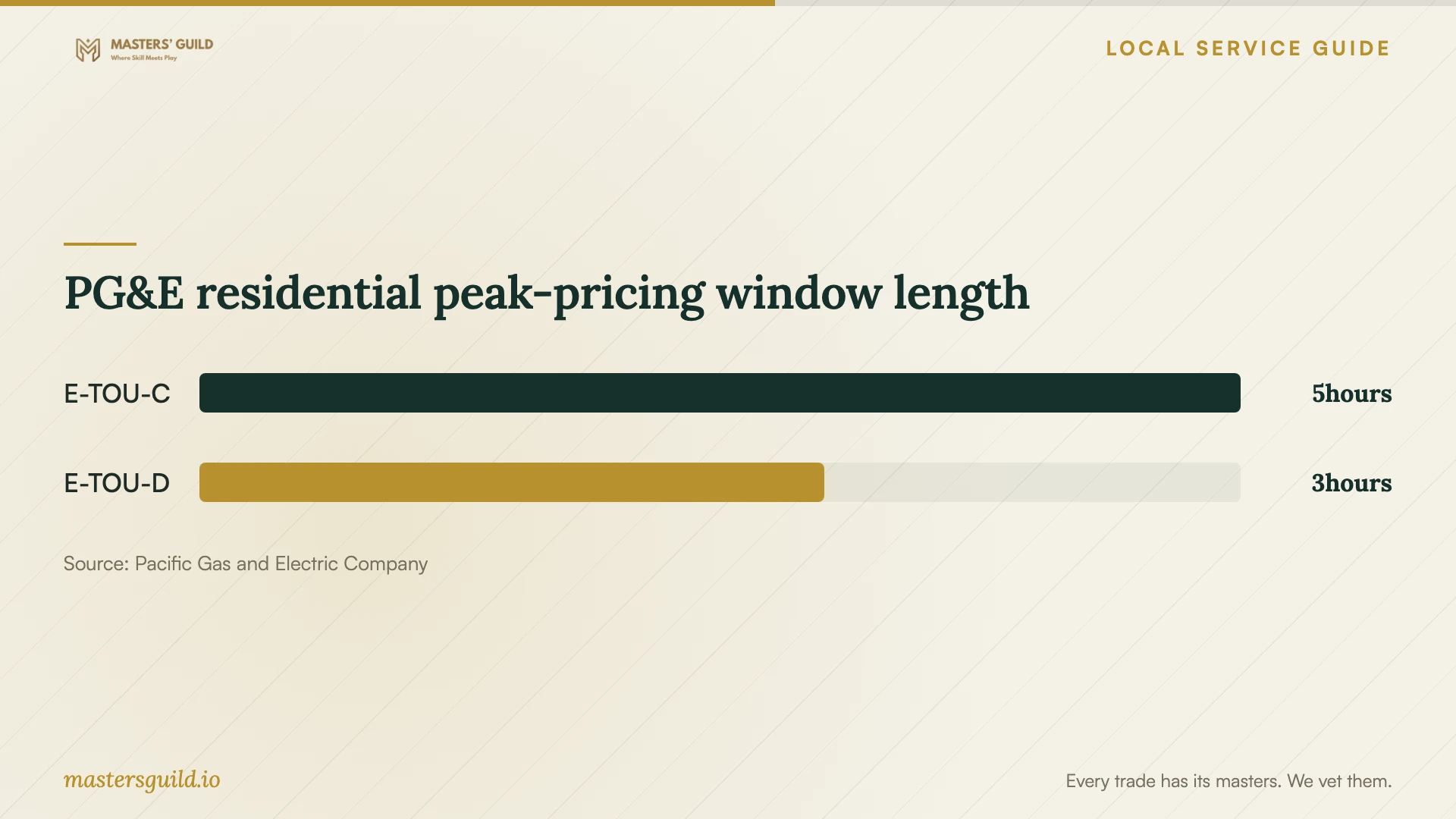
If PG&E serves your household, check the plan shown on your account. PG&E lists E-TOU-C peak pricing from 4 to 9 p.m. every day. It lists E-TOU-D peak pricing from 5 to 8 p.m. on weekdays, with weekends and most holidays outside that peak schedule. Check your account or applicable tariff for the holiday calendar. [3]
PG&E recommends pre-cooling during lower-priced periods. If your workday extends into peak hours, consider that guidance when planning room cooling, subject to your comfort and health needs. The published schedules identify pricing periods; they do not establish your electricity bill, the cost of cooling an office, or a savings amount. [3]
Resolve building work before installation
For contracting work on the building, CSLB requires a current license if the project requires a building permit, uses employee labor or workers, or reaches $1,000 in combined labor and materials. Use that rule when assessing proposed electrical or construction work. Describe the actual scope rather than relying on the label home office setup. [2]
CSLB advises selecting the relevant specialty contractor for a single type of building work. For new outlets or fixed electrical changes, identify who will perform the work and verify their license. For a broader remodel, have the lead contractor explain trade responsibilities and identify subcontractors. [2]
The City of Bakersfield's Building Information Guides page sits within its Building Division resources and includes access to an online permit application and status feature. For an address served by the city, use those resources when asking about your proposed alterations. Describe the work in concrete terms: outlet additions, wall changes, or cooling installation. [1]
Confirm which building authority serves your address before submitting anything. In the building-work quote, name who will check requirements, handle any required permits and inspections, and repair disturbed surfaces. Arrange the sequence before the desk and computer equipment arrive.
Compare itemized quotes and completion checks
Request itemized quotes for your furniture, equipment, and proposed building work. Compare the same inventory and tasks. Have each provider identify labor, supplied hardware, adapters, cable accessories, travel charges, packaging removal, and exclusions. For hourly work, agree on an estimate and a process for approving additional time.
Before the visit, agree on the tests you will perform together. Check monitor positioning, dock connections, a video call, and printing when those tasks belong to the scope. Move a standing desk through its travel and check cable slack. Have the provider list missing accessories and unresolved compatibility questions before leaving.
PG&E residential peak-pricing window length
Local details that affect your job
Use the city's permit resources for building changes
Bakersfield's Building Information Guides page includes its online permit application and status feature within Building Division resources. If the city serves your address, consult that route before arranging outlet additions, wall alterations, or cooling work. Ask about your exact scope and record who will handle any required application and follow-up. [1]
Check the household plan before scheduling cooling
For a household with PG&E service, E-TOU-C peak pricing runs from 4 to 9 p.m. every day; E-TOU-D runs from 5 to 8 p.m. on weekdays except applicable holidays. PG&E identifies weekends and most holidays as off-peak for E-TOU-D. Check your account or tariff for the holiday calendar before planning cooling around an evening work schedule. [3]
Choose help for the scope you want
| Your scope | Help to consider | Resolve before booking |
|---|---|---|
| Desk and chair assembly | Furniture assembly provider | Model details, placement, lifting arrangements, and packaging removal |
| Computer, dock, monitors, and printer | Technology setup provider | Connections, account access, and agreed completion tests |
| Wall-mounted monitor | Installer who accepts the mounting work | Wall assessment, mount compatibility, hardware, and drilling permission |
| New outlets or fixed electrical changes | Relevant specialty contractor; verify licensing under CSLB's project rules | Exact building scope, license verification, and permit responsibility |
| Office remodel involving several trades | Contractor suited to the complete building scope | Trade responsibilities and sequence before furniture installation |
Your hiring checklist
- Measure the room, desk footprint, chair clearance, and delivery route.
- Send model numbers, assembly instructions, connection details, and room photos.
- Check comfort, glare, and call noise during your working hours.
- Separate furniture and technology tasks from proposed building changes.
- Identify who supplies mounts, adapters, hardware, and cable accessories.
- Request written inclusions, exclusions, and approval terms for additional work.
- Agree on equipment tests, unresolved-item notes, and packaging removal.
Frequently Asked Questions
How should I compare setup prices?
Request itemized quotes against the same furniture and equipment list. Compare labor, accessories, mounting work, travel, and removal charges. Quote proposed electrical or cooling work as a separate scope so you can review its responsibilities and timing.
When does building work require a licensed contractor?
CSLB requires a current license for contracting projects that need a building permit, use employee labor or workers, or total $1,000 or more in combined labor and materials. Describe the proposed building changes when checking the requirement. [2]
Should I cool the office before afternoon peak pricing?
PG&E recommends pre-cooling during lower-priced periods. Check your household's plan first: E-TOU-C peaks from 4 to 9 p.m. every day, while E-TOU-D peaks from 5 to 8 p.m. on weekdays except applicable holidays. Confirm the holiday calendar through your account or tariff and adapt cooling to your health and comfort. [3]
What should I prepare for computer setup?
Have devices, power supplies, cables, and account access ready. Check with your employer before arranging changes to a work-managed computer. Enter your own passwords and agree which connections, applications, calls, and printing functions you will test.
Sources and scope
This guide combines the sources below with practical planning guidance. Figures apply to the stated geography and period; request a written quote for your property.