
Local service guide
Computer Virus Removal in Bakersfield, CA
For Computer Virus Removal in Bakersfield, choose a provider you have checked and request a quote for your device and symptoms and an expected completion date. California requires service dealers to give consumers a written total estimate before repairs. Tell the technician whether the computer starts, which files matter, and whether you gave someone remote access. [1]
Describe symptoms before buying a cleanup package
Describe what you observed without deciding the cause yourself. Include the wording of alerts, browser redirects, unfamiliar applications, or startup failures. Note when the problem began and any downloads or software installations around that time. Ask the provider to explain its diagnosis before proposing repairs.
The California Attorney General describes support scams in which callers or pop-ups invent a computer problem to obtain remote access or payment. Close an unwanted browser warning and find help through contact information you trust. Avoid using the phone number inside the warning. [2]
For your service request, include the computer model, operating system if known, and the tasks you need to resume. Mention family photos, tax documents, or home-office files that need attention. Ask the technician to distinguish malware cleanup from any proposed backup, storage replacement, or operating-system repair.
Compare charges and service arrangements
Ask what you will owe if diagnosis leads you to decline repairs. California's Bureau of Household Goods and Services allows a reasonable diagnostic fee and requires dealers to quote any trip charge before a service call. Ask whether the provider applies the diagnostic charge toward an accepted repair. [1]
Compare offers using the same requested tasks. Ask each provider to identify exclusions, any software purchase, and follow-up terms. Avoid choosing from a package name alone; have the technician explain what they intend to do on your computer.
For drop-off service, confirm intake and pickup arrangements and ask for a receipt identifying the device and accessories. For a home visit, agree on an appointment window. For remote service, describe whether you can start the computer and participate in a session, then ask whether that arrangement suits the proposed work.
Set boundaries for files and technician access
Prepare a short list of folders to preserve and describe any backup you have. Agree on a separate approval step before the technician wipes the drive, reinstalls the operating system, or replaces storage. Ask how you will review your files before accepting the completed work.
For a planned remote session, ask which tool the technician will use, whether you can watch, and how they will end access. The Attorney General warns against giving computer control, payment details, or sensitive information to someone you do not know. Choose the provider before agreeing to access. [2]
Arrange to enter credentials yourself. Discuss which folders the technician may inspect, where any temporary backup will go, and how they will delete their copies after you confirm receipt of your data. Include these arrangements in the service scope instead of relying on a conversation at handoff.
Handle prior scam access and check the finished repair
If a suspected scammer had remote access, the California Attorney General recommends shutting down or restarting the computer to cut off the session, running an antivirus scan, and changing computer, email, and financial-account passwords. Tell your chosen technician which software the caller asked you to install and what access you granted. [2]
The Attorney General advises asking your credit card company to reverse charges for fake support. Contact your bank if you shared financial information or suspect someone accessed it. Be cautious about later refund offers: the Attorney General warns that scammers may use them to seek more banking or card information. [2]
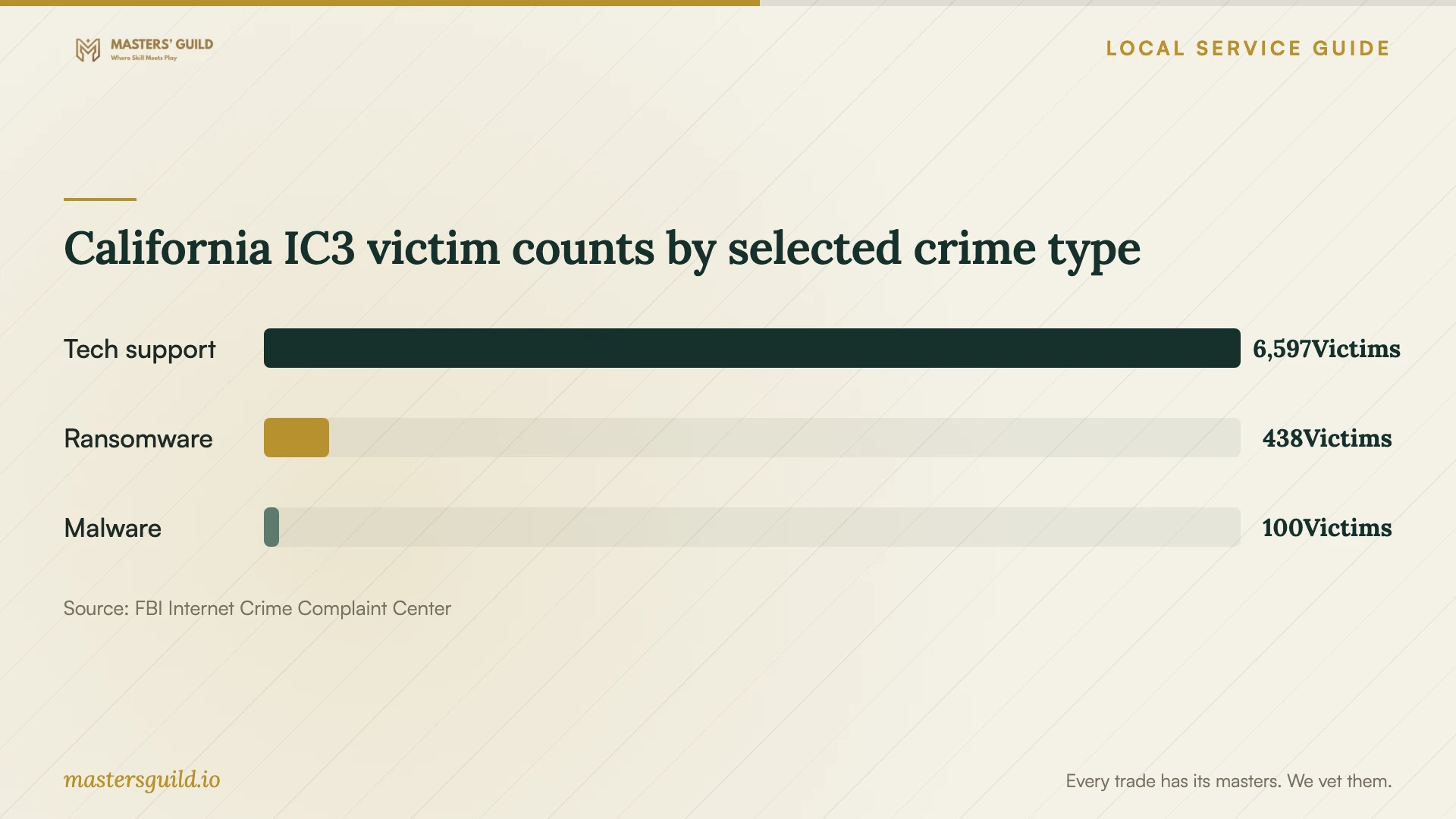
The FBI Internet Crime Complaint Center's 2025 California report lists 6,597 tech-support victims, 438 ransomware victims, and 100 malware victims. These statewide counts provide context for checking support offers. They do not measure Bakersfield infections or tell you whether your computer needs cleanup. [3]
At collection, ask the technician to explain the findings, changes, and checks completed. Open the files you identified and try the tasks that prompted the repair. Have the technician record remaining symptoms and explain how to arrange follow-up under the agreed terms.
California IC3 victim counts by selected crime type
Local details that affect your job
California protections cover personal and home-office computers
BHGS regulates repair of electronic equipment for personal or home-office use, including personal computers. For a household repair in Bakersfield, obtain the written estimate with the total price before repairs and check any trip charge before a visit. Ask for the dealer's BHGS registration details when checking the business. [1]
California offers a route for repair disputes
BHGS says you may file a complaint if you are unhappy with the initial repair; it sets no specific number of repair attempts you must allow. If you hire another dealer, ask that technician to state on the invoice what they found wrong with the first dealer's work. Keep that statement with your original repair records. [1]
Choose a next step based on what happened
| Situation | Next step | Question for the provider |
|---|---|---|
| A pop-up tells you to call support | Close the browser and find help through a trusted contact source. | Can you examine the warning before recommending repairs? |
| The computer starts | Describe the symptoms and discuss a suitable service arrangement. | Which diagnosis and cleanup tasks do you propose? |
| The computer will not start | Arrange diagnosis and identify the files you need. | How will you approach the files before proposing a reinstall? |
| A suspected scammer had remote access | End the session and follow the Attorney General's account and payment advice. | Will you review the software installed during that session? |
| You are unhappy with the initial repair | Discuss follow-up terms or use the BHGS complaint route. | Can you document your findings about the earlier work? |
Your hiring checklist
- Record warning text, symptoms, and when the problem began.
- Identify the device and note whether it starts.
- Disclose any suspected scam access, payments, or requested installations.
- Prepare your file list and backup information.
- Compare included tasks, exclusions, and service arrangements.
- Agree on access boundaries and approval steps for destructive changes.
- Confirm completion timing and follow-up terms.
- At handoff, review your files, test your usual tasks, and retain the repair records.
Frequently Asked Questions
How much should I budget for removal?
Request a written estimate for your computer. Ask the provider to include diagnosis and any proposed cleanup, backup, or operating-system work, with separate explanations of optional charges. California requires service dealers to provide a written estimate including the total price before repairs. [1]
Should I allow remote support?
Choose and check the provider before arranging a session. Ask how you will supervise access and how the technician will end it. The California Attorney General advises against giving computer control to someone you do not know, including someone who approaches you through a support scam. [2]
Can the technician charge for additional work?
BHGS says a dealer can charge for additional parts or labor when it explains the total repair charge and obtains the required approval. Agree on how the technician will contact you about a proposed change, and keep the revised terms with your invoice. [1]
Sources and scope
This guide combines the sources below with practical planning guidance. Figures apply to the stated geography and period; request a written quote for your property.