
Local service guide
Cloud Service Setup in Bakersfield, CA
For Cloud Service Setup in Bakersfield, choose a technician who will agree to a written device and folder inventory, explain account permissions, and demonstrate recovery before you accept the work. Separate setup labor from recurring subscriptions. For a migration, ask the technician to assess your connection and specify who will verify the transfer after the appointment.
Choose the work you want completed
Start with a concrete outcome. You might want family photos accessible on selected devices, private household records stored under your account, or files moved from an old computer. Identify the source devices and destination folders. Tell the technician which records matter most and which household members should have access.
Ask the technician to explain how the proposed service handles changes, deletion, previous versions, and recovery. Request a setup that meets your stated recovery goal, and ask them to identify any limits before you purchase a subscription. Avoid accepting a folder appearing on another device as the only completion check.
Consider remote help when you can locate files and manage sign-in yourself. Choose an in-home visit when you want the technician to inspect computers, external drives, or your network with you. Ask about experience with your chosen platform and request an explanation of the work they would perform.
Compare complete quotes
Give each technician the same inventory so you can compare the proposed work. Request separate charges for labor, travel, cloud storage, optional equipment, and ongoing support. Specify who can authorize extra work and how the technician will price it.
For a migration, distinguish the appointment from transfer completion. Ask the technician to record the data volume and measure upload speed on the device they intend to use. Agree on a monitoring arrangement, a completion check, and any follow-up charge before work starts.
Before changing internet service, request an explanation of which part of your setup would benefit. Compare the current bill with the proposed recurring total, including equipment and the price after a promotion. Keep broadband costs separate from the technician’s setup quote.
Check address-level information before scheduling
The California Public Utilities Commission collects broadband availability data annually. Its California Interactive Broadband Map lets residents investigate providers and speeds, test their connection, and submit feedback. The regulator identifies the published map update as end-of-year 2024 availability and adoption data. [1]
Use the map to prepare questions for your provider rather than treating it as confirmation of an available plan. For your home, ask about current service and upload capacity. Give the technician your measured result when discussing a migration schedule. [1]
If PG&E serves your address, its PSPS update page identifies address lookup as the most accurate shutoff check. PG&E also says account holders receive PSPS alerts without separate enrollment and asks them to keep contact details current. It says alerts begin two days before a shutoff when possible; do not plan around guaranteed advance notice. [2] [3]
Accept the work after a practical demonstration
Keep the account under an email address you control and enter your own password. Review recovery contact details and household sharing permissions with the technician. For remote work, have them explain the access they need and show you how to end it.
Use disposable files to demonstrate the recovery procedure you agreed to purchase. Open representative photos and documents from the destination, and test access on the included devices. Ask the technician to demonstrate offline access to selected essential documents if that forms part of your scope.
Collect a handover note covering configured folders, permissions, recurring charges, recovery steps, and support arrangements. Include instructions for checking progress and dealing with an interrupted transfer. Keep the originals until you have completed the agreed checks.
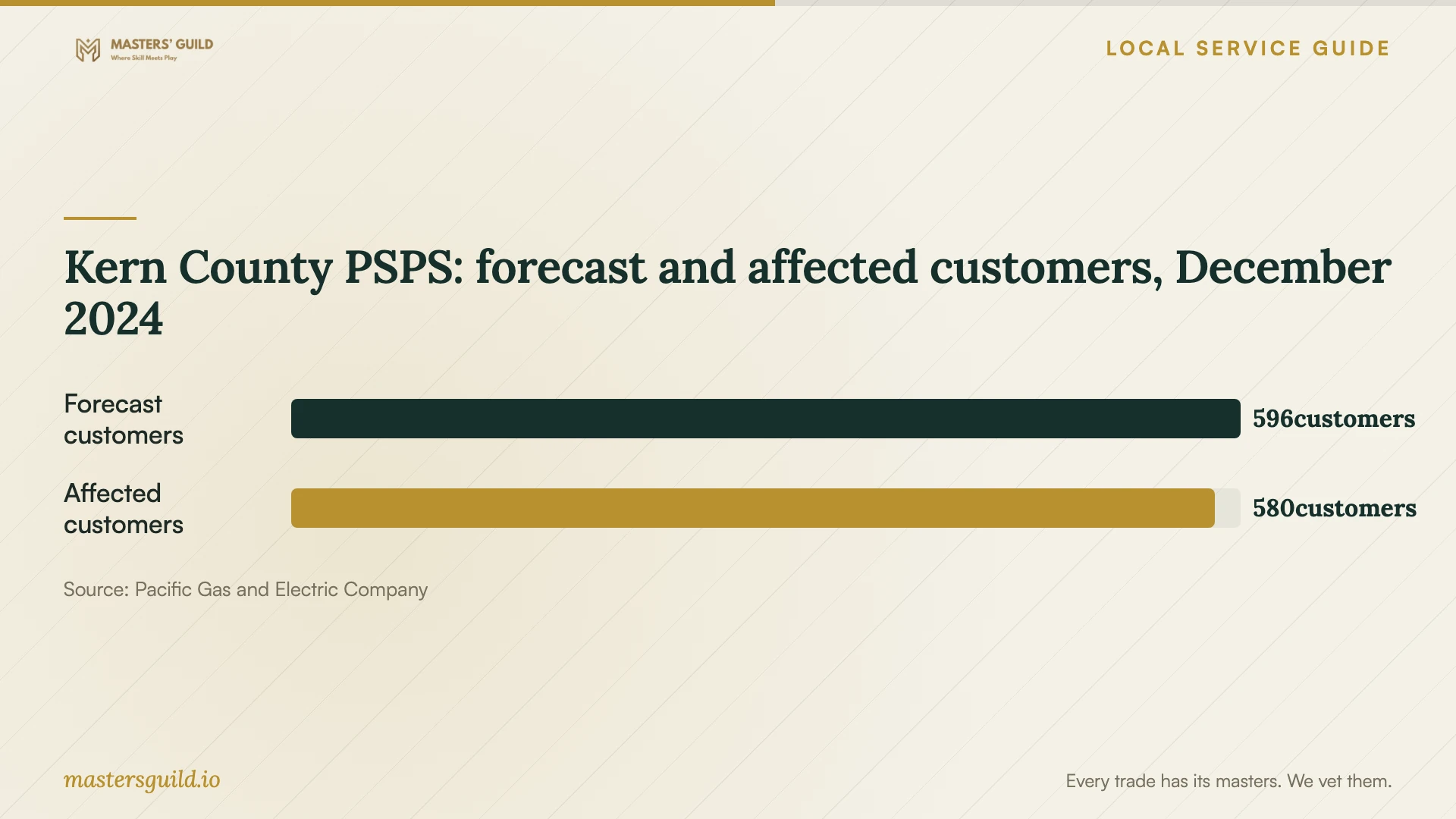
Kern County PSPS: forecast and affected customers, December 2024
Local details that affect your job
Investigate connection options before buying an upgrade
For a Bakersfield household, the CPUC’s statewide map provides a provider and speed lookup plus testing and feedback tools. Its end-of-year 2024 data gives you a starting point for an address-level inquiry. If your provider’s answer differs from the map, use the feedback option and resolve current availability before arranging a setup that depends on switching service. [1]
Plan around your utility address, not a county headline
PG&E reported that a December 2024 Kern County PSPS affected 580 customers. That regional event does not establish exposure at a particular Bakersfield home. For a PG&E-served address, check the utility’s address lookup and discuss whether to defer an extended upload or include a restart procedure in the work. [2] [4]
Match the scope to your household
| Your goal | Work to request | Completion demonstration |
|---|---|---|
| Share household files | Account setup and folder permissions | Each intended user opens only the agreed folders |
| Move files from an old device | Source inventory and migration | Open representative files at the destination |
| Prepare for file loss | Recovery configuration and instructions | Recover a disposable test file |
| Access records during an interruption | Offline-access setup for selected documents | Open those documents without a connection |
Your hiring checklist
- Prepare a device and folder inventory, including external drives.
- Identify private records and household sharing permissions.
- Check that you can access your account and recovery contact information.
- Record questions about recurring charges and extra-work authorization.
- Select disposable files for the recovery demonstration.
- Prepare a destination-file review before removing any originals.
Frequently Asked Questions
How much should I budget?
Request an itemized quote for your actual inventory. Ask whether the price includes troubleshooting, transfer monitoring, and follow-up. Review the recurring storage charge separately. The sources cited here do not establish a local setup price range.
What should I ask about a family account?
Ask who owns the account, who pays the subscription, and which members can change or delete shared files. Have the technician explain how you would remove someone’s access and recover the account if you replaced your phone.
What happens if the first upload stops?
Have the technician explain the selected service’s restart procedure before beginning. Agree who will check for incomplete files and how you will confirm completion. Use a disposable test transfer if you want an interruption demonstration.
Sources and scope
This guide combines the sources below with practical planning guidance. Figures apply to the stated geography and period; request a written quote for your property.