
Local service guide
Technical Skills Training in Austin, TX
For Technical Skills Training in Austin, hire a private instructor when you want staff to practice a specific business task, such as building a spreadsheet or updating a website. Before buying a package, compare that scope with Austin Public Library’s free computer training and ACC’s technical programs. Ask each instructor for a lesson plan, a written total, and a practical exercise your staff can complete without help. [1] [4]
Define the task before choosing an instructor
Write down what you want someone to do after training. For a shop or office, that might mean reconciling a sales export, sharing files with the right permissions, or maintaining a product page. Name the software, the learner’s starting point, and the output you expect. Separate introductory computer skills from training that requires access to your business systems.
Ask the instructor to turn that brief into a sequence of lessons. Request a sample exercise and an explanation of how they will check progress. For a team, tell them who uses the tool daily and who needs occasional access. Ask whether they can accommodate different starting levels without leaving someone behind.
Check free instruction and computer access
Austin Public Library advertises free computer training at several locations, including instruction in email, job searches, résumés, and social media. Its calendar also lists beginner workshops in English and Spanish, creative coding, and sessions for adults age 55 and older. Use the event description to judge whether a class matches the learner’s needs before arranging paid instruction. [1]
The City’s Community Technology program oversees a contract with Austin Free-Net, which manages public computer and technology labs and delivers digital-literacy training. The City also lists laptops and other equipment for reservation through its Technology Lending Library by Austin residents and organizations. Ask about access, reservation conditions, and availability if a learner lacks a suitable device. [3]
Compare published costs without mixing programs
ACC’s Fast Track page lists noncredit technical options with program prices and estimated completion times. At the October 12, 2026 retrieval, it listed PC Technician at $965.70 over three to six months, CompTIA Security+ at $297.50+ over 12 weeks, and Web Development at $983.00+ over 12 months. Confirm the current course sequence, prerequisites, and total with the program coordinator. [4]
ACC says it has applied the advertised discount to the listed prices for eligible programs. The same page marks Software Developer Bootcamp as a non-discounted program. Ask about books, software, certification exams, and the meaning of any plus sign before treating a listed amount as your complete budget. [4]
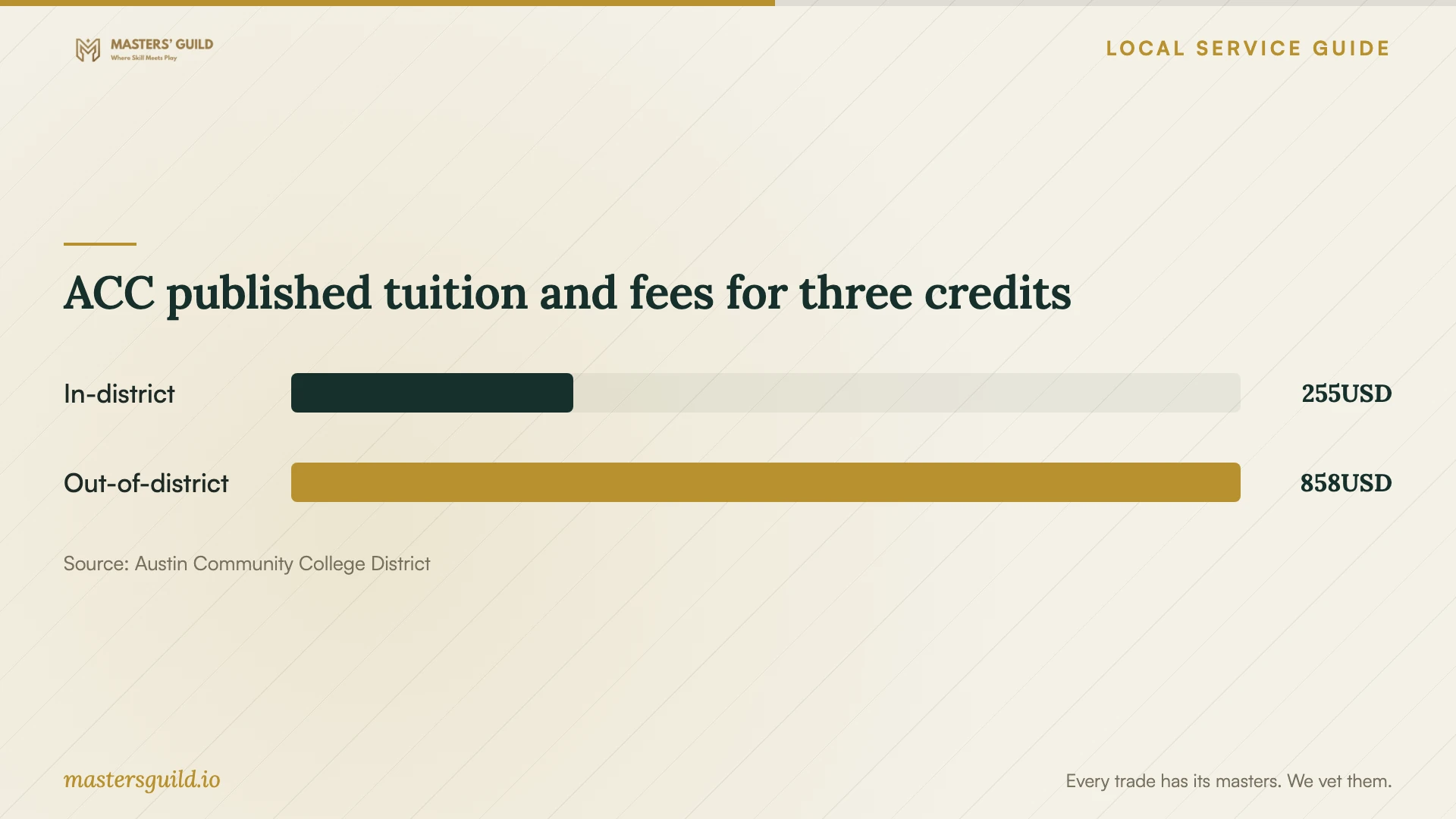
For credit classes, ACC publishes separate residency-based tuition and fees. A three-credit load costs $255 for an in-district Texas resident and $858 for an out-of-district Texas resident in the fetched table. ACC also identifies possible course, book, and other fees. Confirm your district status rather than assuming that an Austin mailing address settles your tuition category. [5]
For private instruction, request a written quote that separates teaching time, preparation, travel, software, and follow-up support. Ask whether you pay per learner or per group, whether the trainer sets a minimum booking, and what happens if someone misses a session. Compare quotes against the same task and number of participants.
Check funding for career-focused learning
Workforce Solutions Capital Area supports training scholarships for some regional high-skill, high-growth occupations and uses targeted occupation lists to guide training funds. It also describes paid training and apprenticeships. If a learner wants a new career or credential, ask which occupations and training programs qualify and what approval they need before enrollment. [2]
The agency says many programs include support such as transportation, child care assistance, and mobile hotspots. Ask which services apply to the learner and program under consideration. Treat these as support to investigate, rather than assuming the agency will fund a company’s internal software workshop. [2]
Prepare a useful first session
Give the trainer a sanitized file or demonstration account. Remove customer details, financial records, and passwords from practice material. Confirm the software version and required permissions before class. If staff will attend remotely, ask them to test the meeting link, microphone, and screen sharing.
Agree on a completion check before booking further sessions. Have the learner repeat the task, explain a common error, and save the result in the right place. Request written steps staff can reuse and a clear boundary for follow-up questions. Ask a coding instructor to explain how learners will run, maintain, and troubleshoot the work after the lesson.
ACC published tuition and fees for three credits
Local details that affect your job
Match language and age requirements at the library
The calendar fetched October 12, 2026 lists an English and Spanish beginner workshop at Southeast Branch, 5803 Nuckols Crossing Road, on October 19 from 12:30 to 1:30 p.m. for adults age 18 and older. It also lists Tech Savvy Seniors at Twin Oaks Branch for adults age 55 and older. Check the current event listing before sending a learner, since the age and language options affect fit. [1]
Arrange device access before paying for lessons
Austin’s Community Technology program identifies public technology labs managed by Austin Free-Net and a Technology Lending Library for residents and organizations. If equipment access prevents someone from participating, ask about these resources before buying a device or booking instruction that assumes the learner owns one. [3]
Check regional training support before enrollment
Workforce Solutions Capital Area describes scholarships tied to regional occupations and possible transportation, child care, and hotspot support. For an Austin learner pursuing career training, confirm the supported pathway and individual eligibility before paying a deposit. [2]
Choose a training route by the learner’s goal
| Goal | Route to consider | Confirm before committing |
|---|---|---|
| Basic email or computer use | Free Austin Public Library computer training | Topic, language, age requirements, and schedule |
| Learning without a suitable computer | City-supported public labs or equipment reservations | Device availability and access conditions |
| A technical career credential | ACC noncredit technical programs | Prerequisites, complete cost, and current course sequence |
| A career change with funding needs | Workforce Solutions Capital Area | Supported occupation, scholarship eligibility, and assistance |
| A specific staff workflow | Private instruction scoped to your business task | Lesson plan, written quote, and completion exercise |
Your hiring checklist
- Name the business task, software version, and expected finished work.
- Record each learner’s starting skills and preferred language.
- Compare relevant public classes with the proposed private lesson plan.
- Request a total that includes preparation, travel, materials, and support.
- Confirm devices, accounts, accessibility needs, and attendance arrangements.
- Prepare sanitized practice files and agree on access permissions.
- Set a completion exercise and review progress before extending the booking.
Frequently Asked Questions
Should I choose private lessons or a college program?
Consider private lessons for a defined task you want staff to practice with your tools. Consider a structured program when the learner wants a broader technical pathway. ACC lists noncredit options including PC Technician, Cisco Certification, Security+, and Web Development. Ask how the curriculum matches the learner’s goal before enrolling. [4]
Can an employee start with free computer training?
Austin Public Library advertises free computer training, including email and other basic topics. Check the specific event’s audience and content. A public class may suit foundational learning; ask a private trainer for a separate plan if the employee needs instruction on a company-specific workflow. [1]
Do ACC’s listed prices cover the full cost?
Confirm that with the program coordinator. ACC’s Fast Track page uses plus signs on some technical program prices, while its credit tuition page identifies possible additional fees. Ask for a complete cost breakdown for the exact enrollment route, including required materials and exams. [4] [5]
How can I assess whether training worked?
Ask the learner to complete the agreed task using a fresh practice example. Check accuracy, whether they can explain the steps, and where they still need help. Use that result to decide whether to repeat a topic or book the next lesson.
Sources and scope
This guide combines the sources below with practical planning guidance. Figures apply to the stated geography and period; request a written quote for your property.