
Local service guide
Software Installation in Austin, TX: Plan Your Setup
For Software Installation in Austin, agree on the programs, devices, backup work, account access, and completion tests before hiring a technician. Request a written quote separating labor, software purchases, and subscriptions. If you need help learning email or basic computer skills, consider Austin Public Library’s free training before booking paid help. [1]
Define the work and compare written quotes
Give the technician your computer model, operating system, application names, and intended tasks. Include each device and any software you already own. For a failed installation, copy the error message and describe what you tried. Ask the technician to confirm compatibility before you authorize a software purchase.
Separate application installation from operating-system replacement, file transfer, account recovery, and troubleshooting. Request a price for each task you want. Agree on a spending limit and require your approval before the technician adds work or purchases a subscription. Compare written quotes for your device and requested work.
A useful home-office scope might include installing your chosen document application, signing into your existing account, opening a sample document, and checking printing. Add file transfer if you need it. Ask providers to quote that same scope so you can compare their charges and completion terms.
Choose remote, in-home, or drop-off help
Ask about remote service if you can start the computer, reach the desktop, connect to the internet, and participate. Confirm the access tool, how you will watch the work, and how you will end access. If you cannot reach the desktop or need someone to inspect connected equipment, request an in-person assessment.
For an in-home appointment, confirm the arrival window, travel charge, minimum charge, and workspace needs. For drop-off work, ask who will hold your device, what you should bring, and how the provider will obtain approval for scope changes. Reserve time to supply account approvals and test the result.
Protect files and test the finished setup
Back up files you want to keep and open sample copies before authorizing changes. Ask the technician to explain any planned step that could remove applications, replace the operating system, or erase data. Agree on how they will stop and contact you if they cannot complete the work within the approved scope.
Keep your recovery email, phone, and authentication device available. Enter passwords and approval codes yourself when possible. Ask which steps require administrator access. Arrange for license purchases and subscription ownership under an account you control, and request a record of installed software and settings changed.
Before accepting completion, restart the computer and perform the agreed tasks. Open the application, sign in, and save and reopen a sample file. Check printing or transferred files if you included them. Obtain follow-up terms and ask the technician to remove temporary remote access before ending the appointment.
Decide whether you need installation or training
Austin Public Library offers free computer training covering topics such as email and basic computer use. If you can open your application but need help using it, review the training calendar before arranging paid installation. Ask about your specific task and whether you may bring your device. [1]
The City’s Community Technology program oversees Austin Free-Net’s public-access computer and technology labs and digital literacy training. The City also offers equipment reservations through its Technology Lending Library for Austin residents and organizations. Ask about access requirements and permission to install software before planning work on public or borrowed equipment. [2]
Check subscriptions and Texas tax treatment
Request an itemized quote for labor, software licenses, subscriptions, backup or transfer work, travel, and tax. For each recurring service, ask about the renewal charge, account owner, and cancellation process. Decide whether you want ongoing services before the technician activates them.
The Texas Comptroller lists offsite electronic file backup as data processing and includes software-as-a-service sellers among data processing providers. Texas exempts 20 percent of data processing charges from tax. If your package includes these services, ask the provider to explain each charge’s classification rather than applying that exemption to the entire installation bill. [3]
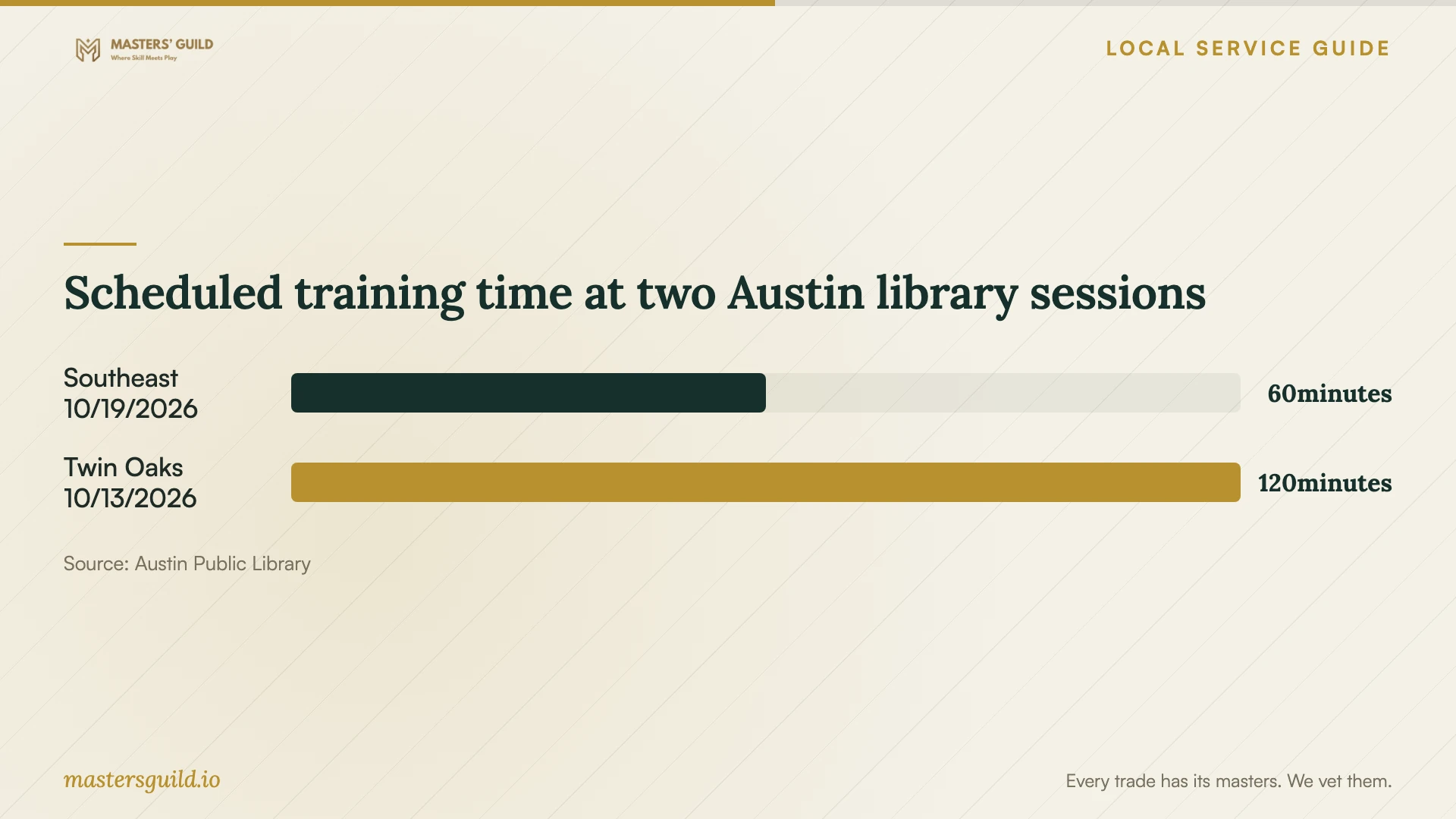
Scheduled training time at two Austin library sessions
Local details that affect your job
Choose a library session by language and age
The library calendar lists English and Spanish beginner workshops at Southeast Branch, 5803 Nuckols Crossing Rd., for adults ages 18 and older. It also lists Tech Savvy Seniors at Twin Oaks Branch, 1800 S. Fifth St., for adults ages 55 and older. Use the topic and eligibility to choose a session, then check the current schedule. Ask whether staff can address your installation question before bringing a personal device. [1]
Arrange computer access while your device needs work
Austin Free-Net manages the City’s public-access computer and technology labs and provides digital literacy training under Community Technology oversight. The City’s Technology Lending Library also accepts equipment reservations from Austin residents and organizations. If you need access while arranging a repair or setup, ask about lab availability or equipment reservations. Confirm borrowing conditions and software restrictions before choosing this route. [2]
Choose your next step
| Your situation | Suggested next step | Confirm before proceeding |
|---|---|---|
| You need help learning email or basic computer use | Review Austin Public Library’s free computer training | Session topic, language, age eligibility, and schedule |
| You need computer access while arranging setup | Check City public-access labs or Technology Lending Library reservations | Access requirements, availability, and software restrictions |
| You want an application installed on your computer | Request a written installation quote | Compatibility, license ownership, service method, and completion tests |
| Your package includes cloud backup or software-as-a-service | Request itemized charges and a tax explanation | Data processing classification, renewal charges, and cancellation terms |
Your hiring checklist
- List your devices, operating systems, applications, and required tasks.
- Gather purchase records and choose the account that should own each license.
- Back up important files and open sample copies.
- Keep your authentication device and account recovery details available.
- Agree on the service method and approval process for extra work.
- Request separate charges for labor, licenses, subscriptions, travel, and tax.
- Restart the computer, test the agreed tasks, and obtain follow-up terms.
Frequently Asked Questions
Can I get free help before hiring a technician?
Austin Public Library offers free computer training, and Austin Free-Net provides digital literacy training and manages City public-access labs. Consider these resources for learning or access needs. Ask whether they can help with your specific task or personal device before making arrangements. [1] [2]
Should I give the technician my password?
Plan to enter passwords and authentication codes yourself. Ask when the technician needs administrator access and arrange to participate. For drop-off work, agree on an access method and ask how the provider will protect your files and remove temporary access.
Does the Texas data processing exemption cover the whole job?
Ask the provider to classify each charge. Texas exempts 20 percent of data processing charges from tax and includes offsite electronic backup and software-as-a-service providers in that guidance. Do not assume the same treatment applies to all installation labor. [3]
How should I check that the installation is complete?
Agree on tests before work begins. Restart the computer, open the application, sign in, and complete a sample task. Include printing or file transfer tests when those tasks belong in the quote. Request the installed software list and follow-up terms before accepting completion.
Sources and scope
This guide combines the sources below with practical planning guidance. Figures apply to the stated geography and period; request a written quote for your property.