
Local service guide
Data Recovery and Backup in Austin, TX
For Data Recovery and Backup in Austin, choose a provider who will assess your device, document custody of business records, and agree on a usable-file acceptance test before you approve work. Obtain a device-specific quote. Specify whether you want files retrieved from a device, an existing backup restored, or a backup system installed, and flag suspected unauthorized access during intake.
Define the work you want quoted
Use these scope descriptions in your request: device recovery means asking the provider to retrieve priority data from the affected storage device; backup restoration means asking them to retrieve a saved copy and demonstrate that you can use it; backup installation means asking them to configure future copies, alert handling, and a tested restore procedure. Have the provider confirm which tasks they accept and price each task.
The Texas Comptroller's guidance covers storing and retrieving customer data, but it does not distinguish these three job scopes for you. It also distinguishes professional services that use a computer as a tool. Ask the provider to explain the technical work and tax classification rather than treating a broad description such as IT support as a complete quote. [2]
Prepare the device model, symptoms, incident timing, last successful use, and any repair attempts. List the files or application records you need first. Ask for handling instructions before transporting the device, and agree on a recovery plan before authorizing reformatting, repair, or disposal.
Follow an intake-to-acceptance process
1. Submit the incident description and priority records. Identify the employee who can approve work and provide controlled access to passwords or encryption keys.
2. Obtain a custody receipt. Confirm where the provider will assess the device, who will handle it, and whether they propose sending it to another facility.
3. Approve assessment terms. Set diagnostic charges and an authorization limit, and request a written explanation of unsuccessful-attempt charges, shipping, and return media.
4. Review the proposed work. Obtain a device-specific quote, define partial recovery, and agree on the test you will use to accept the result. Ask for a separate estimate for backup installation.
Compare costs and data-handling terms
Compare providers against the same file priorities and acceptance test. Request separate charges for assessment, recovery, replacement storage, transport, and setup. For ongoing backup service, ask about storage allowances, retention, restore charges, recurring fees, and cancellation. Ask the provider what circumstances would require another approval.
Texas guidance explains tax treatment for contracts combining taxable and nontaxable services, including requirements for distinguishing and identifying those services. Ask the provider to itemize the quote and explain which portions they classify as taxable. Obtain the total payable amount before approving work. [2]
Agree on subcontractor approval, access to recovered files, and the transfer method. Set a deletion date for retained working copies and identify who will confirm deletion. Request a written handoff that identifies the returned device, delivered data, and any remaining limitations.
Plan the restore and witness acceptance
Tell the installer how much recent work you can afford to lose and how long you can operate without each application. Ask them to propose a copy schedule and restore procedure around those limits. Include business application data, shared folders, and the accounts or keys needed to restore them. Assign an employee to review backup alerts and name a substitute.
5. Witness the acceptance test. Select representative files, request a restore to a separate destination, and open them in the application you use. For application records, check usable data and access permissions. Record the steps, credential owner, and elapsed time. Agree on follow-up testing after major system changes.
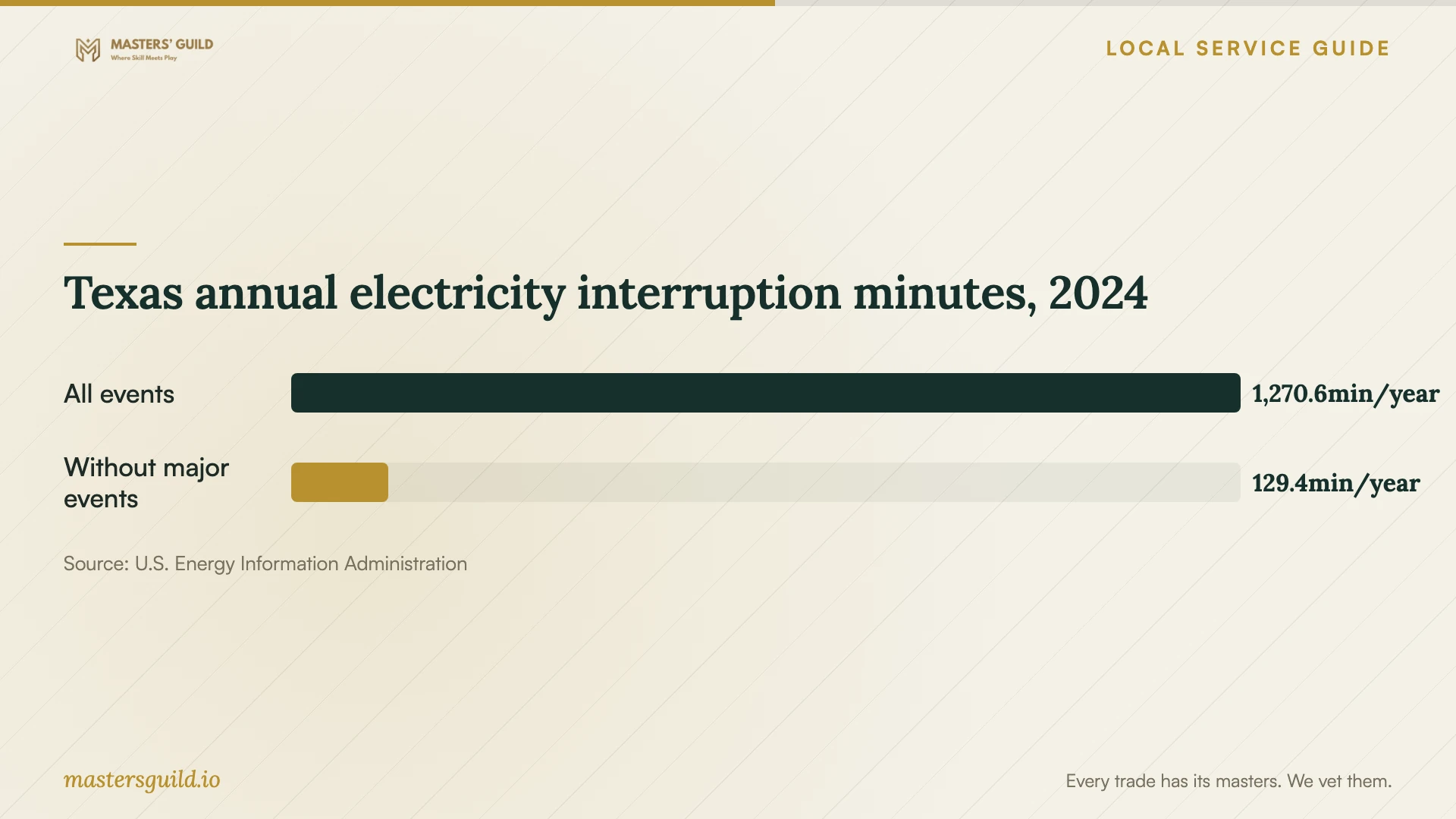
Austin Energy explains that severe weather can affect outage frequency and duration. Ask the installer to assess battery protection, safe shutdown, and restart behavior for storage and supporting network equipment. Include a copy away from the premises in the proposed design, and ask how you would retrieve it during a loss of office power or internet access. [4]
Separate suspected intrusion from routine recovery
Flag suspected unauthorized access before approving cleanup. Ask an incident-response specialist to advise on preserving evidence, and involve your attorney in assessing reporting obligations. Designate a business representative to coordinate the technician, management, and legal review.
The Texas Attorney General states that businesses and organizations experiencing a system-security breach affecting 250 or more Texans must report it as soon as practicably possible and no later than 30 days after discovery. The office also states that businesses and organizations must notify affected consumers. Ask your attorney to assess your circumstances and notice obligations. [3]
Texas annual electricity interruption minutes, 2024
Local details that affect your job
Review both physical-copy locations in FloodPro
The City of Austin provides property-level floodplain and storm-drain information through FloodPro. Review your premises and a proposed second physical backup location before agreeing on equipment placement. Ask the installer to explain how the design addresses shared exposure. The city describes its mapping as informational and disclaims specific accuracy and completeness; use it to guide questions rather than certify a location as flood-safe. [1]
Confirm the utility before writing outage procedures
Austin Energy serves Austin and portions of Travis and Williamson counties. Confirm the electricity provider for your premises, then record the relevant outage-reporting and status-check process in your restore plan. For Austin Energy premises, assign someone to check utility outage status and ask the installer to document shutdown and restart responsibilities. [4]
Assign the Texas breach-reporting handoff
The Attorney General requires electronic business breach reports and restricts completion to an authorized representative of the affected business or organization. Name that representative in your incident plan. The office directs individuals and people without authority to its consumer complaint process, so arrange an internal handoff when a technician raises a suspected breach. [3]
Specify the capability and approval condition
| Your situation | Capability to request | Before approving |
|---|---|---|
| You have a saved copy | Backup restoration | Agree on a separate restore destination and usable-record test |
| You need files from an affected device | Device assessment and recovery | Set diagnostic charges, approval limits, and partial-recovery terms |
| You suspect unauthorized access | Incident response and evidence preservation | Arrange attorney review and an authorized reporting handoff |
| You need future copies | Backup installation and restore support | Agree on retention, alerts, recurring charges, and a witnessed restore |
Your hiring checklist
- Prepare device details, symptoms, incident timing, and previous repair attempts.
- List priority records and identify the last backup you have checked.
- Name the employee authorized to approve work and credential access.
- Choose an acceptance test before approving the recovery quote.
- Record custody, transfer, subcontractor, and retained-copy deletion terms.
- Assign backup alert handling and document offsite retrieval responsibilities.
Frequently Asked Questions
Can I compare quotes before diagnosis?
Compare assessment fees, approval limits, transport charges, and unsuccessful-attempt terms first. Give each provider the same priority file list. Ask what they need to assess the device and obtain a device-specific quote before approving recovery work.
Will Texas sales tax apply?
The Comptroller includes customer-data storage and retrieval within taxable data processing and distinguishes certain professional services. Ask the provider to explain the classification of each service, especially when one contract combines consulting, storage, and recovery. [2]
Does drive failure establish a reportable breach?
The Attorney General's cited requirement concerns system-security breaches affecting 250 or more Texans. Ask an incident-response specialist to assess suspected unauthorized access and consult your attorney about reporting and consumer notice. Describe the symptoms without assuming the legal classification. [3]
How should I test a new backup?
Select files or application records and witness a restore to a separate destination. Open the restored records, check permissions, and document the procedure and credential owner. Ask the installer to include recovery steps for loss of access to the premises.
Sources and scope
This guide combines the sources below with practical planning guidance. Figures apply to the stated geography and period; request a written quote for your property.