
Local service guide
Computer Virus Removal in Austin, TX
For Computer Virus Removal in Austin, choose a technician who agrees in writing on diagnosis, file preservation, access permissions, and approval before erasing or reinstalling anything. Request a written price and completion estimate after diagnosis. If an unsolicited caller or pop-up prompted your search, avoid granting access: the Texas Attorney General warns that fake support agents can steal information or install malware. [3]
Check the warning before hiring help
Pause before following an unexpected virus alert. The Texas Attorney General describes scams that begin with a pop-up or unsolicited call claiming to represent Microsoft or an antivirus company. Scammers may direct you to download software or enter a code that grants access. The agency advises against granting that access and recommends contacting a reputable source for help. [3]
Check a technician's contact information before arranging service. The Attorney General warns that illegitimate support services can buy search advertisements and create convincing websites. Confirm who will perform the work, how you can reach them, and what access they need. [3]
Record the alert's wording and the sequence of events. Include any link you clicked, software you installed, password you shared, or remote session you allowed. Have the technician explain what they found and why they recommend a particular repair.
Compare quotes for the same work
Give each technician the same description and requested scope. Request separate charges for diagnosis, cleanup, file backup, operating-system repair, application reinstallation, and account assistance. Confirm whether you owe a diagnostic charge if you decline the repair.
Request a written price and completion estimate after diagnosis. Include any tax or travel charge, and set a spending limit that requires your approval before additional work. Explain your deadline and discuss whether the technician can return essential files before completing the repair.
For remote service, agree on the session time and who initiates it. Have the technician explain the access software and how they will end access afterward. For drop-off or a home visit, confirm handover, collection arrangements, and how you will approve changes.
Set file and privacy instructions
Identify your priority files, such as family photographs, personal documents, and financial records. Tell the technician where you keep them and whether you have a separate backup. Agree on a preservation plan before changes, especially if you cannot open the files or start the computer.
Specify what the technician may copy, where they may store it, and when they should delete working copies. Discuss whether they need access to unrelated personal folders. Keep account recovery codes and payment details out of handover notes; arrange any necessary login step with the technician.
Request a completion note describing the findings, changes, and unresolved problems. Before accepting the device, open your priority files and check the applications included in the repair scope. Review any remaining account or backup tasks with the technician.
Plan for account exposure
Tell the technician if a stranger accessed the computer or you entered banking details into a suspicious page. The Texas Attorney General explains that remote-access scammers can inspect personal or financial information, and phishing scammers can use stolen information to take money or commit identity theft. [3]
Use another trusted device to contact affected account providers through contact details you have checked. Keep suspicious messages, transaction records, and notes about the support session. Discuss preserving relevant records before the technician deletes files or reinstalls the system.
After repair, review software and security settings with the technician. The Texas Attorney General recommends updating the operating system, browser, and other software, maintaining updated antivirus software, and downloading software from trusted sites. [3]
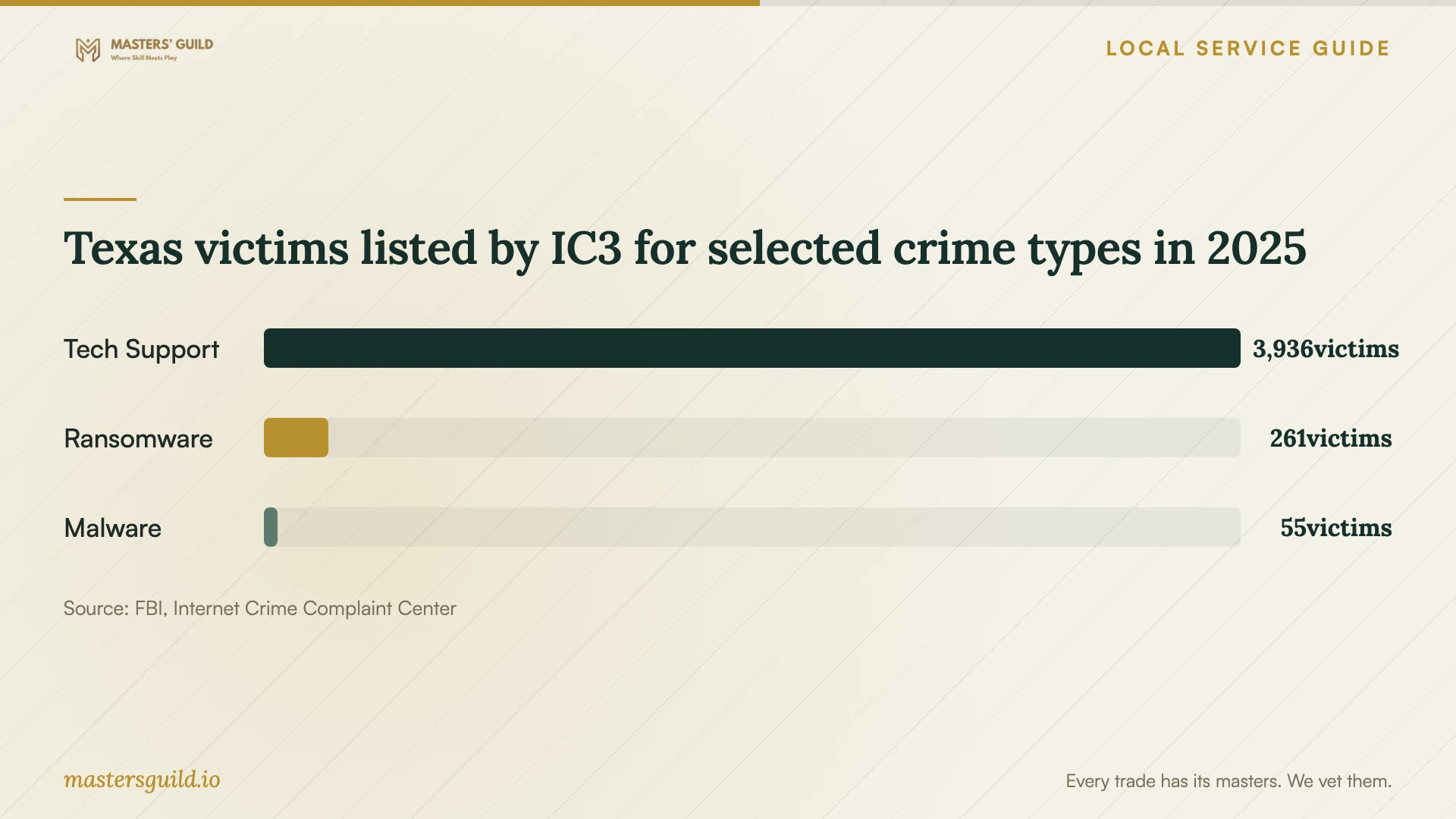
Texas victims listed by IC3 for selected crime types in 2025
Local details that affect your job
Choose the right Austin reporting route
Austin Police's reporting guidance covers non-emergency crimes that are no longer in progress and present no immediate threat. Its online list includes fraud, identity theft, and illegal credit or debit card use. Report by phone if you are under 17, lack a valid email address, or need to report an offense ineligible online. Call Austin 3-1-1 or 512-974-2000 for phone reporting or help. Call 9-1-1 if there is immediate danger to people or property, a crime is happening now, or the suspect remains on scene. For a non-emergency report connected to the computer incident, discuss record preservation before approving erasure. [2]
Book recycling after arranging data handling
Austin Resource Recovery accepts computers at its Recycle and Reuse Center and requires an appointment. Austin and Travis County residents can book through the Austin Recycles app or online; facility use is free for those residents. Fees apply to residents outside that area. If the date no longer works, cancel through the method you used to book, then schedule a new appointment. Before taking the computer in, arrange file preservation and data erasure with your technician. [1]
Choose the next step from what happened
| Situation | Next step | Repair planning question |
|---|---|---|
| Unexpected support call or virus pop-up | Avoid granting access. Check the contact information of the technician you choose. | Can you assess the warning before recommending cleanup? |
| You allowed a stranger remote access | Include suspected personal or financial information exposure in the discussion. | Which records should we preserve before changing the computer? |
| You cannot open essential files | Agree on a preservation plan before approving a reset or reinstall. | Which files will you attempt to preserve, and what needs my approval? |
| Suspected fraud or identity theft | For a non-emergency incident with no immediate threat, review Austin Police's online eligibility and phone exceptions. Call 9-1-1 for immediate danger, a crime happening now, or a suspect still on scene. | Can you preserve relevant records before cleanup? |
| You choose replacement | Arrange data handling, then book a computer recycling appointment. | Can you document file transfer and data erasure before disposal? |
Your hiring checklist
- Record symptoms and any links, downloads, payments, or remote-access sessions involved.
- List priority files and describe existing backups.
- Request separate charges for diagnosis, cleanup, backup, and reinstallation.
- Set an approval limit for extra charges and require approval before erasure.
- Agree on access permissions, copied-data storage, and deletion of working copies.
- Confirm handover arrangements, a completion estimate, and the method for approving changes.
- Request repair notes and check priority files and applications before accepting the computer.
Frequently Asked Questions
Does a virus pop-up mean I need paid removal?
Have a technician you chose assess the computer before approving paid work. The Texas Attorney General describes fake alerts that pressure you into granting remote access. Avoid following the alert's instructions or using its contact details to arrange repair. [3]
Should I approve an operating-system reinstall?
Get an explanation of why the technician recommends it, which files and applications they will preserve, and what you must restore afterward. Agree on the plan and price before approval. Explain whether file preservation or your completion deadline matters more.
Where can I report identity theft connected to the incident?
Austin Police lists identity theft for online reporting when the incident is non-emergency, no longer in progress, and presents no immediate threat. Report by phone if you are under 17, lack a valid email address, or the offense is ineligible online. Call Austin 3-1-1 or 512-974-2000 for help. Call 9-1-1 for immediate danger, a crime happening now, or a suspect still on scene. [2]
Can I recycle the computer if I replace it?
Austin's Recycle and Reuse Center accepts computers by appointment, with free facility use for Austin and Travis County residents. Arrange file transfer and data erasure with your technician before taking the device in. [1]
Sources and scope
This guide combines the sources below with practical planning guidance. Figures apply to the stated geography and period; request a written quote for your property.