
Local service guide
Cloud Service Setup in Austin, TX
Arrange Cloud Service Setup in Austin with a written scope naming your devices, folders, account owner, subscription charges, and completion tests. Include a transfer demonstration or sample backup recovery before accepting the work. If you need basic computer instruction, consider Austin Public Library’s free training before paying for an appointment. [1]
Define the result before comparing offers
Describe the job in terms you can check: move a named photo collection, give household members access to selected folders, or configure a backup and recover a sample file. Have the technician explain which functions your chosen service provides and which settings they will configure. Include the demonstration in the written scope so you know what you are paying for.
List the computers, phones, external drives, and existing accounts involved. Identify the original folders and decide whether to preserve their structure or include organization work. Cover duplicate files, unreadable items, and interrupted transfers before work starts. For shared folders, name who should have access and who should be able to change files.
Compare itemized costs and support terms
Compare written quotes for your task. Separate setup labor, subscriptions, equipment, travel, tax, and follow-up support. Check whether the provider charges a fixed fee or bills for time, including time spent waiting for uploads. Set an approval requirement for extra devices, storage purchases, or work outside the original scope.
Include the cost of another session and responsibility for unfinished transfers in the quote. Before choosing a subscription, have the technician explain the proposed storage allowance, billing owner, renewal terms, and cancellation process. Record who will handle a problem after the appointment and whether that help carries another charge.
The Texas Comptroller includes data storage and offsite electronic backup among taxable data-processing services and identifies software-as-a-service sellers as data-processing providers. It exempts 20 percent of data-processing charges from tax. Have the provider identify how it classifies setup labor and subscriptions and show the tax calculation for the applicable charges. [3]
Plan uploads at the address you will use
The FCC’s National Broadband Map lets you search a home address for provider-reported availability, connection technologies, and maximum advertised upload and download speeds. Use that information to investigate service options at your home, then confirm availability with the internet provider. Have the technician test your connection before committing to a transfer deadline. [4]
Give the technician the size of the folders you want transferred. Separate the appointment’s hands-on work from the upload itself in your plan. Name who will check progress, keep the device available, and restart an interrupted transfer. Include a clear way to confirm that the selected files reached their destination before you remove any originals.
Keep ownership and access under your control
Use an account you own with a recovery address or phone number you control. Enter credentials yourself during the appointment and walk through the available security and recovery settings with the technician. Store recovery information somewhere you can reach without their help. Avoid including passwords in the handover notes.
For remote assistance, define the access you authorize, its duration, and how to remove it. For household sharing, have each intended user demonstrate access to the selected folders. Keep a handover note naming the configured devices, folders, subscription owner, and any unfinished work so another technician can understand the setup if needed.
Check the work before the appointment ends
Have the technician open representative transferred files on the intended devices. For backup work, include recovery of a sample into a separate folder and a walkthrough of the configured settings. Retain the originals while you check the results and decide how to keep another copy. Record any failed or skipped items for follow-up.
Practice the routine yourself: find a file, add a document, and locate the recovery controls. Keep written steps for the tasks you expect to repeat. Before the technician leaves, confirm that the demonstration meets the agreed scope and note who will resolve any remaining issue under the support terms in your quote.
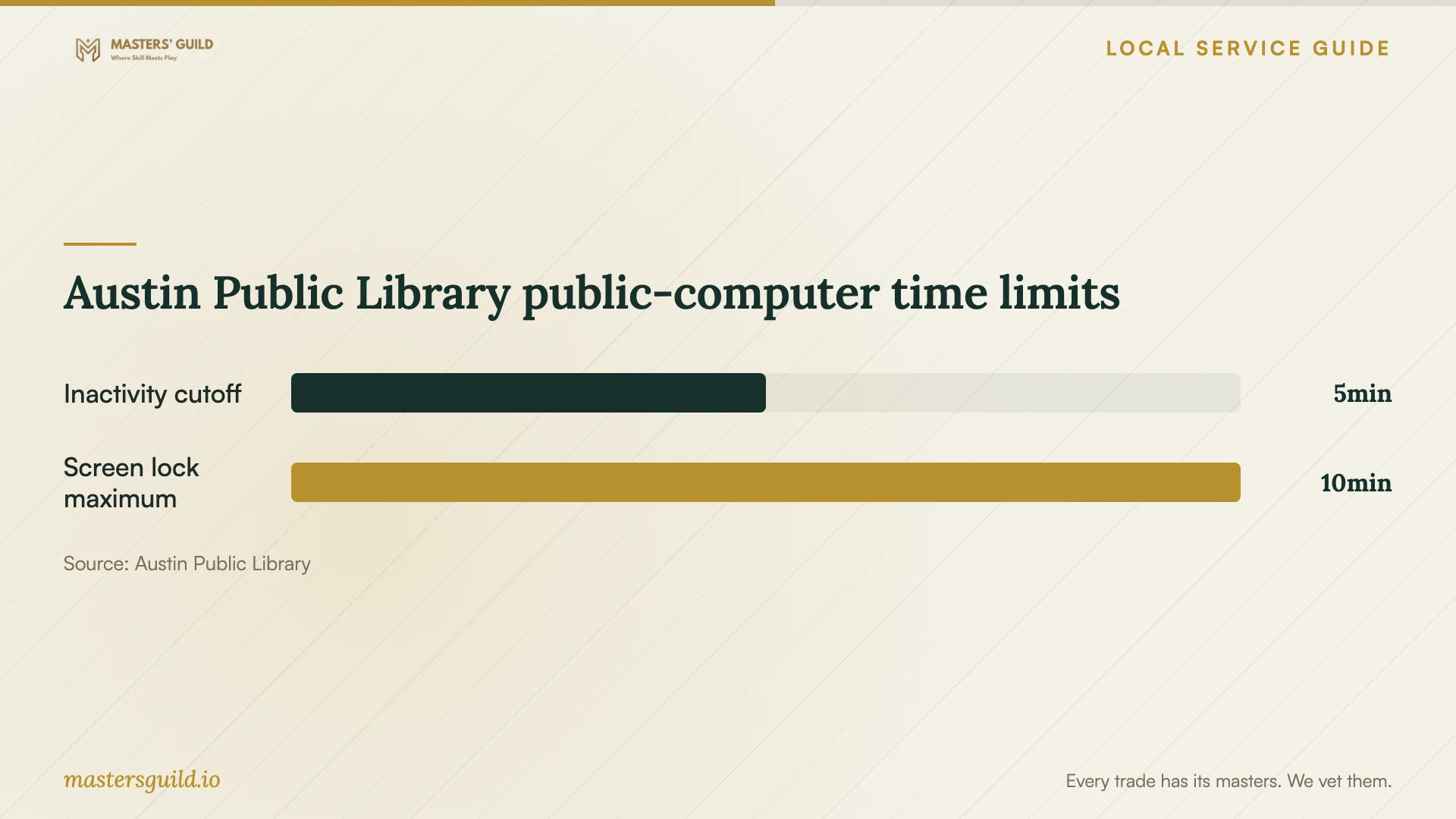
Austin Public Library public-computer time limits
Local details that affect your job
Free instruction can change what you hire for
Austin Public Library offers free computer training at several locations. Its October 12, 2026 calendar lists English and Spanish beginner workshops at Southeast Branch, 5803 Nuckols Crossing Rd., and Tech Savvy Seniors for adults ages 55 and older at Twin Oaks Branch, 1800 S. Fifth St. Check current dates, eligibility, and cancellations, and confirm whether a class covers your chosen cloud service. Consider attending for basic skills before deciding which setup tasks to hire someone to complete. [1]
Plan around library computer session limits
Austin Public Library says public-computer sessions end after five minutes of inactivity. Files saved on the computer are deleted when the session ends. The library advises saving documents to a flash drive, in the cloud, or as email attachments. Confirm that your files reached your chosen destination before ending a session. For an unattended migration, arrange to use a device you control rather than relying on temporary files on a library computer. [2]
Texas billing needs a category-specific explanation
For a household job here, have the provider distinguish setup work from storage or backup subscriptions on the quote. Texas includes offsite electronic backup and data storage in its taxable data-processing examples and exempts 20 percent of data-processing charges. Apply that information to the relevant category; have the provider explain the treatment of the other invoice items. [3]
Choose your next step
| Your situation | Next step | What to confirm |
|---|---|---|
| You need basic computer instruction | Review Austin Public Library’s free training calendar | Class topic, language, age eligibility, and cancellations |
| You want files across household devices | Define the devices, folders, and sharing permissions | Account ownership and an access demonstration |
| You want a recoverable backup | Include sample recovery in the appointment | Selected files, recovery steps, and support terms |
| You plan to use a library computer | Choose a destination for files before starting | Five-minute inactivity cutoff and deletion of local files at session end |
| You have a transfer deadline | Investigate address-based broadband options and arrange a connection test | FCC speeds are provider-reported maximum advertised speeds |
Your hiring checklist
- List devices, existing accounts, source folders, and approximate data volume.
- Choose the files to transfer and the household members who need access.
- Compare itemized quotes, including upload waiting time and another session.
- Confirm account ownership, recovery access, and the end of technician access.
- Name who will monitor uploads and handle interruptions.
- Include file-opening checks or sample backup recovery in the scope.
- Retain originals, collect handover notes, and practice the routine.
Frequently Asked Questions
Should I choose remote or in-home help?
Choose the appointment format around the tasks you want completed. A remote provider should explain how you will connect external drives and enter account credentials. For an in-home visit, identify the devices and drives to include. In either format, define access permissions and completion tests before work starts.
Can I learn the basics at the library first?
Austin Public Library offers free computer training and lists beginner workshops in English and Spanish. Check the current class description and confirm whether the instructor will cover your chosen service. Use that information to decide whether you need instruction, paid configuration, or both. [1]
Will Texas sales tax apply to the whole job?
Have the provider explain each charge. The Comptroller identifies data storage and offsite electronic backup as taxable data processing, with 20 percent of that category’s charge exempt. Obtain an itemized calculation that explains the treatment of setup labor and subscriptions. [3]
How should I assess a promised completion time?
Have the technician review your data volume and test the connection used for the upload. Set separate expectations for the appointment and transfer monitoring. The FCC map reports maximum advertised speeds supplied by providers; those figures do not certify a completion deadline for your files. [4]
Sources and scope
This guide combines the sources below with practical planning guidance. Figures apply to the stated geography and period; request a written quote for your property.