
Local service guide
Network Setup and Support in Aurora, IL
Arrange Network Setup and Support in Aurora by commissioning a diagnostic visit before approving equipment purchases. Include your internet connection, Wi-Fi, wired devices, acceptance tests, and account handover in the written scope. When hiring an outside electrical contractor for permit-requiring commercial work, verify the applicable Aurora registration and consult Building and Permits about scope-specific requirements and exceptions. For dedicated connectivity or links between buildings, investigate OnLight Aurora’s advertised services and confirm site availability before selecting equipment. [1] [3]
Define the problem before buying equipment
Start with the work you need to complete: card payments at the counter, calls in an office, printing from staff computers, or access to shared files. Record the affected devices, their locations, and the tasks underway during failures. Have the technician compare a wired connection with Wi-Fi and document findings before recommending purchases.
For an internet-service comparison, enter your street address in the FCC’s National Broadband Map. Providers report availability, technologies, and maximum advertised speeds there. Use those entries to prepare provider enquiries, then obtain confirmation of installation at your premises and the proposed service terms. [2]
Include a diagnostic charge in the quote and specify the findings you expect to receive. Have the technician identify which issues they propose to address inside your premises and which you should raise with the internet provider. Decide how to authorize further work after reviewing those findings.
Choose connectivity before specifying equipment
OnLight Aurora advertises dedicated fiber internet with symmetrical speeds up to 10 Gbps, wireless transport from a fiber point to a rooftop or tower, and private Metro Ethernet connections between sites. Obtain a site assessment and proposed service terms before designing your internal network around these offerings. The provider’s description does not establish availability or measured performance at your premises. [3]
Give the installer your proposed internet service, staff tasks, and expansion plans. Require an equipment list covering the router, switches, access points, and subscriptions. For each purchase, have the installer explain the business task it supports and identify who will own the hardware and accounts.
If you want cellular backup, commission a test at the intended equipment location. The FCC describes its mobile map as outdoor or in-vehicle coverage, excluding indoor coverage. Include a demonstration of switching connections during a primary-service outage and test the business tasks you want to keep running. [2]
Confirm construction responsibilities and registration
When hiring an outside electrical contractor for permit-requiring work at commercial premises, verify the applicable Aurora registration. The city distinguishes unlimited registration, covering industrial, commercial, and residential work, from limited residential registration for one-family and two-family homes. A limited residential classification alone does not establish authorization for commercial work. [1]
Aurora’s contractor-registration ordinance also contains provisions for qualifying registered maintenance employees working for their employer, specified volunteer programs, owner work, and certain equipment replacements. Consult Building and Permits about the requirements and exceptions for your proposed work rather than assuming one contractor rule covers every situation. [1]
Aurora’s contractor-registration ordinance does not settle whether your particular Ethernet installation needs a permit. Present the proposed cable routes, wall openings, and power work to the Division of Building and Permits before approving construction. In the quote, name who will check requirements, obtain any required permits, and perform each part of the installation. [1]
For leased premises, obtain the property owner’s agreement on drilling, mounted equipment, and cable routes. Include responsibility for wall repairs and abandoned-equipment removal. Arrange access to locked rooms and shared service areas before scheduling the installer.
Compare quotes through testing and support
Compare separate charges for diagnosis, labor, equipment, subscriptions, and follow-up support. Specify cable endpoints, labels, and test results where cabling forms part of the job. Name the areas and devices for Wi-Fi checks, then write acceptance tasks such as completing a payment, joining a call, and printing from a staff workstation.
Choose support terms before scheduling installation. Record support hours, remote and on-site charges, response commitments, and responsibility for provider coordination. Set a work window and a recovery plan in case you cannot complete acceptance testing before reopening.
At handover, retain control of administrator accounts and recovery details. Collect a network diagram, device inventory, configuration backup, subscription list, and fault-reporting instructions. Have the technician document any remote access they retain and the steps you can take to revoke it.
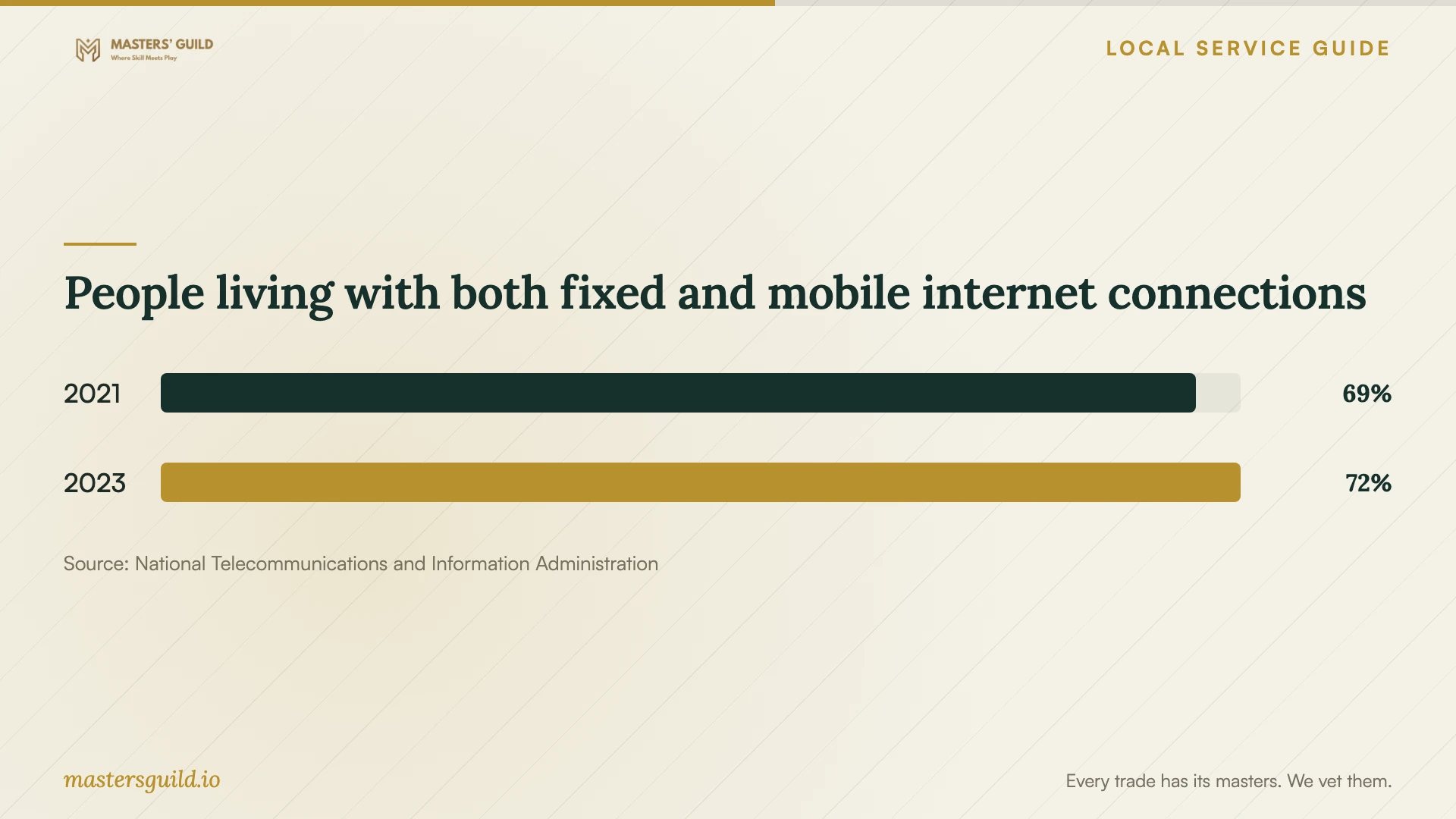
People living with both fixed and mobile internet connections
Local details that affect your job
Match electrical registration to commercial premises
Aurora’s unlimited electrical registration covers industrial, commercial, and residential work; its limited residential registration covers one-family and two-family homes. Before hiring an outside electrical contractor for permit-requiring work in a shop or office, verify the applicable classification. Discuss the proposed scope and any relevant exceptions with Building and Permits before accepting the construction portion of the quote. [1]
Investigate transport between business sites
OnLight Aurora advertises rooftop or tower wireless transport and private Metro Ethernet circuits between facilities, alongside dedicated fiber internet. For another building or a proposed alternative connection, obtain an availability assessment and service proposal before commissioning related internal equipment. Treat these as advertised offerings requiring site confirmation, rather than verified coverage or performance at your address. [3]
Choose the next step for your network job
| Your situation | Next step | Resolve before approval |
|---|---|---|
| Failures during business tasks | Commission diagnosis with wired and Wi-Fi checks | Written findings and authorization for equipment purchases |
| Considering another internet provider | Review address-level, provider-reported options through the FCC map | Provider confirmation of installation and contract terms |
| Planning links between business sites | Investigate OnLight Aurora’s advertised private Metro Ethernet | Site availability, service terms, and required internal equipment |
| Hiring an outside electrical contractor for permit-requiring commercial work | Verify applicable Aurora registration and consult Building and Permits | Scope-specific requirements, exceptions, and construction responsibilities |
| Planning cellular backup | Commission an on-site test; FCC mobile coverage excludes indoor coverage | Connection-change demonstration and business acceptance tasks |
Your hiring checklist
- List the business tasks, devices, and locations the technician must support.
- Record connection failures and gather existing equipment model numbers.
- Obtain provider confirmation of service at the exact premises.
- Document cable routes, property-owner consent, and responsibility for checking city requirements.
- Compare itemized quotes with equipment ownership and subscription terms.
- Set an installation window and write acceptance tests.
- Collect administrator access, configuration records, and support terms at handover.
Frequently Asked Questions
Can I use the FCC map to choose an internet plan?
Use it to identify providers reporting service at your address and compare technologies and maximum advertised upload and download speeds. Obtain installation confirmation and contract terms from the provider. The FCC describes provider-reported availability; it does not report a performance test of your business connection. [2]
Does Ethernet cabling need an Aurora permit?
Aurora’s contractor-registration ordinance does not determine the permit requirement for a specific Ethernet installation. Describe your routes, wall openings, and power work to Building and Permits. When hiring an outside electrical contractor for permit-requiring commercial work, verify the applicable registration and confirm scope-specific requirements and exceptions. [1]
Should a small business investigate OnLight Aurora?
Consider a site enquiry if you want dedicated connectivity, rooftop wireless transport, or a private link between facilities. OnLight advertises those offerings. Obtain confirmation of availability and proposed service terms before approving equipment intended for that connection. [3]
What should I receive after installation?
Collect administrator access, recovery details, a device inventory, and a configuration backup. Include cable labels and test results where applicable, written support terms, and a record of the business tasks you tested. Document retained technician access and how you can revoke it.
Sources and scope
This guide combines the sources below with practical planning guidance. Figures apply to the stated geography and period; request a written quote for your property.