
Local service guide
Home Office Setup in Aurora, IL: Plan the Work
For Home Office Setup in Aurora, choose an assembly or technology specialist for furniture and device tasks, and resolve proposed wiring changes before booking. For permit-required electrical work, hired electrical contractors must hold Aurora registration; qualifying owner-occupants have a conditional exemption. Start with equipment models, room measurements and outlet locations so providers can quote your scope. [1]
Define the work and compare written quotes
Describe the result you want: an assembled desk, an adjustable monitor position, connected peripherals, a working video call and cables secured outside your walking path. Include furniture and device model numbers. Send room measurements and photos of the proposed desk position, existing outlets and any wall where you want a mount.
Ask the provider to distinguish supplied parts from parts you must purchase. Request a monitor-arm compatibility check against the monitor and desk manufacturers’ instructions. For wall mounting, ask the installer to assess the wall and explain the attachment method before drilling. Include furniture movement, packaging removal and cleanup in the scope.
Request written quotes for your equipment and proposed work. Ask providers to itemize assembly, mounting, cable organization and technology configuration, including materials, travel charges and minimum visit charges. Agree on how they will handle missing parts or a return visit before choosing a provider.
Resolve wiring changes before arranging installation
Describe proposed outlet additions, relocations, circuit changes or fixed-wiring alterations to Aurora’s Division of Building and Permits and ask which approvals apply. For electrical work requiring a permit, the city requires hired electrical contractors to hold Aurora registration. Ask the contractor to identify permit responsibility and inspection arrangements in the quote. [1]
Aurora allows a qualifying owner of record to perform work without contractor registration on an owner-occupied single-family dwelling. The owner must continue living there for at least six months after construction and submit the required identification, occupancy records and an affidavit. Confirm your eligibility, project scope and required approvals with the city before relying on this registration exemption. [1]
The exemption has exclusions. New electrical services and service replacements require a licensed contractor. Alternative-generation equipment, including photovoltaic equipment, wind turbines and generators, requires licensed contractors with specialized installation training. [1]
Show the electrician your intended devices, manufacturer specifications and outlet locations. Ask whether your arrangement needs electrical changes. Coordinate the agreed outlet positions with the furniture installer before assembling or anchoring the desk.
Check internet options and performance at the desk
Search your street address using the FCC’s National Broadband Map when comparing internet services. The FCC provides provider-reported availability, connection technologies and maximum advertised download and upload speeds for each location. Confirm service availability, installation arrangements and plan details with the provider before purchasing. [2]
Test your usual work tasks from the planned desk position before specifying router configuration or a cable route. Tell the setup specialist which devices and calling software you use. Include a repeat test after installation in the agreed handover.
Test a proposed cellular backup inside the office. The FCC’s mobile map describes outdoor or in-vehicle coverage and does not show indoor coverage. Use that map to explore options, then check the connection in the room where you intend to work. [2]
Check the finished setup before handover
Sit at the desk and try the arrangement before the provider leaves. Ask for demonstrations of desk controls, monitor adjustments and peripheral connections. Move an adjustable desk through your intended range and inspect the cable routing together. Try a video call, select the correct microphone and camera, and print a test page if printer setup forms part of the job.
Include display power settings in the handover. The Department of Energy advises keeping monitor power management enabled and compatible with the computer and operating system. DOE explains that screen savers do not save energy and recommends turning displays off at night. Ask the installer to demonstrate the sleep settings. [3]
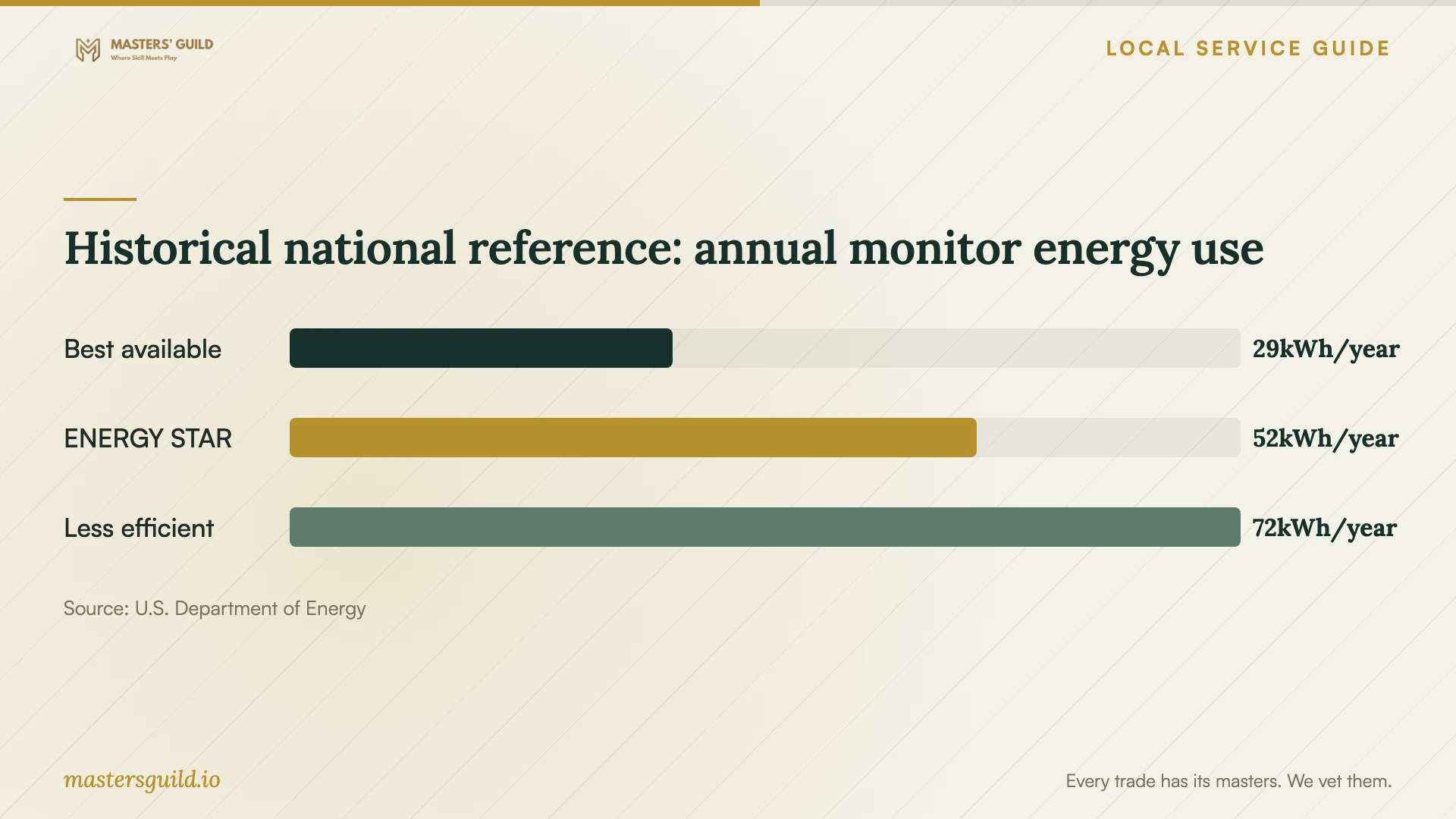
Use the chart as a historical product reference when comparing monitor features. DOE’s December 2024 example compares annual energy use for 27-inch, 1080p LCD monitors. It does not measure your equipment or establish an Aurora electricity bill. [3]
Historical national reference: annual monitor energy use
Local details that affect your job
Check electrical registration coverage and reciprocity
For hired electrical contractors performing permit-required work, verify Aurora registration and the appropriate category. Unlimited registration covers industrial, commercial and residential work; limited registration covers one-family and two-family residences. For a condominium or a building with more than two dwelling units, ask the city to confirm coverage before accepting a wiring quote. Aurora may grant reciprocal registration to contractors specifically licensed as electrical contractors in other Illinois municipalities if the city accepts the equivalence of their testing procedure. Contractors must still pay for registration and meet Aurora’s insurance requirements. Incoming residential-only credentials remain restricted to one-family or two-family residences in Aurora. [1]
Resolve paid assistance before using the owner-work exemption
If you plan to perform an office alteration under Aurora’s owner-work exemption, disclose any paid assistance to the city before work begins. The city prohibits hired assistance unless the hired assistant becomes a licensed contractor in the appropriate trade. Ask the city to confirm the contractor’s compliance and your exemption eligibility before arranging help. The exemption requires an owner of record who occupies the single-family dwelling, supplies the required identification, occupancy records and affidavit, and continues living there for at least six months after construction. Confirm project approvals separately. [1]
Match the provider to your scope
| Planned work | Provider to consider | Resolve before booking |
|---|---|---|
| Desk assembly and placement | Furniture assembly specialist | Model instructions, access, supplied parts and cleanup |
| Monitor arm or wall mount | Installer experienced with your mount | Equipment compatibility and attachment method |
| Dock, printer and network configuration | Technology setup specialist | Devices, account access and connection tests |
| Hired electrical work requiring a permit | Aurora-registered electrical contractor | Registration coverage for the building, permit responsibility and inspections |
| Owner-performed construction with hired assistance | A licensed contractor in the appropriate trade for the hired assistance | City confirmation of exemption eligibility, the assistance arrangement and excluded work |
Your hiring checklist
- Measure the room, desk space, doorways and delivery path.
- Send furniture, monitor, mount and docking-station model numbers with photos.
- Mark desk positions, existing outlets and proposed cable routes.
- List assembly, mounting, configuration, cleanup and testing as separate quote items.
- Ask the city about wiring approvals, contractor registration or eligibility for owner-performed work.
- Test your usual internet tasks and any cellular backup at the desk position.
- Agree on demonstrations of controls, connections and display sleep settings.
Frequently Asked Questions
Do I need an electrical contractor for this setup?
Describe the tasks first. For permit-required electrical work, hired electrical contractors must hold Aurora registration. Qualifying owner-occupants can perform some single-family work under a conditional exemption, but new services, service replacements and specified alternative-generation installations require licensed contractors. Ask the city about proposed wiring changes before booking. [1]
Can I pay a helper while using the owner-work exemption?
Aurora prohibits hired assistance under that exemption unless the hired assistant becomes a licensed contractor in the appropriate trade. Confirm the arrangement with the city, along with the occupancy, documentation and project conditions, before beginning the alteration. [1]
Can the FCC map confirm that video calls will work?
The fixed map provides provider-reported availability and maximum advertised speeds at an address. Confirm service with the provider and test your actual work connection at the desk. The mobile map covers outdoor or in-vehicle reception, so test any cellular backup inside your office. [2]
Which monitor power settings should I check?
Ask the installer to enable compatible display power management and demonstrate sleep settings. DOE explains that screen savers do not save energy and advises turning the display off at night. [3]
Sources and scope
This guide combines the sources below with practical planning guidance. Figures apply to the stated geography and period; request a written quote for your property.