
Local service guide
Computer Virus Removal in Aurora, IL
For Computer Virus Removal in Aurora, ask a technician for a written scope covering diagnosis, cleanup, file preservation and approval before an operating-system reinstall. Describe your symptoms and backups before choosing remote help, drop-off or a home visit. Request a total quote and a return date, with file recovery and account assistance listed as separate tasks.
Choose the repair scope before arranging service
Tell the technician what happened: the message you saw, software you installed, any remote access you granted and whether the computer starts. Describe the symptoms without assuming a virus caused them. Ask for a diagnosis before authorizing cleanup, replacement parts or a reinstall.
For remote help, ask how you will verify the technician’s identity, what access program they want to use and how they will remove that access afterward. For drop-off, request a receipt identifying your device and accessories. For a home visit, confirm travel charges and whether the technician intends to take the computer away.
Compare quotes for the same work. Ask the technician to itemize diagnosis, cleanup, operating-system repair, backup and file restoration. Set an approval limit for additional charges. Request an expected completion date and agree on when the technician will update you if the work takes longer.
Give clear file and privacy instructions
List the files you need, including family photos, tax records and schoolwork. Identify folders outside your usual document locations. Explain where you keep backups and whether you have checked them. Require approval before the technician erases a drive or reinstalls the operating system.
Ask whether you can enter passwords yourself. Agree on how the technician will handle copied files, where they will store them and when they will delete temporary copies. If they need encryption recovery information, agree on a secure handoff instead of adding it to a general job description.
At handover, ask the technician to explain what they found and changed. Open the files you agreed to preserve and try the programs you need. Request written follow-up instructions, including what to do if the original symptoms return and whether another assessment would incur a charge.
Arrange computer access during repair
Aurora Public Library District offers public computers at Santori Library, West Branch and Eola Road Branch. You can obtain a guest pass without a library card. The district uses first-come access and does not accept advance computer reservations. Leave room for a wait when planning a deadline. [1]
The district provides browsers and Microsoft Office on its public computers, but users cannot install programs. Check your task’s software requirements before relying on this option for an exam or another scheduled activity. [1]
The library offers technology lessons lasting 20 to 30 minutes, subject to staff availability. Staff cannot repair personal devices. Consider a lesson for a focused learning task, such as using email, and arrange a technician assessment for device repair. [2]
Include account recovery in your plan
If you suspect misuse of your accounts, ask the technician to identify account-related concerns separately from device repair. Write down which accounts need attention and decide who will handle that work. Ask the technician to explain the cleanup’s limits before treating the repair as the end of the incident.
The Illinois Attorney General’s Identity Theft Hotline offers one-on-one assistance with reporting incidents to financial institutions and local law enforcement, repairing credit and preventing future problems. The office invites calls at 1-866-999-5630 when personal or financial information may have been compromised. [3]
Plan disposal if you choose replacement
Before approving disposal, decide which files to keep and ask who will handle the drive. Request a separate explanation of file preservation and data erasure. If you want documentation of destruction, resolve that requirement before handing over the device.
Kane County operates a recycling center at 517 E. Fabyan Parkway in Geneva. On the county page retrieved October 12, 2026, it lists a temporary closure starting October 19, 2026, and anticipates reopening in mid-November. Check the current notice before traveling to this regional disposal option. [4]
The county’s upcoming-events list includes an Electronics and More collection on December 5, 2026, from 9 a.m. to noon in front of Ace Hardware at 994 N. Lake St., Aurora. The page’s detailed next-event description concerns September 5. Confirm the December arrangements before delivery rather than applying September’s fees or participation rules to that collection. [5]
Kane County describes erasure for devices selected for resale and shredding of data-containing components routed for recycling through its collection partner. The county instructs businesses needing destruction certificates or other specific documentation to arrange those requirements with eWorks before drop-off. For a household device, ask whether eWorks can provide the documentation you need before delivery. [4]
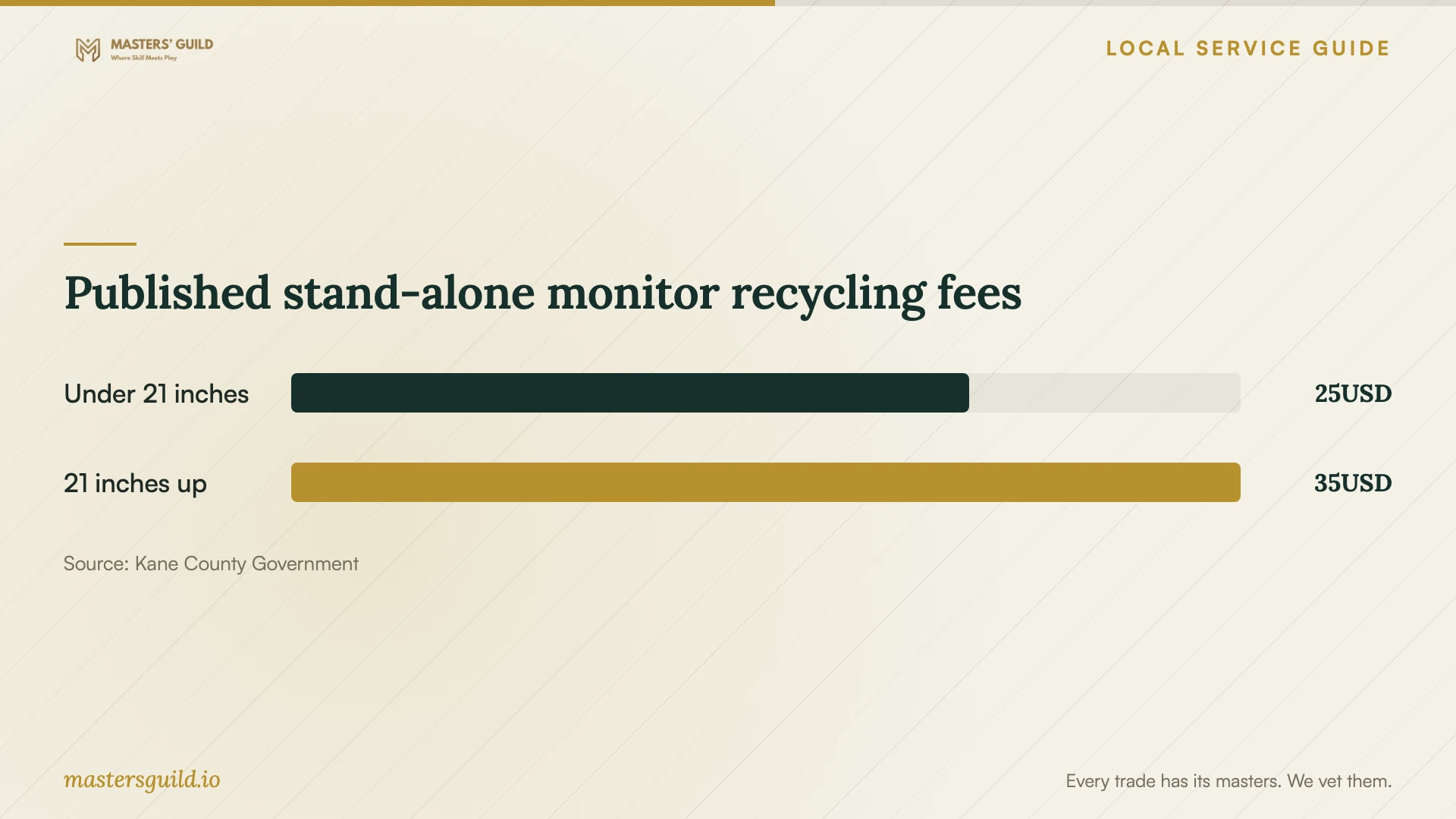
Published stand-alone monitor recycling fees
Local details that affect your job
Guest access has software restrictions
Aurora Public Library District permits public computer use without a library card, but uses first-come access and prohibits installing programs. Check whether your essential task fits those restrictions before scheduling a repair that leaves you without your own computer. [1]
Library instruction excludes device repair
The district offers 20 to 30 minute technology lessons, but staff cannot repair personal devices. For a learning appointment, call 630-264-4117 or use the district’s appointment form. Arrange a technician for the repair assessment. [2]
Check regional disposal timing
Kane County lists a temporary Fabyan Parkway closure starting October 19, 2026, with reopening anticipated in mid-November. Its upcoming-events list includes a December 5 collection from 9 a.m. to noon at 994 N. Lake St., Aurora. Confirm current arrangements before choosing a disposal date. [4] [5]
Choose the next step for your situation
| Your situation | Next step | Question to resolve |
|---|---|---|
| You need diagnosis and cleanup | Arrange a technician assessment | Which work does the quote cover, and what requires further approval? |
| You need instruction on a basic task | Consider a library technology lesson | Can your topic fit a 20 to 30 minute session? Staff cannot repair devices. |
| You need temporary computer access | Consider library public computers | Can you complete the task without installing software or reserving a computer? |
| You suspect personal information compromise | Include Illinois identity-theft assistance | Which reporting or credit-repair steps should you address alongside device repair? |
| You choose to retire the device | Arrange file preservation and confirm recycling availability | Is Fabyan open, and can the recycler provide any documentation you require? |
Your hiring checklist
- Record symptoms, suspicious messages and any remote access you granted.
- List essential files and identify your existing backups.
- Request an itemized quote and an expected completion date.
- Require approval before a reinstall, drive erasure or extra charges.
- Agree on password access and handling of copied files.
- Arrange another computer for essential tasks during repair.
- Open preserved files and test required programs at handover.
Frequently Asked Questions
How should I compare cleanup quotes?
Give each technician the same symptom description and file-preservation requirements. Ask for separate charges for diagnosis, cleanup, backup, reinstall, travel and optional recovery. Confirm what happens if you decline the repair after diagnosis and who must approve additional work.
Can the library remove the virus?
Aurora Public Library District states that staff cannot repair personal devices. Its appointments provide focused technology instruction. You can consider its public computers for temporary access while a technician assesses your device. [1] [2]
Who can help with compromised personal information?
The Illinois Attorney General offers one-on-one assistance through its Identity Theft Hotline at 1-866-999-5630. Advocates help residents navigate incident reporting and credit repair. Include that assistance in your plan if you suspect personal or financial information compromise. [3]
What should I confirm before recycling?
Decide which files to preserve and ask how the recycler will handle the drive. Kane County describes erasure and shredding processes through its collection partner. Confirm site availability and ask about any destruction documentation you need before drop-off. [4]
Sources and scope
This guide combines the sources below with practical planning guidance. Figures apply to the stated geography and period; request a written quote for your property.