
Local service guide
Software Installation in Aurora, CO
For Software Installation in Aurora, CO, request a written quote covering your devices, programs, activation, and completion tests. Ask about remote help if you can start the computer and join a support session; choose an in-home or shop appointment if you need hands-on help. Before an on-site visit, check the provider’s business authorization through Aurora’s license lookup. [1] [2]
Define the work and its completion tests
Give each technician the same description so you can compare offers. Include your computer model, operating system version, program names, device count, and error messages. Explain whether you want a new installation, an upgrade, or help replacing an existing application. Ask the technician to confirm compatibility before you purchase software.
Separate installation from account setup, activation, file transfer, and configuration in your request. For an email program, agree on a send-and-receive test. For a document editor, ask to open and save a file you use. Include printer setup only if you want the technician to demonstrate printing.
Ask for a preservation and recovery plan before authorizing an operating system reinstall or a step that could erase files. Have the technician explain what you should back up, which files and settings they will preserve, and what they will do if they cannot finish the work.
Choose a service format and check the provider
For remote help, confirm that you can connect to the internet, open the agreed support tool, and remain present for account prompts. Ask how the technician handles restarts and ends access. If your computer will not start or connect, describe the fault before booking and ask whether diagnosis needs a separate quote.
For an in-home appointment, explain which equipment you want the technician to test at your desk. Confirm travel charges and arrival arrangements. For shop service, ask what to bring, how the provider will obtain approval for added work, and when you should expect a collection update.
Aurora requires a business license for businesses conducting activities or employing workers within the city. Its lookup page states that businesses without physical presence do not require a business license but may have sales-tax collection obligations. Check the arrangement as well as the business name. Ask the Licensing Section at 303-739-7057 to clarify an ambiguous case. [1] [2]
Use the city’s licensing record to check business authorization, then ask separate questions about the technician’s work with your operating system and chosen program. Request their proposed installation steps and follow-up terms. Keep those answers with the quote so you can compare scope and accountability. [1]
Compare an itemized total
Request a fixed quote or an explanation of time-based billing, including any minimum charge. Ask the provider to list labor, licenses, subscriptions, travel, backup, and troubleshooting as separate items. Set an approval limit for extra work and agree on the charge if incompatibility or activation problems prevent completion.
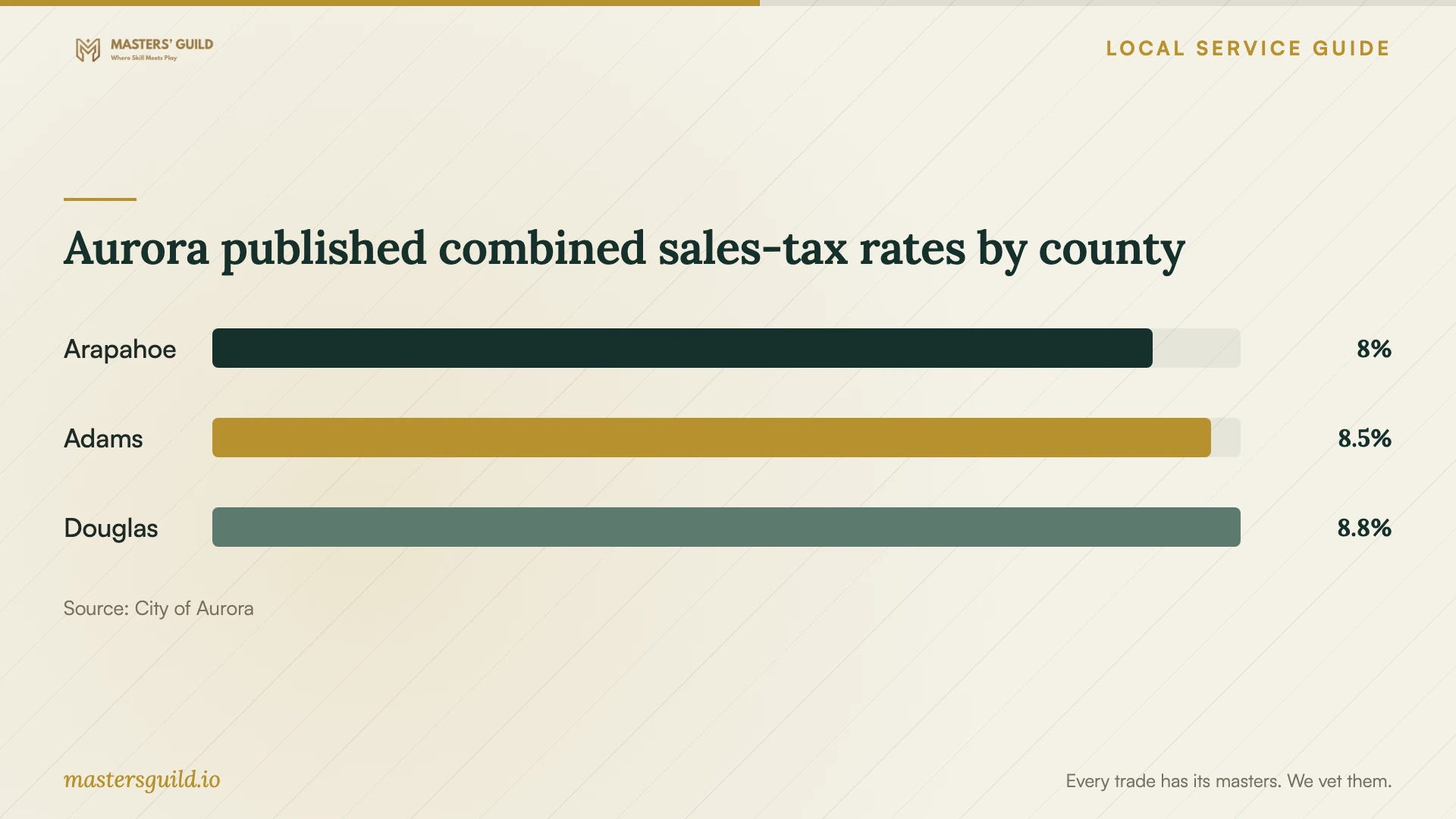
Aurora’s general sales-tax table, reviewed January 1, 2026, lists combined rates of 8.00% for Aurora addresses in Arapahoe County, 8.50% in Adams County, and 8.75% in Douglas County. Ask the seller which quoted purchases are taxable and which address they use. The table does not determine tax treatment for installation labor, a particular software product, or an entire bundled bill. [4]
Keep subscription decisions under your control. Ask who will own the software account, which plan the technician proposes, and whether you must approve a renewal. Request purchase receipts and confirm that you can access the account before accepting the finished work.
Consider library access before paying for installation
If you need to finish a document or spreadsheet while arranging service, consider Aurora Public Library’s existing software. The library offers Word, Excel, Publisher, and PowerPoint on its computers. You may use external storage devices, but you cannot install or use personal software on those computers. [3]
Most library computers allow reservations in 60-minute blocks, depending on location and computer. You can reserve more time if other reservations are not waiting. Confirm access with your chosen location and plan your task around that limit. Arrange installation on your own device if you need a program the library does not provide. [3]
Prepare your device and verify the handover
Back up the files you want to preserve and check that you can open the backup. Gather purchase receipts and license details. Confirm access to your software account and its recovery method. Enter passwords yourself during the appointment; leave passwords and recovery codes out of the job description.
Ask the technician to explain any proposed file deletion, protection change, or recurring purchase before you approve it. At handover, open each requested program and perform the agreed tests. Request a record of installed versions, remaining problems, renewal commitments, and follow-up terms. For remote work, confirm that the technician has ended access and explain whether you want to retain the support software.
Aurora published combined sales-tax rates by county
Local details that affect your job
Check the right Aurora licensing record
Search the Business/Specialty License Lookup by business or owner name and compare the result with your quote. The lookup covers licenses and excludes unlicensed sales-tax collection accounts. For businesses without physical presence, the city directs readers to its tax and licensing portal to verify sales-tax accounts. If an on-site provider gives a different trading name or you cannot interpret a result, ask for their licensed business name and contact the Licensing Section at 303-739-7057. [1] [2]
Use existing library software for a temporary task
Aurora Public Library offers Word, Excel, Publisher, and PowerPoint, permits external storage, and prohibits personal software installation or use on its computers. Most computer reservations run in 60-minute blocks, depending on location and computer; additional time depends on other reservations not waiting. Check reservation availability before choosing this option for an urgent document task. [3]
Choose your next step
| Your situation | Suggested action | Confirm before booking |
|---|---|---|
| Your computer starts and you can join a support session | Ask about remote installation | Support tool, restarts, account prompts, and how the technician ends access |
| You need help with equipment at your desk | Request an in-home quote | Aurora business authorization, travel charge, and equipment tests |
| Your computer will not start or connect | Describe the fault before arranging installation | Separate diagnosis scope and approval for repair work |
| You need temporary office-software access | Consider Aurora Public Library computers | Reservation availability and the prohibition on personal software installation or use |
| Your quote includes software or equipment purchases | Request an itemized total | Taxable items and address; the general tax table does not establish installation labor treatment |
Your hiring checklist
- Record your device model, operating system version, requested programs, and error messages.
- Ask the technician to confirm compatibility and activation requirements before you buy software.
- Compare the business name on the quote with the applicable city licensing record.
- Agree on itemized charges, a completion standard, and approval for extra work.
- Back up important files and check that you can open the backup.
- Prepare account access and enter passwords yourself during the appointment.
- Test activation and the agreed document, email, or printer functions at handover.
Frequently Asked Questions
How much should I budget for installation?
Request a quote for your devices and installation tasks. Ask for labor, software purchases, recurring subscriptions, travel charges, and tax as separate amounts. Agree on the point at which the technician must seek approval for more work and the charge if they cannot complete the agreed installation.
Does a remote provider need an Aurora business license?
Aurora’s lookup page says businesses without physical presence do not need a business license but may need to collect sales tax. The business-licensing page requires licensing for businesses conducting activities or employing workers in the city. Ask the Licensing Section to clarify a provider’s arrangement if those descriptions leave uncertainty. [1] [2]
Can I install my own program on a library computer?
No. Aurora Public Library prohibits installing or using personal software on its computers. It offers Word, Excel, Publisher, and PowerPoint and permits external storage devices. Consider those applications for a temporary task; arrange installation on your own device when you need your chosen program. [3]
What should count as a completed installation?
Agree on tests before work begins. Ask the technician to demonstrate activation and the functions you booked, such as saving a document, sending email, or printing. Request a written explanation of any remaining problem and the terms for follow-up help before accepting completion.
Sources and scope
This guide combines the sources below with practical planning guidance. Figures apply to the stated geography and period; request a written quote for your property.