
Local service guide
Arrange computer virus removal in Aurora, CO
Arrange computer virus removal in Aurora, CO by choosing a technician who explains the proposed repair, how they will handle your files, and the total charge before work starts. Describe your symptoms and any suspicious caller access. Choose remote service, drop-off, or a home visit after discussing what the technician needs to inspect.
Describe what happened before selecting a repair
Give the technician a short timeline: the message you saw, the program you installed, any person you allowed to connect, and whether you entered a password or paid money. Describe what you observed without assuming the cause. Ask the technician to explain their diagnosis before recommending cleanup, a reinstall, or replacement.
If you suspect an unauthorized connection, disconnect the computer from the network while arranging help. Use another trusted device to contact the technician. For the appointment, explain whether the computer starts, whether you can sign in, and whether you can open the files you need. Ask which appointment format they recommend for those symptoms.
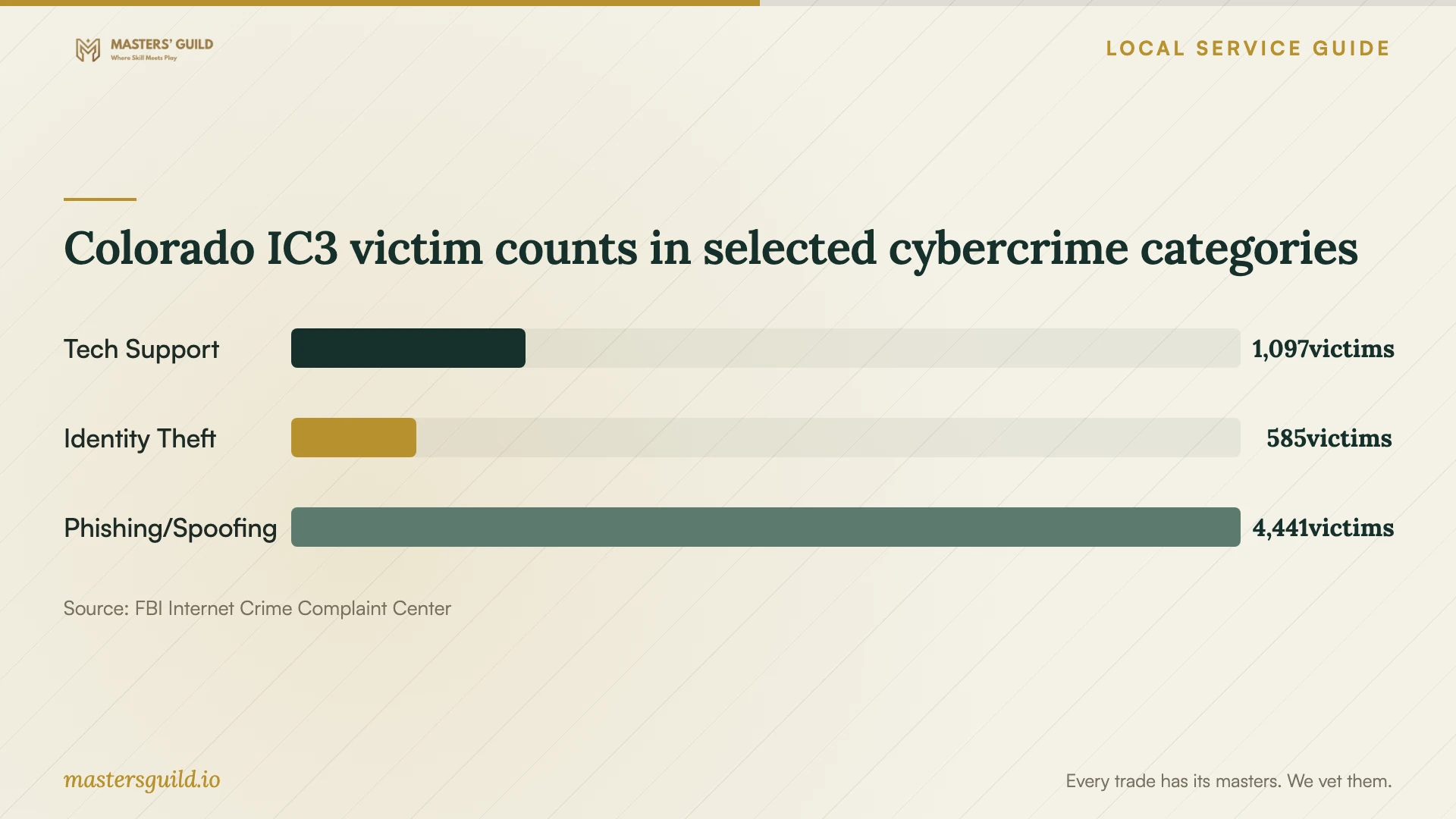
For a suspicious support call, include account exposure in the discussion. The FBI IC3’s 2025 Colorado report lists 1,097 tech-support victims and $32,098,456 in victim losses for that category. These statewide figures give context for discussing scam exposure; they do not diagnose malware on your computer. [3]
Compare the scope, cost, and return date
Ask technicians to price the same proposed tasks so you can compare their offers. Request separate amounts for diagnosis, cleanup, operating-system work, and any backup or restoration you need. Confirm travel charges, applicable taxes, and the total payable amount. Ask whether you owe a diagnostic fee if you decline the repair and whether they credit it toward approved work.
Set a spending limit for additional work. Request an assessment date and a proposed return date, and explain any deadline for school documents or household finances. Ask what happens if the technician finds a problem outside the original scope, including whether they will pause and contact you.
If the technician offers several options, ask for the tradeoffs in plain language. For cleanup, ask what they will inspect and check afterward. For a reinstall, ask which applications you must set up again. For replacement, compare the complete setup proposal, including transfer of the files you want to keep.
Agree on access and file handling
Identify essential folders and tell the technician which have another copy. Before approving a reset or drive replacement, agree on what they will preserve and where they will store a working copy. Ask who can access that copy and when they will delete it. Give written permission for any step that erases data.
Ask how the technician will obtain access without collecting credentials they do not need. Enter passwords yourself where practical. If they install a remote-access tool, agree on when they will remove it. Decide whether you want help with account recovery and password changes, and have them define that work separately.
At handoff, review essential files and applications with the technician. Request a summary of the diagnosis, completed work, and unresolved concerns. Ask them to demonstrate their completion checks and explain the follow-up terms if the same symptoms return. Keep the service record with your receipt.
Handle fraud concerns and replacement separately
If you paid a suspicious caller or shared financial information, contact your bank or card issuer using contact details you trust. Save messages, receipts, transaction details, and a timeline before cleanup. Tell the technician which records you want retained, and ask what they can document for a report.
Aurora Police lists reporting categories for identity theft, unauthorized credit or debit card use, and confidence scams. Use the local reporting guidance below to choose your next step. The department directs emergencies and crimes in progress to 911. [2]
If you choose replacement, recover the files you need before surrendering the old device. The City of Aurora states that Colorado bans electronics from landfills. Ask your chosen recycler about device acceptance, charges, and data destruction before arranging a trip. [1]
Colorado IC3 victim counts in selected cybercrime categories
Local details that affect your job
Check eligibility before filing an Aurora police report online
Aurora Police’s online system serves non-emergency cases with no suspect information and includes identity-theft, card-fraud, and confidence-scam categories. If you have identifying information about the suspect, ask the department which reporting route to use. Choose the category that matches what happened, and follow its instructions rather than assuming any computer problem qualifies. [2]
Avoid an obsolete residential recycling trip
As of October 12, 2026, Aurora’s city page says Pedal Point LifeCycle Solutions ended residential electronics drop-off after July 2026. The city canceled the September 14 to 18 and November 16 to 20 events and directs residents to Earth911 to find alternatives. Confirm a replacement recycler’s acceptance and data-destruction terms before taking your computer there. [1]
Choose a next step based on what happened
| Situation | Next step | Useful question |
|---|---|---|
| Pop-ups or unfamiliar software | Request diagnosis. | What did you find, and what repair do you recommend? |
| A suspicious caller connected | Discuss device access and account exposure. | Can you assess both, and which tasks do you include? |
| The computer will not start | Discuss an in-person assessment. | What should I bring, and how will you assess the drive? |
| Suspected identity theft or card fraud | Check Aurora Police’s reporting categories and online eligibility. | Does my case meet the non-emergency and no-suspect-information conditions? |
| Replacement instead of repair | Choose a current recycler; the former city-partner residential drop-off ended after July 2026. | Do you accept this device, and what are your data-destruction terms? |
Your hiring checklist
- Write a timeline and save screenshots or messages that explain the problem.
- Note the computer model, operating system, and whether it starts.
- List essential files and the locations of any backup copies.
- Confirm the handoff location, charger requirements, and assessment date.
- Record the agreed scope, total charge, and permission needed for added work.
- Bring a list of applications you want to check at collection.
Frequently Asked Questions
How much should I budget for removal?
Compare itemized quotes for your symptoms and file-preservation needs. Ask technicians to distinguish the initial assessment from any repair they recommend afterward. Compare the complete payable amount and included tasks before choosing an offer.
Should I approve a factory reset?
Ask why the technician recommends it and what you will need to restore afterward. Decide after reviewing the proposed handling of your files, applications, and settings. If you do not understand a step that erases data, ask for an explanation before authorizing it.
How should I prepare for remote service?
Arrange the session through contact details you have verified. Ask how the technician will identify themselves, what software you need, and whether you can watch the work. Close unrelated documents and have your symptom notes ready. If you suspect an active unauthorized connection, discuss that concern before reconnecting.
What should I do if the symptoms return?
Record the message, time, and activity that preceded the problem. Contact the technician with the service record and ask whether the follow-up falls within the agreed terms. Avoid authorizing another broad repair until they explain what they propose to investigate.
Sources and scope
This guide combines the sources below with practical planning guidance. Figures apply to the stated geography and period; request a written quote for your property.