
Local service guide
Software Installation in Augusta, GA
For Software Installation in Augusta, request a written quote covering your programs, devices, account activation, and a demonstration of the tasks you need. Choose remote, home, or drop-off help around the equipment you want to test. For library Wi-Fi, bring your own wireless setup assistance: library staff cannot assist with wireless internet setup and cannot touch patron equipment. [1]
Define the result before requesting a quote
Give the technician your computer model, operating system, program names, and any error message. Explain what you need to do after installation. For example, request that you can open and edit an existing document using your own account. Have the technician check compatibility before you buy software.
Identify extra work in the request: email configuration, file transfer, updates, or printer setup. For an operating-system replacement, get agreement on which files and applications the technician will preserve, remove, or reinstall. Set a stopping point for work that requires another purchase or a change to the original scope.
Match the appointment to your equipment
Discuss remote help if you can reach the desktop and connect to the internet. Have the technician explain how you will approve access, handle sign-in prompts, and end the session. Describe startup or connection failures before choosing this arrangement.
Consider a home appointment when your completion test involves a household printer or scanner. For drop-off help, settle what to bring, how to handle activation, and when you will demonstrate the result together. Request a receipt identifying your device and the agreed work.
The library offers free Wi-Fi for your own device, but patrons share the connection and the library asks users to avoid excessively large downloads. Before proposing a library meeting, discuss download needs with the technician and check with the branch about the appointment. [1]
Compare quotes and account ownership
Request a quote separating installation labor, software purchases, subscriptions, travel, and file-transfer work. Find out whether the technician charges a fixed amount or bills for time. Set an approval requirement for additional charges, and establish what you owe if the technician cannot complete the installation.
Keep the software account under your control. Identify who will receive renewal notices and which purchases carry recurring charges. Obtain purchase records and activation information you can retain. If a technician proposes using their own account, resolve ownership and future access before authorizing the purchase.
Protect your files and verify the handover
Back up the files you want to protect and open a few copied files to check the backup. Bring your charger, purchase records, and account recovery method. Require the technician to pause before deleting files or removing existing programs.
Enter passwords yourself where possible. Approve prompts for the work you arranged, and request an explanation before granting administrator access. At handover, review any remote-access software and decide whether to remove it or retain it for an agreed support arrangement.
Run your completion test together, then repeat it yourself. Check how to launch the application after restarting and where to obtain updates. Retain the invoice and a short record of changes. Establish the follow-up contact and any charge for addressing a returning installation problem.
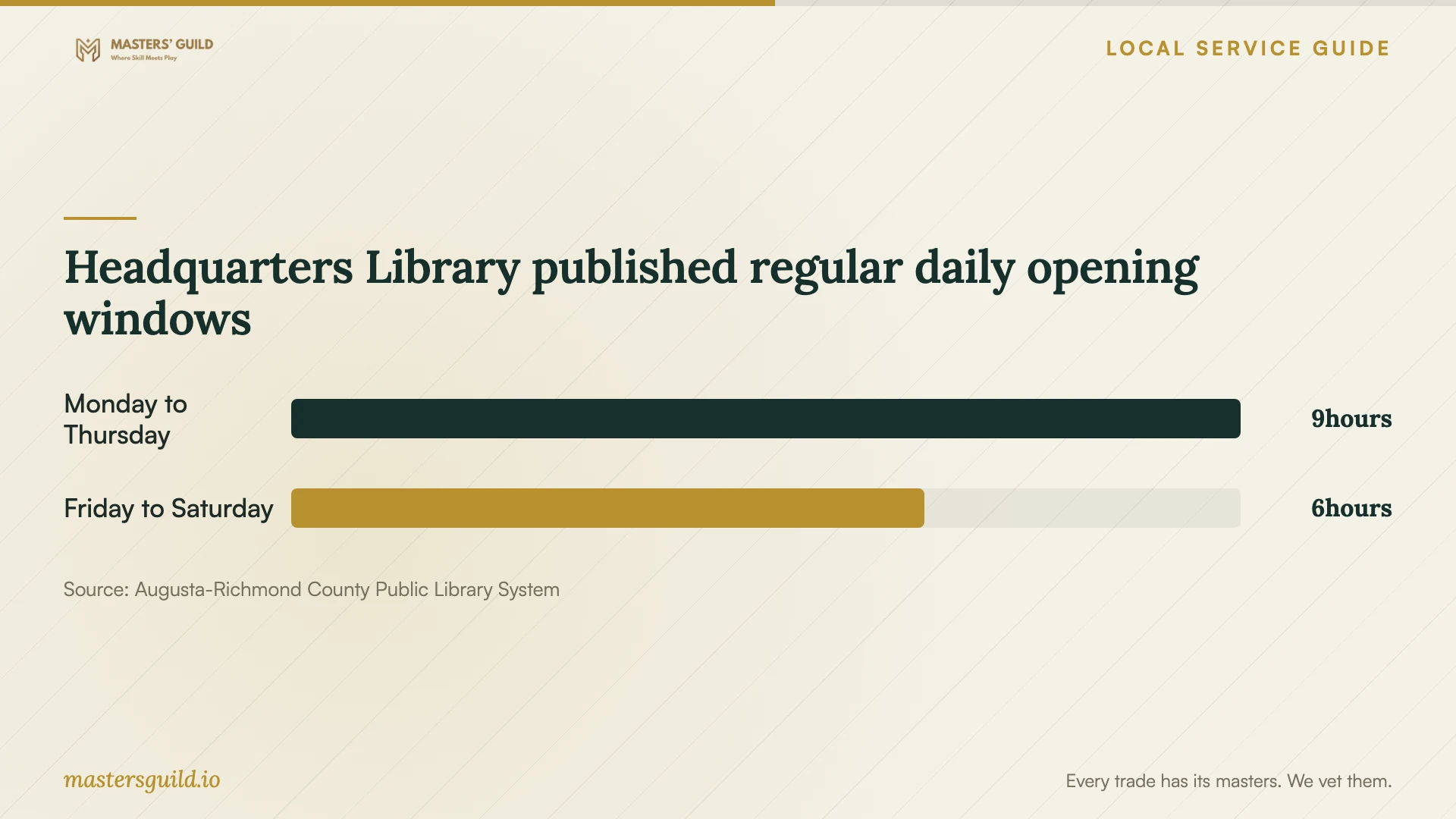
Headquarters Library published regular daily opening windows
Local details that affect your job
Prepare the library Wi-Fi login
The library's Wi-Fi page specifies a 14-digit PINES library card number and password or PIN. If you lack a card or do not know your PIN, speak to Circulation. If you are ineligible for a PINES card, ask Reference about temporary access. Confirm current requirements before relying on this connection for your appointment. [1]
Separate Georgia installation labor on the invoice
Georgia's Department of Revenue says itemized repair or installation labor is not subject to sales tax. For your Augusta job, request a separate installation-labor line and have the seller explain taxes on software, hardware, and subscriptions. The labor rule does not establish the treatment of each purchase. [3]
Confirm access beyond regular library hours
In the homepage snapshot retrieved October 12, 2026, the library announces an all-branch closure for Monday, October 12, for Staff Development Day. Choose another location for that date. For future meetings, confirm branch access before booking; published regular hours do not confirm access for a particular appointment. [2]
Choose an arrangement for your installation
| Your situation | Arrangement to discuss | Resolve before booking |
|---|---|---|
| You can reach the desktop and connect | Remote help | Access approval, sign-in steps, and ending the session |
| You need to test a household printer | Home appointment | Include the printer and a printing test in the scope |
| You need internet access for your laptop | Library Wi-Fi with your own helper | Login credentials and download needs; staff cannot assist with wireless setup or touch your equipment |
| You prefer to leave the device | Drop-off appointment | Device receipt, activation arrangements, and a handover test |
Your hiring checklist
- Send the device model, operating system, program names, and error text.
- Define the task you will use to accept the completed work.
- Set the scope, price basis, and approval limit for extra work.
- Check your backup and prepare account recovery access.
- Confirm the location, internet connection, and accessories to bring.
- Retain purchase records, the invoice, and follow-up terms.
Frequently Asked Questions
Do I need to buy software before the appointment?
Have the technician check compatibility and identify the required edition before you purchase. Include account ownership, activation, and recurring charges in that discussion.
Can I rely on library staff for laptop setup?
Arrange your own helper. The library's guidance prohibits staff assistance with wireless internet setup and prohibits staff from touching your equipment. Discuss a proposed technician meeting with the branch. [1]
How should I compare installation prices?
Give each technician the same device list, programs, and completion test. Compare the total scope, purchases, travel charges, billing basis, and follow-up terms. Get approval terms for work beyond the quote.
Sources and scope
This guide combines the sources below with practical planning guidance. Figures apply to the stated geography and period; request a written quote for your property.