
Local service guide
Data recovery and backup in Augusta, GA
Data recovery and backup in Augusta, GA should start with a written scope: identify the files your business needs, ask who will handle the device, and agree on how you will verify restored data before approving disposal. Choose a recovery specialist for a damaged device, a backup provider for prevention, or an incident-response team if you suspect ransomware. Ask the provider to demonstrate a restore and document how it protects your copies. CISA recommends offline, encrypted backups and regular recovery testing. [5]
Choose the service your business needs
Describe the problem before authorizing work: missing folders, an unreadable external drive, a failed office computer, or a ransom message. Tell the provider what happened before the failure and what you have tried. For a device you suspect has physical damage, stop experimenting and ask a specialist for handling instructions before you transport or ship it.
Separate urgent recovery from the backup work you want afterward. Ask whether the provider performs recovery at its own facility or sends the device to another company. Request the receiving facility's name, a handoff receipt, and a contact responsible for updates. For encrypted storage, agree on a secure way to supply the needed recovery key.
Treat a ransom message as a security incident. CISA recommends isolating affected systems from the network and restoring critical services on a clean network. Its guidance reserves powering down for situations where network disconnection is impossible because shutdown loses evidence held in memory. Call your IT or incident-response contact before reconnecting devices or backup storage. [5]
Compare quotes by deliverables
Request a written diagnostic fee, an approval limit, and the charges that apply if you decline recovery. Ask the provider to separate shipping, replacement media, priority service, and return of the original device. The supplied sources do not establish Augusta recovery prices, so obtain a device-specific quote rather than budgeting from an unsupported local average.
Name the files that matter: the accounting database, current customer orders, payroll records, or project folders. Ask how the provider will report missing or damaged files. Set an acceptance test that includes opening representative documents and checking the business application that uses them. A folder list alone should not be your acceptance test.
For a continuing backup contract, specify which computers, shared folders, and cloud accounts the provider will cover. Agree on backup frequency, retained versions, restore assistance, subscription charges, and account ownership. Ask for a documented exit procedure so you can retrieve your data and transfer administration if you change providers.
Build a restore plan for outages
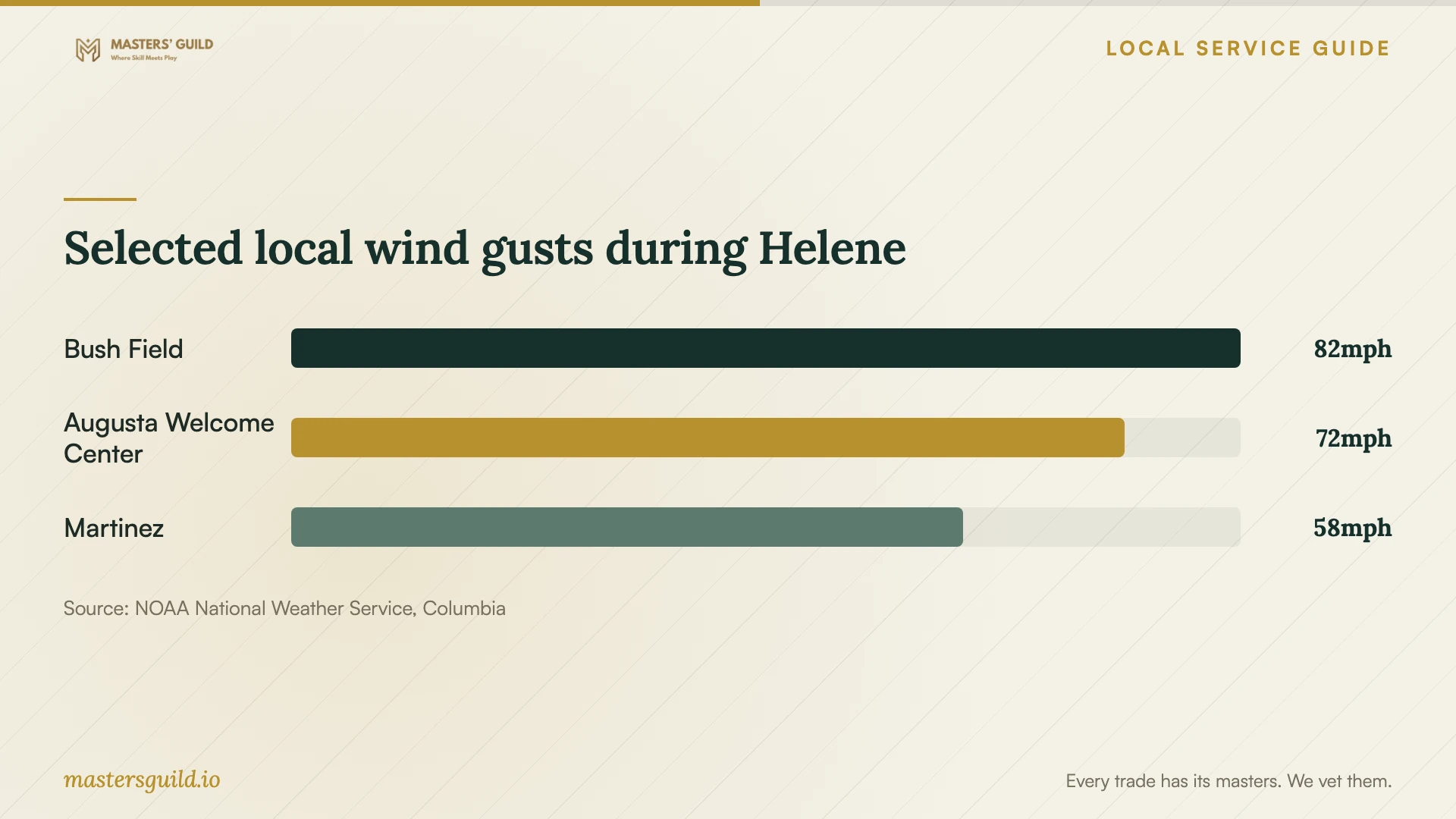
Include an outage scenario in the provider's demonstration. During Helene in September 2024, the National Weather Service reported extended regional power outages and an 82 mph gust at Augusta Bush Field Airport. Use that historical event to plan how you would reach essential records if your premises lost power. It does not predict the next storm or establish that any particular drive failed. [1]
Ask the provider to show how you would restore your essential files from another clean computer and location. Keep written recovery contacts and access instructions where you can reach them without the office computer. Define how much recent work you could afford to lose and how long you could operate without each application; use those answers to set the backup schedule and restoration priorities.
CISA recommends offline, encrypted backups because ransomware can delete or encrypt accessible backups. It also advises reviewing third-party backup practices and formalizing security requirements in the contract. Ask who checks backup failures, who can delete retained copies, and who holds the encryption keys. Require the provider to demonstrate the controls it proposes. [5]
Agree on privacy and incident handling
Georgia's Attorney General explains that businesses must take reasonable action to prevent unauthorized access when disposing of covered personal records. Its guidance includes financial, tax, identification, and medical information, and describes erasing information or making it unreadable as disposal options. Put instructions for temporary recovery copies and retired storage in the work order. [3]
Ask who can view recovered files, whether the provider uses subcontractors, how it transfers your data, and when it deletes working copies. Request a receipt identifying the device and a record of its return or agreed disposal. Keep the original device until you complete the acceptance test and create the replacement backup.
Georgia Consumer Ed describes notification requirements involving breaches of unencrypted digital personal records and notes that a third-party custodian may send the notice. If you suspect exposure of customer information, ask your incident-response provider and legal adviser to assess notification duties. A successful file restore does not resolve the separate question of whether someone accessed or stole records. [4] [5]
Selected local wind gusts during Helene
Local details that affect your job
Arrange commercial disposal before retiring drives
Augusta's 2026 announcement offers free recycling for residents' household electronics, including computers and cell phones, with proof of Richmond County residency. It lists November 21, 2026, from 7:00 a.m. to 10:00 a.m. at the Augusta–Richmond County Landfill, 4330 Deans Bridge Road in Blythe. It does not establish eligibility for business electronics or promise secure data destruction. For office equipment, call 311 to confirm an appropriate disposal route and arrange data sanitization with your provider before handoff. [2]
Put Georgia record disposal into the recovery contract
For customer account, tax, identification, or medical records, use Georgia's disposal guidance to set the provider's cleanup obligations. Ask the provider to document how it erases or makes covered information unreadable on temporary copies and retired media. Specify the retention deadline and who authorizes disposal so you can finish testing restored files first. [3]
Test access beyond the office
The National Weather Service documented outages lasting hours to weeks across the region during September 2024's Helene. Ask your backup provider to demonstrate recovery without relying on equipment at your Augusta premises. Include an alternate contact method and a place from which you could retrieve essential records; the report describes a past regional event, not a current outage. [1]
Select the scope before requesting a quote
| Your situation | Service to request | Acceptance or next step |
|---|---|---|
| A readable device has missing files | Assessment of the missing files and available backups | Identify required folders and agree on a file-opening test |
| A device appears damaged or unreadable | Specialist recovery assessment | Obtain handling instructions and approve diagnosis before further work |
| Files show a ransom message | Incident response with recovery planning | Isolate affected systems; coordinate restoration on a clean network |
| You want protection for office records | Managed backup setup and restore testing | Require offline, encrypted backup protection and a demonstrated restore |
| You are retiring equipment containing customer records | Data sanitization and disposal arrangements | Specify treatment of covered personal records and obtain disposal documentation |
Your hiring checklist
- List essential folders, applications, devices, and the last backup you have verified.
- Record symptoms, failure timing, and recovery attempts before the handoff.
- Confirm the recovery facility, subcontractors, device receipt, and update contact.
- Approve a written diagnostic fee, spending limit, and unsuccessful-recovery terms.
- Agree on secure key delivery, file transfers, retention, and disposal.
- Open representative recovered files and test the business application before accepting the job.
- Request a restore demonstration from another clean computer and location.
- Keep the original device until you verify the restored data and replacement backup.
Frequently Asked Questions
How much should I budget for recovery?
Request a quote after the provider assesses your device and required files. These sources do not establish local prices. Ask for diagnosis, shipping, replacement storage, and priority charges, plus the amount due if recovery fails or you decline the work.
Can I reconnect my backup after a ransomware incident?
Have your incident-response team approve the recovery environment first. CISA recommends restoring from offline, encrypted backups and taking care to avoid infecting clean systems during recovery. [5]
Does Augusta's free electronics recycling include data destruction?
The city announcement lists accepted household electronics and residency requirements but does not promise data destruction. Confirm eligibility for your equipment with 311 and arrange sanitization before disposal. [2]
What should count as a completed recovery?
Agree on the acceptance test before work begins. Check the required folders, open representative files, and test any application that depends on recovered data. Document missing items and create a replacement backup before authorizing disposal of the original device.
Sources and scope
This guide combines the sources below with practical planning guidance. Figures apply to the stated geography and period; request a written quote for your property.