
Local service guide
Cloud Service Setup in Augusta, GA
Arrange Cloud Service Setup in Augusta, GA by hiring a technician who will document what you need to move, check your connection, configure staff access, and demonstrate a file restore before handover. Ask for separate prices for setup, migration, subscriptions, and ongoing support. Include offline access and a recovery plan in the scope, particularly if you need customer records or working documents to keep your business running.
Define the work before asking for quotes
Write a short inventory of computers, phones, shared folders, and accounts that the technician will handle. Identify who owns each account and which files staff need for daily work. For an office, distinguish shared working documents from accounting exports, customer records, and archives. Ask the technician to explain which items the proposed service will protect and which need a separate backup arrangement.
Set a clear boundary around the job. Specify whether you want file storage, shared folders, automated backups, or a migration from an existing account. If you also need business email, domain changes, or application migration, request those as named deliverables. Ask the technician to show experience with your chosen platform and describe how they will check the result.
Keep the original data until you have checked the migration and recovery process. Ask for a written list of folders included, folders excluded, unresolved errors, and follow-up tasks. Agree on who will monitor any transfers that continue after the appointment and who will confirm completion.
Plan the transfer around your address and working hours
The Georgia Broadband Program describes a location-level map that combines home and business locations with provider availability. Use that regional resource to investigate your Augusta business address, then confirm service details with your internet provider. Ask the technician to measure upload performance at the premises before committing to a migration schedule. [1]
Give the technician your data volume and the hours when staff need the connection. Ask them to propose a transfer window, explain how they will handle an interruption, and identify the point when staff should stop editing the old files. For a busy shop or office, request a small trial transfer before the main move.
Choose remote or on-site help based on the tasks you need. Ask for an on-site scope if you want someone to inspect several devices, connect backup equipment, or walk staff through the finished setup. For remote work, agree on the support tool, session timing, and removal or retention of remote access after completion.
Include recovery and account security in the setup
CISA advises organizations to maintain offline, encrypted backups of critical data and test their availability and integrity during recovery. Ask the technician to identify the backup destination, retention settings, and person responsible for checking failures. Require a demonstration in which you recover a sample file and open it. [4]
For an external backup drive, CISA advises disconnecting it when you are not backing up because ransomware can reach connected drives. CISA also recommends securing encryption recovery keys and passwords before starting encryption. Decide where you will keep those recovery details and who can retrieve them if the usual account holder is unavailable. [3]
CISA recommends phishing-resistant multifactor authentication, separate administrator and everyday user accounts, and access limited to each person's responsibilities. Ask the technician to apply those principles to staff and support accounts. At handover, review who can administer the service, share folders, and delete backups. [4]
Compare the full cost and agree on handover
Request an itemized quote covering setup labor, migration, subscriptions, backup equipment, and support. Ask whether the technician charges for follow-up visits, transfer monitoring, and staff training. The supplied sources do not establish a verified Augusta setup price, so compare written quotes against the same deliverables rather than relying on an advertised starting figure.
Define completion before work begins. You should be able to sign in through your own account, find the agreed files, check a staff member's access, and follow the recovery instructions. Ask the technician to record remaining problems and confirm who will resolve them. Keep the handover document with your business continuity records.
Discuss what you need during a power or internet interruption. Choose essential documents for offline access and ask the technician to demonstrate opening them without a connection. If you want backup power for network equipment, request a separate equipment assessment and confirm its limits before purchasing.
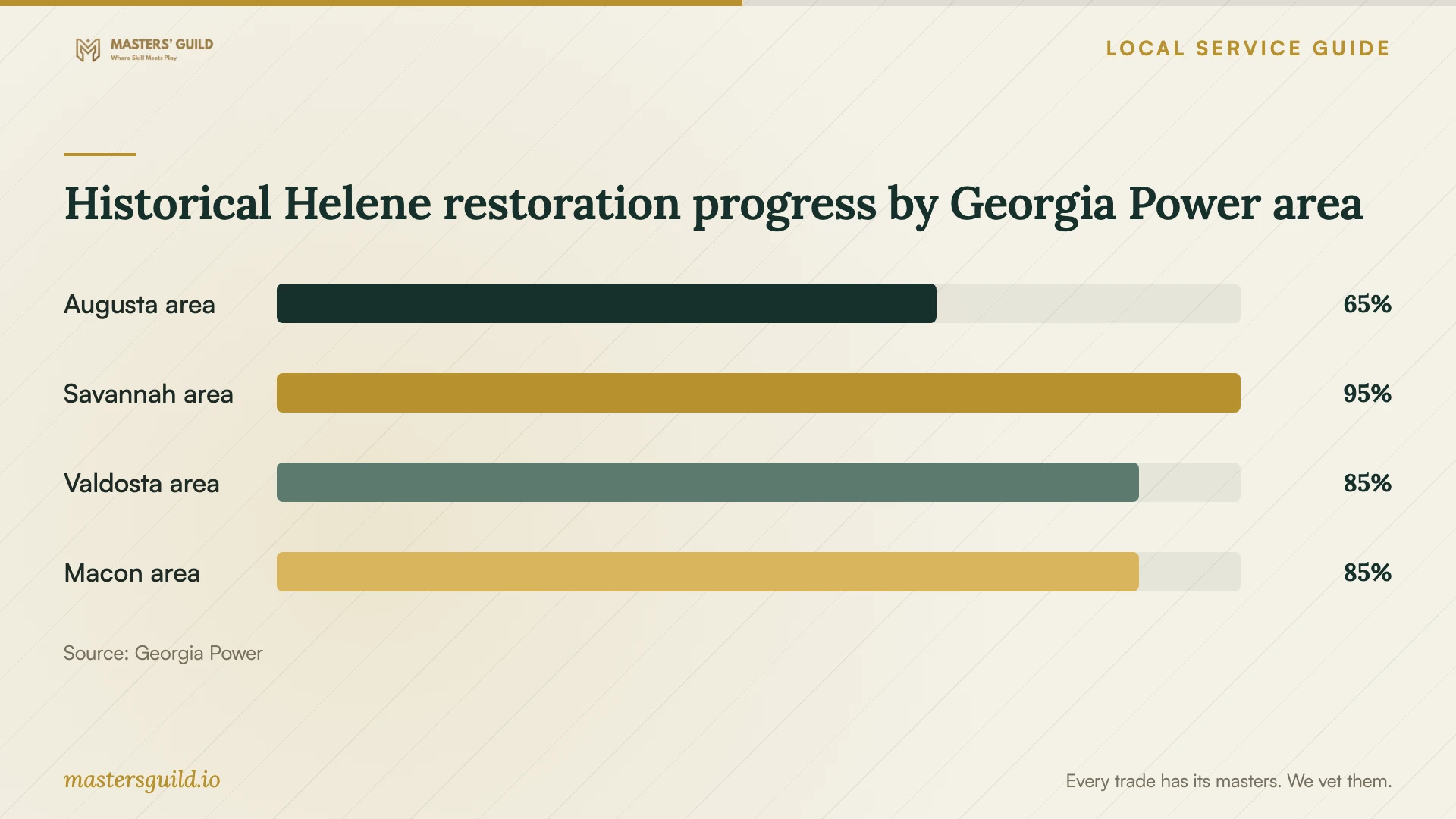
Historical Helene restoration progress by Georgia Power area
Local details that affect your job
Use Georgia's location-level broadband mapping
Georgia's broadband mapping covers individual home and business locations across the state. For an Augusta migration, investigate the actual premises rather than assuming that service available elsewhere in the city reaches your address. The mapping explanation uses a minimum of 25 Mbps download and 3 Mbps upload to define broadband. Treat those as mapping criteria, then ask your provider and technician to confirm the connection you will use for the transfer. [1]
Build an outage plan around Augusta's historical experience
In its October 3, 2024 Helene update, Georgia Power identified Augusta as its most heavily impacted area and reported extensive flooding and tree damage. It said approximately 65 percent of storm-affected Augusta-area customers had been reconnected at that point. That historical event supports a concrete setup request: identify essential offline documents, keep an accessible recovery procedure, and decide how you will resume interrupted uploads. It does not describe current power conditions or predict the next outage. [2]
Choose the setup scope that matches your business
| Your priority | Scope to request | Handover check |
|---|---|---|
| Move working files | Named folders, migration plan, and original-data retention | Open sample files and review transfer errors |
| Share files with staff | Access limited to each person's responsibilities | Check access through a staff account |
| Recover after data loss | Offline encrypted backups and recovery testing | Restore and open a sample file |
| Work through an interruption | Essential offline documents and a written restart procedure | Open agreed documents without an internet connection |
Your hiring checklist
- List the devices, accounts, folders, and staff included in the job.
- Record the data volume and identify files you need during business hours.
- Check service availability at the premises and request an upload test.
- Request separate charges for labor, subscriptions, equipment, and support.
- Agree on transfer timing, interruption handling, and when staff stop editing old files.
- Choose who controls administrator access and stores recovery details.
- Witness a sample restore and an offline-access demonstration.
- Review technician access and keep a written handover with unresolved tasks.
Frequently Asked Questions
Can I arrange the setup remotely?
Ask the technician to assess the scope first. Describe the devices, accounts, and backup equipment involved, then request a remote or on-site plan. For remote help, agree on the access tool and what access the technician will retain after the session.
What should I ask about backups?
Ask which data the technician will protect, where backups will live, how long you will retain them, and who will check failures. CISA recommends offline, encrypted backups of critical business data and regular recovery testing. Request a sample restore during handover. [4]
How should I handle passwords and recovery keys?
Keep control of the business accounts and agree on a secure method for providing access during the work. CISA advises storing encryption recovery keys and passwords safely because losing them can cause permanent data loss. Identify an authorized backup contact for recovery. [3]
How much should I budget?
Obtain an itemized quote for your devices, data, and support needs. Compare setup labor separately from subscriptions, equipment, and follow-up work. These sources do not provide a verified local price range; ask competing technicians to quote the same scope.
Sources and scope
This guide combines the sources below with practical planning guidance. Figures apply to the stated geography and period; request a written quote for your property.